2OM-1751-003w_G5S.pdf - 第137页
2OM-1751 2-15 1303-001 (B01_02) PCB origin offset X (Horizontal), Y (V ertical) [mm] Set the offset values to correct the difference between the placement coordinate reference (N0) and the PCB origin (P0). "Plus&quo…
2OM-1751
2-141303-001
(B01_01)
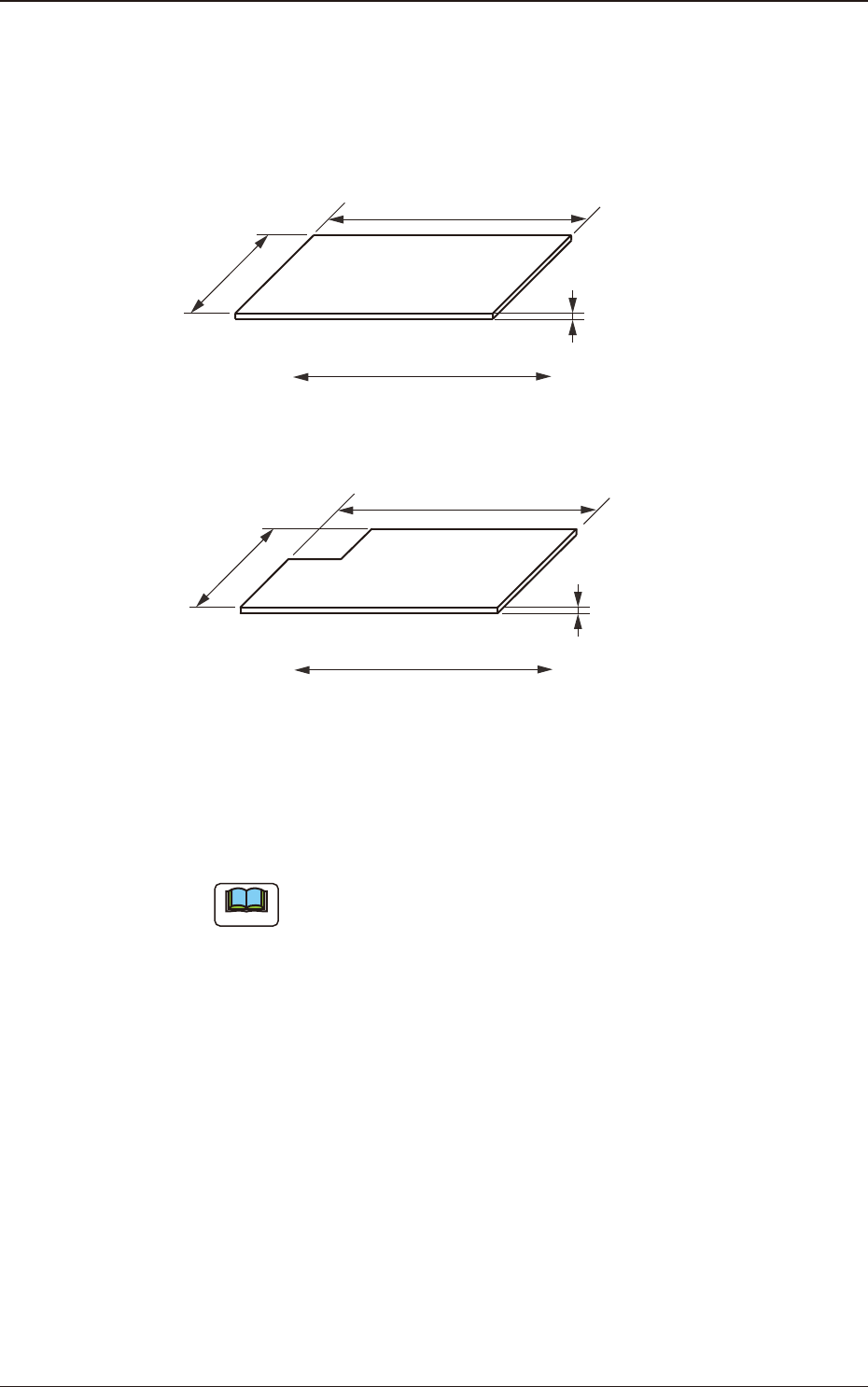
PCB size
X (Horizontal), Y (Vertical), and T (thickness) [mm]
Set the dimensions of the PCB to be produced.
Y (Vertical)
T (Thickness)
PCB
X (Horizontal)
PCB Flow Direction
F2B4
When the PCB has a cutout, the following dimensions must be entered.
Y (Vertical)
T (Thickness)
PCB
X (Horizontal)
PCB Flow Direction
F2B5
•
Data Input Range
X
: 50 to 610
Y
: 50 to 510
T
: 0.3 to 5.0
Note
(a) Be sure to set a correct parameter in the "X (Horizontal)" text
box because the set parameter is used to automatically correct the
placement position when a parameter is selected in the "PCB locate
method" text box in the "PCB transfer Mode Setup" tab sheet.
(b) The set parameter in the "Y (Horizontal)" text box must be used as a
target width for the conveyor width automatic adjustment operation.
(c) "T (Thickness)" is used as a target value for the backup table
ascending position when a PCB is clamped by the clamp plates and
positioned.
3.2 PCB
2OM-1751
2-151303-001
(B01_02)
PCB origin offset
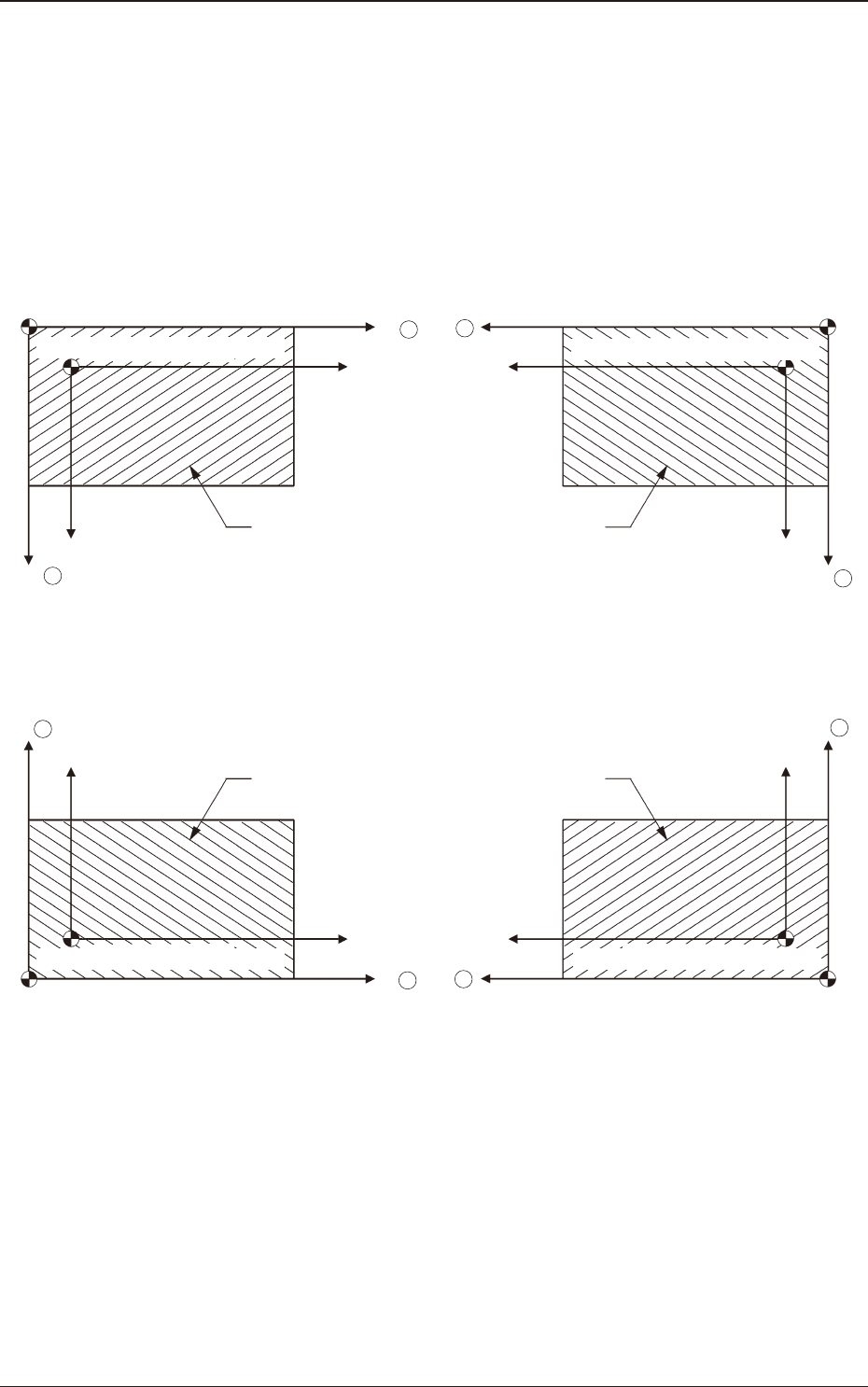
X (Horizontal), Y (Vertical) [mm]
Set the offset values to correct the difference between the placement
coordinate reference (N0) and the PCB origin (P0).
"Plus" or "Minus" can be set in both X and Y coordinates in the direction of
the correction.
Placement Coordinate Reference Point :
For Front Right
Y
PCB Origin(P0)
PCB
X
Placement Coordinate Reference (N0)
PCB Origin(P0)
Y
X
Placement Coordinate Reference (N0)
X
Y
PCB
PCB Origin(P
0)
Placement Coordinate Reference (N0)
Y
X
PCB
PCB Origin(P
0)
Placement Coordinate Reference (N0)
Placement Coordinate Reference Point :
For Rear Left
Placement Coordinate Reference Point :
For Front Left
Placement Coordinate Reference Point :
For Rear Right
PCB
+
+
+
+
+
+
+
+
F2B6
3.2 PCB
2OM-1751
2-161303-001
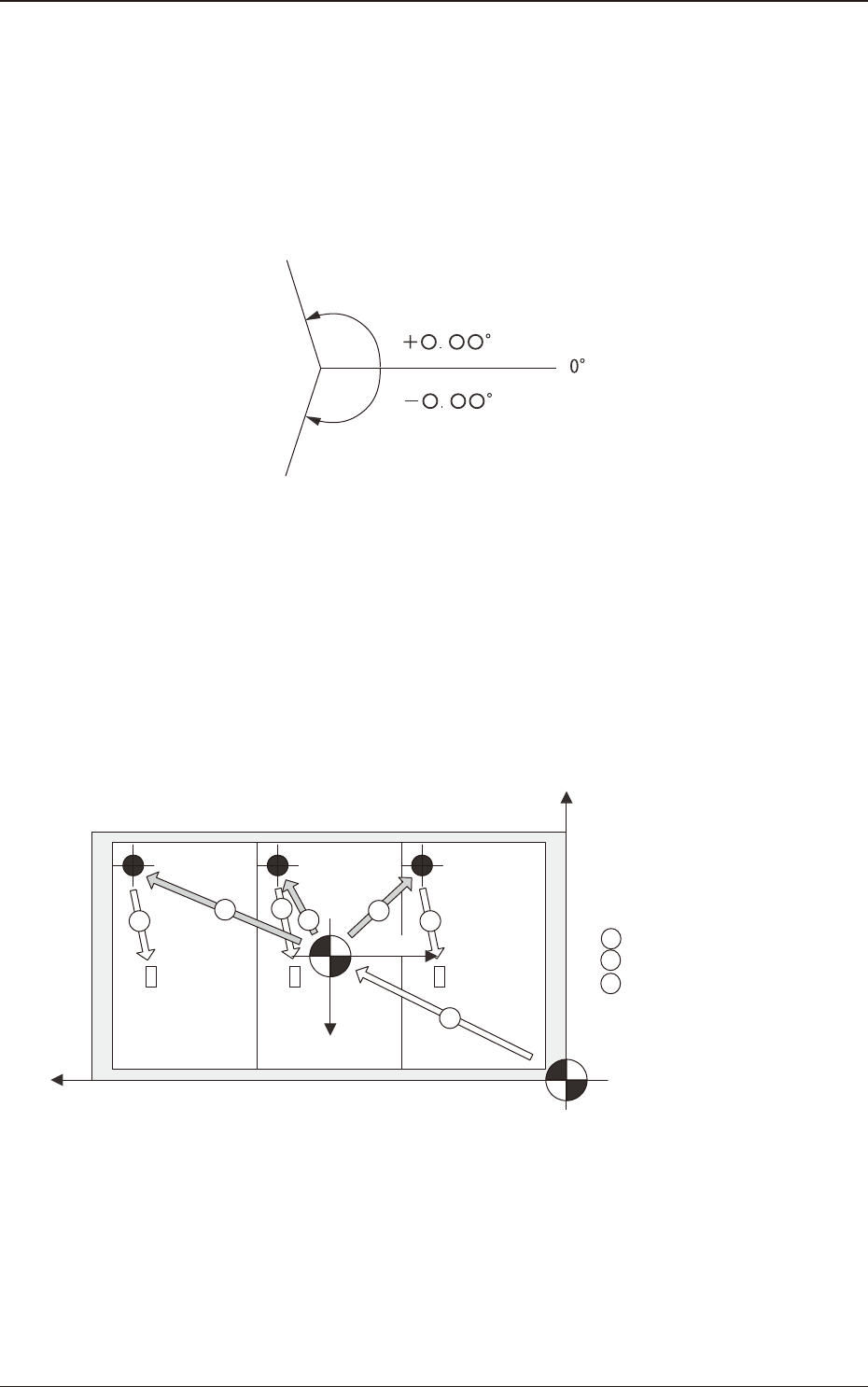
Z (Angle) [deg]
Set the offset value for component placement angle.
The set value is added to the "Offset Z (deg)" of all components in the
placement data (P data).
To correct the angle of component placement counterclockwise, a parameter
must be entered with a plus (+) sign. A minus (-) sign must be afxed for
clockwise correction.
F2B7
X-Direction and Y-Direction
"Same" or "Opposite" can be selected as the X and Y directions in the
placement reference coordinate system.
Same
: Select this when the direction of the coordinates is the same
as that of the machine coordinates.
Opposite
: Select this when the direction of the coordinates is opposite,
compared with the direction of the machine coordinates.
Y+
X+
X+
Y+
1
2
3
2
2
3
3
1 : PCB Origin Offset
2 : Unit PCB Origin
3 : Placement Coordinates
Machine Origin
PCB Origin
Machine Coordinate System
Placement
Coordinate
Reference
Machine Coordinate System
F2B8
Z-Direction
Select one of the following options to determine the Z angular orientation of
the placement coordinate reference point.
Same
: Select this when the angular orientation is the same as that
of the machine coordinates.
Opposite
: Select this when the angular orientation is opposite,
compared with the direction of the machine coordinates.
3.2 PCB