2OM-1751-003w_G5S.pdf - 第163页
2OM-1751 2-41 1303-001 (D02_01) PCB detection off DL Y The time period from the PEC recognition to PCB release is set in this text box. (D02_02) PCB locate SET Common : When selected, the PCB positioning is set commonly …
2OM-1751
2-401303-001
(D02) PCB locate Data
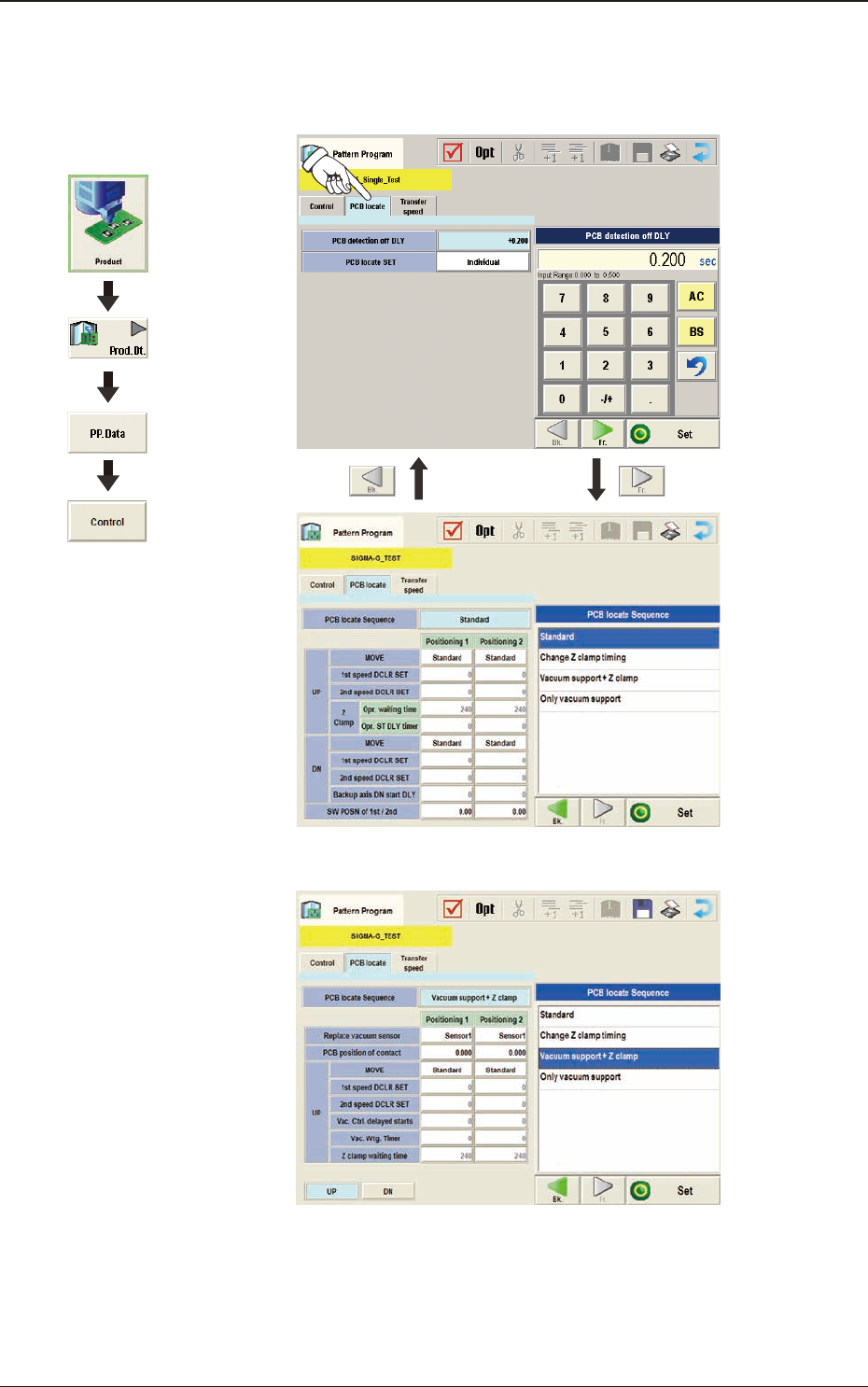
When the [PCB locate] tab is pressed in the "Control" window, the following
tab sheet appears.
F2B37
In PCB Vacuum Support F2B38
Graphic
Development
3.4 Control

2OM-1751
2-411303-001
(D02_01)
PCB detection off DLY
The time period from the PEC recognition to PCB release is set in this text
box.
(D02_02)
PCB locate SET
Common :
When selected, the PCB positioning is set commonly to the
machines in the line.
Individual :
When selected, the PCB positioning is set individually for each
machine in the line.
(D02_03)
PCB locate Sequence
The PCB positioning mode is set in this text box.
Backup Base + Z Clamp
: When selected, the positioning is performed
using the backup base and the Z-clamp.
Z Clamp
: When selected, the positioning is performed
only using the Z-clamp.
PCB vacuum support
: When selected, the positioning is performed
using the vacuum jig.
(D02_04)
UP
Positioning 1, Positioning 2
MOVE
The PCB moving up operation for positioning is selected from "Standard" or
"Value Set".
Normally, "Standard" is selected.
Standard
:
When selected, the PCB is moved up for positioning
based on the standard value set in the machine.
Low Speed 1
:
When selected, the operation speed is one step lower
than the standard value.
Low Speed 2
:
When selected, the operation speed is two step lower
than the standard value.
Low Speed 3
:
When selected, the operation speed is three step lower
than the standard value.
Low Speed 4
:
When selected, the operation speed is four step lower
than the standard value.
Value Set
: When selected, the speed value can be set freely.
3.4 Control

2OM-1751
2-421303-001
1st speed DCLR SET
The backup base operation speed reduction rate is set in this text box.
This value is reected on the rst operation in the 2-stage operation in the
PCB positioning, and second operation in the 2-stage operation in the PCB
releasing.
2nd speed DCLR SET
The backup base operation speed reduction rate is set in this text box.
This value is reected on the second operation in the 2-stage operation in
the PCB positioning, and rst operation in the 2-stage operation in the PCB
releasing.
Z Clamp
Opr. waiting time
The Z-clamp operation WAIT time is set in this text box.
Opr. ST DLY timer
The time period from the backup base moving up start to Z-clamp moving
up start, is set in this text box.
(D02_05)
DN
Positioning 1, Positioning 2
MOVE
The PCB moving down operation for positioning is selected from "Standard"
or "Value Set".
Normally, "Standard" is selected.
Standard
:
When selected, the PCB is moved up for positioning
based on the standard value set in the machine.
Low Speed 1
:
When selected, the operation speed is one step lower
than the standard value.
Low Speed 2
:
When selected, the operation speed is two step lower
than the standard value.
Low Speed 3
:
When selected, the operation speed is three step lower
than the standard value.
Low Speed 4
When selected, the operation speed is four step lower
than the standard value.
Value Set : W
hen selected, the speed value can be set freely.
1st speed DCLR SET
The backup base operation speed reduction rate is set in this text box.
This value is reected on the rst operation in the 2-stage operation in the
PCB positioning, and second operation in the 2-stage operation in the PCB
releasing.
3.4 Control