2OM-1751-003w_G5S.pdf - 第234页
2OM-1751 4-20 1303-001 3. "CRNT .PP .MNG.DT" Window This window enables the operator to conrm the production management data for the current pattern program. [2] [1] [3] F2D13 [1] T abs and T ab Sheets There a…

2OM-1751
4-191303-001
2.4 "Handling/Plac." Tab Sheet
*D:component recognition
Shown is the number of components judged "NG" (No Good) through
recognition process.
*E:component thickness
Shown is the number of errors in compo
*F:pick-up difference
Shown is the number of components judged "NG" (No Good) through
recognition process.
*H:measurement error
Each text box shows the total count of measurement error in each individual
feeder.
*K:coplanarlty
The times of error decided in the coplanarity error detection is shown in this
data box.
The percentage of error detected in the optional device installation, is
displayed in this data box.
[2] Component chuck
[((*total comp.-(*A+*B+*C+*G+*L))/*Total comp.) × 100] (%)
The value (%) is determined by the following formula.# of Picks -
(Counts in "A" + Counts in "B" + Counts in "C"
+ Counts in "G" + Conuts in "L")
×100
# of Picks
[3] Component placement
[((*total comp.-(*A+*B+*C+*D+*E+*F+*G+*H+*K+*L))/*Total comp.)
× 100] (%)
The value (%) is determined by the following formula.
# of Picks - (Counts in "A" + Counts in "B" + Counts in "C"
+ Counts in "D"+ Counts in "E"+ Counts in "F"+ Counts in "G
+ Counts in "H"+ Counts in "K"
+ Conuts in "L"
)
×
100
# of Picks
Note
About Data Counting (Counting of "*A: component missing [sensor]"
and "*B: component missing [recognition]")
The machine stops in an error condition according to the number of times
(the number of continuous component missing errors to be counted to stop
the machine in an error condition) set in the "1" text box of "Error process"
in the "Control Data" tab sheet of a "Component Library" window.
In this case, the number of missing component errors is not added to the
number of picks and the number of chuck errors.
2OM-1751
4-201303-001
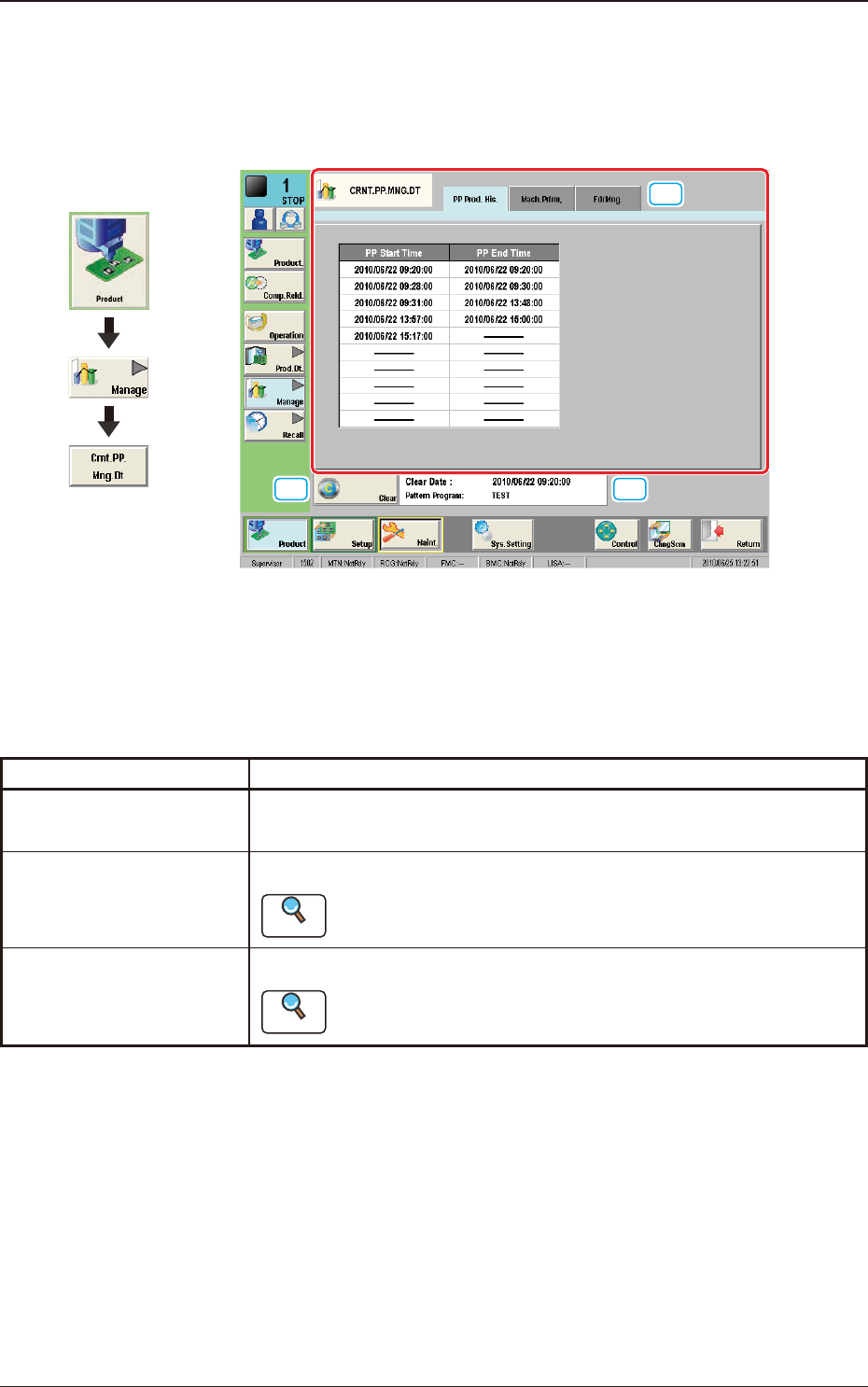
3. "CRNT.PP.MNG.DT" Window
This window enables the operator to conrm the production management data for
the current pattern program.
[2]
[1]
[3]
F2D13
[1] Tabs and Tab Sheets
There are three tab sheets for the "CRNT.PP.MNG.DT" window. When any
tab is pressed, the corresponding tab sheet appears.
Buttons Description
PP Prod. His.
In this tab sheet, the automatic operation starting date and time and
ending date and time are recorded.
Mach.Prfrm.
In this tab sheet, the device management result data is displayed.
Reference
Refer to "2.1 "Mach.Prfrm." Tab Sheet" for each item.
FdrMng.
In this tab sheet, the pick-up data for each feeder is displayed.
Reference
Refer to "2.2 "FdrMng." Tab Sheet" for each item.
T2D3
[2] [Clear] Button
When this button is pressed, all the data parameters are deleted in each tab
sheet for the "CRNT.PP.MNG.DT" window.
[3] Information on Tatalization File Information
The update date and time for the totalization le and pattern program are
displayed in this area.
Graphic
Development
3. "CRNT.PP.MNG.DT" Window
2OM-1751
4-211303-001
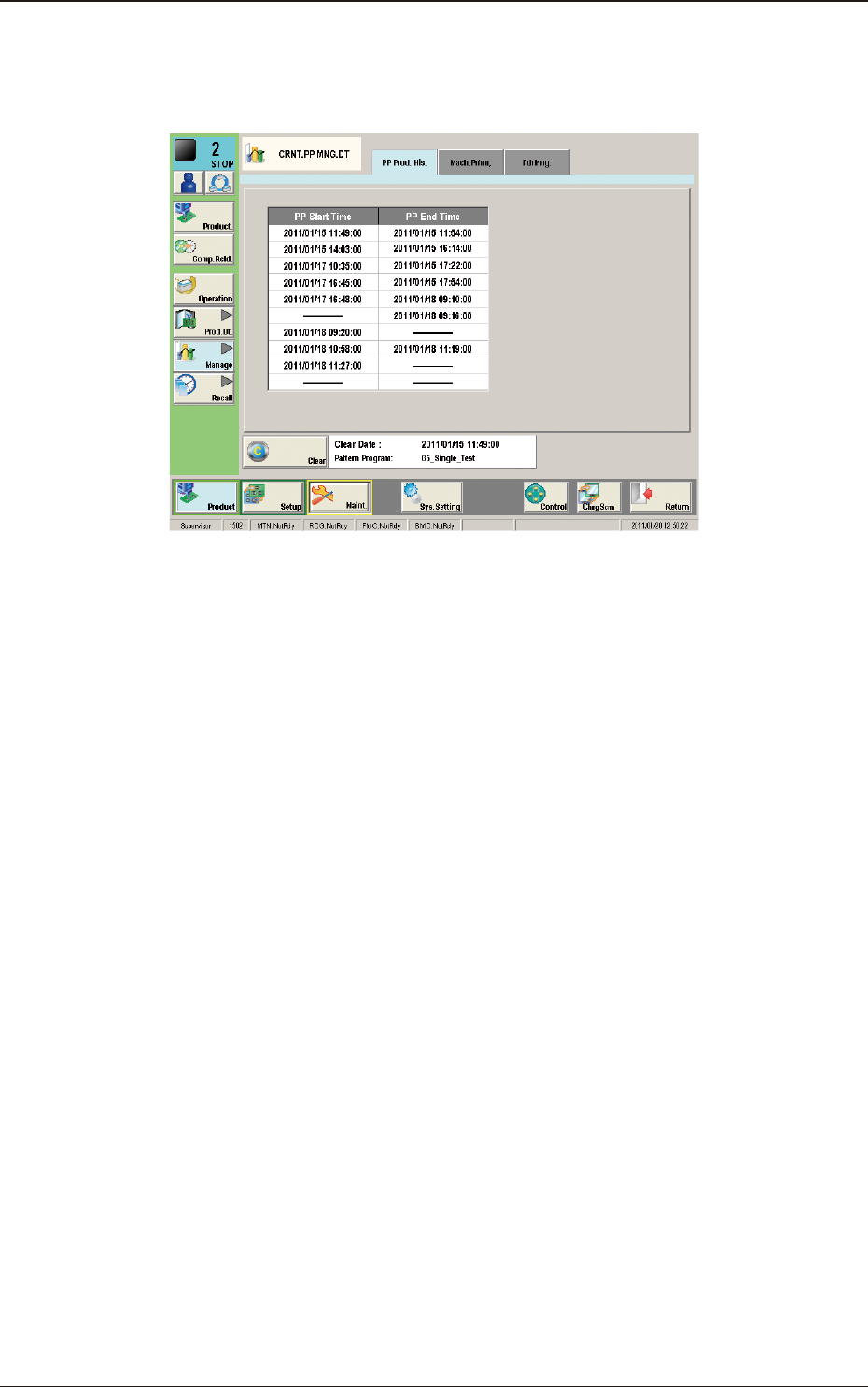
3.1 "PP Prod. His." Window
The PCB production start date and time, and end date and time are recorded.
"PP Prod. His." Tab Sheet F2D14
3.1 "PP Prod. His." Window