2OM-1751-003w_G5S.pdf - 第293页
2OM-1751 6-21 1303-001 F2F22 [Head and Noz Place] T ab When the [Head and Noz Place] tab is pressed, the tab sheet is changed to the "Head and Noz Place" setup tab sheet. When the button for the stocker, for wh…
2OM-1751
6-201303-001
[Change] Button
When pressed, this button attaches the vacuum nozzle to the placement head.
Note
When the vacuum nozzles (to be used after a program change operation)
are prepared in the extended stocker (option), they are stored and attached
in succession.
[Reset] Button
When pressed, this button stores the vacuum nozzle in the object nozzle
stocker.
[5] [Move] Button
When the [START] button on the operation panel is pressed in 10 seconds
after the button corresponding to the required operation is selected and this
button is pressed, the machine performs the selected operation for the nozzle.
Note
When the nozzle quantity is not enough in this operation, the required
nozzles are displayed in the "Nozzle Check" window.
Reference
Refer to "3. "PP CHANGE" window" in "Chapter 6" for how to use the
"Nozzle Check" window.
[6] [Zero] Button
When pressed, all devices are zeroed.
[7] [PLACE. HEAD/NOZ.] Button
Using this button, the head/nozzle placement data set in the pattern program
can be read and reected on the setup.
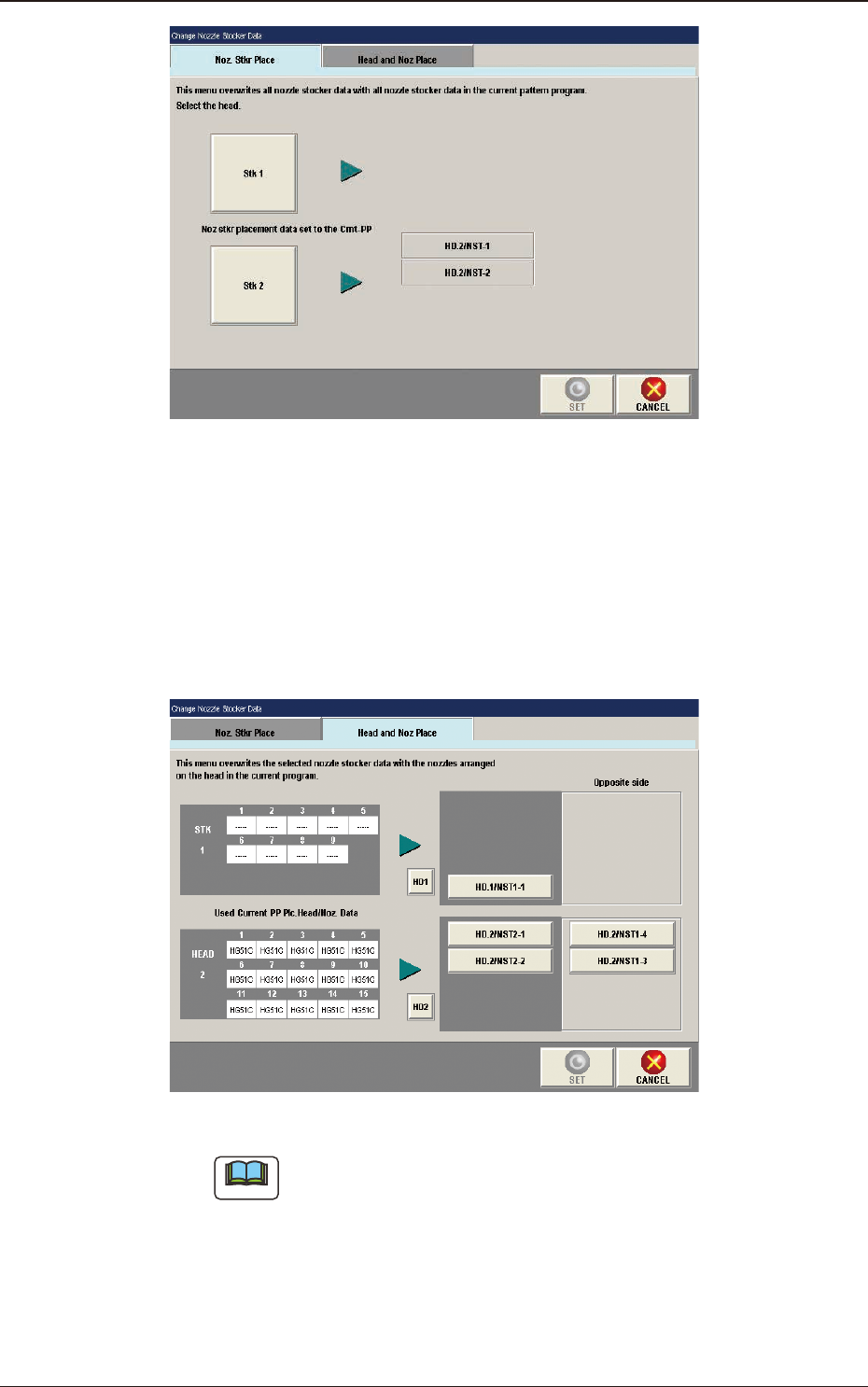
[Noz Stkr Place] Tab
When the button of the nozzle stocker of which arrangement data is
rewritten, is pressed and then, the [SET] button is pressed, the parameters are
rewritten.
When the [Noz Stkr Place] tab is pressed, the following tab sheet appears.
5. "NOZ.CHG." Window
2OM-1751
6-211303-001
F2F22
[Head and Noz Place] Tab
When the [Head and Noz Place] tab is pressed, the tab sheet is changed to
the "Head and Noz Place" setup tab sheet.
When the button for the stocker, for which the head and nozzle placement
data is to be re-written, is pressed and the [SET] button is pressed the data
rewriting is performed.
F2F23
Note
(a)
Only the nozzles corresponding to each nozzle stocker (housing) can
be allocated. That is, only the high-speed nozzles can be allocated
to the high-speed nozzle stockers (housings) and only the middle-
size odd shaped nozzle to the middle-size odd shaped nozzle stockers
(housings).
(b) In the case that there is any nozzle stocker where the nozzle allocation
setting is available, on the opposite side, the nozzles can be allocated
on the opposite side.
5. "NOZ.CHG." Window
2OM-1751
6-221303-001
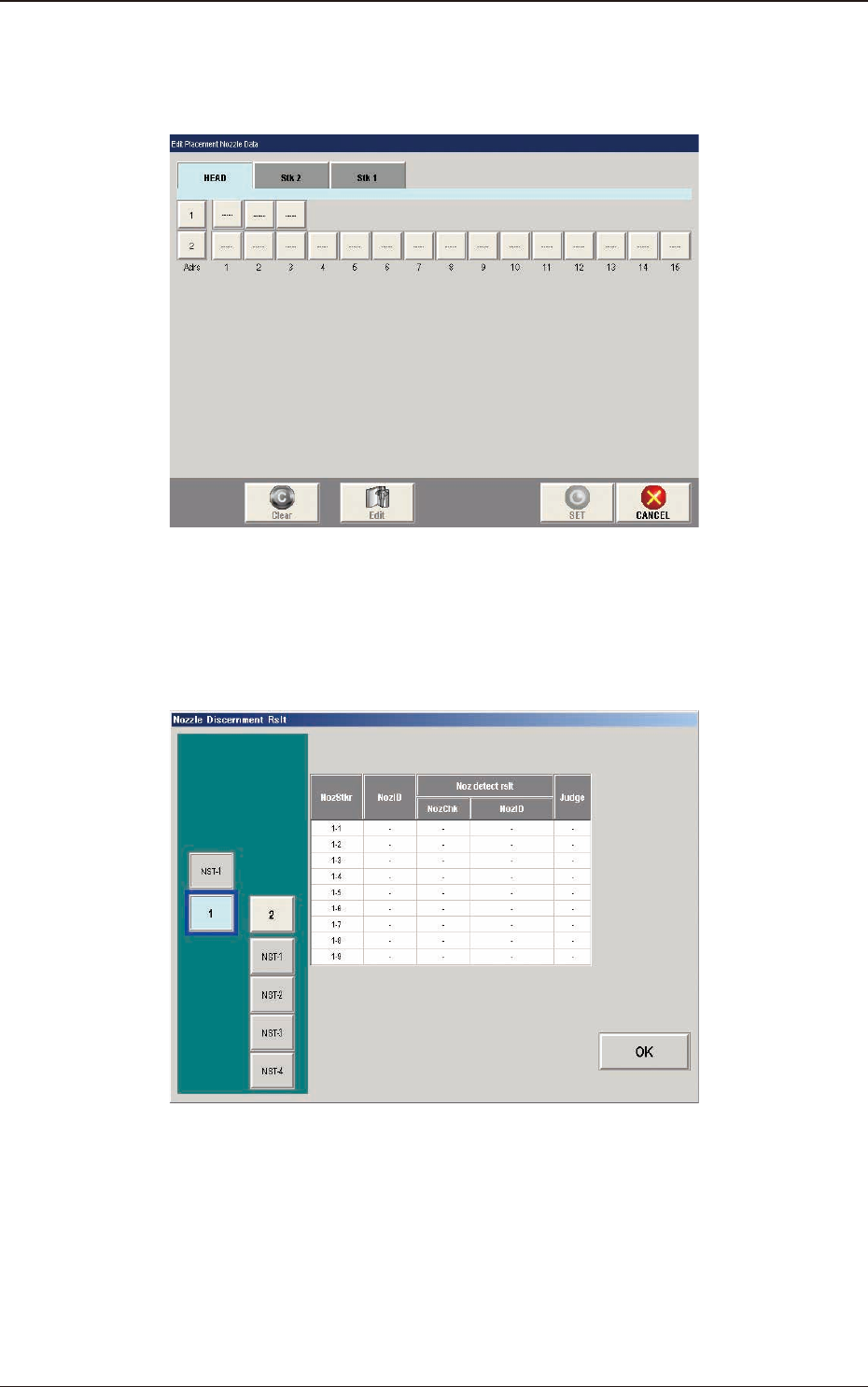
[8] [Place. Noz Edit] Button
When the [Place.Noz Edit] button is pressed, the "Edit Placement Nozzle
Data" window appears.
F2F24
[9] [Nozzle Disce Rslt] Button
When the [Noz.Disce Rslt] button is pressed, the "Nozzle Discernment Rslt"
window appears.
F2F25
5. "NOZ.CHG." Window