2OM-1751-003w_G5S.pdf - 第311页
2OM-1751 6-39 7.2.2 "Recognition" Window in Manual Alignment Mode When any of the [Cycle run] button, [Select Step] button or [TEACH] button is pressed, the following window appears. [1] [2] [3] [4] [5] F2F39 […
2OM-1751
6-38
[
] Button
: Image Fitting Mode (the image is displayed fully using the
recognition image display domain).
After changing to the image tting mode using the
[
] button (the shape of the pointer is changed to
), when the image to be t is touched, or the left button
of the mouse is clicked on the image, the image is displayed
fully using the recognition image display domain, from the
pointer position as the center.
When the image is to be displayed in the image tting mode
with its position xed, place the pointer on the center of the
image before the image tting operation.
[
] Button
: Using this button, the image displayed in the display area
in the recognition window can be moved to the desired
position.
1303-001
7.2 "Place Pos Teach" Window
2OM-1751
6-39
7.2.2 "Recognition" Window in Manual Alignment Mode
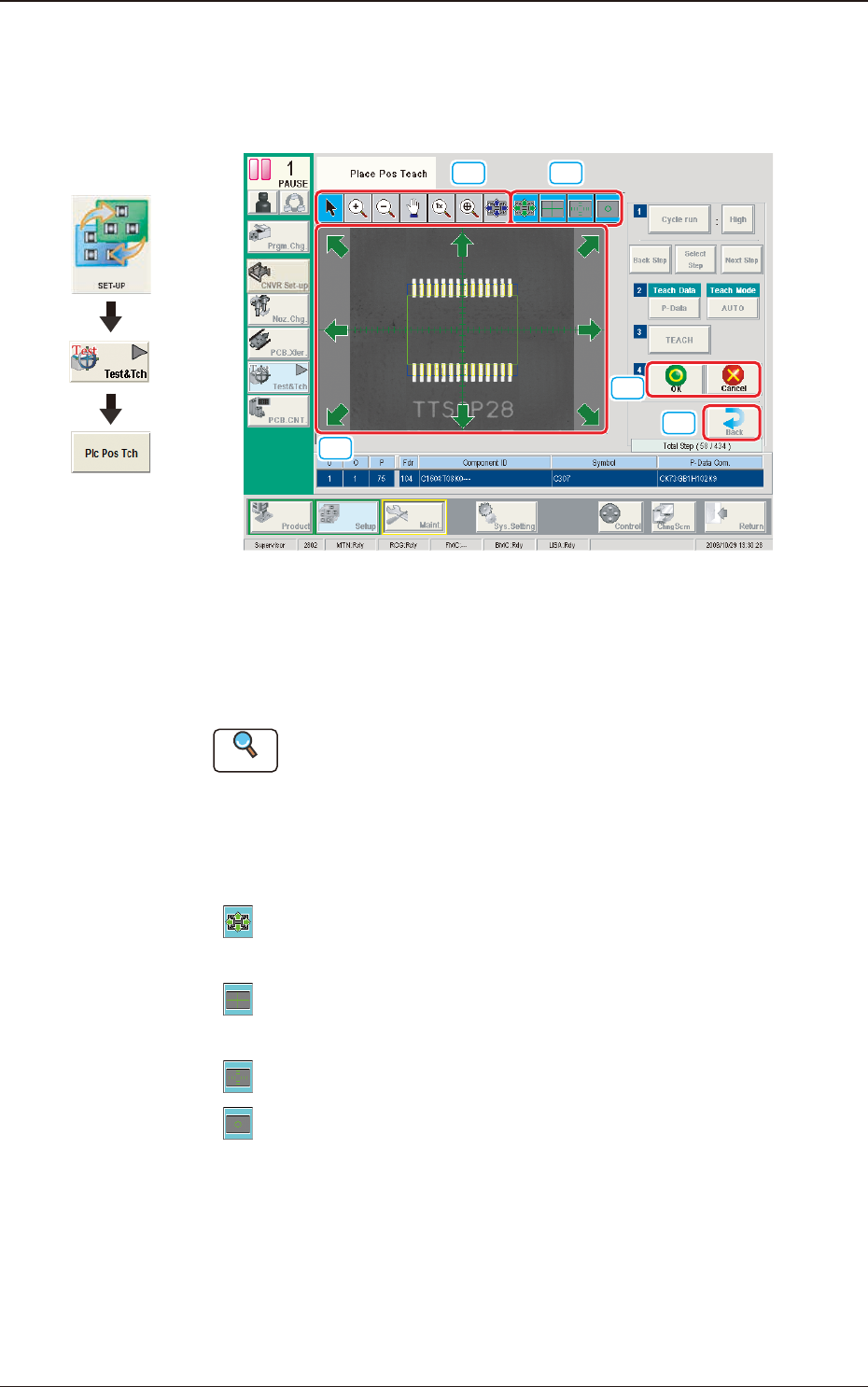
When any of the [Cycle run] button, [Select Step] button or [TEACH] button is
pressed, the following window appears.
[1] [2]
[3]
[4]
[5]
F2F39
[1] Image Operation Buttons
The following buttons can be used to change the mode that enlarges or
moves the image in the recognized image display area.
Reference
Refer to "[3] Image Operation Buttons" in "4.2 "Recognition" Window for
Placement Position Teaching " for the description of each button.
[2] Graphics Selection Buttons
Use these button to select the types of a graphic to be displayed for the
manual alignment operation. (Multiple Selection Acceptable)
[
] Button
: This button is used when the displayed image position is
aligned with the graphic image position.
[
] Button
: When seleced, this button displays a crosshaire that indicates
the center of the camera.
[
] Button
: When selected, this button displays the scale lines.
[
] Button
: When selected, this button displays the outline of the object
mark for the manual alignment.
Graphic
Development
1303-001
7.2 "Place Pos Teach" Window

2OM-1751
6-40
[3] Graphic Image Move Buttons (
Buttons)
When the arrow direction is touched in the recognition image display area,
the image is moved in the corresponding direction.
[4] [OK] Button
When pressed, the matching position is conrmed.
[Cancel] Button
When pressed, this button cancels the manual alignment operation.
[5] [Back] Button
When pressed, the "Place Pos Teach" window is returned.
1303-001
7.2 "Place Pos Teach" Window