2OM-1751-003w_G5S.pdf - 第321页
2OM-1751 6-49 1303-001 7.3.3 "Library T eaching New Creation" T ab Sheet On this tab sheet, the initial data parameter entry is performed for the data to be created newly. When the [Library T eaching New Creati…

2OM-1751
6-481303-001
7.3.2 "Sel. from CompDt" Tab Sheet
When the [Sel. from CompDt] tab is pressed in the "COMP RCG" test window,
the following tab sheet appears.
[1]
[2]
[3]
[4]
F2F46
[1] Test ID Selection Tabs
The corresponding tab sheet enables the operator to display the test IDs
registered for the block selected in [3].
[2] Page Change Button
[
] Button
: When pressed, the top page is displayed.
[ ] Button
: When pressed, the previous page is displayed.
[ ] Button
: When pressed, the next page is displayed.
[ ] Button
: When pressed, the last page is displayed.
[3] [Select block] Button
Using this button, the block is selected.
[4] [Edit] Button
When this button is pressed, the test ID selected in [1] is edited.
Reference
Refer to "Component Library" in "Chapter 3", for the editing procedure.
7.3 "COMP RCG" Test Window
Graphic
Development
2OM-1751
6-491303-001
7.3.3 "Library Teaching New Creation" Tab Sheet
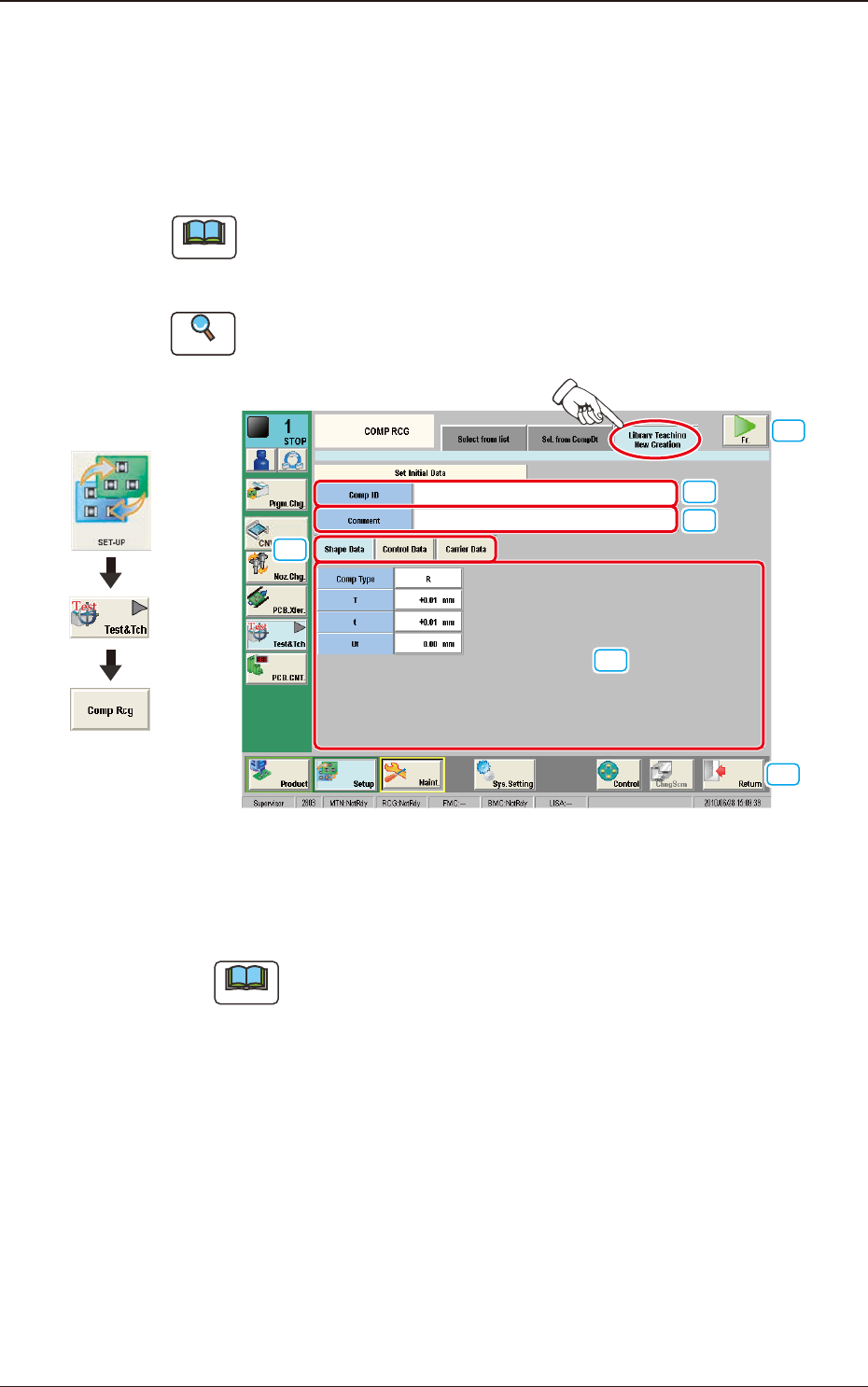
On this tab sheet, the initial data parameter entry is performed for the data to be
created newly.
When the [Library Teaching New Creation] tab is pressed in the "COMP RCG"
window, the following tab sheet is displayed.
Note
On this tab sheet, enter the parameters for "T" (Thickness), "t" (Thickness" and
"Ut" (Thickness). If this setting is not performed, the procedure does not go to
the next step.
Reference
Refer to "Vol. 6 Component Library" for the description of each item.
[1]
[2]
[4]
[5]
[6]
[3]
F2F47
[1] [Comp ID] Button
In this data box, the component ID to be created is entered.
Note
Enter the component ID. If this setting is not performed, the procedure
does not go to the next step.
[2] [Comment] Button
The comment for the component can be entered in this text box.
[3] Input Data Change Button
[Shape Data]
The shape data entry window is displayed.
[Control Data]
The control data entry window is displayed.
7.3 "COMP RCG" Test Window
Graphic
Development
2OM-1751
6-501303-001
[Carrier Data]
The carrier data entry window is displayed.
[4] [Fr.] Button
When this button is pressed, the component recognition test window for the
Test & Teaching operation is transferred.
Reference
Refer to "7.3.4 "Component Recognition Test Execution" Window" in
chapter 6, Vol.2, in the Instruction Manual for the Main Machine for the
"COMP RCG" window for the Test & Teaching operation.
[5] [Return] Button
When this button is pressed, the "COMP RCG" test window is returned.
[6] Shape Data Entry Window
In this window, enter the shape data.
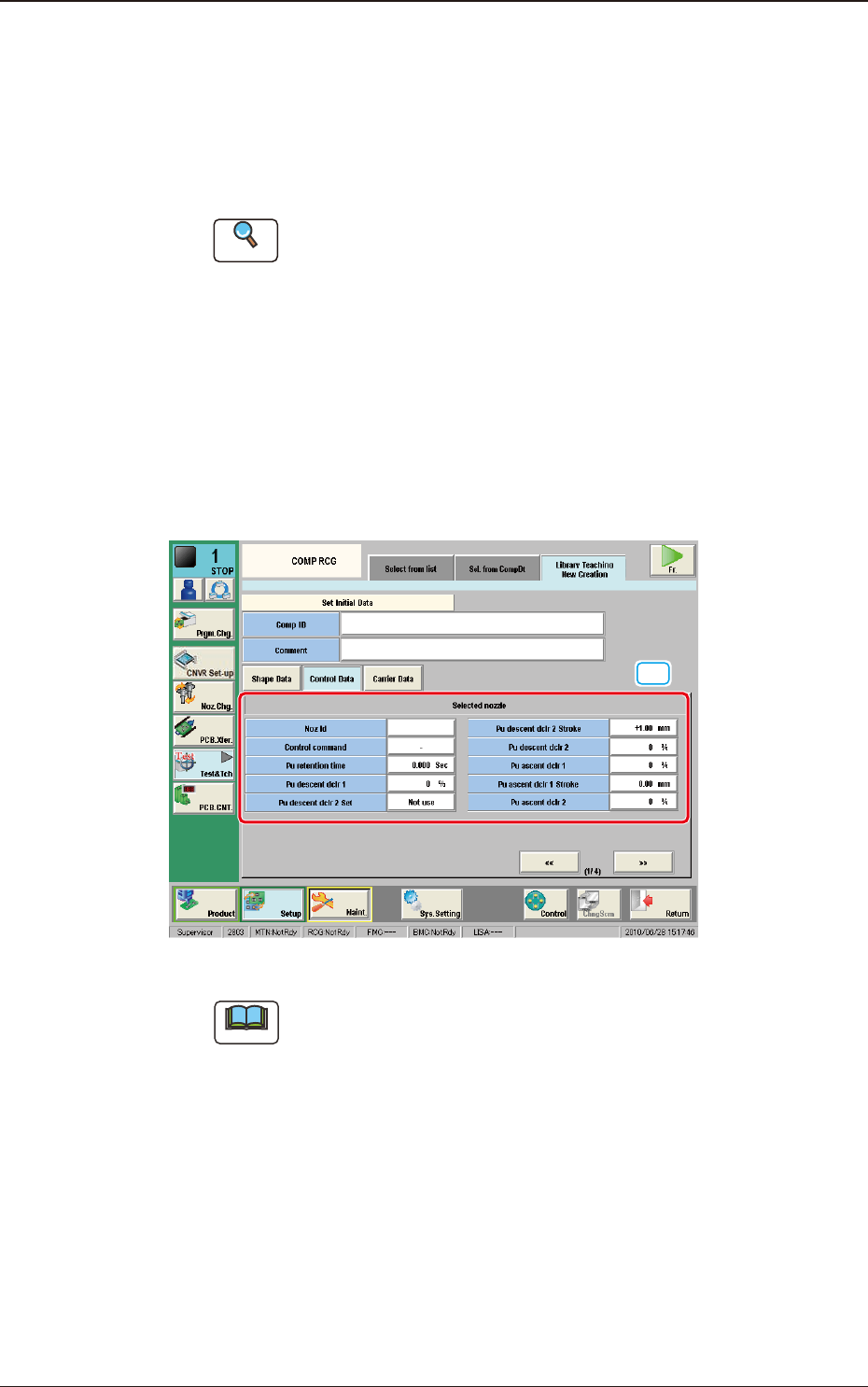
[7] Control Data Entry Window (1/4)
[7]
"Control Data" Entry Window (1/4) for the "Initial Data Setting" F2F48
Note
Enter the parameter for the "Nozzle ID".
If this setting is not performed, the procedure does not go to the
next step.
7.3 "COMP RCG" Test Window