2OM-1751-003w_G5S.pdf - 第330页
2OM-1751 6-58 1303-001 7.3.4.1 Hysteresis T est This test supports the data settings for the beam speed reduction in the component pick-up specied in the component library, review of the rotation speed reduction and bea…

2OM-1751
6-571303-001
[Recog] Button
When this button is pressed the within 10 seconds, the [START] button on
the operation panel is pressed, the head in the block selected using the "[4]
Head Sel" button, is moved to the component recognition camera position
and the component recognition is executed.
[Teach] Button
This button is selected when new component library registration is
performed.
Reference
Refer to ""Execution Teach" Window" in chapter 6, Vol.2, in the
Instruction Manual for the Main Machine for the details.
[Hysteresis] Button
The component deviation in the pick-up operation can be tested using this
"Hysteresis test" button, When this button is pressed, the "Hysteresis Test"
window appears.
[Dscd] Button
When this button is pressed, the component is discharged according to the
component library data.
[Collect.] Button
When this button is pressed and within 10 seconds, the [START] button on
the operation panel is pressed, the head is move to the lane No. specied
using the "Coll. Pos" button.
[Vac. Off] Button
Using this button, the vacuum ON/OFF for the nozzle is changed over.
Depending on the current vacuum condition, the left indication of the "Vac.
Off" button is changed to "Vac Pick-up OFF/Vac Pick-up ON".
[Bk.] Button
When this button is pressed, the previous page appears.
[ZERO] Button
When this button is pressed, all the axes of the selected XY beam are zeroed.
Coll.Pos
Using this button, the test component collection position is specied.
7.3 "COMP RCG" Test Window
2OM-1751
6-581303-001
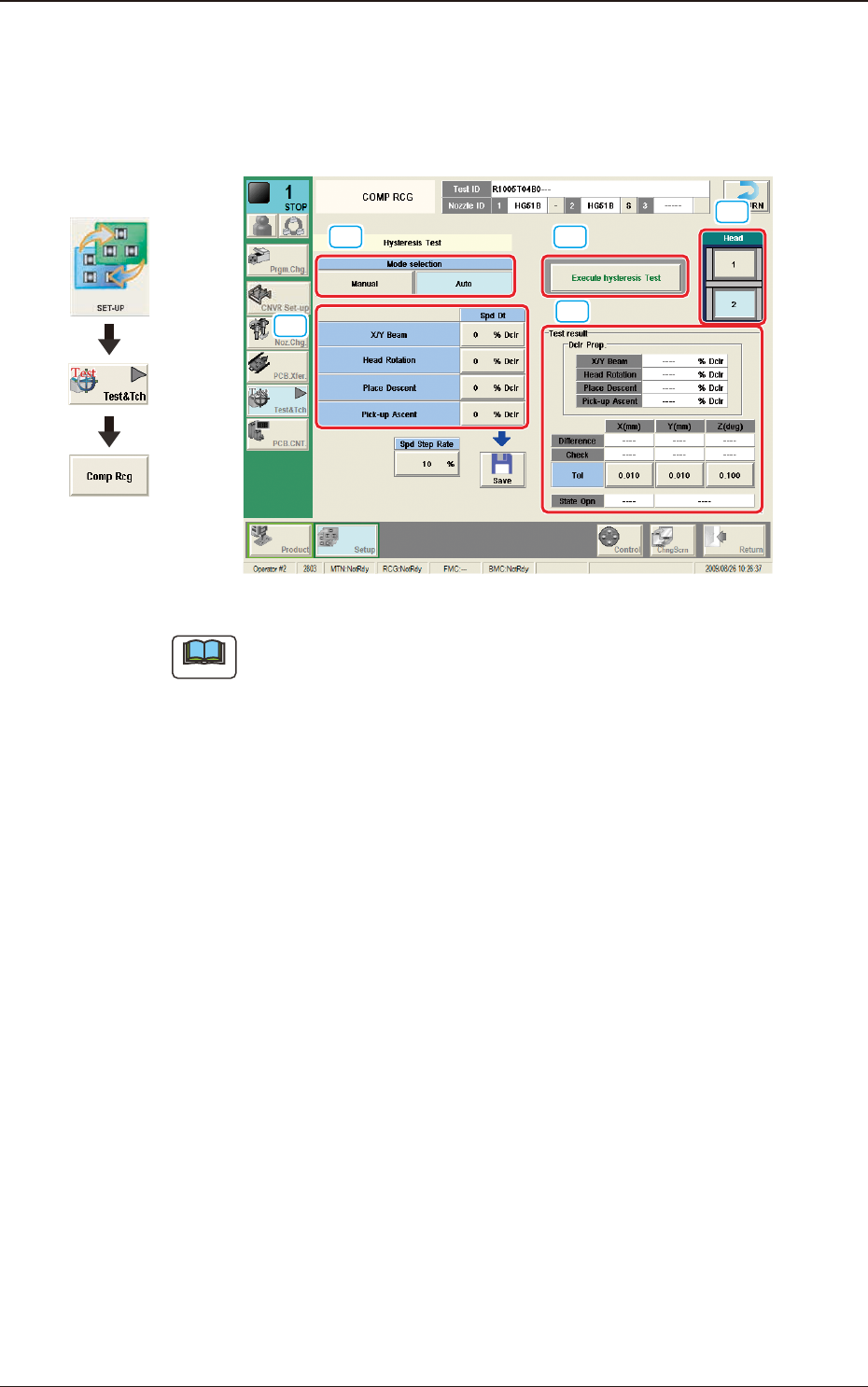
7.3.4.1 Hysteresis Test
This test supports the data settings for the beam speed reduction in the component
pick-up specied in the component library, review of the rotation speed reduction
and beam and rotation speed reduction setup.
[1] [3]
[5]
[4]
[2]
F2F55
Note
When the tab sheet is changed to the other one, the recognition window can be
conrmed.
[1] Mode Selection
Using the following buttons, the test mode is setup.
[Manual] Button
The hysteresis test is performed based on the data set in the "Hysteresis
Manual Setup" window.
[Auto] Button
When this button is selected, the hysteresis test operation procedure is
repeated with the speed increase in increments of 1% of the speed reduction
value based on the data set in the "Hysteresis Auto Setup" window.
[2] Spd Dt
The speed reduction setup values for the beam (XY), head rotation, moving
up for pick-up, and moving down for pick-up, are displayed in this pane.
Spd Step Rate
When the "Auto" mode is selected, the current speed reduction rate is
displayed in this data box.
7.3 "COMP RCG" Test Window
Graphic
Development

2OM-1751
6-591303-001
[3] [Execute hysteresis Test] Button
When this button is pressed and within 10 seconds, the [START] button on
the operation panel is pressed, the hysteresis test is executed.
[4] Head
The buttons showing each head are displayed using images. Selecting one of
these buttons, the head to be used for the hysteresis test is selected.
[5] "Test result" Group Box
In this pane, the test result is displayed.
"Dclr Prop." Group Box
The recommended values for each speed reduction setup are displayed in
these data boxes.
Difference X, Y, Z
Each deviation value is displayed in these data boxes.
Check X,Y,Z
Each determination result is displayed in these data boxes.
Tol X,Y,Z
The allowances for the deviation in X/Y direction and Angle Z direction set
in the "Hysteresis Manual Setup" window, are displayed in these text boxes.
7.3 "COMP RCG" Test Window