2OM-1751-003w_G5S.pdf - 第369页
2OM-1751 6-97 1303-001 [5] [Move] Button Using this button, the beam is moved to the set position. [6] [Manual Alignment] Button Using this button, the window where the recognition position setup using the manual alignme…
2OM-1751
6-961303-001
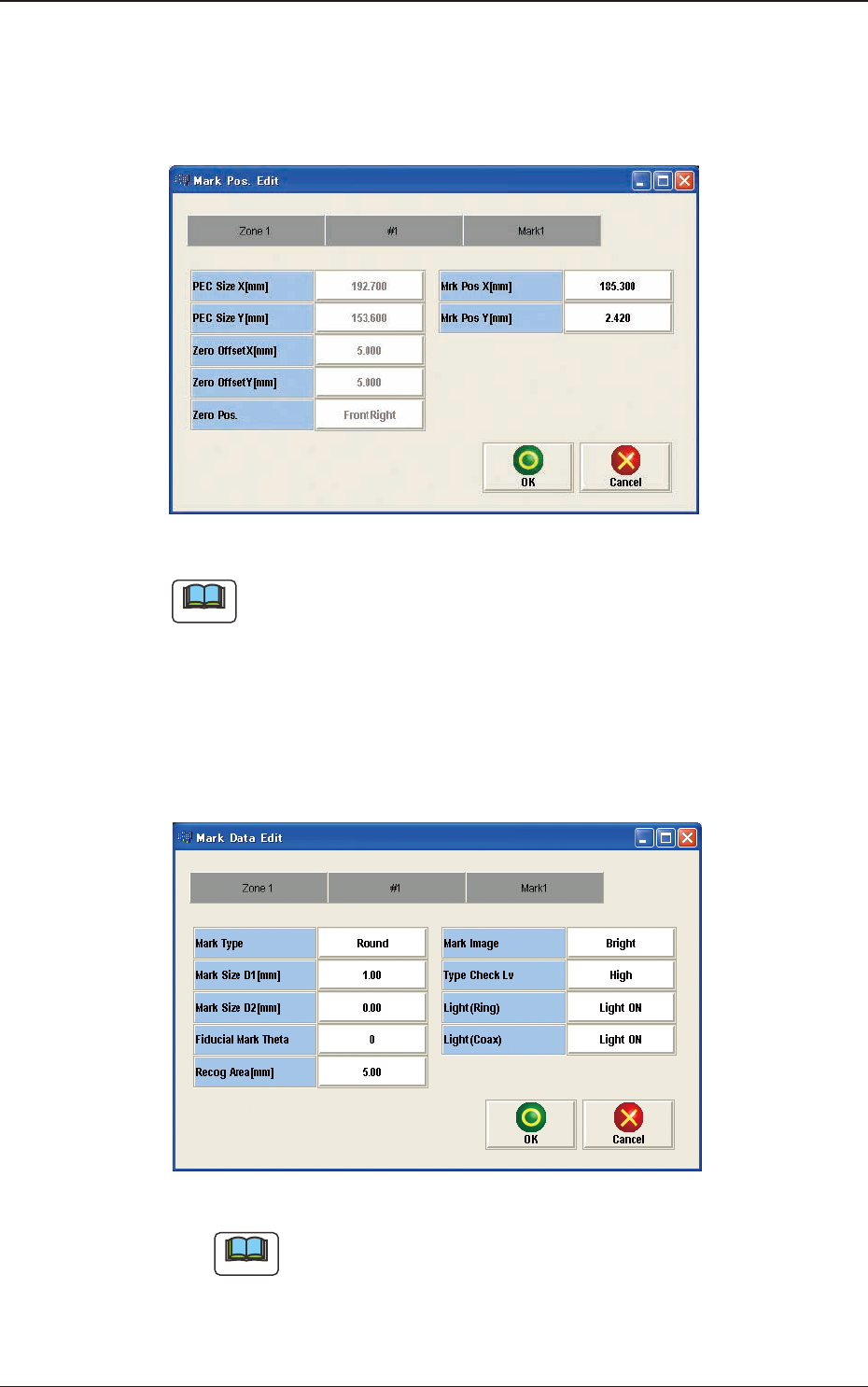
[3] [Mark Pos Edit] Button
Using this button, the PEC recognition mark position is setup.
Each item is shows as a button and when each button is pressed, the
corresponding data set window appears.
F2F115
Note
(a) When the pattern program has been setup, the parameters for the [PEC Size
X[mm]], [PEC Size Y[mm]] and [Y arrange Pos] are automatically set.
(b) When the settings have been performed in the "Cmt PP Data Setting"
window, the [Mrk Pos X[mm]] and [Mark Pos Y[mm]] also have already
been setup.
[4] [Mark Data Edit] Button
Press each button to set the PEC recognition mark.
F2F116
Note
When the settings have been performed in the "Cmt PP Data Setting"
window, the PEC recognition mark data has already been setup.
7.4 "PEC RCG" Test Window

2OM-1751
6-971303-001
[5] [Move] Button
Using this button, the beam is moved to the set position.
[6] [Manual Alignment] Button
Using this button, the window where the recognition position setup using the
manual alignment operation, is opened.
[7] [PEC Recog] Button
When this button is pressed, the PEC recognition test is prepared.
[8] Result:
In this pane, the PEC recognition test results are displayed.
[9] [PCB XFER] Button
When this button is pressed, the "PCB Transfer" window appears.
[10] [Save Image] Button
When this button is pressed, the "Image Save" window appears.
This window is used to save the test results.
[11] [Re-Recognition] Button
After pressing this button, the recognition image is touched in the "Manual
Alignment" window to re-recognize the marks.
7.4 "PEC RCG" Test Window
2OM-1751
6-981303-001
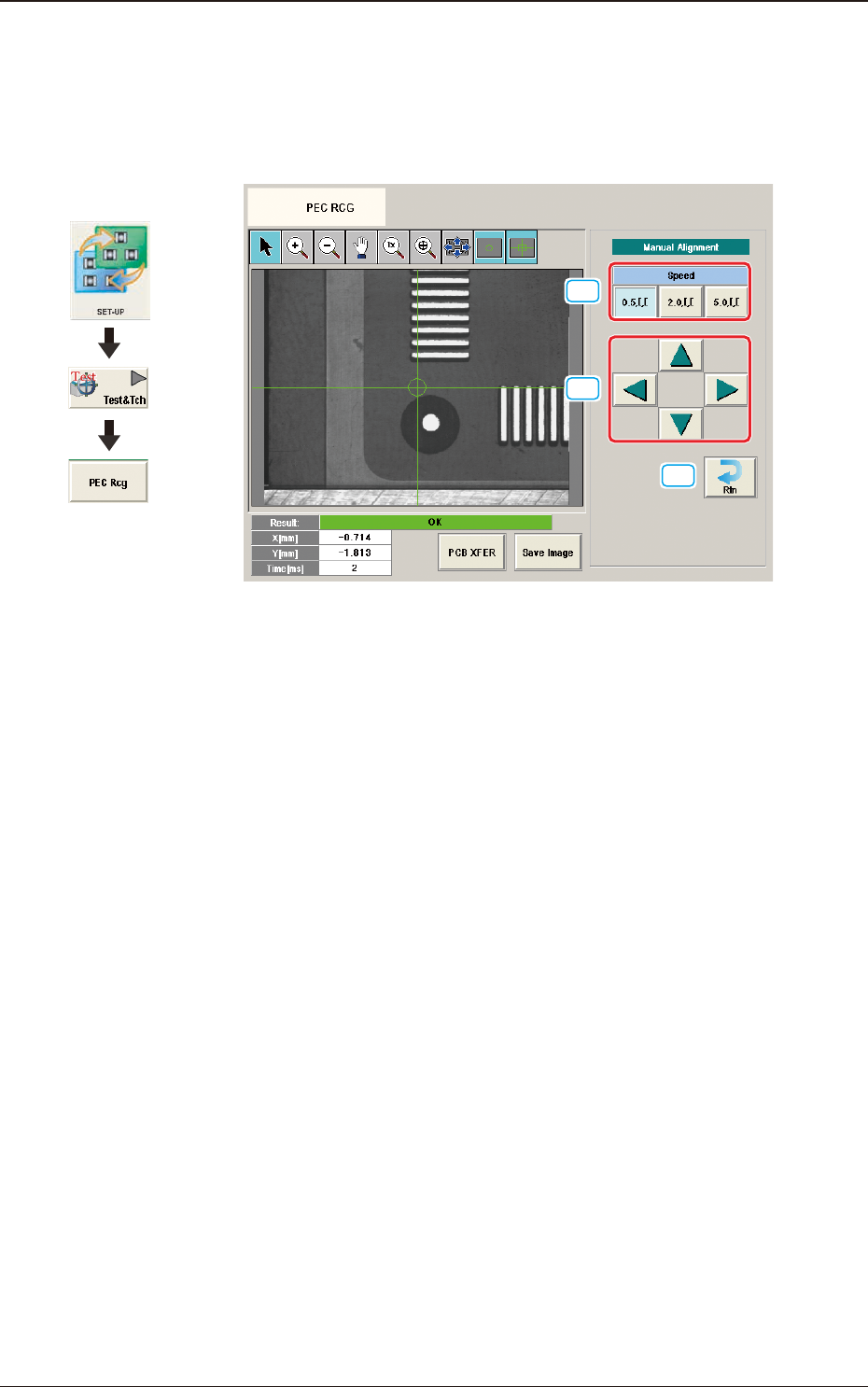
7.4.1 Manual Alignment Operation
The PEC recognition position is located using the manual alignment operation.
When the [Manual Alignment] button is pressed after the [Move] button is pressed
on the "PEC RCG" test window, the "Manual Alignment" window appears.
[1]
[2]
[3]
F2F117
[1] [Speed] Button
The beam movement speed in the manual alignment operation is selected
from the following items.
[0.5 mm] Button, [2.0 mm] Button, [5.0 mm] Button
[2] Manual Alignment Operation
When pressed, the beam is moved at the speed selected in "[1] Speed Setup"
in the arrow direction.
[3] [Rtn] Button
When pressed, the "PCB Test" window is returned.
7.4 "PEC RCG" Test Window
Graphic
Development