2OM-1751-003w_G5S.pdf - 第374页
2OM-1751 6-102 1303-001 7.5 "PU Pos Ofst T ch" Window For the components which can not be picked up at its center, the teaching for the pick-up position is performed. The manual alignment operation is performed…

2OM-1751
6-1011303-001
•
PEC Recognition Test Execution
Procedure
(1) Press the [START] button on the operation panel within 10 seconds after
pressing the [Recog] button.
(The PEC recognition operation are performed.)
When the "Mrk Pos Align" has been set to "Enable" and the recognition test
is completed successfully, the XY beam is moved so that the PEC recognition
mark is located at the center on the recognition monitor.
•
When the recognition test fails, an error (recognition error) window
appears.
Collect each parameter referring to the descriptions in the "Error" window
and perform the PEC recognition test again.
•
When the recognition test is completed successfully, make a note of
collected parameters and reect them onto the pattern program data for the
product PCB to be tested.
7.4 "PEC RCG" Test Window
2OM-1751
6-1021303-001
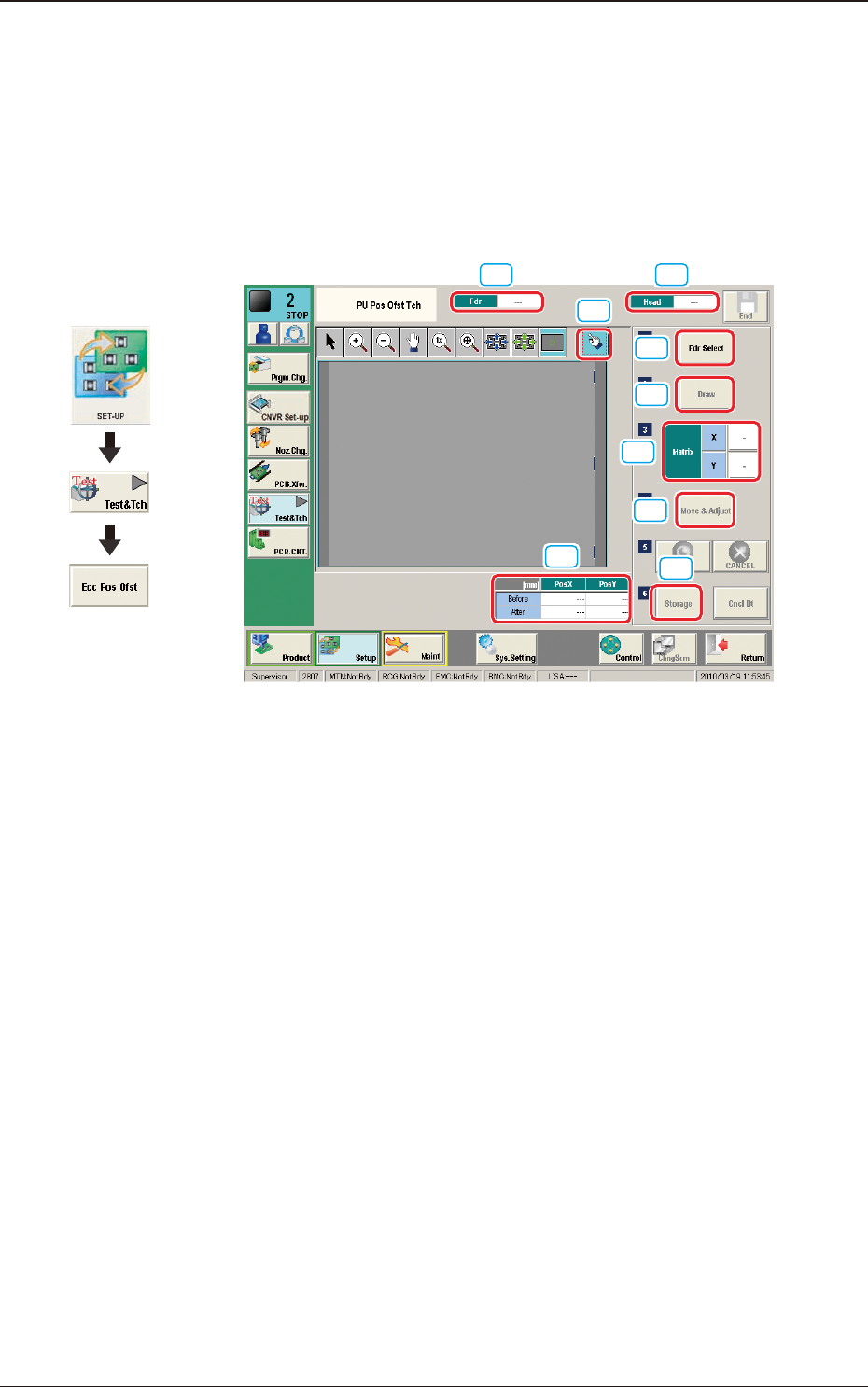
7.5 "PU Pos Ofst Tch" Window
For the components which can not be picked up at its center, the teaching for the
pick-up position is performed.
The manual alignment operation is performed from the current eccentric pick-up
position, of which data obtained by means of adding the data of component center
position correction, simple package shape and pick-up angle.
[1] [2]
[9]
[3]
[4]
[5]
[6]
[7]
[8]
F2F120
[1] Fdr
The Feeder No. to be used to pick-up the component is displayed in this data
box.
[2] Head
The head No. to be used to perform the teaching operation is displayed in
this data box.
[3] Pick-up Position Offset
The pick-up position correction values on the component library data are
displayed for the components in the specied feeder No.
Before
: Value before the teaching operation
After
: Resultant value after the teaching operation
[4] [Fdr Select] Button
When this button is pressed, the "Fdr Select Form" window is displayed.
In this window, the feeder to be used to perform the teaching operation, is
selected.
Graphic
Development
7.5 "PU Pos Ofst Tch" Window
2OM-1751
6-1031303-001
[5] [Draw] Button
This button is used for the multi-layer tray feeder (option).
[6] Matrix
This group box is used for the multi-layer tray feeder (option).
[7] [Move & Adjust] Button
This button is used to manual alignment operation for the pick-up position.
[8] [Storage] Button
This button is used for the multi-layer tray feeder (option).
[9] [Re-Recogition] Button
After pressing this button, the recognition image is touched in the matching
window to re-recognize the pockets.
Note
When the pocket recognition is unavailable due to the feeder type, the [Re-
Recognition] button is not displayed.
•
Re-Recognition Procedure
Procedure
(1) Press the [Re-Recognition] button in the Matching Window.
(2) Touch the position around the pocket to be re-recognized.
(The graphic image is moved).
7.5 "PU Pos Ofst Tch" Window