2OM-1751-003w_G5S.pdf - 第375页
2OM-1751 6-103 1303-001 [5] [Draw] Button This button is used for the multi-layer tray feeder (option). [6] Matrix This group box is used for the multi-layer tray feeder (option). [7] [Move & Adjust] Button This butt…
2OM-1751
6-1021303-001
7.5 "PU Pos Ofst Tch" Window
For the components which can not be picked up at its center, the teaching for the
pick-up position is performed.
The manual alignment operation is performed from the current eccentric pick-up
position, of which data obtained by means of adding the data of component center
position correction, simple package shape and pick-up angle.
[1] [2]
[9]
[3]
[4]
[5]
[6]
[7]
[8]
F2F120
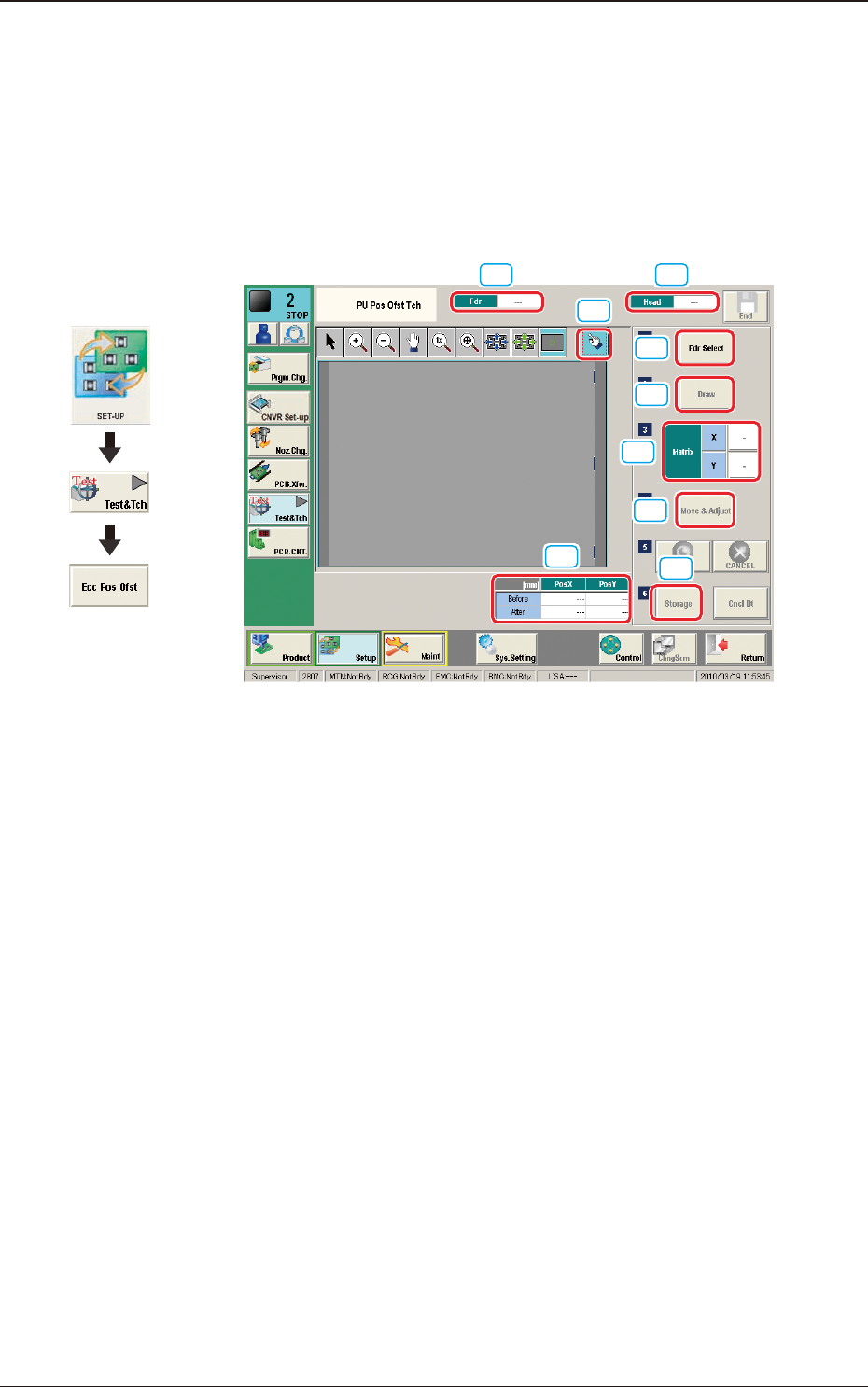
[1] Fdr
The Feeder No. to be used to pick-up the component is displayed in this data
box.
[2] Head
The head No. to be used to perform the teaching operation is displayed in
this data box.
[3] Pick-up Position Offset
The pick-up position correction values on the component library data are
displayed for the components in the specied feeder No.
Before
: Value before the teaching operation
After
: Resultant value after the teaching operation
[4] [Fdr Select] Button
When this button is pressed, the "Fdr Select Form" window is displayed.
In this window, the feeder to be used to perform the teaching operation, is
selected.
Graphic
Development
7.5 "PU Pos Ofst Tch" Window
2OM-1751
6-1031303-001
[5] [Draw] Button
This button is used for the multi-layer tray feeder (option).
[6] Matrix
This group box is used for the multi-layer tray feeder (option).
[7] [Move & Adjust] Button
This button is used to manual alignment operation for the pick-up position.
[8] [Storage] Button
This button is used for the multi-layer tray feeder (option).
[9] [Re-Recogition] Button
After pressing this button, the recognition image is touched in the matching
window to re-recognize the pockets.
Note
When the pocket recognition is unavailable due to the feeder type, the [Re-
Recognition] button is not displayed.
•
Re-Recognition Procedure
Procedure
(1) Press the [Re-Recognition] button in the Matching Window.
(2) Touch the position around the pocket to be re-recognized.
(The graphic image is moved).
7.5 "PU Pos Ofst Tch" Window
2OM-1751
6-104
•
Teaching Procedure
Procedure
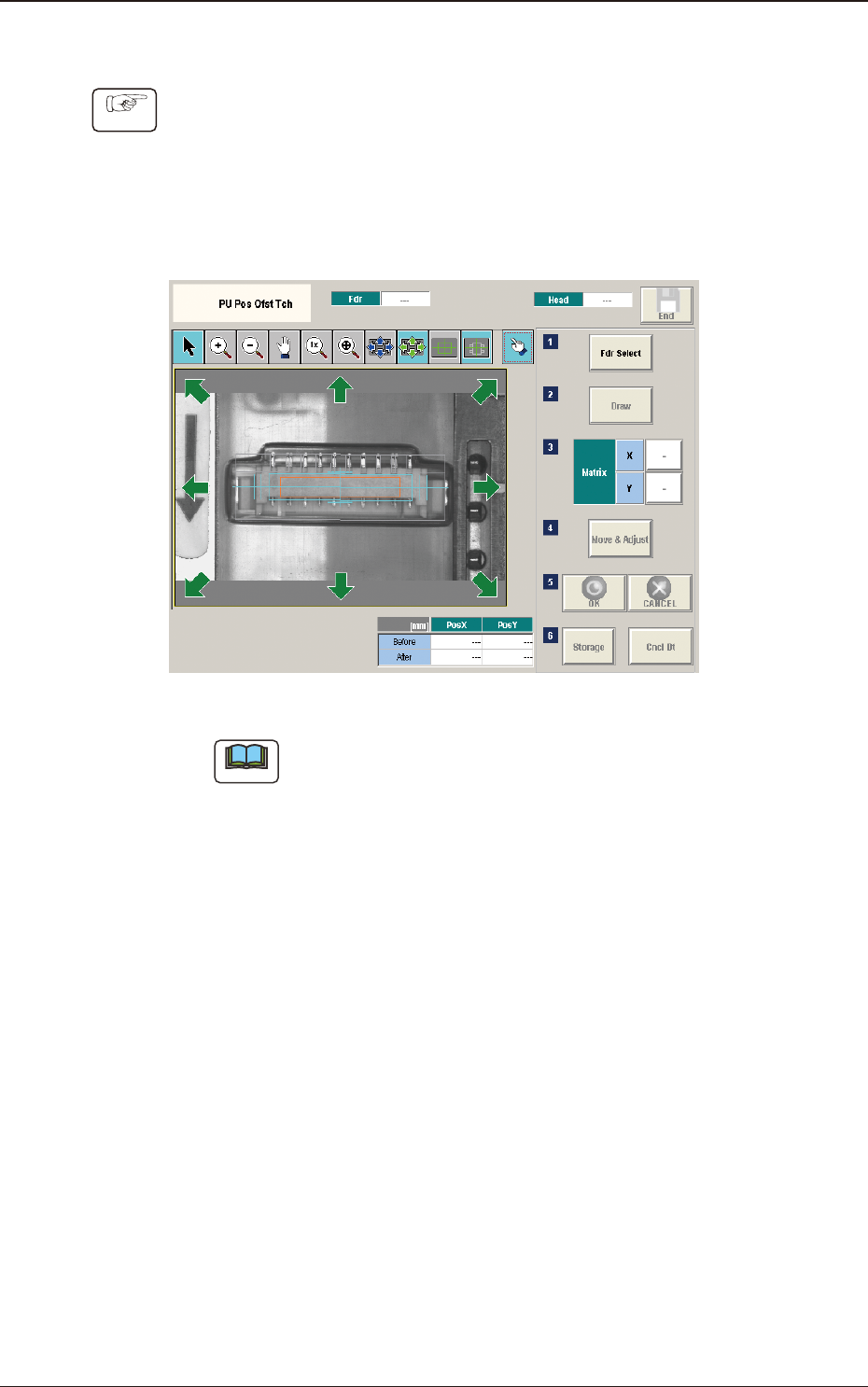
(1) Press the [Fdr Select] button to select the feeder for which the teaching
operation is performed.
(2) Press the [Move Adjust] button.
(The recognition window will be displayed to enable the manual alignment
operation).
F2F121
Note
In the case that the subject for which the manual alignment operation is
not within the camera view, press the button on the recognition window to
return the "Eye Match Guide" window and move the beam.
(3) Move the eccentric pick-up position of the subject for which the manual
alignment operation is performed, so that it is the center of the cross hairs
using the image movement button in the recognition window.
(4) Press the [OK] button to determine the position.
(The teaching results are displayed in the data boxes for the pick-up position
corrected values.)
(5) Press the [Save] button.
(The conrmation window for the data saving will be displayed).
•
When [Yes] is pressed, the data is reected on the component library data
and saved.
•
When [No] is pressed, the data saving operation is stopped.
1303-001
7.5 "PU Pos Ofst Tch" Window