2OM-1751-003w_G5S.pdf - 第86页
2OM-1751 1-34 1303-001 [2] Object Select one of the following options as a recognized object to be saved. Comp and PEC Recog : Both images captured through component and PEC recognition operations are regarded as object …
2OM-1751
1-331303-001
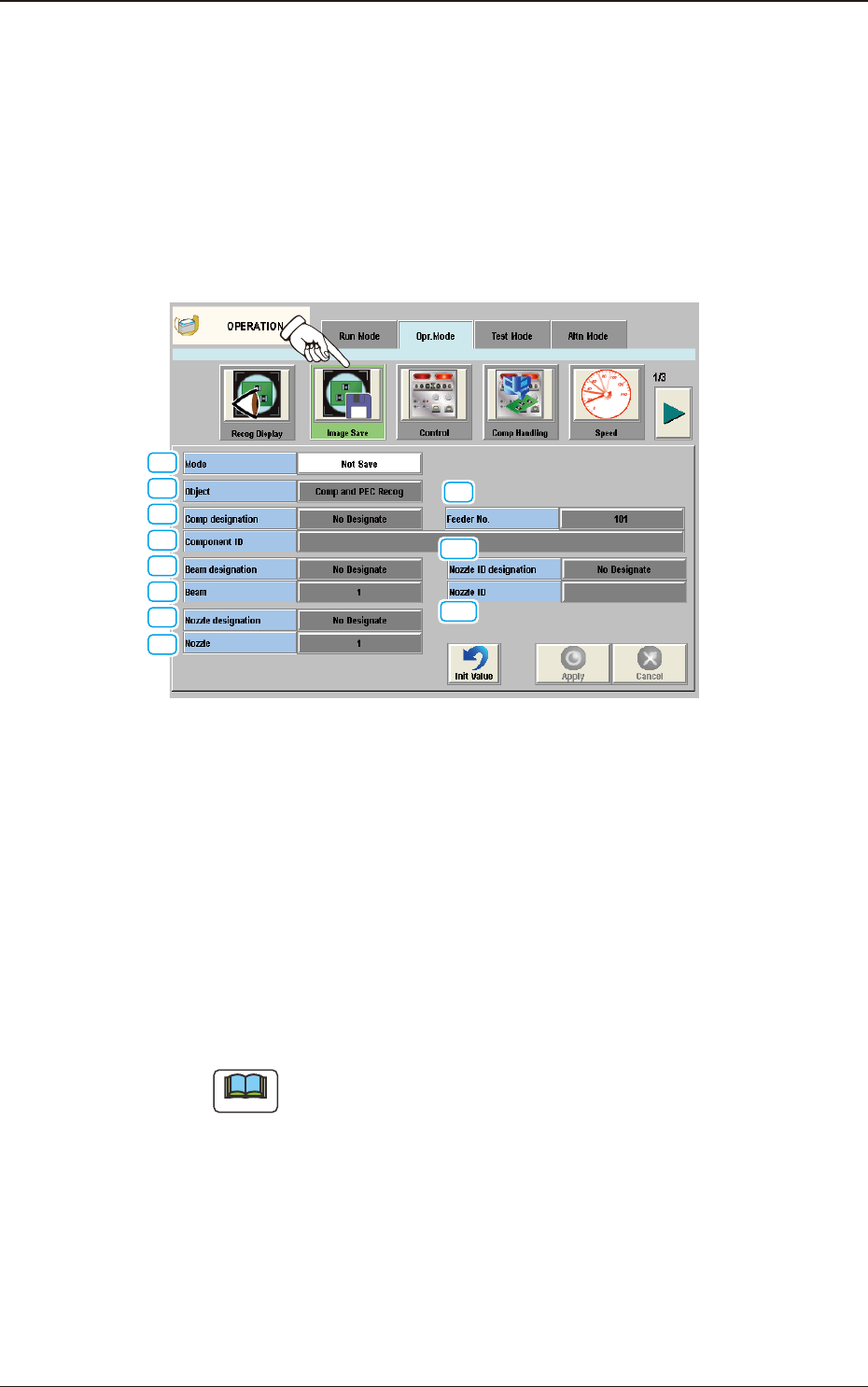
4.2.2 Image Save
When the [Image Save] button is pressed on the "Opr. Mode" tab sheet, the
following window appears.
Set parameters in the "Object" and "Select" text boxes to analyze the cause of a
recognition error in comparison with the error image on the monitor.
When "Save" is set in the "Mode" text box, the image which matches the
parameters in the "Object" and "Select" text boxes is stored in memory of the
Machine.
[1]
[2]
[3]
[4]
[5]
[6]
[7]
[8]
[9]
[10]
[11]
Image Save F2A27
[1] Mode
Select one of the following options to determine whether or not the
recognized image should be saved.
Not Save
: The recognized image is not saved.
Save [Recog NG]
: The recognized image is saved only when the
recognition results in "NG" (No Good).
Save [Recog OK]
: The recognized image is saved only when the
recognition results in "OK".
Save [Recog NG/OK]
: The recognized image is saved when the
recognition results in "NG" or "OK".
Note
When "Not Save" is selected, the other items cannot be set.
4.2 "Opr.Mode" Tab Sheet

2OM-1751
1-341303-001
[2] Object
Select one of the following options as a recognized object to be saved.
Comp and PEC Recog :
Both images captured through component and
PEC recognition operations are regarded as
object images to be saved.
Comp Recog :
Only the image captured through a component
recognition operation is regarded as an object
image to be saved.
PEC Recog :
Only the image captured through a PEC
recognition operation is regarded as an object
image to be saved.
[3] Comp designation
In this section box, whether or not the component to be saved is designated,
is selected.
No Designate
: The component to be saved is not designated.
Feeder No.
: The component to be saved is designated using the feeder
No.
Component ID
: The component to be saved is designated using the
component ID.
[4] Feeder No.
When it is selected that the feeder No. is designated, enter the feeder No. to
be designated.
[5] Component ID
When "Component ID" is selected in the "Comp designation" text box, it is
required to enter the component ID to be designated.
[6] Beam designation
When the image only of the specied beam is to be saved, select "Designate"
in this text box.
[7] Beam
When "Designate" is selected in the "Beam designation" text box, it is
required to select one of the following options (beams).
1, 2
[8] Nozzle designation
When the image only of the specied nozzle No. is to be saves, select
"Designate" in this text box.
4.2 "Opr.Mode" Tab Sheet

2OM-1751
1-35
[9] Nozzle
When "Designate" is selected in the "Nozzle designation" text box, it is
required to enter the No. of the nozzle to be designated.
[10] Nozzle ID designation
When the image only of the specied nozzle ID, is to be saved, select
"Designate" in this text box.
[11] Nozzle ID
When "Designate" is selected for the "Nozzle ID designation", the nozzle ID
to be designated is input.
1303-001
4.2 "Opr.Mode" Tab Sheet