2OM-1751-003w_G5S.pdf - 第89页
2OM-1751 1-37 1312-003 [2] Plcmnt Auto Adjust This function is available only when the double beam recognition has been set in the pattern program. Disable The double beam recognition i s always performed. Enable When pr…
2OM-1751
1-361312-003
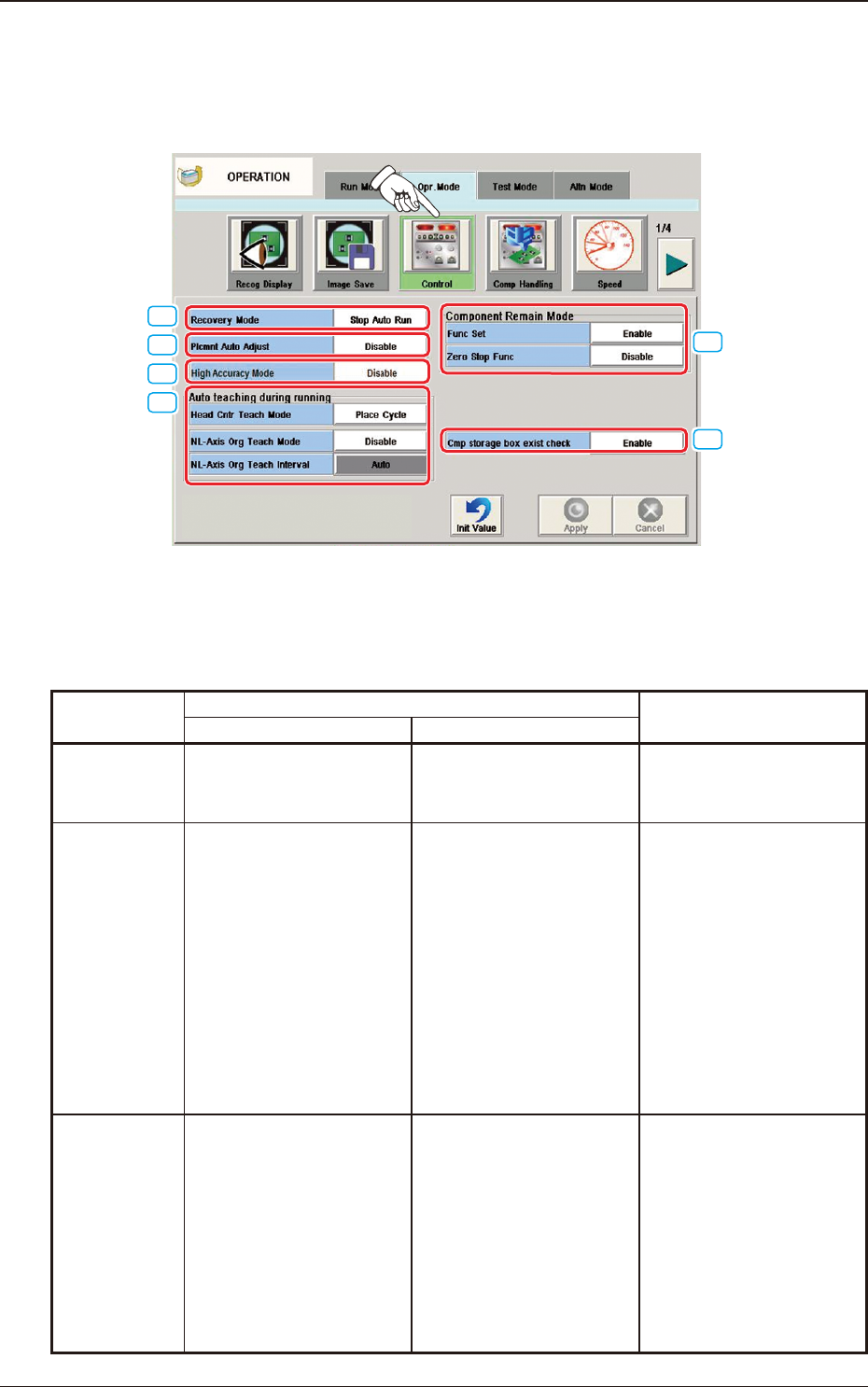
4.2.3 Control
When the [Control] button is pressed on the "Opr. Mode" tab sheet, the following
window appears.
[1]
[3]
[2]
[5]
[4]
[6]
F2A28
[1] Recovery Mode
For the Recovery Mode, select "Immediately Stop (Priority of Reload)",
"Recovery Mode" or "All Recovery Mode".
Recovery Mode
When the component shortage has been detected: Treatment when a pick-up
error has been detected
Treatment "Alternate" has been setup.
Stop Auto Run
When the component shortage
is detected, the machine is
stopped immediately.
When the component shortage
is detected, the alternative
operation is started up.
When the component shortage
is detected, the machine is
stopped immediately.
Aft Other
Plcmnt
When the component shortage
is detected, the machine is not
stopped immediately. In turn,
the machine information is
issued, prompting the operator
to replenish the components.
Then, after placing the
components other than the
missing ones, the machine is
stopped without discharging
the PCB.
When the component shortage
is detected, the alternative
operation is not started up
immediately, but after the PP
nal step.
When the pick-up error is
detected, the components
for the next cycle are used to
recover the operation.
Batch Recovery
When the component shortage
is detected, the alternative
operation is started up.
When the component shortage
is detected, the alternative
operation is started up.
After the pick-up error is
detected, the operation is
continues using the spare
nozzles set up for the following
cycles. When there is no spare
nozzle, recovery operation
is performed lastly using the
components for the following
cycles for recovery.
T2A2
4.2 "Opr.Mode" Tab Sheet

2OM-1751
1-371312-003
[2] Plcmnt Auto Adjust
This function is available only when the double beam recognition has been
set in the pattern program.
Disable
The double beam recognition is always performed.
Enable
When pressed, the double beam recognition is performed with the interval
based on the data in the machine. Normally, single beam recognition is
performed using the recognition results using the double beam as the
correction values. The cycle time can be reduced with this function.
[3] High Accuracy Mode
It is set when ne components such as 0402 component, are to be placed.
Disable
When selected, the high-accuracy mode is not used.
Enavle
When selected, the high-accuracy mode is used. The placement speed is
reduced to 40% in X-axis and to 20% in Y-axis.
[4] Auto teaching during running
The automatic teaching during the machine operation is set up in this
selection box.
NL-Axis Org Teach Mode
"Enable" or "Disable" for the NL-axis Origin Teaching, is setup in this data
box.
NL-Axis Org Teach Interval
When the NL-axis origin teaching is to be performed, the teaching time
interval is selected from the following items.
Auto, 5 min, 10 min, 30 min
Chute Mark Compen
"Enable" or "Disable" for Chute Mark
Compen
, is setup in this data box.
4.2 "Opr.Mode" Tab Sheet

2OM-1751
1-38
[5] "Component Remain Mode" Group Box
The component remainder management function (mode) is used to count the
number of components picked from the feeder, manage it, and provide the
related information.
Func Set
Disable
Select this button not to use the component remainder management mode.
Enable
Select this button to use the component remainder management mode.
When the [Enable] button is selected, an alarm will be issued, indicating
that the machine will soon be short or empty of components.
Zero Stop Func
Disable
When this button is pressed, the feeder does not stop working after the
number of remaining components has reached "0" (zero).
Splicing
When this button is pressed and the number of remaining components has
reached "0" (zero), the deciency is regarded as a component shortage
error and the feeder stops working.
In this case, it is required to reload the components afterward.
ALL
When this button is pressed and the number of remaining components
has reached "0" (zero) for all feeders, the deciency is regarded as a
component shortage error and the feeder (the machine) stops working.
[6] Cmp Storage Box Exist Check
"Enable" or "Disable" for the Cmp Storage Box Exist Check, is setup in this
data box.
1312-003
4.2 "Opr.Mode" Tab Sheet