JO-072-006_w.pdf - 第68页
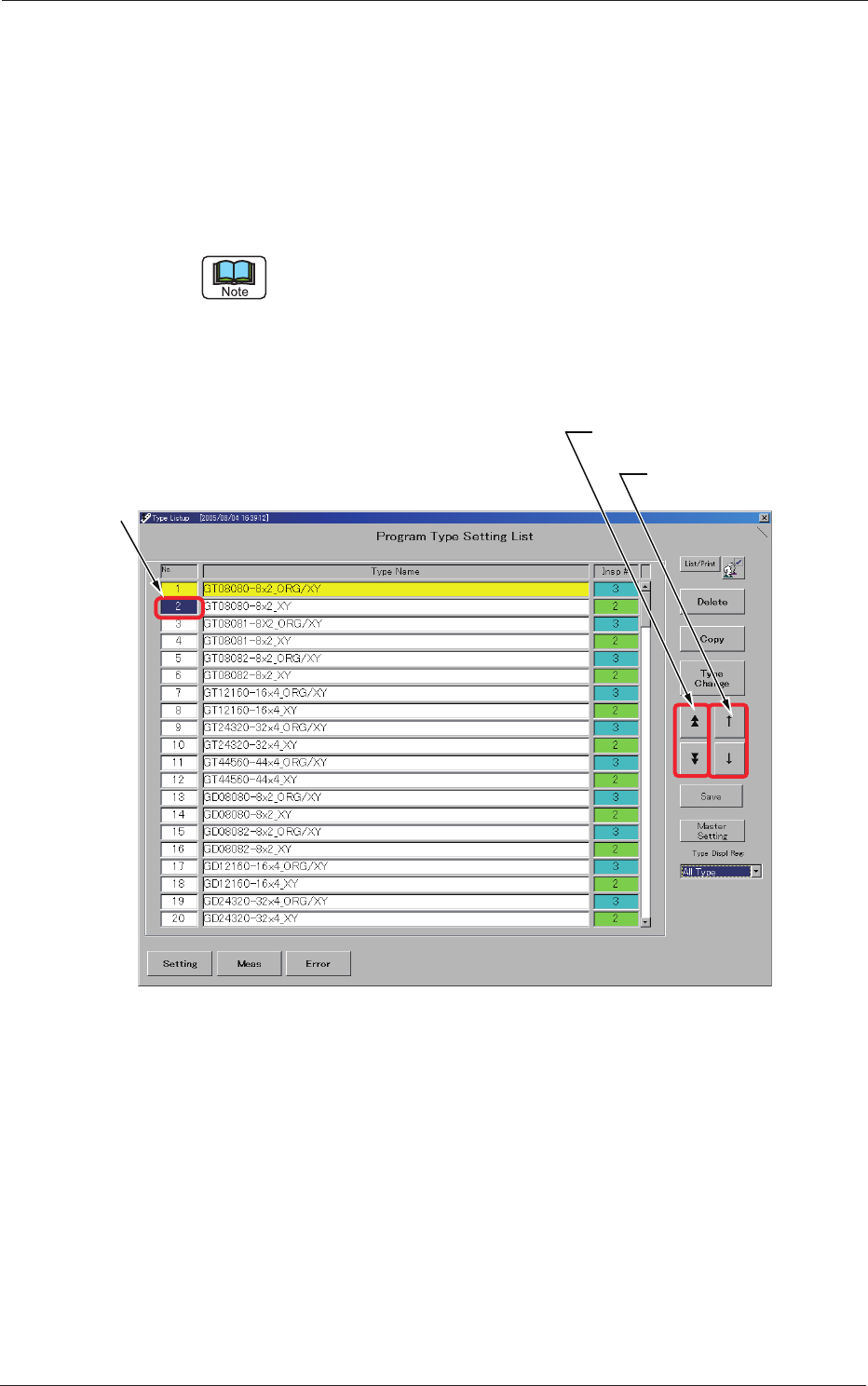
3-15 AKBEG-ID Manual T ype Change • Specication in "T ype Listup" W indow When the "T ype Setting" window is active, press the [Setting] button. The "T ype Listup" window opens. Use the [Pa…

3-14
AKBEG-ID
•
3: Simultaneous Inspections "1" and "2"
The lane origin offset and ducial mark position adjustments are
inspected at the same time.
The origin of
fset value for the Y axis is calculated according to the
shifted distance of the pickup hole based on the design value and
the shifted distances of the X and Y axes from the ducial mark are
recalculated and displayed after being inspected.
Each value displayed during the inspection represents the result of
image processing based on the position moved to the rst pickup
hole.
After all specied pickup holes have been inspected, the origin
offsets are gured out and the distances shifted from the ducial
mark are also calculated based on the result of origin offset
correction and redisplayed.
The results of judgment are based on the values obtained after this
recalculation.
(3) Type Change
The type change method can be divided roughly into "Automatic Type
Change" and "Manual Type Change".
Automatic T
ype Change
After a certain type and serial No. are read, the corresponding type is
selected automatically.
In the type retrieval process, it is checked if the read type exists or not
by using the type name of the type data.
When the specied type data is the same as the read one, no type retrieval
is made.
When the required type cannot be retrieved automatically, it is
required to create it.
4. "Type Setting" Window
0508-001
3-15
AKBEG-ID
Manual Type Change
•
Specication in "Type Listup" Window
When the "T
ype Setting" window is active, press the [Setting]
button.
The "Type Listup" window opens.
Use the [Page Selection] or [Cursor Movement] button to move the
subcursor to the target type No.
The subcursor can also be moved by clicking the scroll bar, directly the No. of
the pertinent line in the list, or the type name area.
Press the [Type Change] button.
The type data corresponding to the No. specied by the subcursor is
called and displayed.
Subcursor
[Page Selection] Button
[Cursor Movement]
Button
Fig. C13 "Type Listup" Window
4. "Type Setting" Window
0508-001
3-16
AKBEG-ID
0508-001
5. "System Setting" Window
In the "System Setting" window, the set value peculiar to the machine can be
dened.
(1) How to open the "System Setting" window
Only "Administrator" can open the "System Setting" window and
change the settings.
Change the current authority level to "Administrator".
Reference
Refer to "1. Administrative
Authority Change" in "Section 3" for how to change
the authority.
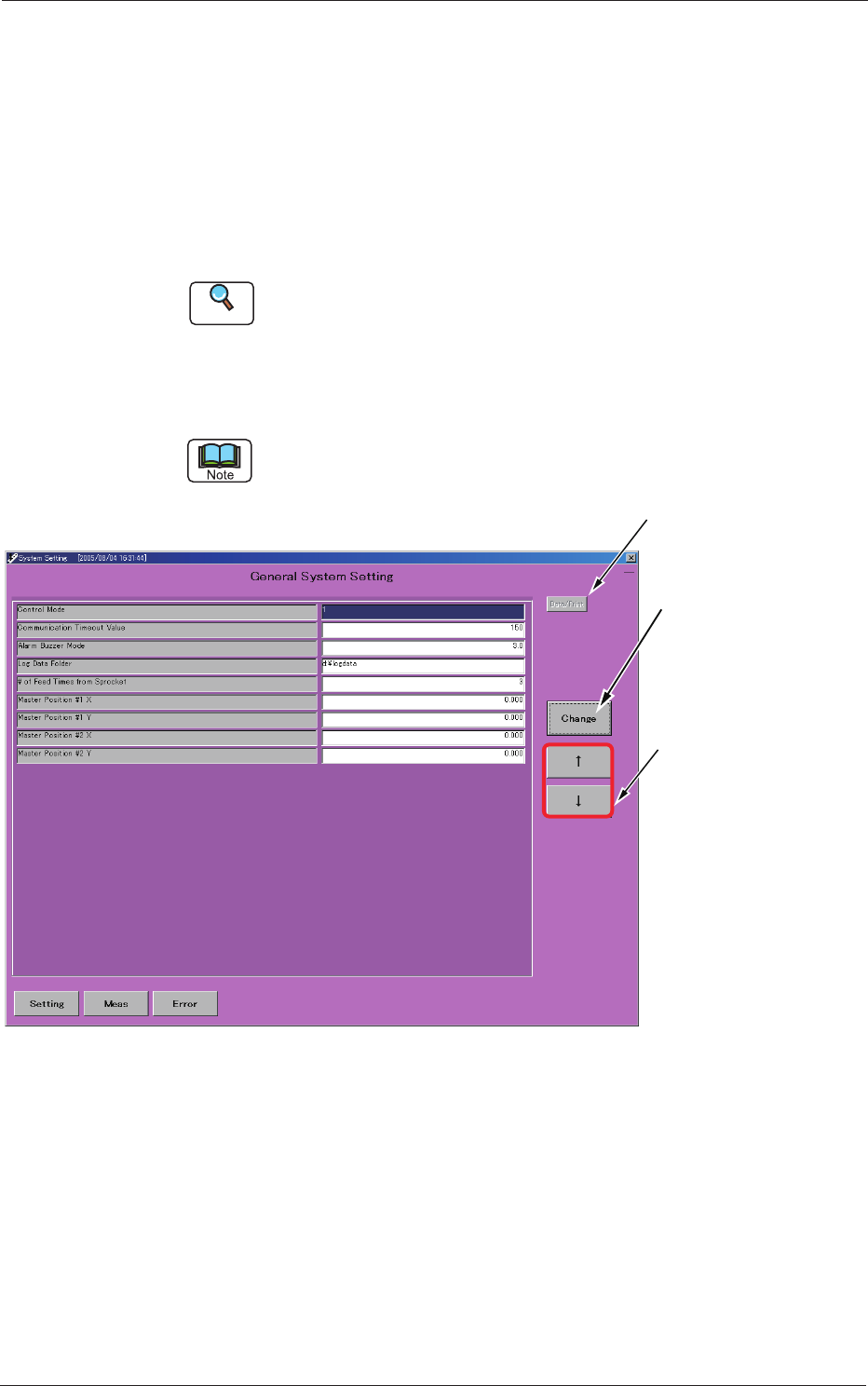
Make the subcursor appear in the "Type Listup" window and press the
[Setting] button.
The subcursor can be located at any place regardless of whether the type data is
already registered or not.
Used to print the
system data.
Used to move
the cursor.
The entry window
for the pertinent set
value opens,
enabling you to change
the set value.
Fig. C14 "System Setting" Window
5. "System Setting" Window