21 Zoll breite LP X Serie.pdf - 第15页
Special Desig n 2 Retrofit instructions: 21" wide PCB (00176062-01) SIPLACE X-series 05/2006 Edition 15 2.6 Retrofit 2.6.1 Long board option Installation of th e Long board option is de scribed in re trofit instruct…

2 Retrofit instructions: 21" wide PCB (00176062-01) SIPLACE X-series Special Design
05/2006 Edition
14
2.5 Safety instructions
WARNING
The safety instructions from the “Operational safety” chapter of the user manual and servicing in-
structions take precedence over these instructions. 2
The SIPLACE placement machines are supplied with mains voltage.
Consequently parts of these systems carry dangerous voltages! This voltage is present at certain
modules inside the machine base, even when the machine is switched off at the main power
switch.
Incorrect handling of the placement machine or touching live parts of the machine can result in
death or severe injury, and considerable damage to equipment.
BEFORE starting any work, shut down the operating system correctly, then switch the machine
OFF at the main power switch and disconnect from the main power supply. In addition, the com-
pressed air supply must be switched off at the compressed air unit's main valve in the machine
base and vented by actuating the needle valve on the compressed air unit.
There is DANGER for heart pacemaker wearers in the vicinity of the linear motors, as described
in detail in the "Special safety instructions for working in the vicinity of strong magnetic fields"
section of the user manual and service manual.
Always follow the accident prevention regulations, DIN or other standards and special safety
rules applicable in your country.
Pay attention to the information concerning residual voltages in the Operational Safety chapter.
Follow the ESD regulations as described in the operational safety section of the operating
instructions.
During the retrofit, always secure the machine to prevent access by other people and to prevent
it being switched on again. The procedure is described in the “Locking the machine…” section of
the user manual.
Working with the SITEST program further increases the risk of accident.
The SITEST program must only be used by authorized and trained personnel.
2
2.5.1 Definitions
2
PLEASE NOTE 2
2
Special Design 2 Retrofit instructions: 21" wide PCB (00176062-01) SIPLACE X-series
05/2006 Edition
15
2.6 Retrofit
2.6.1 Long board option
Installation of the Long board option is described in retrofit instructions 00193888-02. 2
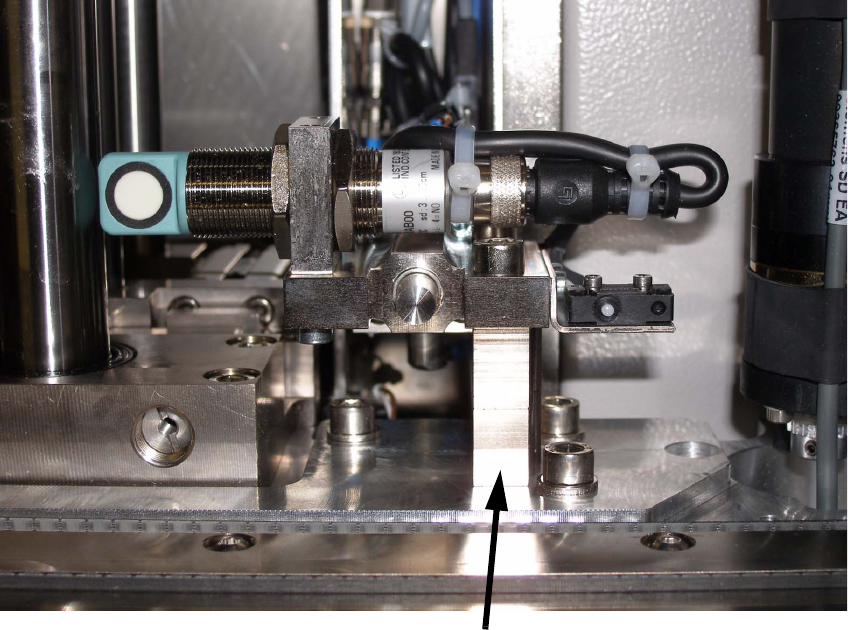
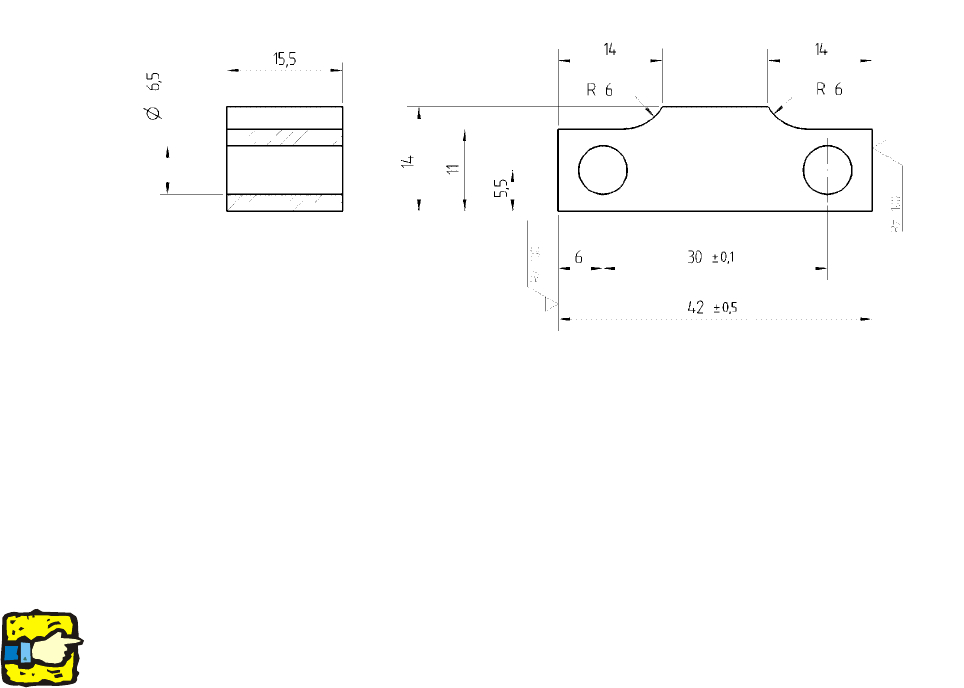
: Also install the stopper spacer (00371915-xx) in placement area 2 since the fixed conveyor
side wall must be set to overwide using the SITEST function.
Setting the fixed conveyor side wall to overwide makes the space for installing the additional stop-
per for the LBO in PA2 critical. 2
: For this reason, you should fit a spacer in order to ensure there is sufficient space for installa-
tion.
2
Additional spacer for stopper
2 Retrofit instructions: 21" wide PCB (00176062-01) SIPLACE X-series Special Design
05/2006 Edition
16
2
Fig. 2.11 - 1 Spacer for stopper
2.6.2 Downloading the special design conveyor firmware
: Use the SITEST function to download the special design conveyor firmware provided.
The maximum PCB width with this firmware special design is 536 mm. 2
2
Do not set the conveyor to overwide until you have downloaded the firmware. 2
2
2.6.3 Setting the conveyor
: Start the SITEST program.
: In SITEST, set the conveyor to overwide (Conveyor => Settings).
2.6.4 Measuring the PCB reference corner in placement area 1/2
Use the SITEST function to remeasure the PCB reference corners in both placement areas. 2