00195440-05-SG_D-Series_FSE-EN.pdf - 第159页
9 C&P Placement Heads 9.2.8 Positioning into Pickup Angle 9.2 Placement Procedure Student Guide SIPLACE D-Series (FSE) 159 9.2.8 9 . 2 . 8 P o s it io n in g in t o P ic k u p A n g le Positioning into Pickup Angle 9…
9 C&P Placement Heads
9.2 Placement Procedure 9.2.5 Checking the Nozzle Length for Component Recognition
158 Student Guide SIPLACE D-Series (FSE)
9.2.5
9.2.5 Checking the Nozzle Length for Component Recognition
Checking the Nozzle Length for Component Recognition
9.2.6
9.2.6 NOTE:
NOTE:
9.2.7
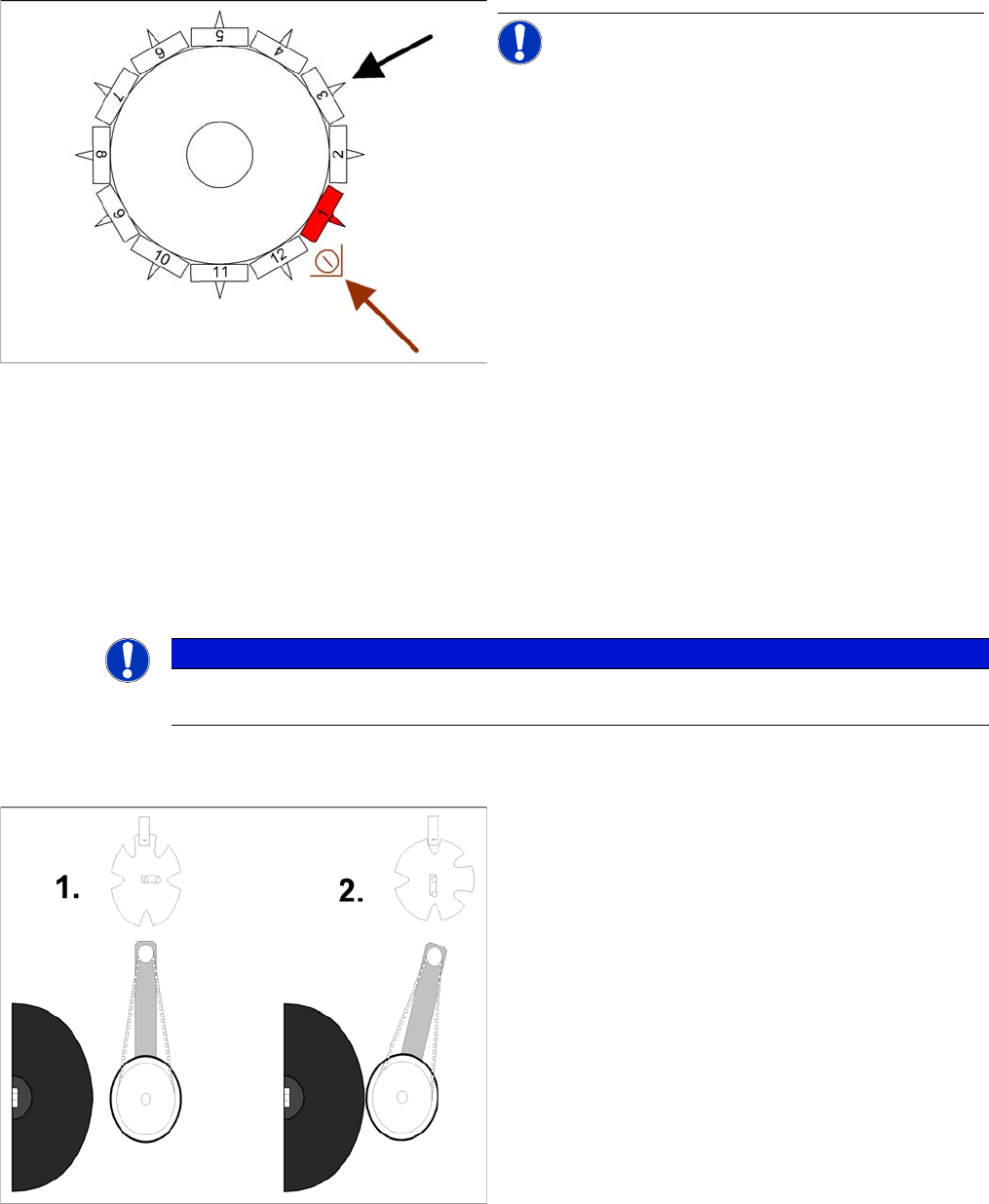
9.2.7 Detailed Rotation of DP Station 1.Swivel In
Detailed Rotation of DP Station 1. Swivel In
Checking the nozzle length "Component recognition be
-
fore placement by the component sensor"
NOTICE! This step is only performed indepen-
dently before the very first pickup cycle.
Measurement by the component sensor (optional) at ap-
prox. 315°:
▪ The component sensor measures the length of the
empty nozzle*. This measured length before pickup is
compared to the reference length of the nozzle.
▪ If a difference of -0.15 mm or +0.1 mm is found, the
gantry axes will move the placement head into the
service position for replacement of the nozzle.
▪ Measurement is performed "on the fly", during star
movement.
* A component which is to use this component sensor,
needs to be picked up for the segment concerned (com-
ponent presence check or height check with component
sensor).
All other "preconditions" also need to be fulfilled:
Installation/configuration of the option for this gantry and
the appropriate nozzle length.
NOTICE
You should already know the C&P6/12 placement sequence and the individual steps which run
parallel to this. We will therefore only explain the functional details of these individual steps.
Detailed rotation of DP station, 1. Swivel in
▪ Diagram 1 shows the initial position (state after refer-
ence run).
▪ From the initial position, the stepping motor rotates by
90° for swivel-in.
▪ The DP station swivels in and contacts the sleeve (in-
cremental disk).
▪ The stepping motor is monitored by the light barrier
on the cam disk.
▪ Diagram 2 shows the status after swiveling in.
▪ This is the start command for the DP axis drive.
9 C&P Placement Heads
9.2.8 Positioning into Pickup Angle 9.2 Placement Procedure
Student Guide SIPLACE D-Series (FSE) 159
9.2.8
9.2.8 Positioning into Pickup Angle
Positioning into Pickup Angle
9.2.9
9.2.9 Positioning into Placement Angle
Positioning into Placement Angle
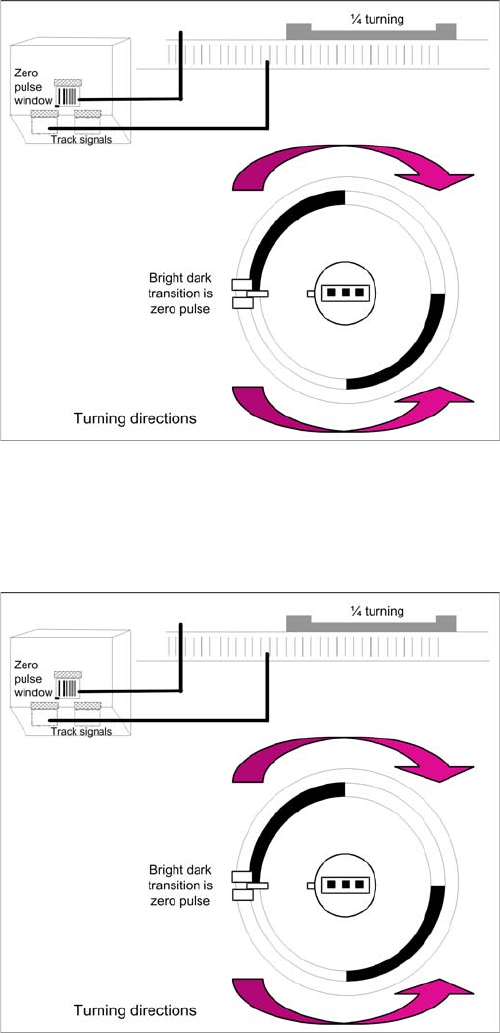
Detailed rotation of DP station, positioning into pickup an
-
gle
▪ The DP axis positions the segment to the relevant
zero pulse and checks the signal level at a distance
of 3 digits.
▪ An end position signal is emitted if the actual position
deviation is within the permitted tolerance.
▪ There is no difference between the 0° and 180° or 90°
and 90° pickup angle.
Detailed rotation process at DP station, positioning into
placement angle
▪ When positioning begins, the actual position of the
axis is set to 0 by setting the position counter of the
DP axis to 0.
▪ The DP drive is operated in relative positioning mode.
▪ The DP axis starts to move towards the target posi-
tion which is calculated from the station calibration
values, the line computer programming values and
the centering values of the placement procedure.
▪ An end position signal is emitted as soon as the actu-
al position deviation is within the permitted tolerance.
9 C&P Placement Heads
9.2 Placement Procedure 9.2.10 Detailed rotation of DP station, 3. Swivel Out
160 Student Guide SIPLACE D-Series (FSE)
9.2.10
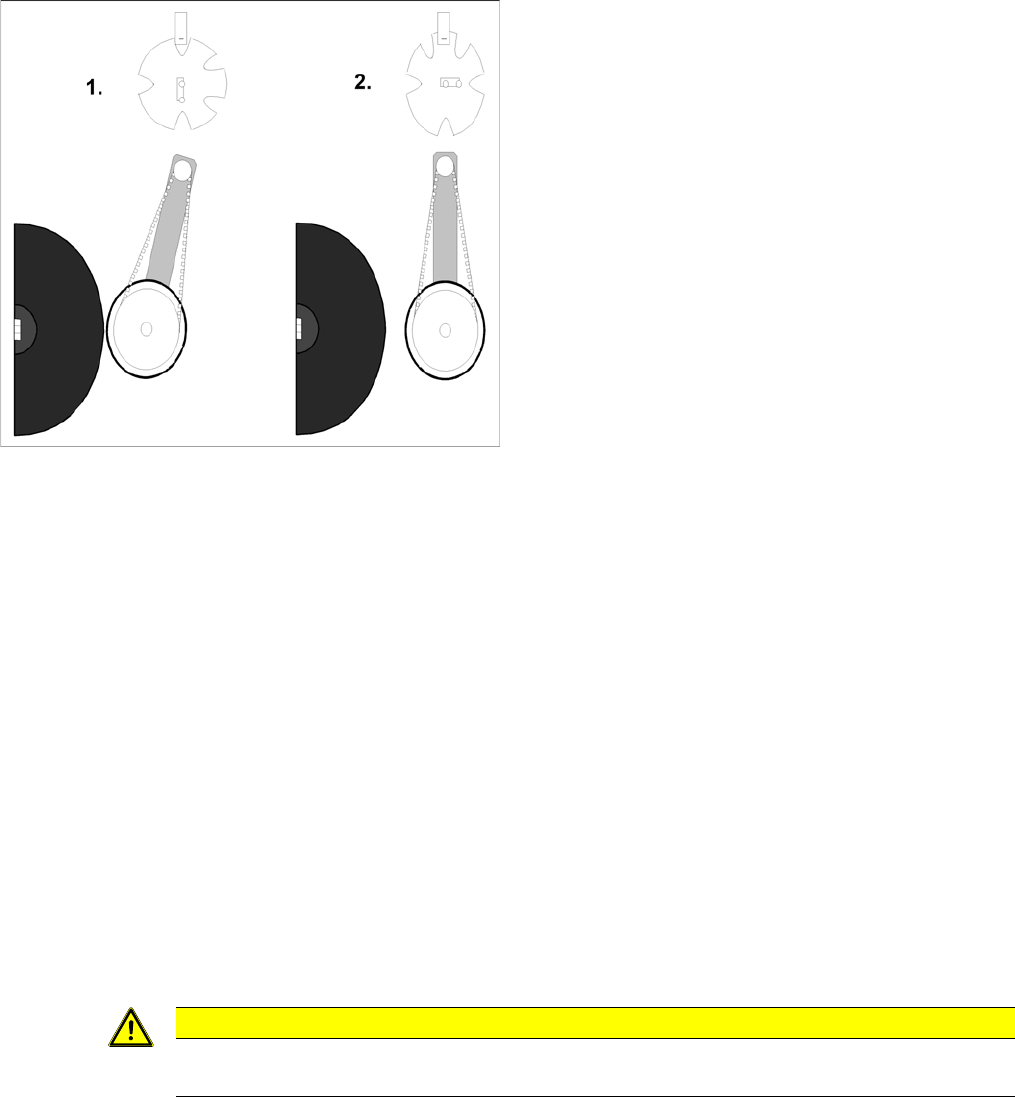
9.2.10 Detailed rotation of DP station, 3. Swivel Out
Detailed rotation of DP station, 3. Swivel Out
9.2.11
9.2.11 Optical Nozzle State Recognition (Nozzle Scanning)
Optical Nozzle State Recognition (Nozzle Scanning)
1. After placing the first board the nozzle scanning is activated:
– Alle Nozzles which have been activated for nozzle scanning are tested by the Be (Nozzles ex-
ample 901, 904, 905, 906, 907, 911, 914, 925).
– From SW 601, these can be found in the nozzle.lib.xml
– If the nozzle outline or the nozzle air inlet limit deviates from the defined construction, a 'nozzle
is dirty' error will be issued.
2. Due to the low component height, small nozzles may touch the soldering paste or adhesive if a com-
ponent has slipped.
3. The frequency of the tests can be defined The standard fequency is after 350 The test is automati-
cally carries out after a PCB placement is completes and during a reference run
9.2.12
9.2.12 Air Blast Control During Placement
Air Blast Control During Placement
Diese Funktion nutzt eine für den TWIN- und C&P20-Kopf nötige Programmiermöglichkeit für den Blas-
druck beim Bestücken auch für den C&P6/12-Bestückkopf als Zeitsteuerung für das Blasluftventil wie
folgt aus:
Air blast control during placement with the C&P6/12 head
▪ Entering "0" means: air blast valve will not be switched on. (Do not use!)
▪ (1) Entering "1-50" means: air blast valve will be switched off before the stepping motor is started.
(Not recommended as the air blast is then too short to reliably place the component.
▪ (2) Entering "51-150" means: air blast valve will be switched off at a 90° rotation of the stepping mo-
tor.
▪ (3) Entering "151-255" means: the air blast valve will be switched off when the light barrier is up or
when the stepping motor rotates by 180°.
▪ No entry "----" (from conversion of 501/502 to 503) means: switching as in 3 (standard).
Detailed rotation of DP station, 3. Swivel out
▪ The command to start swiveling out is the end posi-
tion signal from DP positioning.
▪ The DP drive is still located at the sleeve.
▪ Diagram 1 shows the status when swiveled in.
▪ The stepping motor is controlled by the light barrier
on the cam disk.
▪ From its swiveled-in status, the stepping motor ro-
tates by 90° in a counterclockwise direction, to swivel
out.
▪ Diagram 2 shows the status when swiveled out.
CAUTION
Sie können diese Funktionen keinesfalls dazu nutzen um Zeit einzusparen. Ihre
Bestücksicherheit leidet, Bauelemente werden u. U. wieder mit hochgerissen.