00195440-05-SG_D-Series_FSE-EN.pdf - 第227页
12 Modular Conveyor 12.3.2 Conveyor Control 12.3 Conveyor Settings Student Guide SIPLACE D-Series (FSE) 227 PCB Handling - Predecessor and Successor Station SIEMENS / SMEMA Single / Dual Conveyor DIP switch S1 on TSP201 …
12 Modular Conveyor
12.3 Conveyor Settings 12.3.2 Conveyor Control
226 Student Guide SIPLACE D-Series (FSE)
► First, fasten the side flange with the screw and then check the measurements on both sides. The two
conveyor sides must run parallel to one another.
► Fasten the second side flange with the screw and then check the measurements again.
► Check the positioning again by moving the PCB conveyor to 216 mm and then move the test board
into the PCB conveyor. The board needs to be moved through the entire conveyor.
12.3.2
12.3.2 Conveyor Control
Conveyor Control
12.3.2.1
12.3.2.1 TSP 201
TSP 201
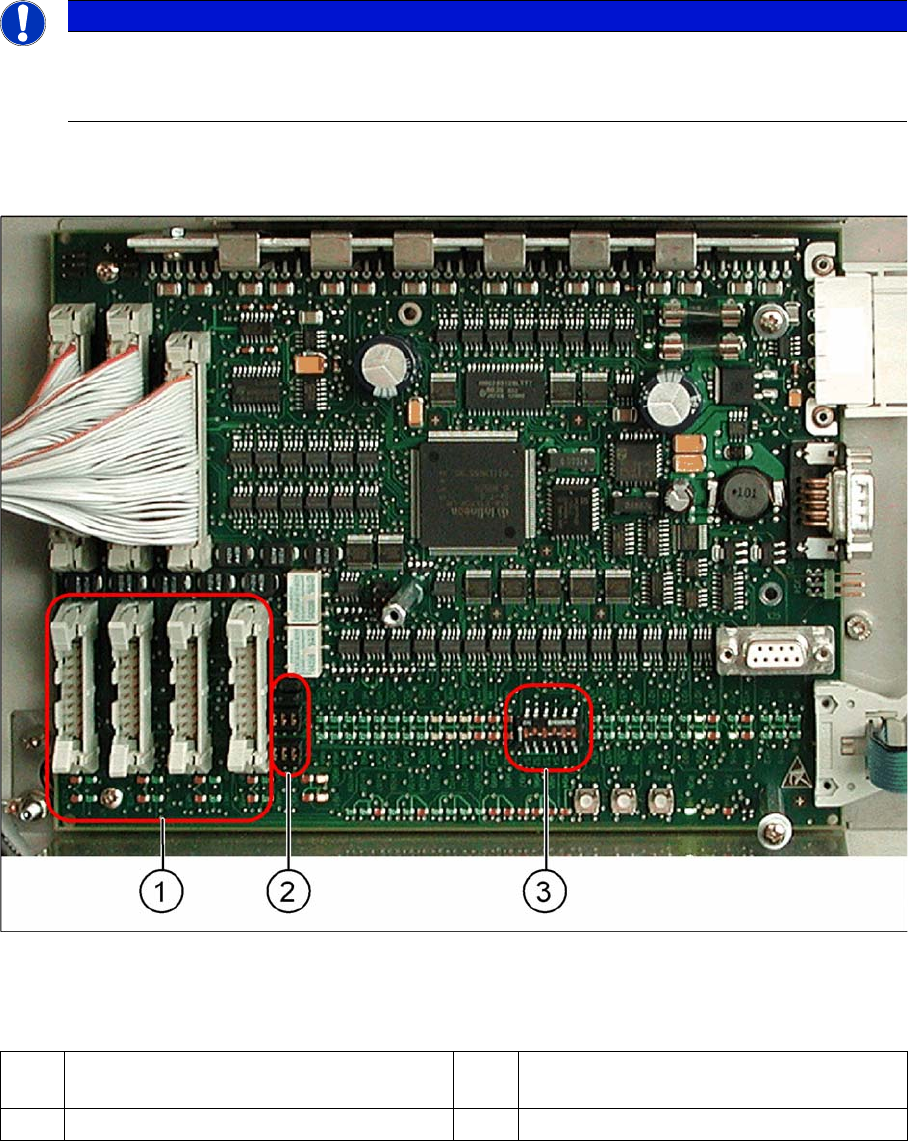
Overview
TSP 201
Legend
NOTICE
Cause of Hazard
The TSP201 conveyor control is used in D1/D1i and D2/D2i machines, while TSP301 conveyor
control is used in D3 and D4/D4i machines.
1 PCB handling (predecessor /successor
stations)
3 DIP switch for single / dual conveyors
2 Jumper for SIEMENS / SMEMA option
12 Modular Conveyor
12.3.2 Conveyor Control 12.3 Conveyor Settings
Student Guide SIPLACE D-Series (FSE) 227
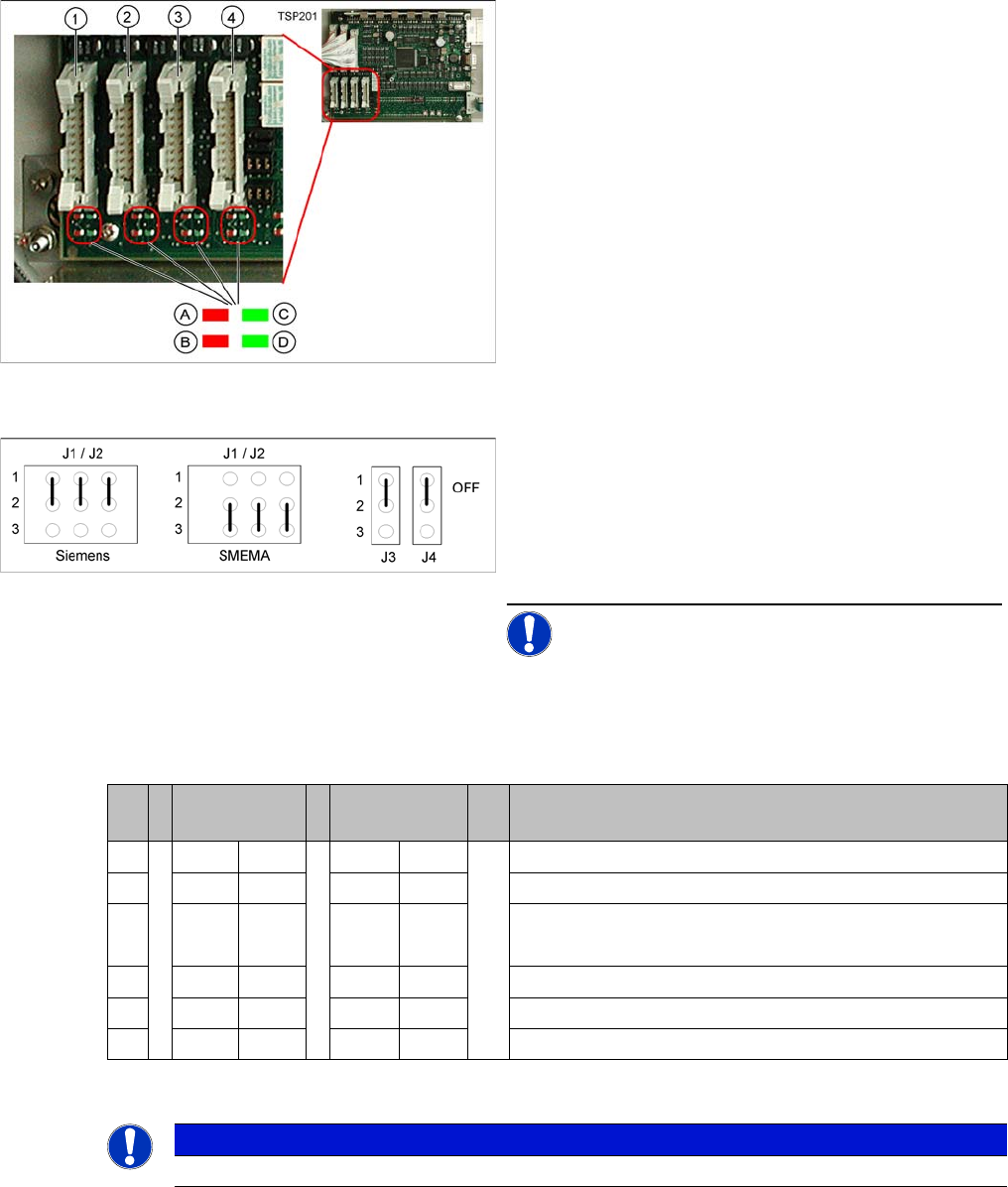
PCB Handling - Predecessor and Successor Station
SIEMENS / SMEMA
Single / Dual Conveyor
DIP switch S1 on TSP201
LEDs on the TSP201
Legend
1. X1 – PCB handling – predecessor station lane 1
2. X2 – PCB handling – successor station lane 1
3. X4 – PCB handling – predecessor station lane 2
4. X5 – PCB handling – successor station lane 2
Connector and interface status display
▪ A = Received
▪ B = Permitted
▪ C = Transmitted
▪ D = Requested
Jumper J1, J2 "successor/predecessor station" at TSP
201
Legend
▪ J1 predecessor station
▪ J2 successor station
▪ J3/J4 interference loop (emergency stop on produc-
tivity lift switches the placement machine off)
NOTICE! Jumpers J1 and J2 can be set inde-
pendently of one another, at SIEMENS or SMEMA.
S Single con-
veyor
Dual conveyor Comments
1OFF ON OFF = single conveyor, ON = dual conveyor
2ON ONStation type (always ON)
3OFF OFF OFF = clamping sensor disabled (with adj unit)
ON = without adj unit
4ON ONOFF = 125 Kbit/s (S27), ON = 1 Mbit/s (D1/D1i/D2)/D2i
5oo oo CAN terminating resistor, OFF for D1/D1i, ON for D2/D2i
6OFF OFF not used
NOTICE
See also the label on the TSP201 cover.
12 Modular Conveyor
12.3 Conveyor Settings 12.3.2 Conveyor Control
228 Student Guide SIPLACE D-Series (FSE)
12.3.2.2
12.3.2.2 TSP 301
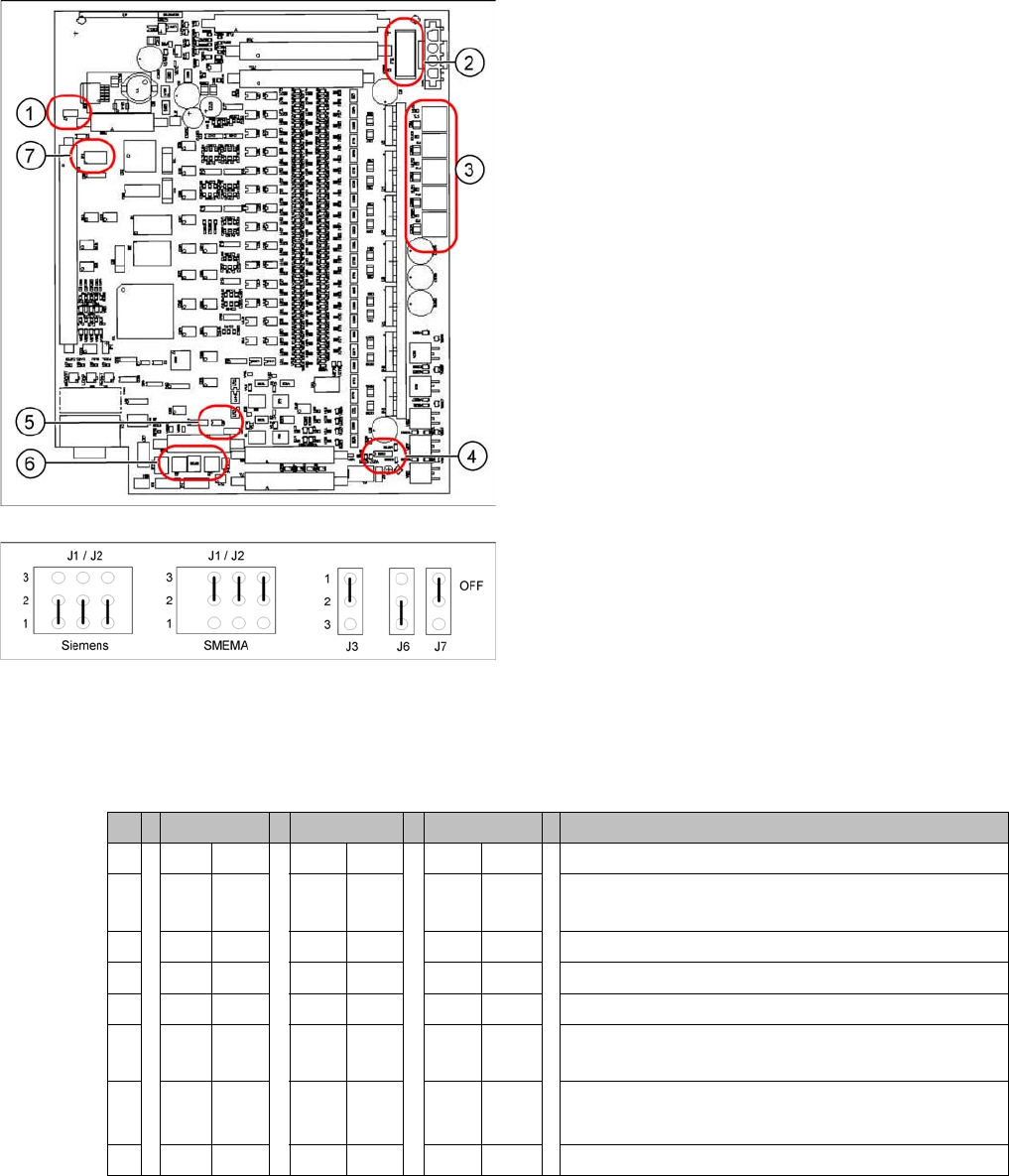
TSP 301
Jumper Settings for TSP 301
DIL switch S4 at TSP 301
* Switches 1 and 2 set the hardware ID 5 for D4/D4i machines and hardware ID 6 for X4I, X series, HF
and D3.ID 7 for Width Adjustment Unit
Legend
1. J7 CAN bus 1 terminating resistor
2. F6 Main Fuse TSP 301
3. F1 - F5 Fuses for the conveyor motors
4. J3 interference loop
5. J6 CAN bus 2 terminating resistor (not used)
6. J2, J1 successor/predecessor station
7. S4 DIL switch
Jumper J1, J2 "downstream/upstream station" at TSP
301
Legend
▪ J1 predecessor station
▪ J2 successor station
▪ J3 interference loop (EMERGENCY STOP on pro-
ductivity lift also switches the placement machine off)
▪ J6 CAN bus 2 terminating resistor (not used)
▪ J7 CAN bus 1 terminating resistor
S X4I D4 X/D3/HF Comments
1* ON ON ON ON
2* OFF ON OFF ON = SIPLACE D4/D4i, OFF: SIPLACE X, HF, D3,
X4I
3 OFF OFF OFF OFF= clamping sensor is no longer used
4ONONOFF OFFONON = quad lane, OFF: default conveyor
5 OFF OFF OFF Not in use
6 OFF ON OFF OFF ON OFF: Default conveyor, ON: quad lane (conveyor
edges fixed on outside)
7 OFF OFF OFF OFF: With width adj unit
ON: Without width adj. unit
8 OFF OFF OFF Not in use