00195440-05-SG_D-Series_FSE-EN.pdf - 第243页
14 SITEST 14.1.2 SITEST Overview 603 14.1 Overview SITEST Student Guide SIPLACE D-Series (FSE) 243 14.1.2 1 4 . 1 . 2 S I T E S T O v e r v ie w 6 0 3 SITEST Overview 603 As you can see in the over view diagr am, th e ca…
14 SITEST
14.1 Overview SITEST 14.1.1 Starting/Terminating the Test Program
242 Student Guide SIPLACE D-Series (FSE)
14.1.1.2
14.1.1.2 Terminating the Program
Terminating the Program
There are three ways of properly terminating the test program, i.e. either
▪ Via the Mode menu and the menu item Exit,
▪or via the ESC
▪ button or by proceeding as follows:
► In the main view, click on the .
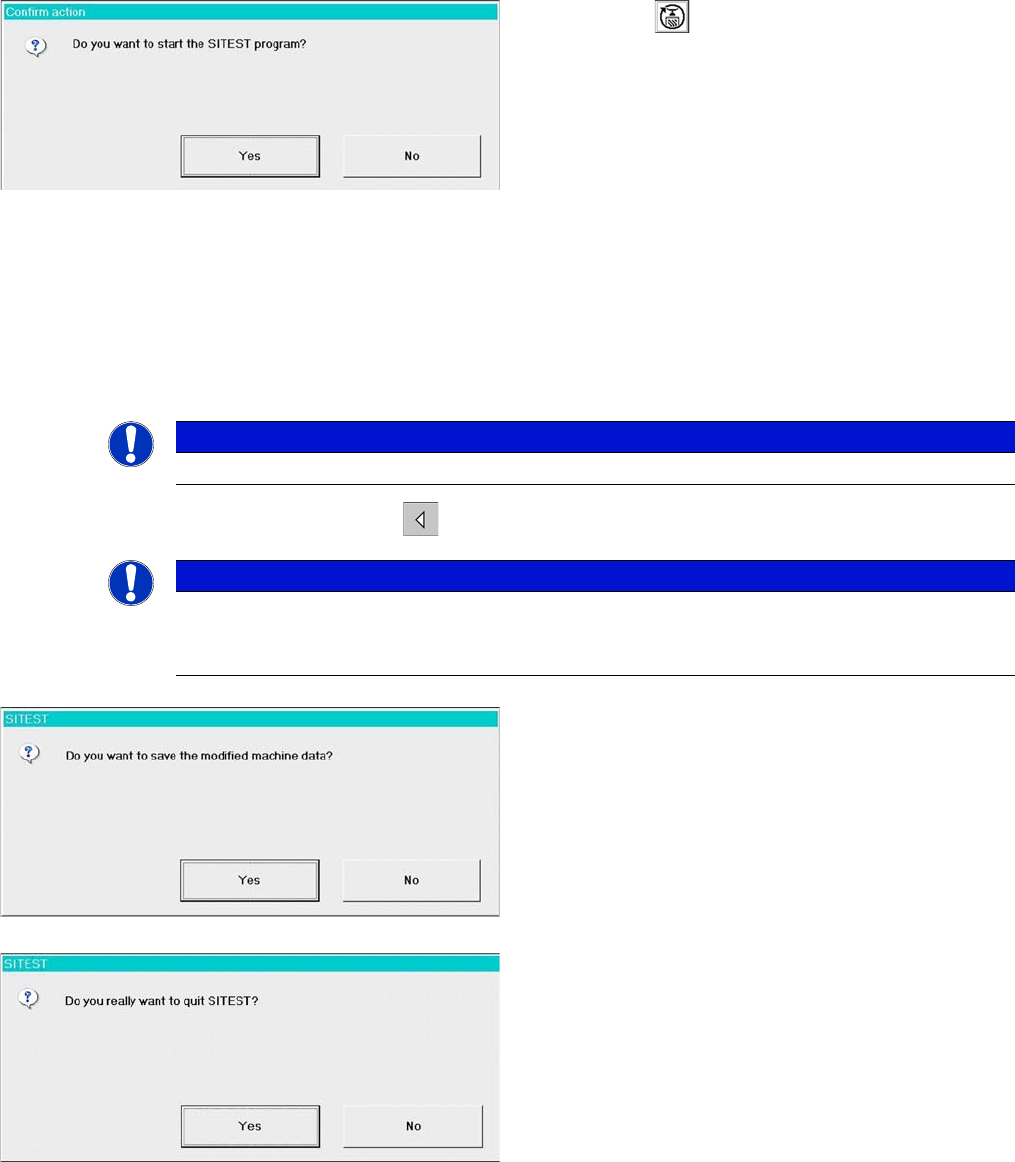
Starting SITEST.
► Click on the in the main menu of the SIPLACE
user interface. SITEST will be started.
► Bestätigen Sie nebenstehende Meldung mit YES.
► The main view of the user interface of the test pro-
gram will appear on the screen shortly afterwards.
NOTICE
The ESC button is the only option which closes SITEST from every window.
NOTICE
If newly determined or edited machine data have not been saved yet, an appropriate message
will be displayed before exiting the program prompting you to save the data (see example be-
low).
► Click on YES to save the data and exit SITEST or
click on No if you do not want to save the data. The
following dialog will be shown:
► Click on YES. SITEST will be closed.
14 SITEST
14.1.2 SITEST Overview 603 14.1 Overview SITEST
Student Guide SIPLACE D-Series (FSE) 243
14.1.2
14.1.2 SITEST Overview 603
SITEST Overview 603
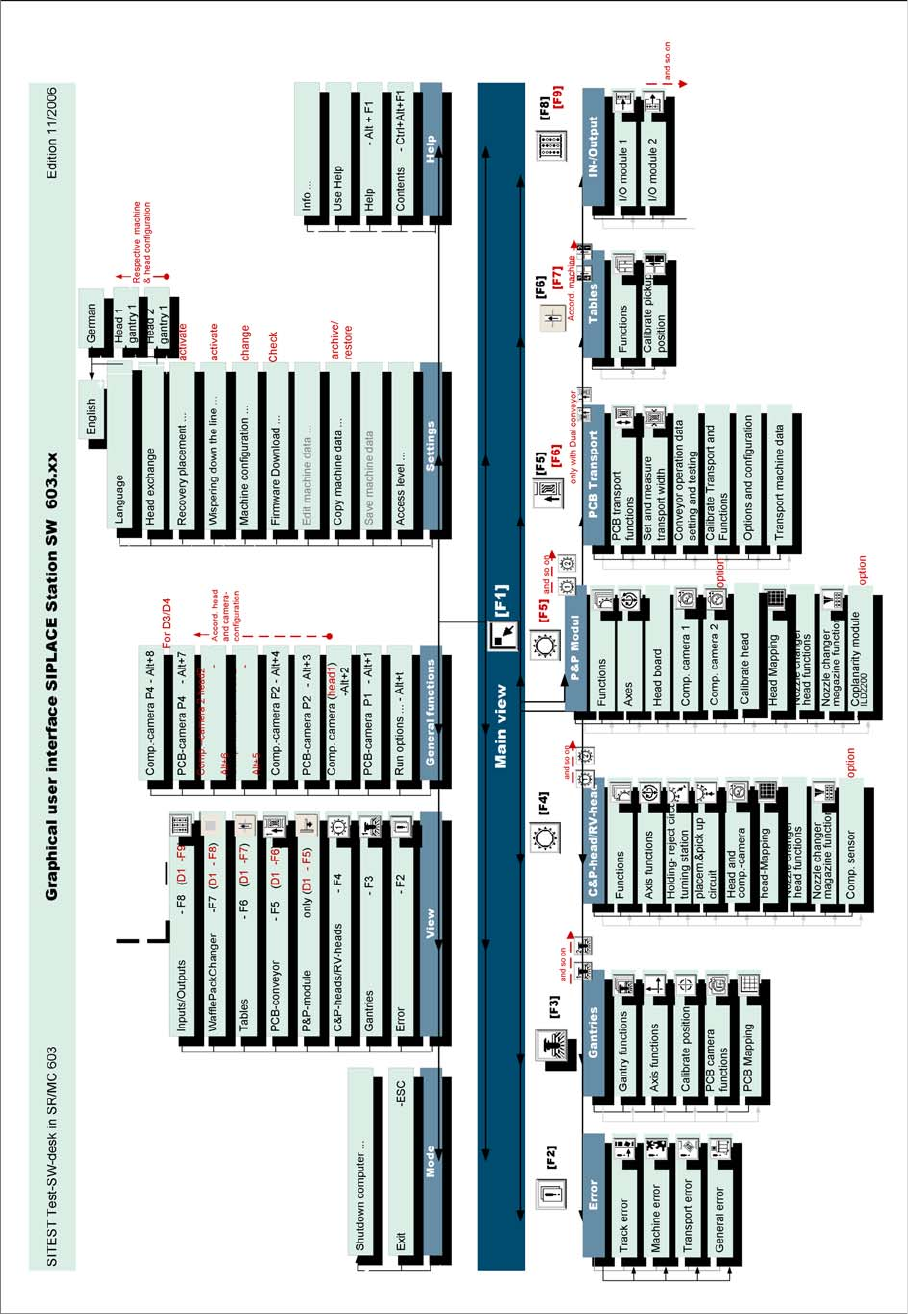
As you can see in the overview diagram, the calibration menus in the SITEST software are allocated to
the hardware components on which each is fitted or for which the function is used.
14 SITEST
14.2 Calibration 14.1.2 SITEST Overview 603
244 Student Guide SIPLACE D-Series (FSE)
14.2
14.2 Calibration
Calibration
Tools and SITEST
▪ Calibration tool – general –
Version III not transparent is for HF/X/D/Di machines with C&P6/12 and Twin/P&P Head [03010565-
01]
(Version II transparent is for S/F/HS machines [00316308-03], calibration nozzle 920)
(Version for SST23 at X machines with C&P20 head [03034148-xx])
▪ Nozzles – general –
Type 956, 517, 518, nozzle for ZPC of D-axis TH [03008862-03]
(C&P20 head: 1235)
▪ Setting gauge for S tables
▪ Board for calibrating the PCB conveyor width
▪ 2D coplan - (ILD2200) - calibration tool
▪ SITEST, version 602.xx or higher
DANGER
RISK OF INJURY!
The gantry may move during some of the following procedures.
Therefore, before you begin with any of these procedures make sure that you and everyone
else stay physically clear of the travel range of the gantries.
► Also, sure, that no objects are in the way.
NOTICE
Cause of Hazard
Before you begin with the calibration, you must reference the heads and the gantries.
During calibration, unused gantries will automatically be moved to their parking position.
To completely calibrate the machine, go to Calibrate machine... and select the Calibrating the
entire machine menu. This provides all the required calibration functions.