00195440-05-SG_D-Series_FSE-EN.pdf - 第247页
14 SITEST 14.3.1 Travel Range 14.3 Calibration Basics Student Guide SIPLACE D-Series (FSE) 247 14.3 1 4 . 3 C a lib r a t io n B a s ic s Calibration Basics 14.3.1 1 4 . 3 . 1 T r a v e l R a n g e Travel Range 14.3.1.1 …
14 SITEST
14.2 Calibration 14.2.3 C&P Head
246 Student Guide SIPLACE D-Series (FSE)
▪ Each magazine must at least have a nozzle present and configured (1) in garage 1 .
14.2.3
14.2.3 C&P Head
C&P Head
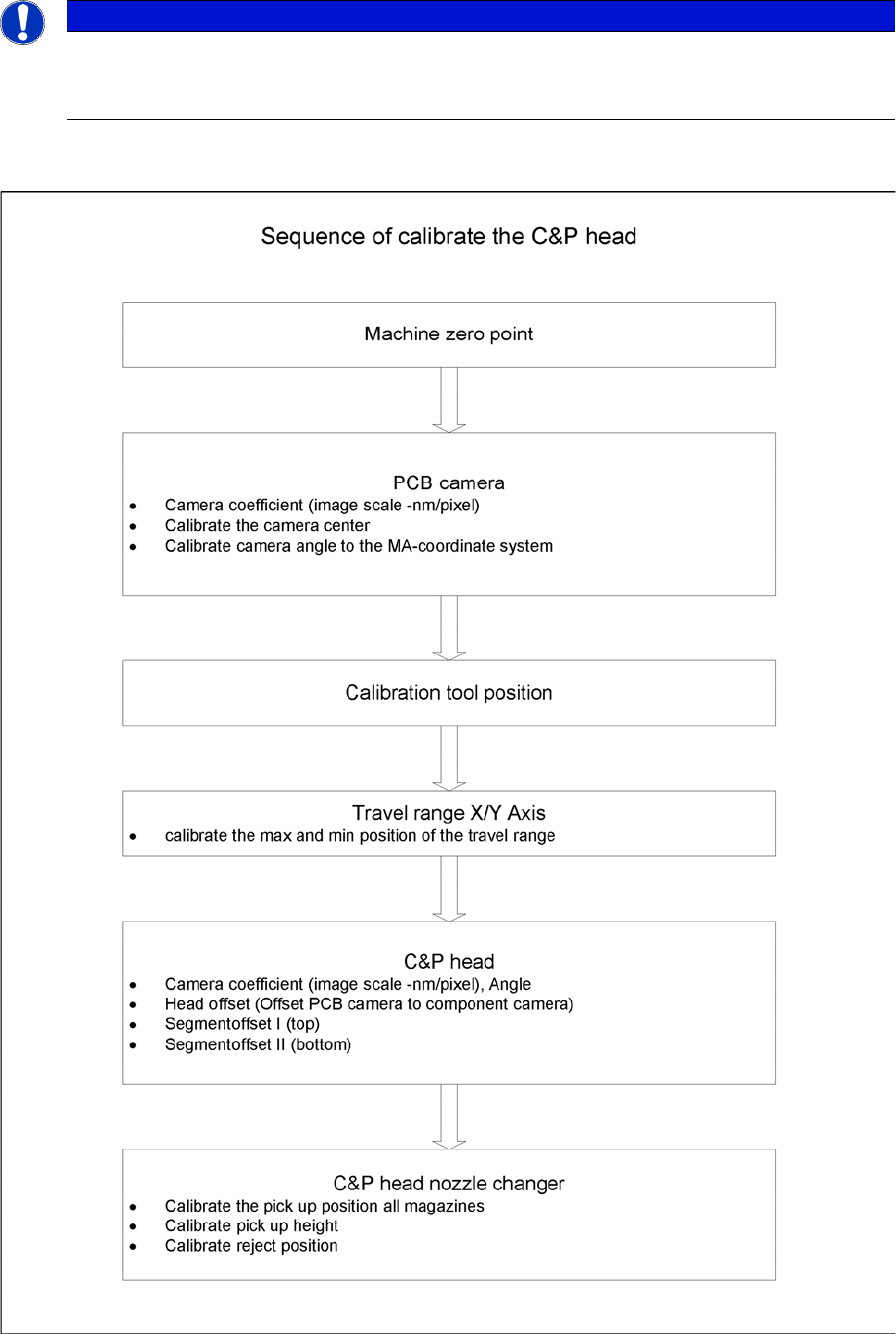
Sequence of C&P head calibration
NOTICE
Cause of Hazard
When configuring the C&P12 (only), you can also set all magazines to "empty" and the head to
"full".
14 SITEST
14.3.1 Travel Range 14.3 Calibration Basics
Student Guide SIPLACE D-Series (FSE) 247
14.3
14.3 Calibration Basics
Calibration Basics
14.3.1
14.3.1 Travel Range
Travel Range
14.3.1.1
14.3.1.1 Position of Calibration Tool
Position of Calibration Tool
▪ Calibrate the X and Y pick up position of the calibration tool.
14.3.2
14.3.2 Component Camera
Component Camera
▪ The Pixel size of the CCD sensors of the camera is determined in µm. Measured and calculated with
Ax/Bx/Cx/Ay/ByCy calibration values. Saved in camera.xml as: XU_Pixel / YU_Pixel in nm
▪ The pixel size is:
approx. 49700 nm for component camera SST 28 (for 12-segment head)
approx. 26760 nm for component camera SST 29 (for 6-segment head/12-segment head option)
approx. 17220 nm for component camera SST 23 (for 20-segment head)
▪ The camera center is determined.
▪ The Mounting angle of the CCD-chip in the camera to the turning level of the placement star is meas-
ured. The value is saved as Kamera_winkel (camera_angle) in the data block of the component cam-
era, in the camera.xml .
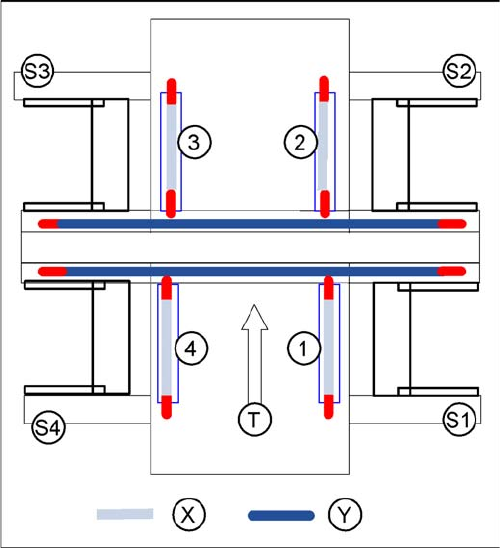
X gantry axis:
▪ The X gantry axis moves to the zero pulse, to cali-
brate the travel range and then moves on to the HW
end stoppers (limit switch). The respective gantry
axis position is recorded there.
▪ The maximum hardware travel range is set 1.5 mm
before the bumper. The software travel range value is
0.5 mm before that.
Y gantry axis:
▪ The Y gantry axis moves to the zero pulse, to cali-
brate the travel range and then moves on to the outer
HW end stoppers on the left or right (limit switch). The
respective gantry axis position is recorded there.
▪ The maximum hardware travel range is set 1.5 mm
before this position. The software travel range value
is 1.5 mm before that.
▪ In the case of the Y axes, only the outer HW end stop-
pers are approached in each case. The other end po-
sition of the travel path is calculated. This gives a
travel range distance to the other gantry of about 35
mm.
Legend
▪ 1-4:Gantry 1-4
▪ S1 - S4:Sector 1-4
▪ X:Travel range X
▪ Y:Travel range Y
▪ T:Transport direction
14 SITEST
14.3 Calibration Basics 14.3.2 Component Camera
248 Student Guide SIPLACE D-Series (FSE)
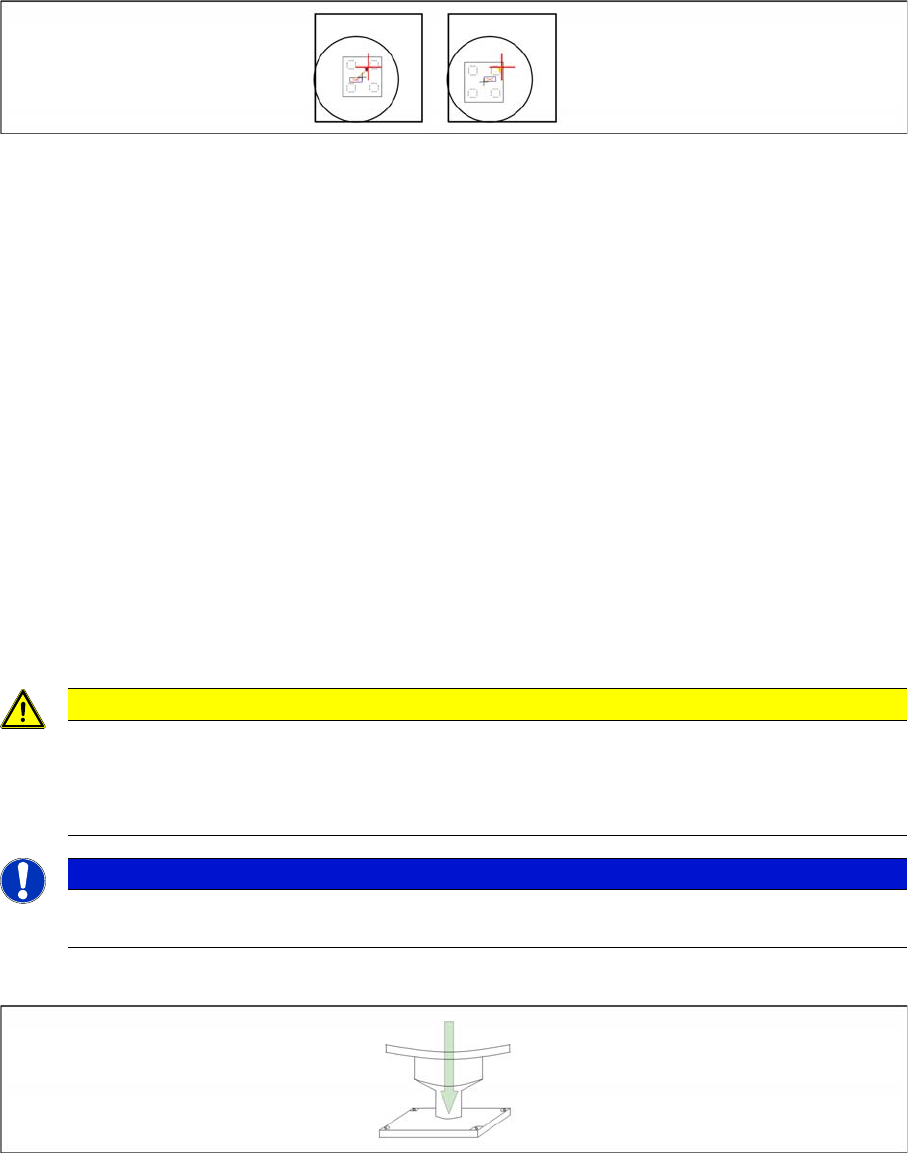
Sequence segment offset top (I):
Principle picture of a calibration tool in the camera in 0° (left); in 180°(right).
PCB Camera - Component Camera Offset:
▪ During measurement of the segment offset up (I), the calibration of the PCB camera -> component
camera offset is performed with segment 1:
▪ The distance in X- and Y- direction of the camera centers is determined in µm.
▪ The top segment offset (I) is compared to a calculated average value. (the segment offset I of seg-
ment 1 is therefore no longer 0.)
▪ Segment 1 is the reference point for calculation of the offset (I and II).
▪ This distance is saved in REAL.MA at ‘Kopfoffsets’ at Kopf 1 Kopfoffset_X /..Y. The segment offset
down (II) for segment 1 is 0 (see below).
▪ The segment offsets for the remaining 11 segments are saved in the PIP_OFF.MA file (as deviation
to segment 1).
▪ Deviation in the X and Y direction of the rotary axis for the remaining segments, compared to seg-
ment 1 (in µm).
▪ Measurement is performed at 0° and 180° or 90° and 270° in each case. The center of the segment
is then determined from these 0/180° or 90/270° values.
▪ The values for the segment offset are saved in the PIP_OFF.MA file.
Sequence segment offset bottom (II):
Sequence at one nozzle:
▪ After the segment offset up (I) calibration step has been performed, the calibration procedure for the
segment offset down (II) begins for C&P DLM 3:
▪ Is the calibration tool picked with a Nozzle under 0 degree; optically centered and placed with the
PCB-camera is the exact placement position determined (in µm).
▪ Is the calibration tool picked with a Nozzle under 90 degree; optically centered and placed with the
PCB-camera is the exact placement position determined (in µm).
CAUTION
For the segment offset I (top), the standard deviation value should not exceed 600 µm. The dif-
ference between the segments must not exceed +/- 150 µm.
Segment offset II (down) absolute threshold +/- 150 µm and difference in values max. +/-
150 µm.
NOTICE
The segment offset II (bottom), from the first segment is always 0 that is the reference value to
the other segments.