00195440-05-SG_D-Series_FSE-EN.pdf - 第275页
16 Annex (FSE) 16.3 Calibration Steps and Individual Calibration Functions Student Guide SIPLACE D-Series (FSE) 275 Replace the curren t noz - zle on the TWIN module with the special ca libra - tion nozzle, according to …

16 Annex (FSE)
16.3 Calibration Steps and Individual Calibration Functions
274 Student Guide SIPLACE D-Series (FSE)
If the WPC is recognized
by SITEST on the D1/D1i
table, changeover table 1
will be calibrated with
track 61 and 90. If the
WPC is OFF, calibration
will be performed from
track 1 to 90.
Repeat the function for
track 90 (track 72 for D4/
D4i).
For precision purposes,
only use one 'iron' per lo-
cation, so that the feeder
pickup position in the table
center is not affected.
Repeat this function for
all other changeover ta-
bles.
Save in REAL.MA.
Calibrating the closed vac-
uum
For (head 2 P&P module)
YES
With
TWIN
YES In 'P&P module' 'calibrate
head'
The TWIN module picks
up a 518 nozzle from the
nozzle changer.
518 nozzle
The 518 nozzle is moved
to the top edge of the
conveyor side, to meas-
ure the vacuum.
The rubber membrane of
the 518 nozzle is sealed
onto the edge of the con-
veyor side. The measured
vacuum is the same as the
closed vacuum value for
the C&P heads.
Save in --- …. … the closed vacuum is
measured at each refer-
ence run.
Zero adjustment vacuum
For (head 2 P&P module)
YES
With
TWIN
YES In 'P&P module' 'head
board'
The air blast vacuum is
adjusted to '0'.
The compressed air sup-
ply is disabled.
This is the real '0' state.
The vacuum difference is
measured and after reac-
tivation, the electronic
control valve is set to the
new 0 value.
The nozzle must not be
manually blocked/closed.
Save in control valve
EPROM
Calibrating the zero point
correction D/Di-axis
For (head 2 P&P module)
YES
With
TWIN
YES In 'P&P module' 'calibrate
head'
Calibration step/individu-
al calibration function
For D4/
D4i
For D3 For D2/
D2i
For D1/
D1i
Comments

16 Annex (FSE)
16.3 Calibration Steps and Individual Calibration Functions
Student Guide SIPLACE D-Series (FSE) 275
Replace the current noz-
zle on the TWIN module
with the special calibra-
tion nozzle, according to
the SW message.
The gantry moves the
TWIN module above the
component (IC) camera.
Within a +/-5° tolerance,
the SW determines the
angle correction.
Save in Achs_ver.ma.
Calibration menus reserved for SIPLACE Service
FCCS for digital cameras White adjustment of hard-
ware required.
The PCB camera cali-
brates the calibration tool
carrier position after this
carrier has been moved
into the PCB conveyor
and clamped into place.
Other PCB camera test
measurements follow.
All cameras programmed
in the Config.ma file are
brightness calibrated via
a whiteness adjustment
measurement.
Save in camera EPROM! The results can be saved
in the calibration value
XML file.
Checking the star mounting
position in the magnetic
neutral position
The star mounting posi-
tion is checked by com-
paring the magnetic
neutral position with the
'zero position of segment
1'.
A deviation of up to 95x 1/
1000° is tolerated by the
SW.
Should errors occur, re-
mount the placement
star on the star motor
shaft.
Calibration step/individu-
al calibration function
For D4/
D4i
For D3 For D2/
D2i
For D1/
D1i
Comments
16 Annex (FSE)
16.4 Backup of Machine Data Without Disk Drives 16.4.1 Error / problem
276 Student Guide SIPLACE D-Series (FSE)
16.4
16.4 Backup of Machine Data Without Disk Drives
Backup of Machine Data Without Disk Drives
16.4.1
16.4.1 Error / problem
Error / problem
With the introduction of the CPU assembly “SMP 16-CPU086“ (BOX PC), there is no longer a disk drive
or CD/DVD burner available at the station. Machine data backup or restoration can therefore not be per-
formed with external data carriers at the station.
16.4.2
16.4.2 Backup with Data Network
Backup with Data Network
The backup or recovery of data is performed via a network, to a folder (e.g. on the SIPLACE Pro com-
puter), which the service staff have set up for you!
Select the folder which was set up for your machine, on the required computer in the SIPLACE Pro net-
work.
16.4.3
16.4.3 Backup of Machine Data on CD
Backup of Machine Data on CD
An external CD-RW drive is supplied with D and X machines. The SITEST backup function allows you
to select this CD drive for the backup. Select the CD drive shown for the station computer.
16.4.4
16.4.4 Machine Data Backup with the Fast SYSTEM Recovery Software Option
Machine Data Backup with the Fast SYSTEM Recovery Software Option
This software option enables you to store the station machine data at a computer in the network, with
appropriate comments.
16.4.6
16.4.6 Settings on SIPLACE Pro Computer
Settings on SIPLACE Pro Computer
► Log onto the SIPLACE Pro computer as administrator.
► In partition D (or C, if the hard drive only has one partition), create a new folder and name it
Backup_MachineData (Backup_Maschinendaten) .
NOTICE
German menu names shown in brackets.
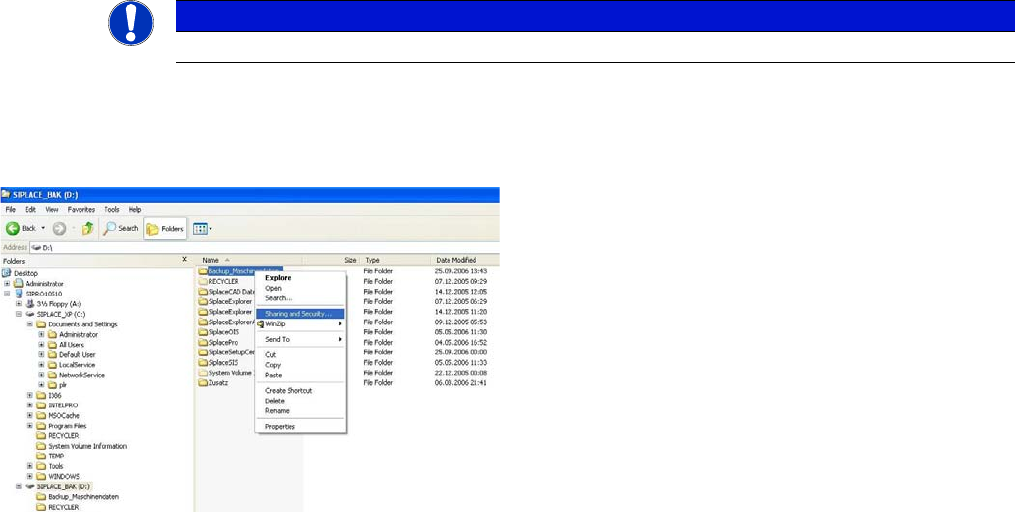
► Release this folder for the network. Right-click with
the mouse to highlight the Backup_MachineData
(Backup_Maschinendaten) folder and open the Shar-
ing and Security (Freigabe und Sicherheit)...menu: