00195440-05-SG_D-Series_FSE-EN.pdf - 第278页
16 Annex (FSE) 16.4 Backup of Machine Data Wit hout Disk Drive s 16.4.7 Settings at Station Computer 278 Student Guide SIPLACE D-Series (FSE) 16.4.7 1 6 . 4 . 7 S e t t in g s a t S t a t io n C o m p u t e r Settings at…
16 Annex (FSE)
16.4.6 Settings on SIPLACE Pro Computer 16.4 Backup of Machine Data Without Disk Drives
Student Guide SIPLACE D-Series (FSE) 277
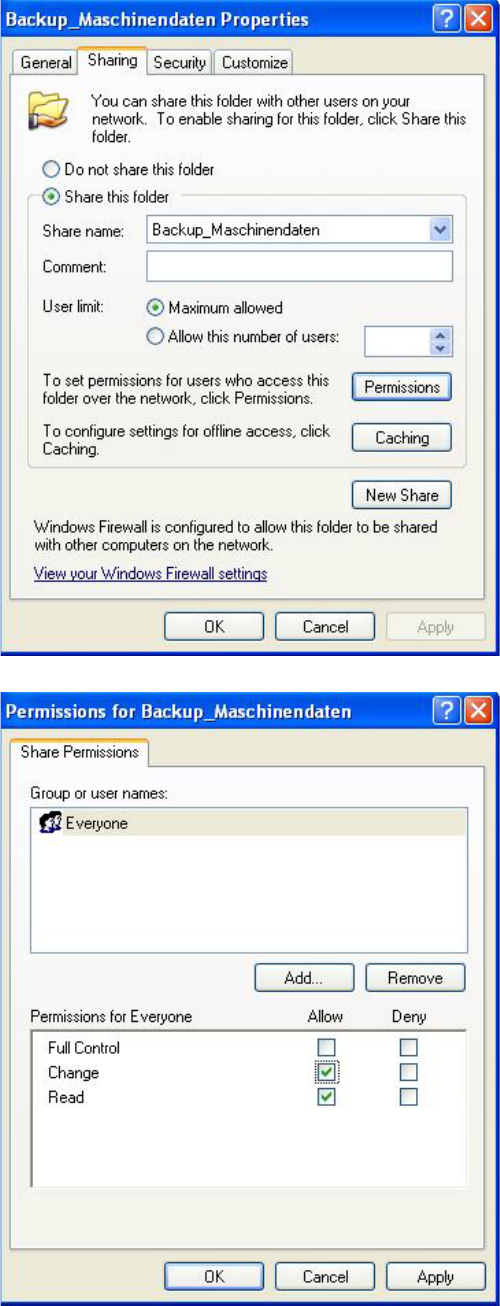
► In the menu Backup_MachineData Properties
(Backup_Maschinendaten Eigenschaften) (Proper-
tiesand the tab Sharing (Freigabe).
Press Share this folder (Diesen Ordner freigeben) to
release this folder for network access:
► Click on Permissions for Backup_MachineData (Be-
rechtigung) to set the access rights.
► In the menu Permissions for Backup_MachineData (
Permissions für Backup_Maschinendaten) select
group Everyone (Jeder) and activate the permission
Change (Ändern):
► Click twice on the OKbuttons to accept the settings.
16 Annex (FSE)
16.4 Backup of Machine Data Without Disk Drives 16.4.7 Settings at Station Computer
278 Student Guide SIPLACE D-Series (FSE)
16.4.7
16.4.7 Settings at Station Computer
Settings at Station Computer
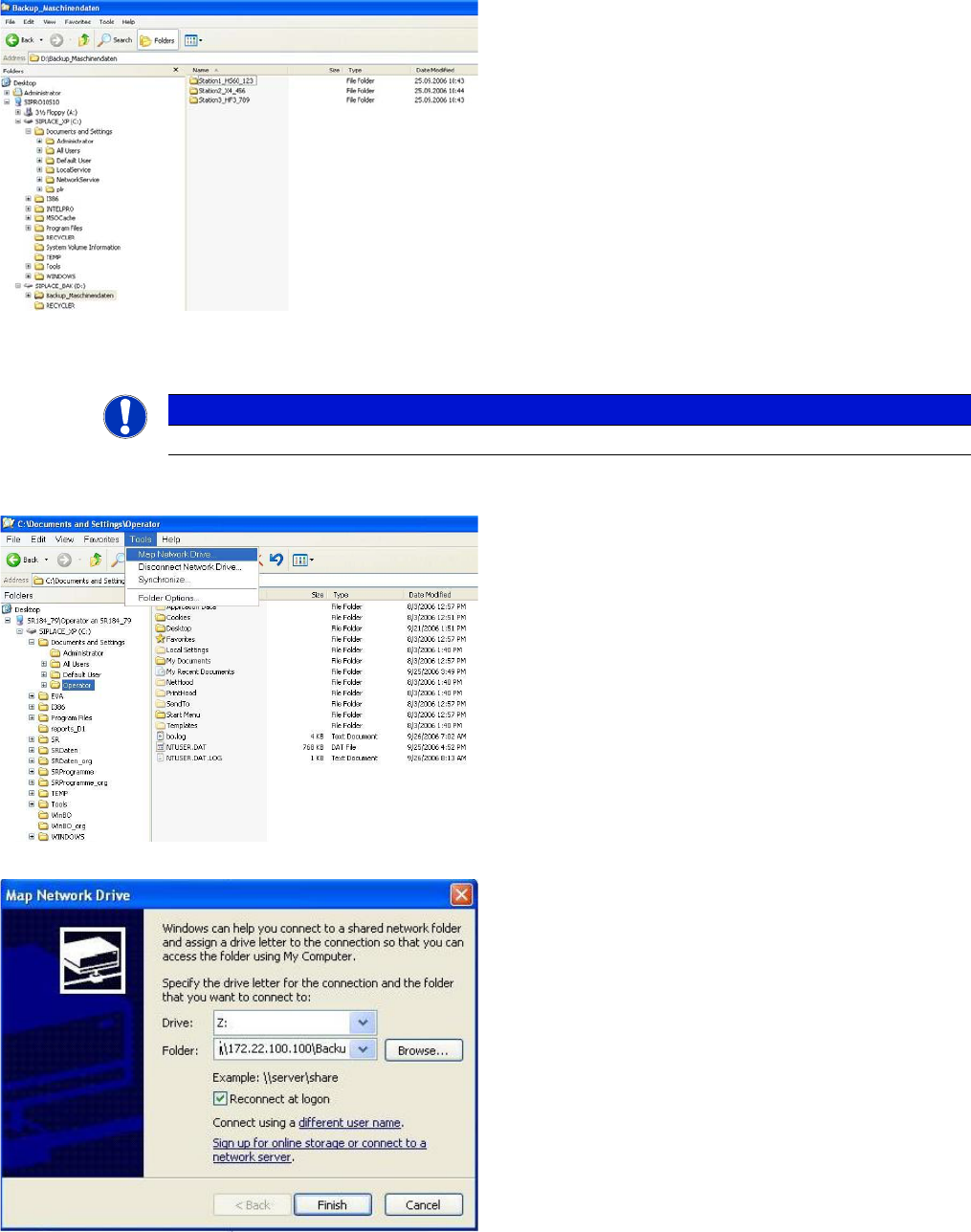
► Switch over to the operating system at the station computer.
► Now go to the Backup_MachineData
(Backup_Maschinendaten) folder and create a sub-
folder for each station.
Each subfolder will be assigned the station name by
SIPLACE Pro:
NOTICE
German menu names shown in brackets.
► Select Windows Explorer → Tools (Extras) → Map
Network Drive (Netzlaufwerk verbinden) . . .:
► In the Map Network Drive (Netzlaufwerk verbinden)
You will see the line Folder: (Ordner:), with the com-
plete path for the corresponding subfolder on the
SIPLACE Pro computer, in the following format:
\\IP-Address SIPLACE Pro comput-
er\Backup_Machine Data\Name subfolder
(example: \\172.22.100.100\Backup_Machine Da-
ta\Station1_HS60_123).
The standard settings for Drive Z (Laufwerk: Z:) and
Reconnect at logon (Verbindung bei Anmelden wie-
derherstellen) will be accepted by the system.
► Click on the Terminating the Program (Beenden) but-
ton to establish the connection to the SIPLACE Pro
computer:
16 Annex (FSE)
16.4.8 Additional Information 16.5 Backup of Machine Data on CD
Student Guide SIPLACE D-Series (FSE) 279
16.4.8
16.4.8 Additional Information
Additional Information
16.5
16.5 Backup of Machine Data on CD
Backup of Machine Data on CD
An external CD-RW drive is supplied with D and X machines. The SITEST backup function allows you
to select this CD drive for the backup. Select the CD drive shown for the station computer.
16.6
16.6 SIPLACE Vision - Sensor Overview
SIPLACE Vision - Sensor Overview
The digital SIPLACE Vision solution is another step towards the satisfaction of customer demands for
greater speed, flexibility and robustness.
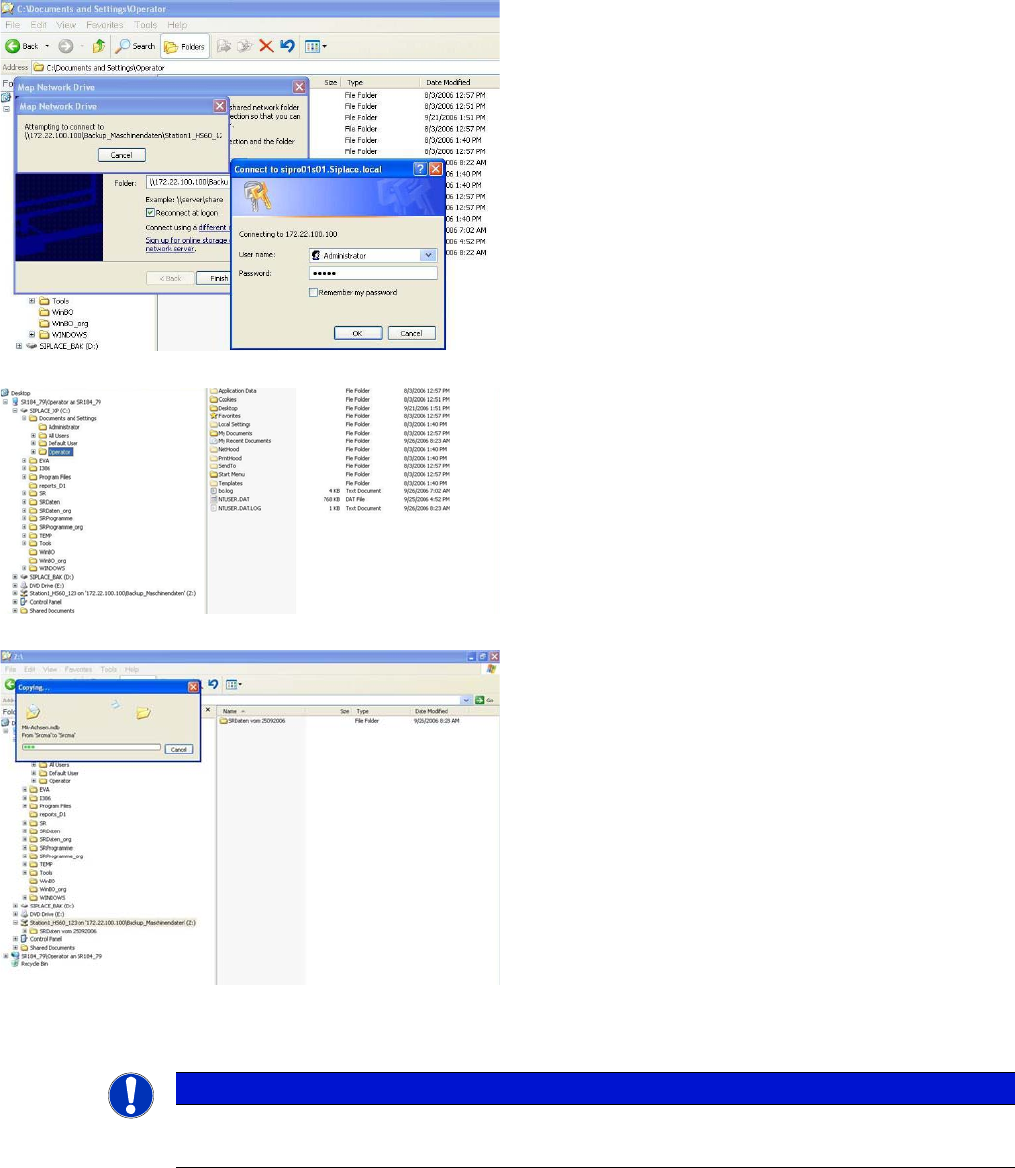
► To connect to the folder on the SIPLACE Pro comput-
er, you need to enter the name of a user with the re-
quired permissions for the SIPLACE Pro computer in
the following login window. The standard is User
name (Benutzername). Administrator
Password: <standard password for administrator>.
Confirm your entries with OK :
► The connection will now be established to the sub-
folder on the SIPLACE Pro computer and will be
made available for future access as driveZ::
► The machine data or the entire station computer data
folder can now be copied to this drive and is available
here for data recovery purposes.
To differentiate multiple data backups in the same
subfolder, you can rename the backup or WinZip file
after copying e.g. by adding the date:
NOTICE
At the SIPLACE Pro computer, you can now save the data on an external data carrier.
This procedure for data backup/recovery can be set up for all SIPLACE station computers.