00195440-05-SG_D-Series_FSE-EN.pdf - 第279页
16 Annex (FSE) 16.4.8 Additional Information 16.5 Backu p of Machine Data on CD Student Guide SIPLACE D-Series (FSE) 279 16.4.8 1 6 . 4 . 8 A d d it io n a l I n f o r m a t io n Additional Information 16.5 1 6 . 5 B a c…
16 Annex (FSE)
16.4 Backup of Machine Data Without Disk Drives 16.4.7 Settings at Station Computer
278 Student Guide SIPLACE D-Series (FSE)
16.4.7
16.4.7 Settings at Station Computer
Settings at Station Computer
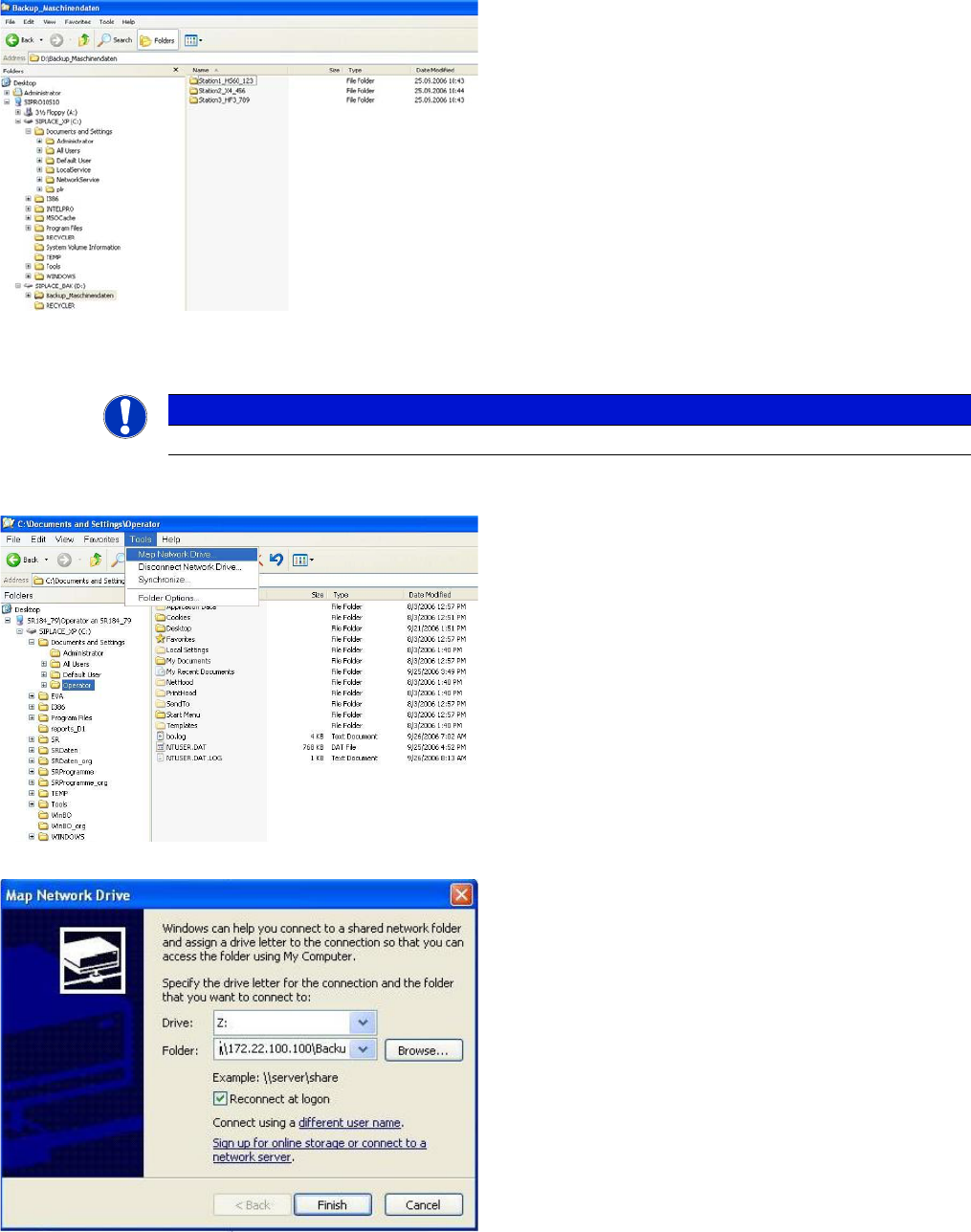
► Switch over to the operating system at the station computer.
► Now go to the Backup_MachineData
(Backup_Maschinendaten) folder and create a sub-
folder for each station.
Each subfolder will be assigned the station name by
SIPLACE Pro:
NOTICE
German menu names shown in brackets.
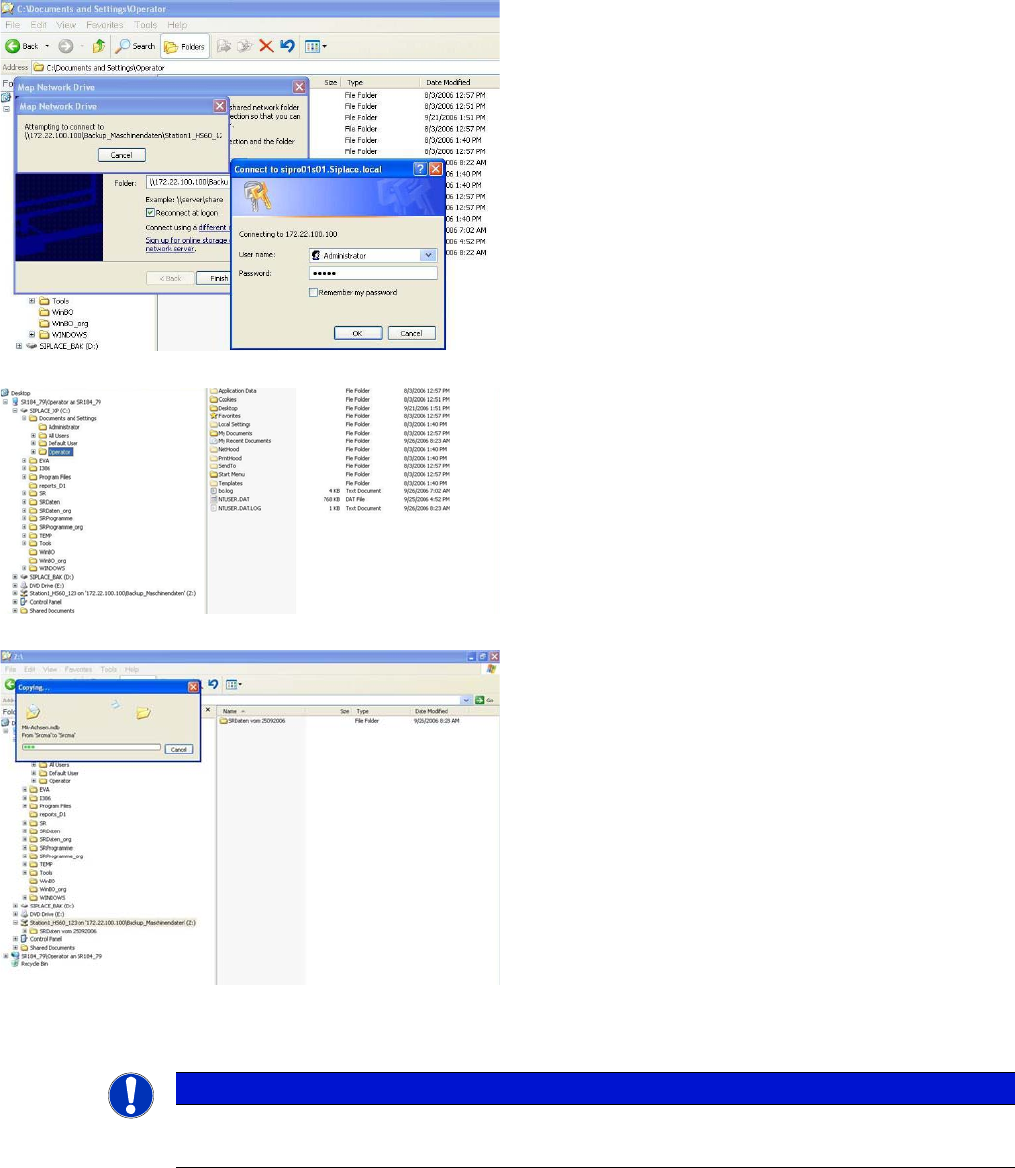
► Select Windows Explorer → Tools (Extras) → Map
Network Drive (Netzlaufwerk verbinden) . . .:
► In the Map Network Drive (Netzlaufwerk verbinden)
You will see the line Folder: (Ordner:), with the com-
plete path for the corresponding subfolder on the
SIPLACE Pro computer, in the following format:
\\IP-Address SIPLACE Pro comput-
er\Backup_Machine Data\Name subfolder
(example: \\172.22.100.100\Backup_Machine Da-
ta\Station1_HS60_123).
The standard settings for Drive Z (Laufwerk: Z:) and
Reconnect at logon (Verbindung bei Anmelden wie-
derherstellen) will be accepted by the system.
► Click on the Terminating the Program (Beenden) but-
ton to establish the connection to the SIPLACE Pro
computer:
16 Annex (FSE)
16.4.8 Additional Information 16.5 Backup of Machine Data on CD
Student Guide SIPLACE D-Series (FSE) 279
16.4.8
16.4.8 Additional Information
Additional Information
16.5
16.5 Backup of Machine Data on CD
Backup of Machine Data on CD
An external CD-RW drive is supplied with D and X machines. The SITEST backup function allows you
to select this CD drive for the backup. Select the CD drive shown for the station computer.
16.6
16.6 SIPLACE Vision - Sensor Overview
SIPLACE Vision - Sensor Overview
The digital SIPLACE Vision solution is another step towards the satisfaction of customer demands for
greater speed, flexibility and robustness.
► To connect to the folder on the SIPLACE Pro comput-
er, you need to enter the name of a user with the re-
quired permissions for the SIPLACE Pro computer in
the following login window. The standard is User
name (Benutzername). Administrator
Password: <standard password for administrator>.
Confirm your entries with OK :
► The connection will now be established to the sub-
folder on the SIPLACE Pro computer and will be
made available for future access as driveZ::
► The machine data or the entire station computer data
folder can now be copied to this drive and is available
here for data recovery purposes.
To differentiate multiple data backups in the same
subfolder, you can rename the backup or WinZip file
after copying e.g. by adding the date:
NOTICE
At the SIPLACE Pro computer, you can now save the data on an external data carrier.
This procedure for data backup/recovery can be set up for all SIPLACE station computers.
16 Annex (FSE)
16.6 SIPLACE Vision - Sensor Overview 16.6.1 Digital PCB Camera (Type 34)
280 Student Guide SIPLACE D-Series (FSE)
Advantages of the digital Vision system:
▪ Robust and fast computing algorithms
▪ Flexible measurement processes
▪ Intuitive graphical user interface
▪ Geometric description of components at the machine
▪ State-of-the-art digital camera hardware
▪ Homogenous illumination of camera field of vision and components
Each C&P head has its own digital component camera.
16.6.1
16.6.1 Digital PCB Camera (Type 34)
Digital PCB Camera (Type 34)
16.6.1.1
16.6.1.1 Technical data
Technical data
Technical data for camera type 34
16.6.1.2
16.6.1.2 Fiducial Criteria
Fiducial Criteria
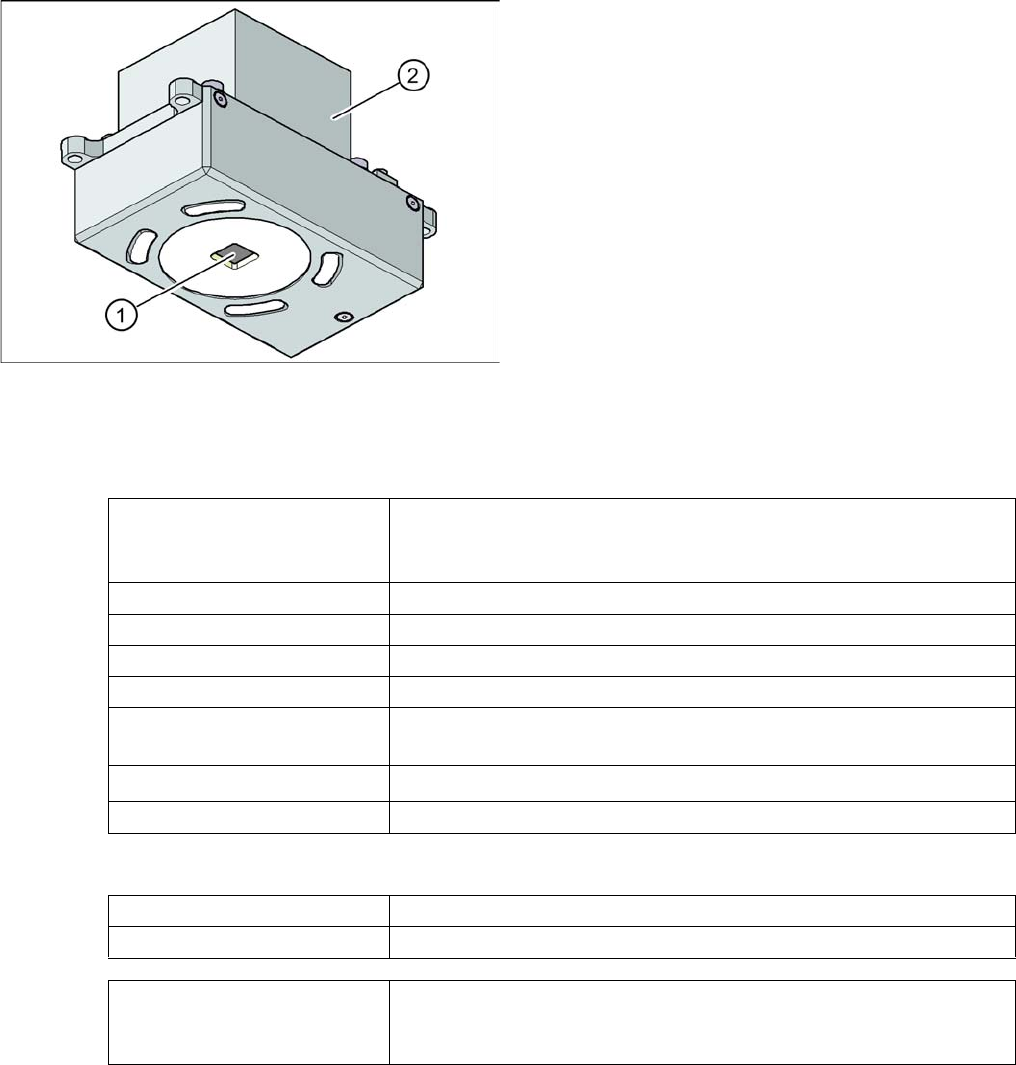
PCB camera under the gantry (X-axis)
Legend
1. PCB camera optics and illumination
2. Camera amplifier
PCB fiducials Up to 3 (panels and cluster panels),
Up to 6 for the option "long board" (optional fiducials are issued by the
optimization process).
Local fiducials Up to 2 per PCB (can be of different types)
Library archive Up to 255 fiducial types per panel
Image processing Edge detection method (single feature) based on gray values
Method of illumination Front-lighting (3 levels, programable as required)
Erkennungszeit pro Marke/
Schlechtmarke
20 ms - 200 ms
Field of vision
5.78 x 5.78 mm
2
Distance from the focus plane 28 mm
Determine 2 fiducials X/Y position, angle of twist, central PCB displacement
Determine 3 fiducials Additional: shearing, displacement separately in X and Y direction
Fiducial shapes Synthetic fiducials: circle , cross , square , rectangle , diamond , circu-
lar, square and rectangular contours, doublecross
Pattern: any