OperatorManual - 第30页
RAIL CHAIN LUBRIC ATION STATUS The present status of the Ra il Chain Lubrication System can be display ed by selecting the "Lubrication" symbol at the top of the Ov en Operating Screen. (This symbol will be dis…
Rail chain lubrication (optional)
The Rail Chain Lubrication Option provides smooth operation and will extend the life of the rail chain conveyor by
periodically applying lubrication to the chain during oven operation. The Oven MUST be running for ANY
Lubrication to take place. This Option can be used, in either automatic or manual mode.
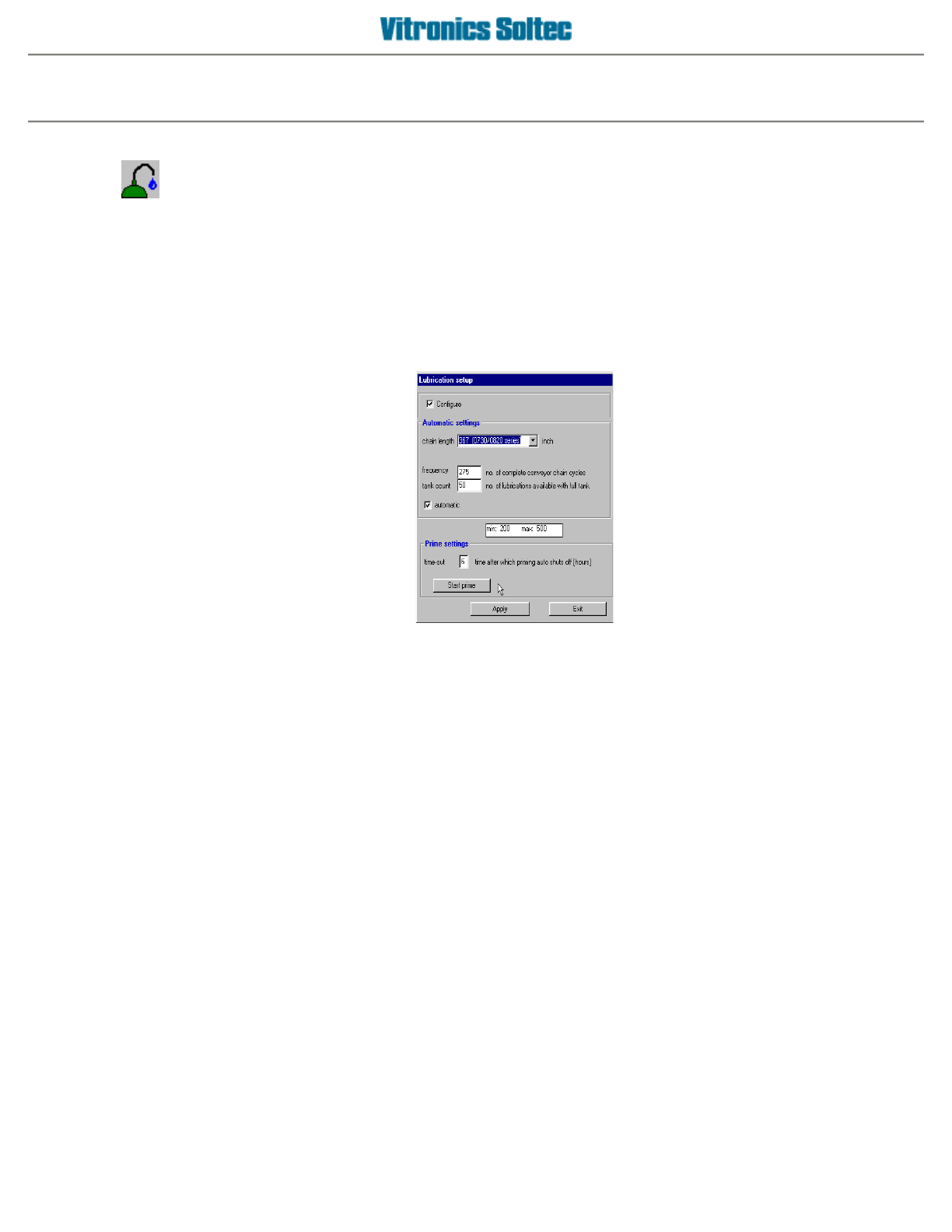
RAIL CHAIN LUBRICATION SETUP
Configuration of the Rail Lube System involves selecting
Setup
, then
Lubrication
, which produces the
Lubrication Setup Dialogue Box:
1.
A check in this box indicates that the Automatic Conveyor Lubrication Option is installed
2.
Indicates oven model / size
3.
This box must have a check mark for the lubrication process to operate automatically
4.
Time (in hours) for priming of the lubrication system (new installs, after repairs to system).
5.
Used to manually prime the system to deliver oil from the reservoir to the lubrication brushes.
6.
Apply changes or modifications to this screen.
7.
Exit this function.
Automatic Lubrication operation
The automatic lubrication starts when the chain has completed the number of cycles between lubrications.
The Lubrication Icon (symbol) is displayed with the time remaining in the Lubrication Process, as a predetermined
quantity of lube oil is applied to the rail chain.
RAIL CHAIN LUBRICATION
Operator manual 29 August 2003
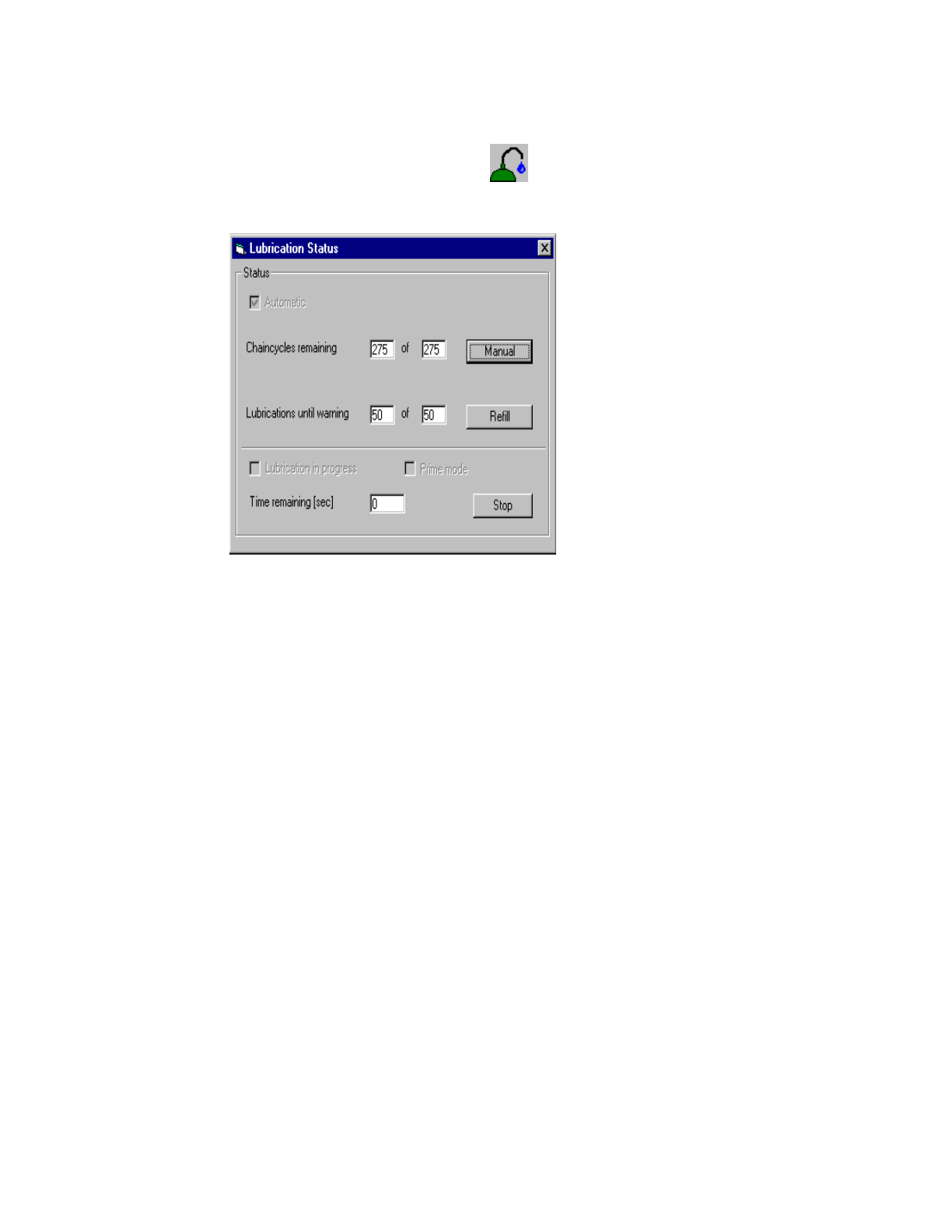
RAIL CHAIN LUBRICATION STATUS
The present status of the Rail Chain Lubrication System can be displayed by selecting the "Lubrication" symbol
at the top of the Oven Operating Screen.
(This symbol will be displayed at the bottom of the screen during the Lubrication Process)
Operator manual 30 August 2003

Barcode reader (optional)
Use the barcode reader
The barcode reader allows you to either select your products via a handscanner manually or completely
automated via a fixed barcode system.
Principle of operation
1 - Hand scanner option
If you don't have the SMEMA option, you still can use a barcode reader, but as a user you have to determine the
status of the oven to decide if a new product can be chosen via the reader.
Basically instead of typing in the new product yourself, you use the reader to do that for you.
A typical sequence:
-empty the oven
-read the new barcode
-wait until the oven gets proccess ready
-enter the board with the barcode.
If you want to read in a barcode that uses the same product as the current one, you can just read the barcode and
enter the board.
2 - Automated barcode reading
If you have SMEMA (thus also the infeed/outfeed sensors), you can use a fixed barcode reader on the infeed of
the oven. The oven will automatically control the correct board flow, using the infeed/outfeed sensors and the
SMEMA capabilities.
A typical sequence:
-A barcode gets read on a board
- The oven determines that the new product differs from the current one and will stop the infeed via SMEMA
- After the last board exits the oven, the new product gets loaded, machine will go into stabilize mode.
- After the oven goes into proccess ready, the infeed will allow boards again, via SMEMA.
- The board enters the oven
- The barcode on the next board gets read
- The product is the same as the current one, the oven lets the board enter
IMPORTANT
The automated barcode o
p
tion re
q
uires the use of the SMEMA o
p
tion.
If the barcode system is active, the program uses the 'barcode' product/recipe directory. Products/recipes
that are being used by the barcode system have to be stored there.
IMPORTANT
In the automatic mode, the system assumes that every board has a correct barcode, and that that barcode is
linked to a valid product. There is no hardware forseen to detect boards with an invalid or without a barcode.
Those boards will enter the oven with the current settings.
Operator manual 31 August 2003