80S-15贴片机.pdf - 第199页
SIPLACE 80 S/ F/G Service M anual 7 Components Table Edition 04/97 7 - 17 7.3 Components Table Power Suppl y DANGER QQQ Before y ou star t work on the compo nents table power supply , the com ponents changeo ver tabl e m…

7 Components Table SIPLACE 80 S/F/G Service Manual
Edition 04/97
7 - 16
●
Flap opener plungers do not extend or retract far enough
Possible causes:
–
Compressed air for the flap opener has been incorrectly set at the compressed air unit (setting should
be 2.8 bar, see User’s Manual, Section 9).
–
Pressure loss in the compressed air branch for flap openers: check threaded hose connections,
replace pinched compressed air hose.
–
The corresponding compressed air cylinder in the flap opener is defective: replace the compressed air
cylinder.
●
Flap openers of an entire feeder sector (locations 1 or 3) are not being activated
Possible causes:
–
No linear vibratory feeder or 24/32 mm tape feeder module (blister tapes) has been defined at this
location (table 1; 3) (see User’s Manual for the UNIX computer, "Feeder Part Editor").
–
After fault correction or reinstallation: The ribbon cable plug has been plugged into the board "Flap
opener control" incorrectly (plug misaligned with socket).
–
The 30 VDC electrical circuit has been broken by the fuse (see section 7.5 "Communications Unit").
–
Break in the ribbon cable; interruption in the communications unit or in the components table interface
cable (output signal from the control unit not present).
7.2.1.4 Fault in the Components Table Pneumatic System or
Components Table Compressed Air Supply
●
An individual compressed air feeder module is not conveying:
Possible causes:
–
The feeder module has not been positioned correctly; the locking device at the end of the module has
not engaged and closed.
–
The associated pneumatic adapter in the components table compressed air supply is leaky: replace o-
rings, replace pressure spring
→
see section 7.7 "Components Table Pneumatics, Components Table
Compressed Air Supply".
–
The solenoid valves in the compressed air feeder module are not switching:
–
The compressed air feeder module has not been defined on this track (see User’s Manual for the
UNIX line computer, "Feeder Part Editor").
–
Solenoid valve(s) in the feeder module is (are) defective; electrical interruption in the module or in
the connecting cable of the module (see the Service Manual for the module).
–
Interruption within the communications unit: replace (see section 7.5 "Communications Unit").
●
None of the compressed air supply modules of a location is being activated or conveying correctly
Possible causes
–
At this location (1; 3) no compressed air supply modules have been defined (see User’s Manual to the
UNIX line computer, under "Feeder Parts").
–
Compressed air for the components table compressed air supply has not been set precisely to 5 bar:
for setting, see the section 7.7 "Components Table Pneumatics, Components Table Compressed Air
Supply".
–
Pressure loss in the compressed air branch (5 bar) from the compressed air unit to the components
table compressed air supply.
–
Break in the components table interface cable (signal not arriving from the control unit). See also:
error message "Communication with table interrupted".

SIPLACE 80 S/F/G Service Manual 7 Components Table
Edition 04/97
7 - 17
7.3 Components Table Power Supply
DANGER
QQQ
Before you start work on the components table power supply, the components changeover table must be dis-
connected from the mains (mains plug, on the righthand side of the machine base).
Please note with all work in the machine base interior and in particular on the components table power supply
the stricter VDE 0113 safety regulations.
7.3.1 Tools and Spare Parts Required
Auxiliary Measuring and Test Equipment
●
Ohmmeter
Spare Parts
●
Miniature fuse 5x20/T3,16AT, from Item No. 00304938-01
●
Cable: control signals, components table Y558-W1, from Item No. 00300380-06
●
Cable: power, components table Y545-W1, from Item No. 00300379-03
NOTE:
With error message "Communication with table interrupted" the fuse F1 at transformer T1 could be defective.
Carry out preliminary fault location with the aid of the section 7.2 "Fault Characteristics".
Details of the components table power supply will be found in the Overview section, the corresponding circuit
diagrams in the current circuit diagrams folder: diagram 1710460-Y0928-...-L-.../-Y0558-..-L-.../-Y0545-...-L-..
7.3.2 Replacing Fuse F1
●
Select "Abort placement" to return all picked-up components.
DANGER
QQQ
Switch off the machine at the main switch and disconnect it from the power supply.
●
Undo the plug connections of the components changeover table at the machine base on the right beside
the components changeover table (mains and interface connector X37 and if applicable the pneumatic
connection).
●
Open the protective covers and pull cover at the components loading point upwards and away.
7 Components Table SIPLACE 80 S/F/G Service Manual
Edition 04/97
7 - 18
●
Slide the placement head by hand over the board conveyor (see CAUTION note in section 7.2 „Fault Char-
acteristics“ on page 7 - 11).
●
Release the clamping lever and lift and using a lift truck move the components changeover table including
fitted feeder modules carefully out of the machine as described in the User’s Manual.
●
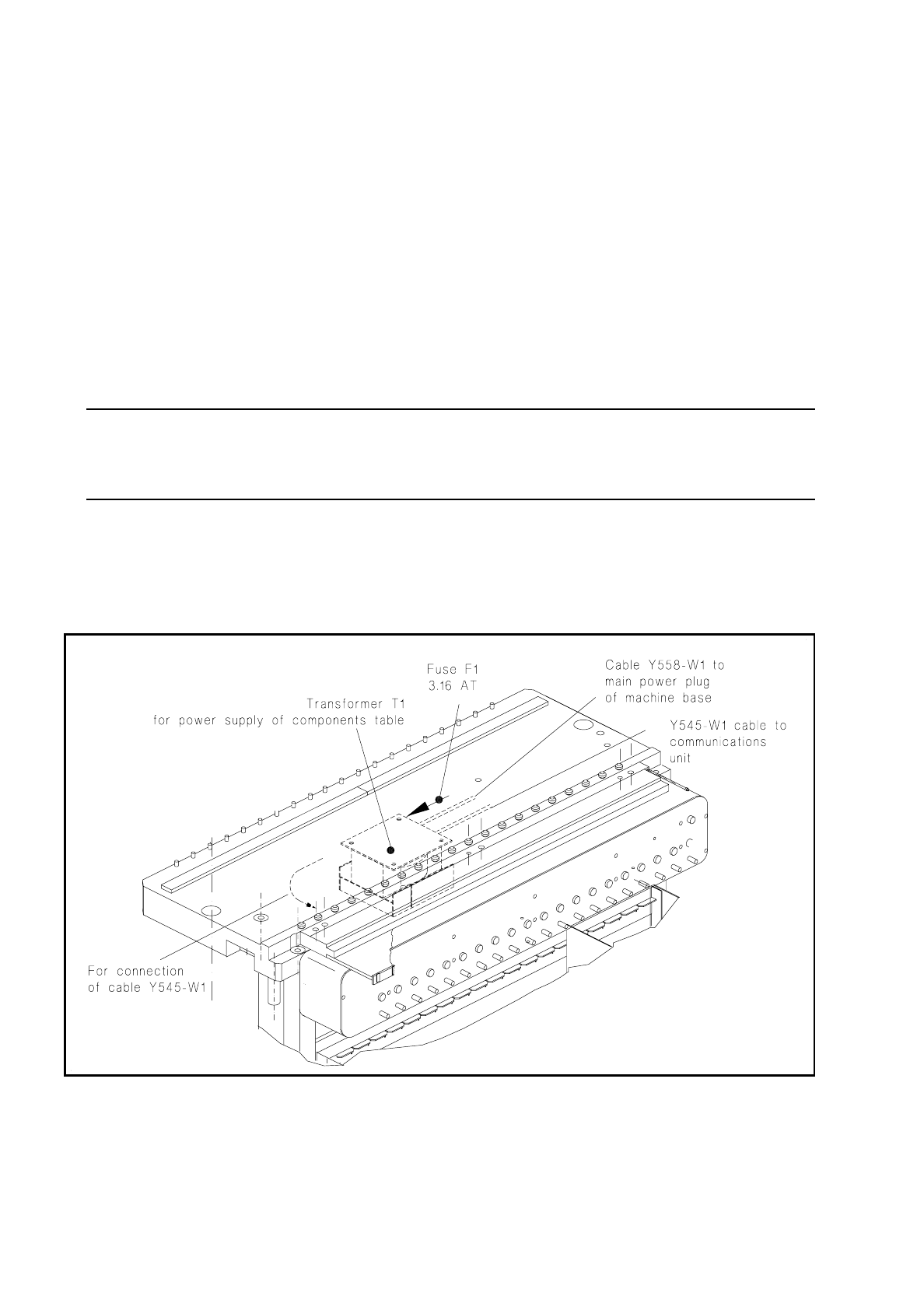
Unscrew and remove the fuse F1 at the transformer T1 (see Fig. 7.3.1).
–
If the fuse is defective, first, where possible, remove the cause of the problem, which should be looked
for on the output side of the transformer:
If necessary, remove the communications unit (see section 7.5 "Communications Unit") and use the
meter at the 5-pin plug (cable of power supply communications unit) to see whether there is a short
circuit in the cable or in the transformer winding. Please observe the following NOTE!
–
If you can correct the short circuit in another way, replace the 3.16 AT fuse.
NOTE
The transformer T1 and / or the cables Y558-W1 and Y545-W1 at the transformer (see Fig. 7.3.1) will be
replaced only by the SMD Service department of Siemens AG.
●
Install the components changeover table back in the machine in the reverse sequence of operations to
removal as described above. Make sure the plug connections (mains plug and X37, and, if applicable,
pneumatic connection) are firmly seated.
●
Switch the machine on and start the placement sequence.
Fig. 7.3.1 Components table power supply: checking and replacing the fuse