80S-15贴片机.pdf - 第275页
SIPLACE 80S/F/G Service Manual 8 IC Head Edition 01/97 8 - 27 8.6 Measur e Nozzl e Ch anger 8.6.1 Tools, Equipmen t 8.6.2 Determine X/Y-Coor dinates of the Nozzle Garages ● Select the fol lowing men u sequenc e from th e…

8 IC Head SIPLACE 80S/F/G Service Manual
Edition 01/97
8 - 26
SIPLACE 80S/F/G Service Manual 8 IC Head
Edition 01/97
8 - 27
8.6 Measure Nozzle Changer
8.6.1 Tools, Equipment
8.6.2 Determine X/Y-Coordinates of the Nozzle Garages
●
Select the following menu sequence from the SITEST program:
Functions
↵
Nozzle changer
↵
Nozzle changer IC head
↵
Calibrate nozzle changer complete
8.6.3 Determine Nozzle Pick-Up Angle
The nozzle pick-up angle is the angle at which the nozzle is removed from the garage.
●
Connect the test box as described in the Adjusting Instructions.
●
Place a nozzle on the nozzle support (spring steel sheet).
●
Deactivate the dr axis.
●
Manually turn the sleeve until the nozzle can be moved into the garage.
●
Read the corresponding dr axis value on the test box.
●
Divide the value determined by two and enter this value in the menu. As a rule the values should be about
9500.
PLEASE NOTE
It is generally sufficient to determine the value for one nozzle and then to use this value for the other noz-
zles.
The values in the test program for ’pick-up at d pos. or ’lock in place at d pos.‘ are used only to pick-up or
set down the nozzles correctly. They are not saved. In the menu item ’Pick-up angle’ the value will be
stored in the file Real.Ma.
8.6.4 Determine Pick-Up Height
●
Select the following menu sequence from the SITEST program:
Functions
↵
Nozzle changer
↵
Nozzle changer IC head
↵
Pick-up or return nozzle. The correct pick-up
height is determined by picking up and returning the nozzle.
From item number
SITEST program V
≥
203.000
Nozzle removal tool 00311448-01
Test box
Adjusting Instructions
8 IC Head SIPLACE 80S/F/G Service Manual
Edition 01/97
8 - 28
8.6.5 Insert Nozzle into Nozzle Changer
●
Manually insert the new or serviced nozzles in the correct order into the nozzle changer.
●
Using the nozzle removal tool, turn each nozzle to the left in order to lock it in place in the nozzle changer.
●
Select the station menu functions Gantry 1
↵
Nozzle changer configuration to display the assignment and
check the desired and actual values of the assignment for consistency.
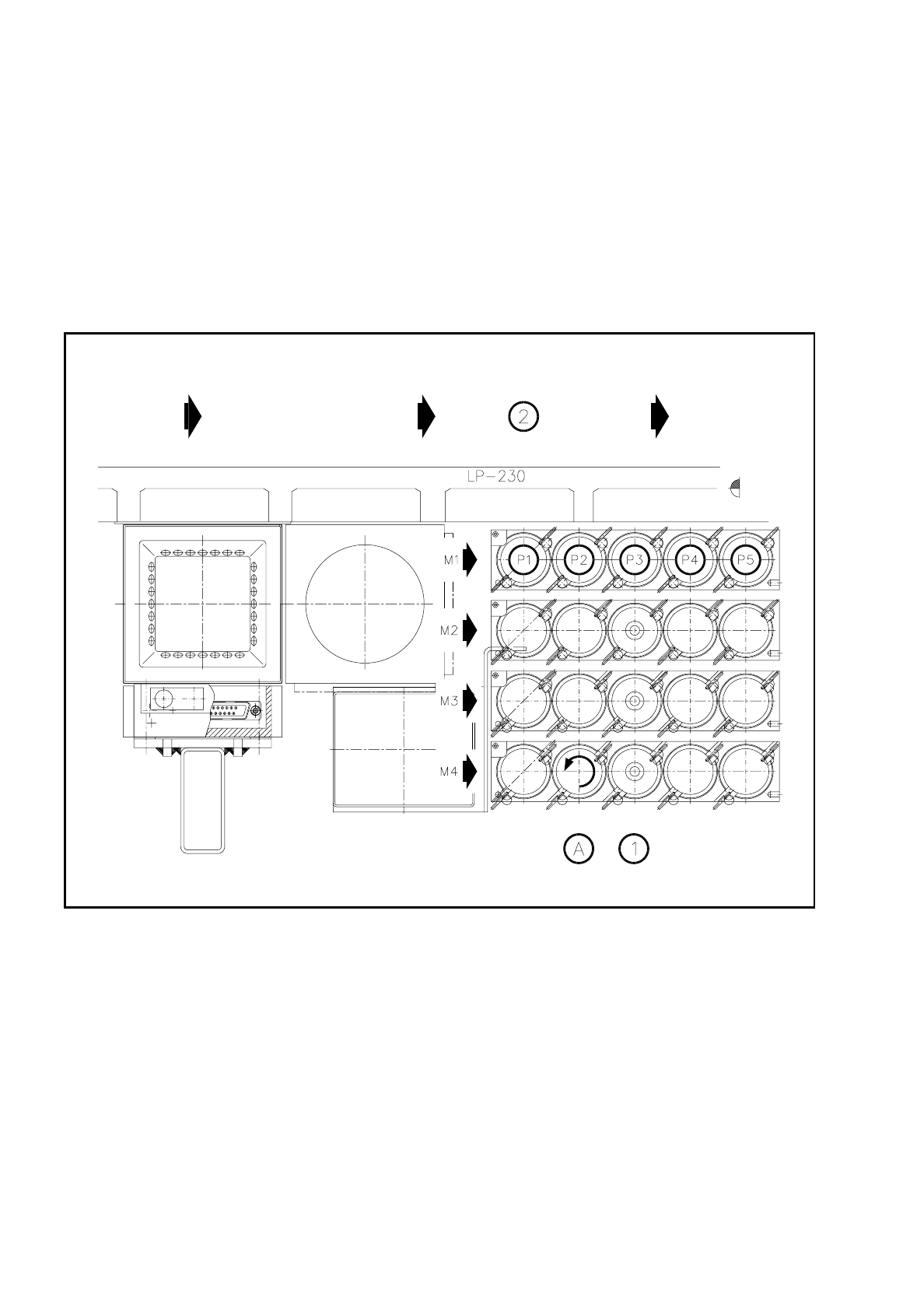
The general assignments are shown in the following diagram.
Fig. 8.6.1 Garage number of the nozzle changer
Key to Fig. 8.6.1
1 Nozzles 2 PCB transport direction
A Lock nozzle in place by turning to the left