80S-15贴片机.pdf - 第435页
SIPLACE 80S/F/G Service Manual 9 Revolver Head Edition 04/97 9 - 151 Fig. 9.20.2 Sz axis drive Key to F ig. 9 .20.2 ● Loosen t he M6x 0.5 hexago n nut fo r fixing th e cam d isk (see item 5 in Fig. 9.2 0.2). ● Remove the…
9 Revolver Head SIPLACE 80S/F/G Service Manual
Edition 04/97
9 - 150
PLEASE NOTE:
Note the order of the segments and from which star position you removed the segments. In this way, you
will ensure that the configuration will be correct when you refit the segments.
●
Remove the cable ties and detach connector X15 on the ’Small axis’ conversion board Y0005 (see Fig.
9.12.1 on page 9 - 98).
●
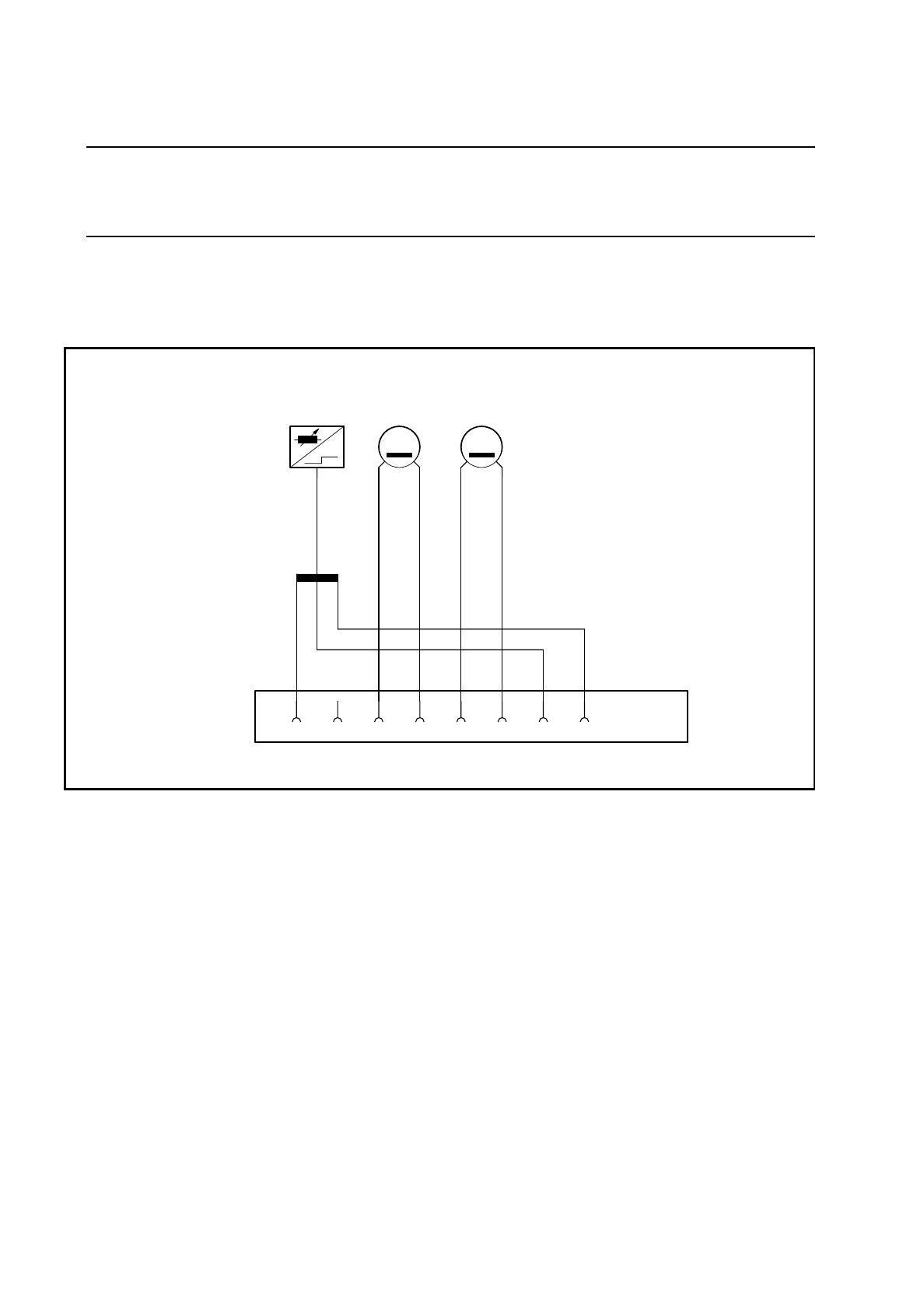
Disconnect the motor and tacho cables from connector X1 (see items 3, 4, 5 and 6 in Fig. 9.20.2).
Fig. 9.20.1 Connector assignment for the DC motor and BERO of the sz axis
Key to Fig. 9.20.1
●
Dismantle the PCB camera (see items 1. 2, 3, 6 and 8 in Fig. 9.14.1 on page 9 - 108) and the cover (see
item 4 in Fig. 9.14.1 on page 9 - 108) as described in Section 9.14.2 on page 9 - 107.
3 Tacho connection: blue 1 BERO connection: black
4 Tacho connection: white 7 BERO connection: brown
5 Motor connection: black 8 BERO connection: blue
6 Motor connection: red X1 Connector for slot X15 on the
’Small axis’ conversion board Y0005
X1
+-
T
-+
M
21 345678
B1 Tacho Motor
SIPLACE 80S/F/G Service Manual 9 Revolver Head
Edition 04/97
9 - 151
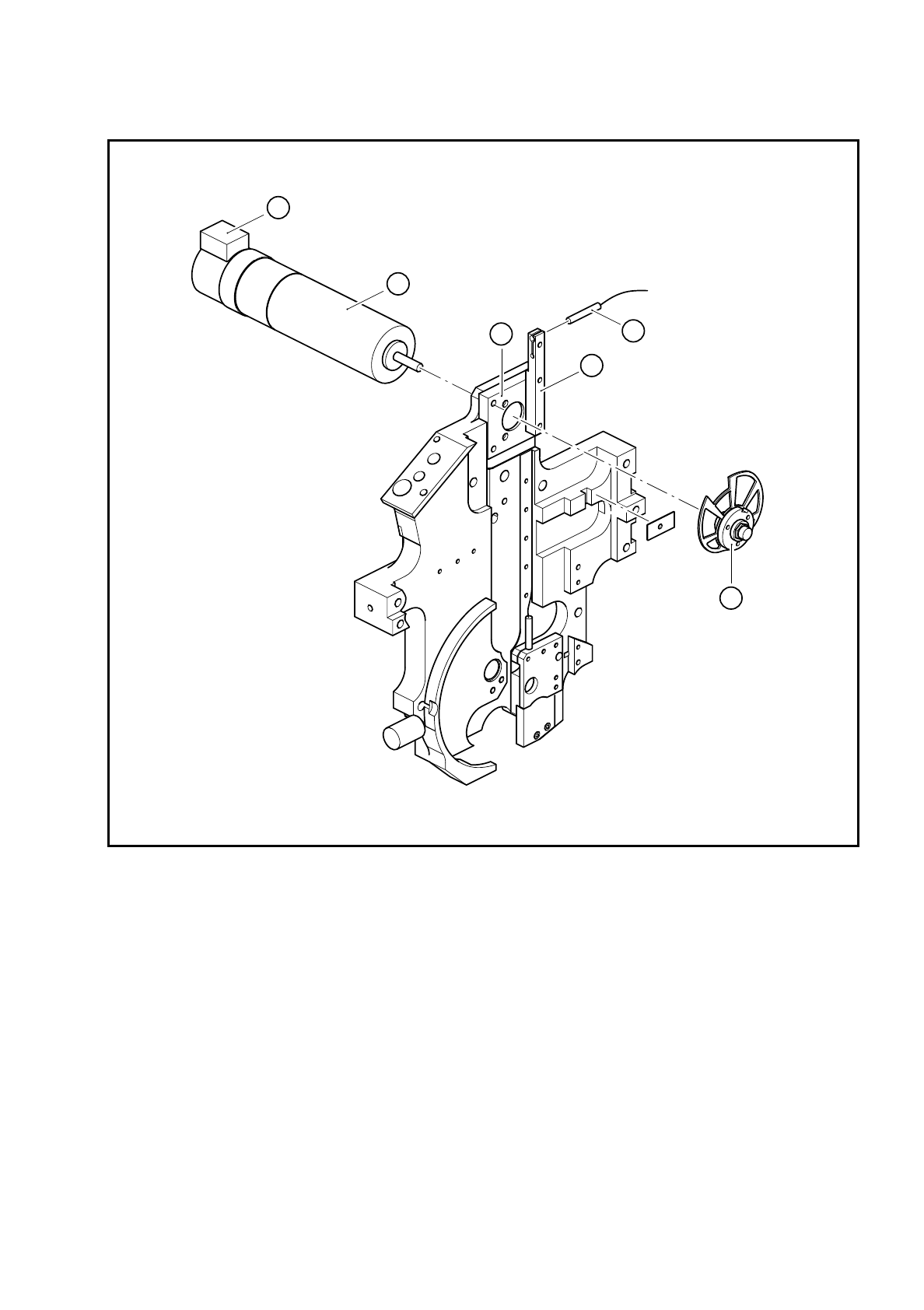
Fig. 9.20.2 Sz axis drive
Key to Fig. 9.20.2
●
Loosen the M6x0.5 hexagon nut for fixing the cam disk (see item 5 in Fig. 9.20.2).
●
Remove the cam disk.
●
Loosen the three M3x6 countersunk screws on the motor mount (see item 2 in Fig. 9.20.2).
●
Replace the DC servo motor (see item 1 in Fig. 9.20.2) and fix in place.
1 DC servo motor 28GDT12 and incremental shaft encoder
2 Motor mount
3 3RG4603 2AB00 BERO
4 BERO holder
5 Completely assembled cam
A The incremental shaft encoder points upwards
5
2
1
4
3
A

9 Revolver Head SIPLACE 80S/F/G Service Manual
Edition 04/97
9 - 152
PLEASE NOTE:
Position the sz motor so that the incremental shaft encoder points upwards (see point A in Fig. 9.20.2).
●
Fix the cam disk on the motor shaft.
●
Wire up the motor as shown in the wiring diagram in Fig. 9.20.1.
●
After assembly, check the dynamic behavior and functioning of the sz axis with reference to the adjust-
ment instructions and using the SITEST program.
9.20.4 Replacing the cam disk
Dismantling and assembly of the cam disk are described in Section 9.20.4 on page 9 - 152.
●
After assembly, check the dynamic behavior and functioning of the sz axis with reference to the adjust-
ment instructions and using the SITEST program.
9.20.5 Replacing the BERO of the sz axis
●
Loosen the clamping screw on the BERO holder (see item 4 in Fig. 9.20.2).
●
Replace the BERO.
The electrical connections are shown in Fig. 9.20.1.
●
Use a 0.15 mm feeler gauge to adjust the operating distance of the BERO for the sz axis.
●
Then check the functioning of the BERO using the SITEST program.