80S-15贴片机.pdf - 第456页
10 Si plac e G au tom atic g lue ap plic ator SIPLA CE 80 S/80 F/G Servi ce Ma nua l Ed itio n 06 /98 10 - 20 Fig. 10 .2.6 Overview : Replac ing the di spensin g valve (gl ue appl ication h ead 2) Key t o Fig. 10.2 .6 1 …
10 Siplace G automatic glue applicator SIPLACE 80S/80F/G Service Manual
Edition 06/98
10 - 16
10.2.5.1 Removal
PLEASE NOTE
It is not necessary to dismantle the glue application head in order to remove the direct-drive motor. It is also
unnecessary to slacken the toothed belt.
● Detach the electrical connections on the direct-drive motor to be replaced. To do this, disconnect the two
plugs from the small axis conversion board at the top of the gantry. Remove the cable ties from the small
axis conversion board.
● Loosen the fixing screws on the direct-drive motor (3 x M3 hexagon socket-head screws). The fixing
screws can be accessed from the bottom of the mini-gantry.
For the Y2 axis direct-drive motor only: Remove the elastomeric spring before loosening the third fixing
screw. Hold a hammer at the top of the mini-gantry and tap the clamping collar holding the elastomeric
spring out from below. Use a 3.9 mm diameter drift punch. Then remove the elastomeric spring from the
mini-gantry.
● Lift the direct-drive motor out from the top of the mini-gantry.
10.2.5.2 Installation
● Place the new direct-drive motor in the mini-gantry, making sure that the toothed belt runs around the
toothed belt wheel. The incremental encoder on the direct-drive motor must be aligned at the back (away
from the glue application head).
● Screw in the three fixing screws of the direct-drive motor and secure with Loctite adhesive.
● Only for the Y2 axis direct-drive motor: Refit the elastomeric spring once you have tightened all three fixing
screws. Insert the elastomeric spring in the mini-gantry. Hold a hammer at the top of the mini-gantry and
then tap the clamping collar in from below.
● Connect the two plugs for the direct-drive motor to the small axis conversion board at the top of the gantry.
Fix the cable to the small axis conversion board once more using cable ties.
● Check the tension of the toothed belt and tighten, if necessary. A description of the tensioning process is
given in Section 10.3.
● Run the "Calibrate mini-gantry" function in order to determine the zero point correction and the minimum
and maximum travel distances.
● Check the dynamic behavior of the X2/Y2 axis. If necessary, set the dynamic behavior as described in
Section 10.3.
● Determine the offset between heads 1 and 2 and head 3 (see Section 10.3).
● Map the X2 and Y2 axis (see Section 10.3.3.6, page 10 - 30 -”Mapping the X2/Y2 axes (mini-gantry map-
ping)”).
SIPLACE 80S/80F/G Service Manual 10 Siplace G automatic glue applicator
Edition 06/98
10 - 17
10.2.6 Replacing the toothed belt (X2/Y2 axis drive)
PLEASE NOTE
The procedures for replacing the toothed belts for the X2 and Y2 axes are almost identical. Consequently,
only replacement of the X2 toothed belt will be described here.
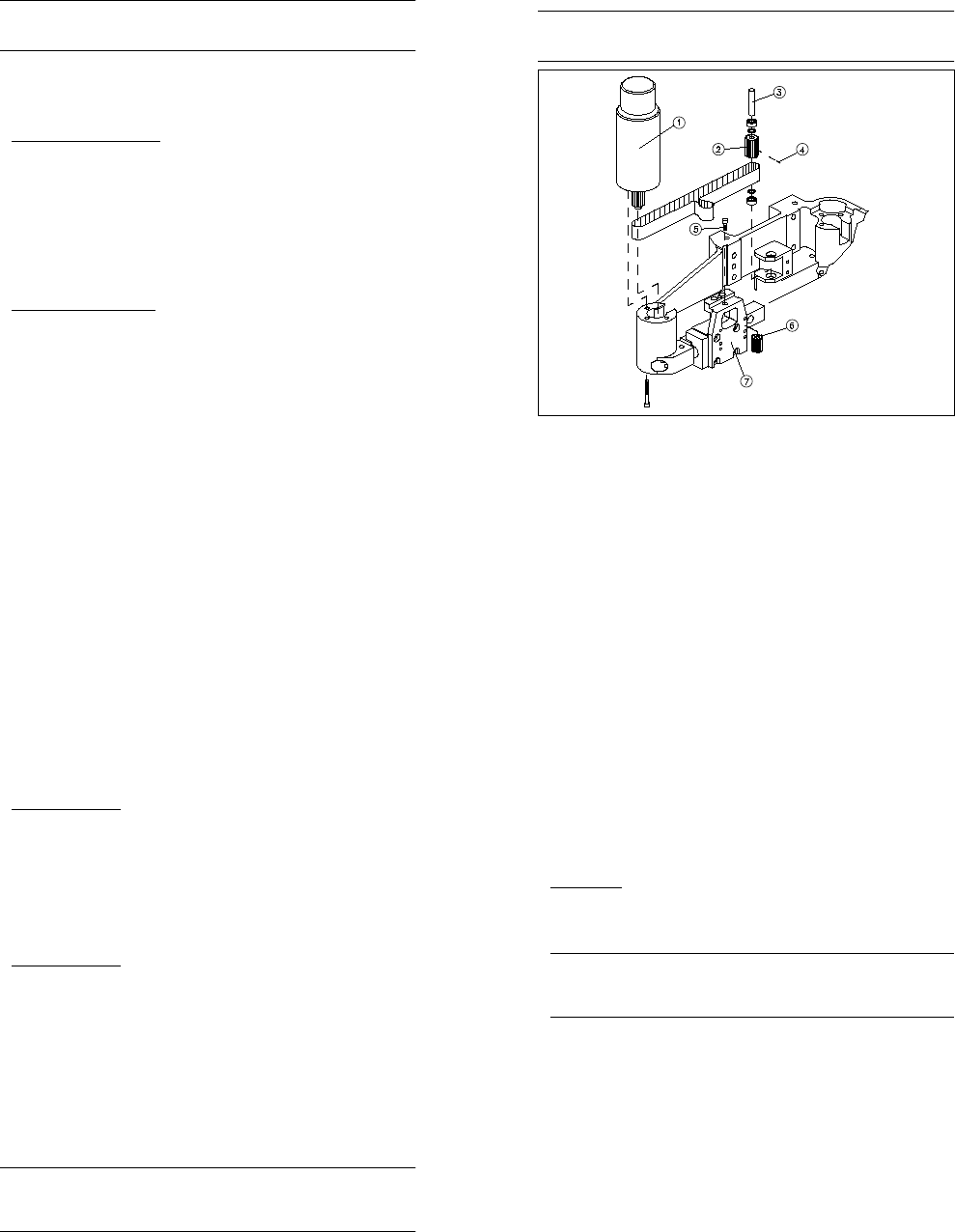
Fig. 10.2.5 Overview: Replacing the toothed belt (X2 axis)
Key to Fig. 10.2.5
1 X axis direct-drive motor
2 Synchronizing disc (deflection pulley)
3 Axle of the deflection pulley
4 Stud bolt for clamping the deflection pulley
5 Fixing screw of the idler pulley
6 Idler pulley
7 Angle bracket
10 Siplace G automatic glue applicator SIPLACE 80S/80F/G Service Manual
Edition 06/98
10 - 18
10.2.6.1 Removal
● Dismantle the direct-drive motor of the mini-gantry axis concerned (see previous section). Do not detach
the electrical connections from the direct-drive motor.
● Open the angle bracket by removing the fixing screw from the idler pulley (1 x M4 hexagon socket-head
screw). Then remove the idler pulley from the toothed belt fastener.
● For the X2 toothed belt only:
● Release the clamping on the deflection pulley. To do this, remove the small stud bolt in the teeth of the
deflection pulley (see Fig. 10.2.5).
● Using a drift punch (diameter 3.9 mm), tap the shaft of the deflection pulley out through the bottom.
● Remove the toothed belt from the machine.
10.2.6.2 Installation
● Thread the new toothed belt into the angle bracket.
● Insert the idler pulley in the angle bracket once more. The toothed belt must wrap around the idler pulley.
Do not fully tighten the fixing screw of the idler pulley.
● For the X2 toothed belt only:
● First place the toothed belt around the deflection pulley and then refit the deflection pulley.
● Clamp the deflection pulley by screwing the small grub screw back into the deflection pulley.
● Insert and tighten the screws of the direct-drive motor (see Section 10.2.5).
● Tension the toothed belt (see Section 10.3).
● Run the "Calibrate mini-gantry" function in order to determine the zero point correction and the minimum
and maximum travel distances.
● Check the dynamic behavior of the X2/Y2 axis. If necessary, set the dynamic behavior as described in
Section 10.3.
● Determine the offset between head 1 and 2 and head 3 (see Section 10.3).
● Map the X2 and Y2 axes (see Section 10.3).
10.2.7 Replacing the dispensing valve
PLEASE NOTE
The dispensing pressure unit has two valves: a dispensing valve and an air relief valve. Before replacing,
check which of the two valves is defective. Then order the correct replacement valve. Replacement of both
the dispensing valve and the air relief valve is described below.
SIPLACE 80S/80F/G Service Manual 10 Siplace G automatic glue applicator
Edition 06/98
10 - 19
10.2.7.1 Removal
● Detach the ribbon cable from the gluing head board of the glue application head. To do this, push down on
the plug retainers.
● Remove the entire dispensing pressure unit from the glue application head. To do this, loosen the fixing
screws on the mount or the separator (2 x M4 hexagon socket-head screws, see Fig. 10.2.6).
● Remove the three plugs from the controller of the dispensing valve/air relief valve (at the bottom of the glu-
ing head board).
● Loosen the four cap nuts and remove the gluing head board from the dispensing pressure unit. When you
do this, pull the pressure sensor connecting tube carefully from the dispensing pressure unit.
● Disconnect the dispensing pressure line from the quick-release coupling of the dispensing pressure unit.
● Disconnect the black air line from the gantry to the dispensing valve.
● Gluing head 2 only: Remove the separator from the dispensing pressure unit. To do this, loosen the fixing
screws on the separator (2 x M3 hexagon socket-head screws).
● First mark the position of the covers on the dispensing pressure unit. Then loosen the fixing screws on the
covers (4 x M3 spacer bolts plus 2 x M3 hexagon socket-head screws). Then carefully lift the cover.
● Remove the cover gasket.
PLEASE NOTE
Mark the position of the dispensing valve on the dispensing pressure unit before removing the valve. You
will also note that there is a hole drilled through one of the two fixing screws of the dispensing valve. Mark
the position of this fixing screw as well.
● Dismantle the dispensing valve by loosening the fixing screws (2 x M3 hexagon socket-head screws) on
the inside of the dispensing pressure unit.
● Loosen the fixing screw of the air relief valve (1 x M10 hex screw) on the inside of the dispensing pressure
unit using a special thin socket spanner.
● Remove the entire dispensing valve and air relief valve from the dispensing pressure unit.
10 Siplace G automatic glue applicator SIPLACE 80S/80F/G Service Manual
Edition 06/98
10 - 20
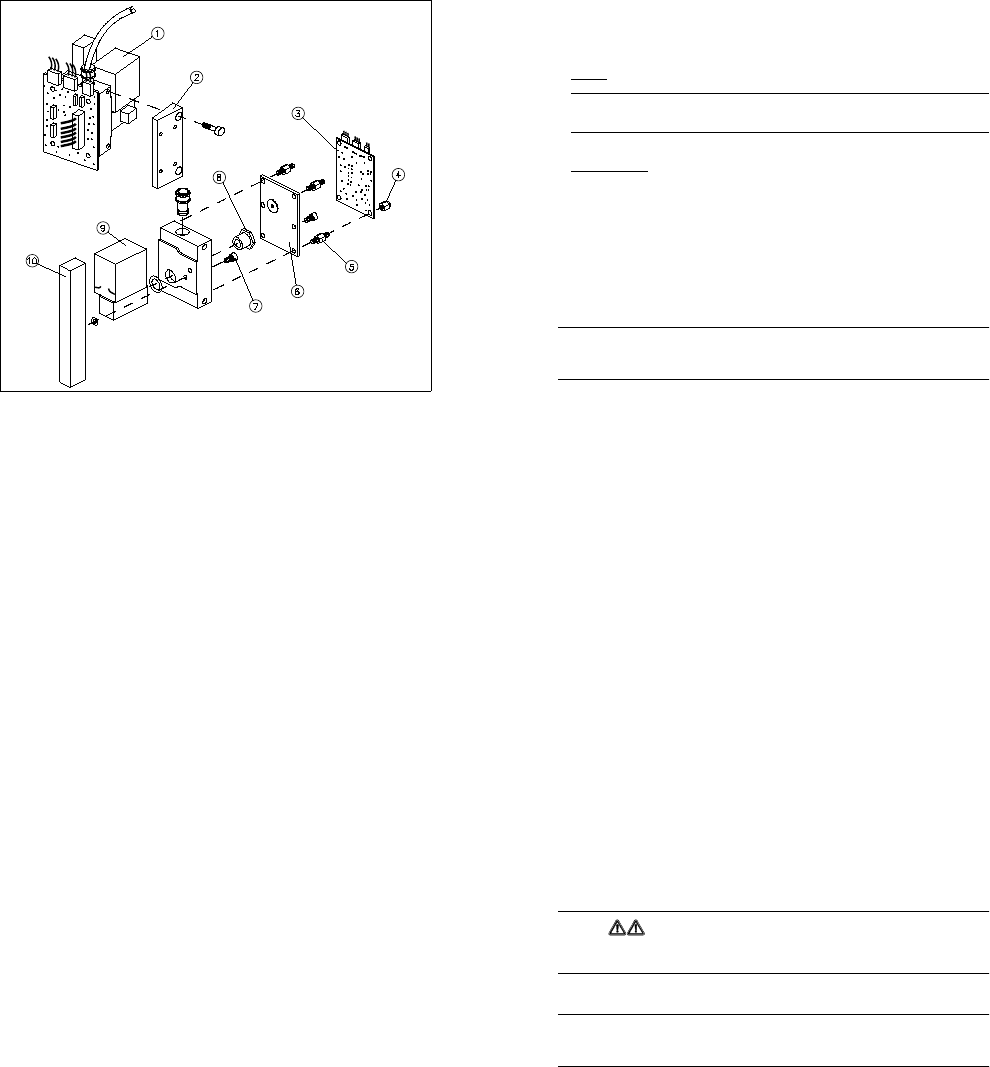
Fig. 10.2.6 Overview: Replacing the dispensing valve (glue application head 2)
Key to Fig. 10.2.6
1 Complete dispensing pressure unit
2 Separator
3 Conversion board for gluing head Y0052 (gluing head board)
4 Cap nut (4 x for fixing the gluing head board)
5 Spacer bolts
6 Cover
7 Drilled fixing screw for the dispensing pressure unit
8 Fixing screw for the air relief valves
9 Air relief valve
10 Dispensing valve
SIPLACE 80S/80F/G Service Manual 10 Siplace G automatic glue applicator
Edition 06/98
10 - 21
10.2.7.2 Installation
● Screw the new air relief valve firmly to the dispensing pressure unit. Replace the seal at the same time.
● Fit the new dispensing valve. Align it carefully against the installation marks. Screw the fixing screw with
the hole drilled through it into the hole you marked. Replace the seal at the same time.
● Replace the cover on the dispensing pressure unit. Align it carefully against the installation marks.
ALWAYS
replace the cover gasket.
PLEASE NOTE
The long threads of the spacer bolts are screwed into the dispensing pressure unit.
● Place the dispensing pressure line back on the dispensing pressure unit.
● Gluing head 2 only: Fit the separator on the dispensing pressure unit once more.
● Replace the gluing head board on the dispensing pressure unit. As you do so, carefully push the connect-
ing tube of the dispensing pressure sensor into the dispensing pressure unit. Then tighten the four cap
nuts. Do not forget the washers.
● Check the seals of the dispensing pressure unit (see Section 10.3).
● Fit the entire dispensing pressure unit on the glue application head once more.
● Reconnect the three plugs for controlling the dispensing valve/air relief valve to the gluing head board.
10.2.8 Replacing the reed switch/heat exchanger
PLEASE NOTE
On the glue application head, the heat exchanger, ribbon cable and reed switch form a single unit. Conse-
quently, the heat exchanger, ribbon cable and reed switch must all be replaced at the same time.
● Disconnect the ribbon cable of the heat exchanger from the gluing head board.
● Loosen the fixing screws (2 x M2 hexagon socket-head screws) to remove the two retaining plates from
the ribbon cable.
● Loosen the fixing screws on the heat exchanger (2 x M3 hexagon socket-head screws). Remove the heat
exchanger together with the reed switch and ribbon cable.
● Screw the new heat exchanger to the glue application head, pressing the heat exchanger down onto the
stop as you do so.
● Fit the two retaining plates on the ribbon cables. Make sure that the ribbon cable is laid correctly, so that
the z axis cannot be damaged if it moves.
● Connect the ribbon cable to the gluing head board once more.
● Carry out all the position corrections described under "Replacing the glue application head". See also the
PLEASE NOTE box in Section 10.2.3.2 "Installation".
10 Siplace G automatic glue applicator SIPLACE 80S/80F/G Service Manual
Edition 06/98
10 - 22
● Check the settings of the temperature sensors for the new heat exchangers. Adjust the temperature sen-
sor, if necessary (see Section 10.3).
● Once you have completed the settings, carry out a short functional test of the new reed switch/heat
exchanger.
SIPLACE 80S/80F/G Service Manual 10 Siplace G automatic glue applicator
Edition 06/98
10 - 23
10.3 Settings on the SIPLACE G automatic glue appli-
cator
10.3.1 Overview
This chapter describes the settings for the SIPLACE G glue application heads. Always follow the safety
instructions in Section 10.2.1 when changing the settings.
WARNING
Many of the settings are changed using the SIKLEBER test program. The SIKLEBER test program must only
be used by authorized Siemens AG personnel who have been trained in the use of the program.
The description of the settings relates to version 5.xx of the SIKLEBER test program.
PLEASE NOTE
Use the "Store MA data" function to check that the data has been saved under the name "REAL.MA". If this is
not the case, modify the file name in the "Name" menu option.
10.3.1.1 Tools required
You will need the equipment listed in this section in order to change the settings of the glue application heads.
- 1 digital multimeter (Multizet)
- 1 four-channel storage oscillograph (a two-channel storage oscillograph could also be used)
- 1 axis testing device
- 1 compressed air measuring device (digital)
- 1 belt tension measuring device
- 1 SIKLEBER test program, version 5.xx
- 1 aluminum test PCB (approximately 250 mm x 350 mm x 2 mm)
- 1 machine zero point gauge
- 1adjusting screwdriver
- 1 set of hexagon socket screw keys
- 1 x diagonal cutter, small
10 Siplace G automatic glue applicator SIPLACE 80S/80F/G Service Manual
Edition 06/98
10 - 24
Settings
(from left to right)
Reason for
settings
Determine zero offset for axis z1, z2, z3
Check / set belt tension
Check / set dynamic response of axis
Check / set temperature sensor
Check / set pressure sensor
Set jumper X12 gantry 1
Set jumper X29 gantry 1
Set ambient temperature sensor
Distance scale - scanning head 0.4 mm
±
0.05mm
Set track signals X1 axis
Set track signals Y1 axis
Replacement of motor z1, z2, z3 X X
Replacement of motor x2, y2 X X
Replacement of toothed belt x2/, y2 X X
Replacement of heat exchanger X
Replacement of DE1, DE2, DE3 X X X
Replacement of scale / scanning head X1 X X
Replacement of scale / scanning head Y1 X X
Replacement of small axis conversion board
(Y0055)
XX X
Replacement of large axis conversion board
(Y0004)
XX
SIPLACE 80S/80F/G Service Manual 10 Siplace G automatic glue applicator
Edition 06/98
10 - 25
Calibration
(from left to right)
Reason for
calibration
Calibrate mini-gantry
Calibrate PCB camera
Offset between DE3 and PCB camera
Offset between DE3 and DE1/ DE2
X2 / Y2 mapping
Calibrate machine zero point
Record travel distance X1/ Y1 axis
Calibrate position of calibrating part
Calibrate placement nest
Replacement / assembly of PCB camera X X X X
Replacement / assembly of scale / scanning head
X1/Y1
X
Replacement of dispensing unit 1/2 (DE1 / DE2) X X
Replacement of dispensing unit 3 (DE3) X X X
Replacement of motor z1, z2 X X
Replacement of motor z3 X X X
Replacement of motor x2, y2 X X X
Replacement of toothed belt x2/ y2 X X X
Replacement of heat exchanger DE1 / DE2 X X
Replacement of heat exchanger DE3 X X
Change of calibrating part position: standard/ right /
left conveyor
X
Replacement of stopper, clamping rail, fixed side of
conveyor
X
10 Siplace G automatic glue applicator SIPLACE 80S/80F/G Service Manual
Edition 06/98
10 - 26
10.3.3 Adjusting the zero points
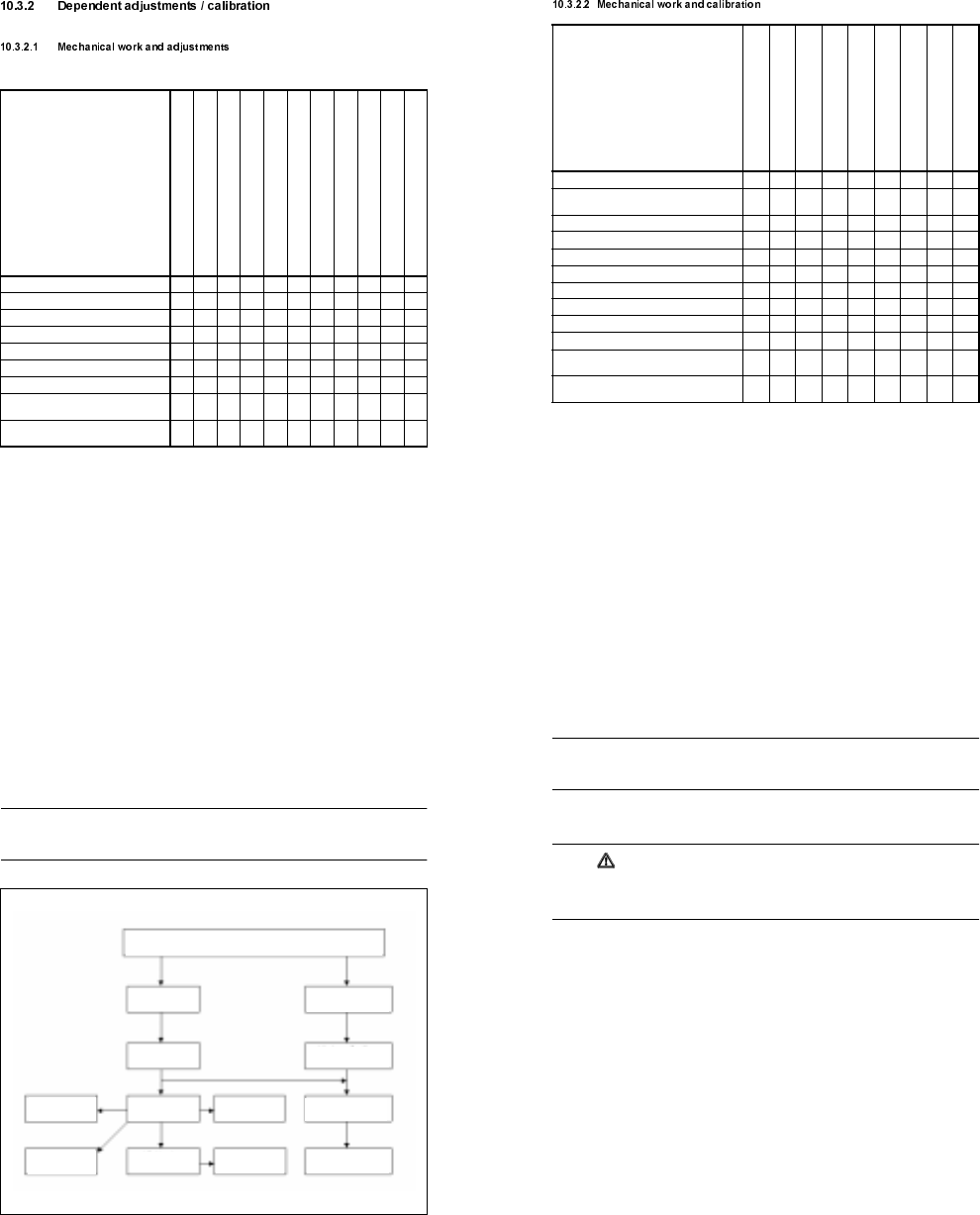
When certain components of the SIPLACE G are replaced, the machine must be measured again. Partial or
full calibration of the machine may be required. The following overview shows the order and interdependen-
cies of the individual calibration procedures (see Fig. 10.3.1). Important note: Before carrying out any calibra-
tion procedures, always check which procedures are required. For example, the PCB camera must be
calibrated before the offset between the PCB camera and glue application head 3 may be recorded.
PLEASE NOTE
The reference point for all offset calculations is the fixed glue application head 3. The machine can be mea-
sured more quickly if an aluminum test PCB is moved crosswise onto the center conveyor.
Fig. 10.3.1 Order for calibrating/setting the SIPLACE G
PCB camera
offset to head 3
Machine
zero point
Min./max. position
of X1/Y1 axes
Calibrating
the PCB camera
Automatic
width adjustment
PCB mapping
D3 mapping
Mapping of
X2/Y2 axes
Min./max. position of
X2/Y2 axes
Position of pos. cali-
bration tool
Zero point correction of Z1, Z2 and Z3 axes
Zero point correction of
X2/Y2 axes
Offset of heads 1 and 2
to head 3
SIPLACE 80S/80F/G Service Manual 10 Siplace G automatic glue applicator
Edition 06/98
10 - 27
10.3.3.1 Zero point correction for the z axes
PLEASE NOTE
The zero point correction for the z axis(es) must be carried out before all other settings. A zero point correc-
tion is always required when the cam disc is released.
● Before the reference run for the z axis, release the cam disc and then clamp it lightly. To do this, loosen the
clamping screw on the hub of the cam disc and then tighten it again manually.
CAUTION
The cam disc must be released before the reference run. In the event of a wiring error (e.g. tacho confused
with motor), the axis can run away at full speed and damage the Z axis carriages. It is also possible for the
zero reference mark to be behind the cam disc, in which case the z axis would lie against the end stop.
● Load the SIKLEBER test program. Please read the warnings at the start of this chapter.
● Connect the axis testing device to the Z axis board. On the axis testing device, select the display for the
corresponding z axis.
● Set the zero point correction for the z axis to a provisional value of 10 digits. To do this, select the "Axes"
menu, followed by "Z axis ...", then "Change axis data", then "Positions" and then "Zero point correction".
● Start a reference run for the z axis by selecting the "Run axis reference" option. Press the Return key to
start the Z axis direct-drive motor running clockwise.
● Switch the z axis off briefly and then on again at the axis board. The motor will then reverse its direction of
rotation and search for the zero pulse. Once it finds the zero pulse, the axis board will set the ACTUAL
position counter to -10 digits (negative zero point correction). The reference point has been reached when
the counter position = 0 (end signal).
● Turn the cam disc counterclockwise as far as the stop (with the nose of the cam disc lying against the top
ball bearing).
● Set the z axis to 680 digits. The cam disc can still be easily clamped.
● Switch off the servo and carefully move the cam disc until the clamping screw on the hub is easily accessi-
ble. Tighten the clamping screw with an Allen key.
● Ensure that the cam disc is aligned centrally with respect to the top and bottom ball bearings.
● If the position of the cam disc on the motor shaft does not change after you tighten the screw, the maxi-
mum travel distance is still 680 digits. Otherwise, enter the precise zero point correction in the machine
data.
● The precise zero point correction can be calculated as follows:
Formula: Actual distance - Desired distance = Difference
Figures: 656 - 680 = -24
Calculation: Prov. ZP corr. + Difference = zero point correction
10 + (-24) = -14