80S-15贴片机.pdf - 第458页
10 Si plac e G au tom atic g lue ap plic ator SIPLA CE 80 S/80 F/G Servi ce Ma nua l Ed itio n 06 /98 10 - 28 ● Enter the new zero point correc tion in the machine da ta. T o do this, select t he "Change axis data&q…
10 Siplace G automatic glue applicator SIPLACE 80S/80F/G Service Manual
Edition 06/98
10 - 24
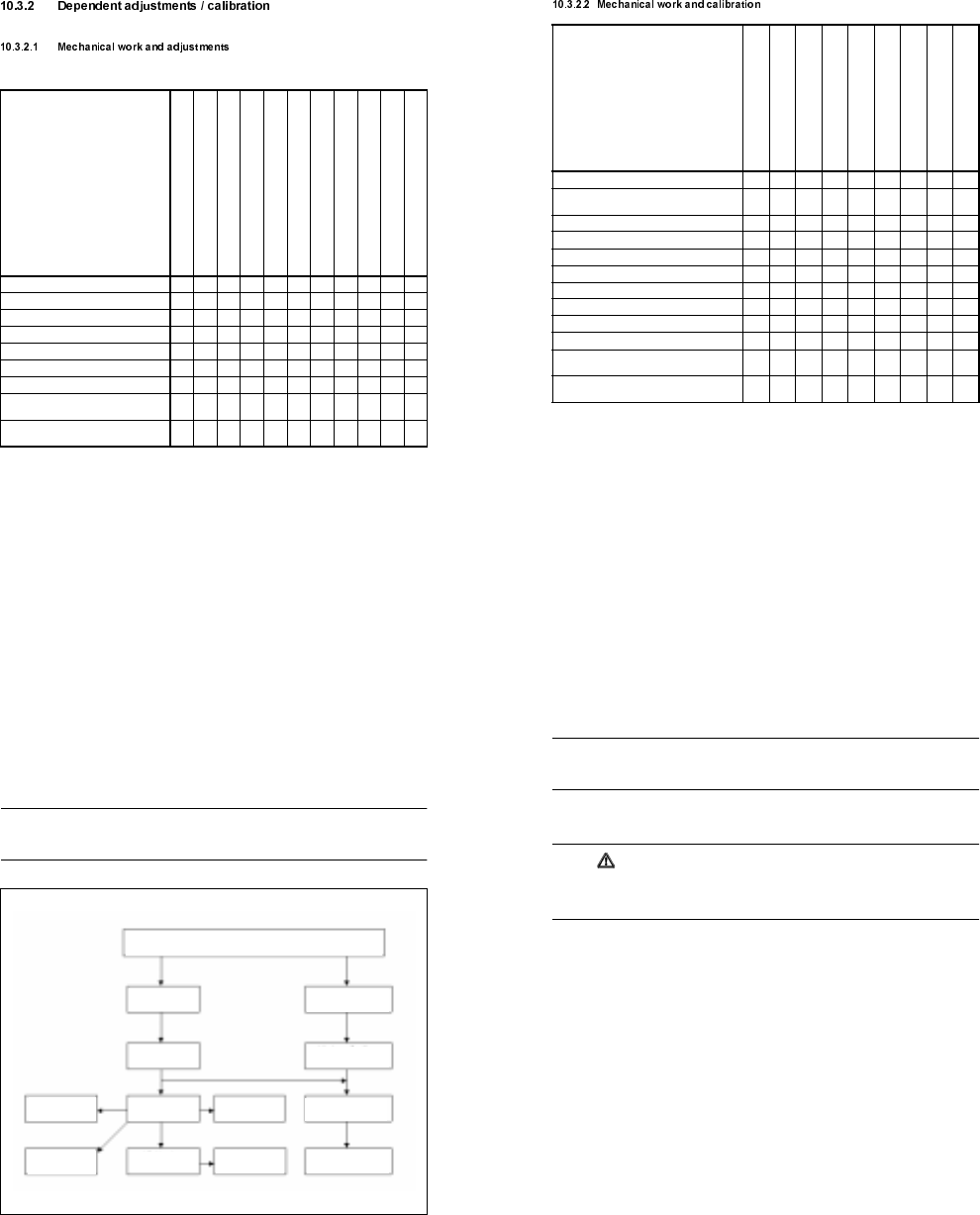
Settings
(from left to right)
Reason for
settings
Determine zero offset for axis z1, z2, z3
Check / set belt tension
Check / set dynamic response of axis
Check / set temperature sensor
Check / set pressure sensor
Set jumper X12 gantry 1
Set jumper X29 gantry 1
Set ambient temperature sensor
Distance scale - scanning head 0.4 mm
±
0.05mm
Set track signals X1 axis
Set track signals Y1 axis
Replacement of motor z1, z2, z3 X X
Replacement of motor x2, y2 X X
Replacement of toothed belt x2/, y2 X X
Replacement of heat exchanger X
Replacement of DE1, DE2, DE3 X X X
Replacement of scale / scanning head X1 X X
Replacement of scale / scanning head Y1 X X
Replacement of small axis conversion board
(Y0055)
XX X
Replacement of large axis conversion board
(Y0004)
XX
SIPLACE 80S/80F/G Service Manual 10 Siplace G automatic glue applicator
Edition 06/98
10 - 25
Calibration
(from left to right)
Reason for
calibration
Calibrate mini-gantry
Calibrate PCB camera
Offset between DE3 and PCB camera
Offset between DE3 and DE1/ DE2
X2 / Y2 mapping
Calibrate machine zero point
Record travel distance X1/ Y1 axis
Calibrate position of calibrating part
Calibrate placement nest
Replacement / assembly of PCB camera X X X X
Replacement / assembly of scale / scanning head
X1/Y1
X
Replacement of dispensing unit 1/2 (DE1 / DE2) X X
Replacement of dispensing unit 3 (DE3) X X X
Replacement of motor z1, z2 X X
Replacement of motor z3 X X X
Replacement of motor x2, y2 X X X
Replacement of toothed belt x2/ y2 X X X
Replacement of heat exchanger DE1 / DE2 X X
Replacement of heat exchanger DE3 X X
Change of calibrating part position: standard/ right /
left conveyor
X
Replacement of stopper, clamping rail, fixed side of
conveyor
X
10 Siplace G automatic glue applicator SIPLACE 80S/80F/G Service Manual
Edition 06/98
10 - 26
10.3.3 Adjusting the zero points
When certain components of the SIPLACE G are replaced, the machine must be measured again. Partial or
full calibration of the machine may be required. The following overview shows the order and interdependen-
cies of the individual calibration procedures (see Fig. 10.3.1). Important note: Before carrying out any calibra-
tion procedures, always check which procedures are required. For example, the PCB camera must be
calibrated before the offset between the PCB camera and glue application head 3 may be recorded.
PLEASE NOTE
The reference point for all offset calculations is the fixed glue application head 3. The machine can be mea-
sured more quickly if an aluminum test PCB is moved crosswise onto the center conveyor.
Fig. 10.3.1 Order for calibrating/setting the SIPLACE G
PCB camera
offset to head 3
Machine
zero point
Min./max. position
of X1/Y1 axes
Calibrating
the PCB camera
Automatic
width adjustment
PCB mapping
D3 mapping
Mapping of
X2/Y2 axes
Min./max. position of
X2/Y2 axes
Position of pos. cali-
bration tool
Zero point correction of Z1, Z2 and Z3 axes
Zero point correction of
X2/Y2 axes
Offset of heads 1 and 2
to head 3
SIPLACE 80S/80F/G Service Manual 10 Siplace G automatic glue applicator
Edition 06/98
10 - 27
10.3.3.1 Zero point correction for the z axes
PLEASE NOTE
The zero point correction for the z axis(es) must be carried out before all other settings. A zero point correc-
tion is always required when the cam disc is released.
● Before the reference run for the z axis, release the cam disc and then clamp it lightly. To do this, loosen the
clamping screw on the hub of the cam disc and then tighten it again manually.
CAUTION
The cam disc must be released before the reference run. In the event of a wiring error (e.g. tacho confused
with motor), the axis can run away at full speed and damage the Z axis carriages. It is also possible for the
zero reference mark to be behind the cam disc, in which case the z axis would lie against the end stop.
● Load the SIKLEBER test program. Please read the warnings at the start of this chapter.
● Connect the axis testing device to the Z axis board. On the axis testing device, select the display for the
corresponding z axis.
● Set the zero point correction for the z axis to a provisional value of 10 digits. To do this, select the "Axes"
menu, followed by "Z axis ...", then "Change axis data", then "Positions" and then "Zero point correction".
● Start a reference run for the z axis by selecting the "Run axis reference" option. Press the Return key to
start the Z axis direct-drive motor running clockwise.
● Switch the z axis off briefly and then on again at the axis board. The motor will then reverse its direction of
rotation and search for the zero pulse. Once it finds the zero pulse, the axis board will set the ACTUAL
position counter to -10 digits (negative zero point correction). The reference point has been reached when
the counter position = 0 (end signal).
● Turn the cam disc counterclockwise as far as the stop (with the nose of the cam disc lying against the top
ball bearing).
● Set the z axis to 680 digits. The cam disc can still be easily clamped.
● Switch off the servo and carefully move the cam disc until the clamping screw on the hub is easily accessi-
ble. Tighten the clamping screw with an Allen key.
● Ensure that the cam disc is aligned centrally with respect to the top and bottom ball bearings.
● If the position of the cam disc on the motor shaft does not change after you tighten the screw, the maxi-
mum travel distance is still 680 digits. Otherwise, enter the precise zero point correction in the machine
data.
● The precise zero point correction can be calculated as follows:
Formula: Actual distance - Desired distance = Difference
Figures: 656 - 680 = -24
Calculation: Prov. ZP corr. + Difference = zero point correction
10 + (-24) = -14

10 Siplace G automatic glue applicator SIPLACE 80S/80F/G Service Manual
Edition 06/98
10 - 28
● Enter the new zero point correction in the machine data. To do this, select the "Change axis data" menu,
followed by "Positions" and then "Zero point correction".
● Carry out a reference point run with the z axis.
PLEASE NOTE
The zero point correction must not exceed ± 50 digits, otherwise the axis will not find the zero pulse or will
move down too far during the reference run.
● Switch off the z axis and turn the cam disc until it reaches the end stop. If the cam disc is adjusted correctly
and if the zero point correction has been determined correctly, the following value will be obtained:
maximum travel distance: 680 digits ± 1 digit.
● Switch the z axis on again.
● Save the machine data.
● Check: the z axis must not drop after the machine is switched off.
● If necessary, carry out the zero point correction for the other two z axes.
10.3.3.2 Zero point correction for the X2/Y2 axis
● Load the SIKLEBER test program. Please read the warnings at the start of this chapter.
● Switch the machine control.
● Carry out a reference run for the three z axes.
● To do this, select the "Axes" menu followed by "Z axis ..." and then "Run axis reference".
● Select the "Gantry positions" menu.
● Select the "Calibrate" menu and then "Calibrate CP". The zero point correction and the maximum and min-
imum positions for the X2 and Y2 axes will then be calculated automatically.
● Check the maximum position of the X2 and Y2 axes. The maximum position must always be larger than
2856 digits (= travel distance 50 mm). To do this, select the "Axes" menu, followed by "X2/Y2 axis", then
"Change axis data" and "Positions".
● Save the machine data.
10.3.3.3 Calibrating the PCB camera
● Load the SIKLEBER test program. Please read the warnings at the start of this chapter.
● Carry out the full reference sequence.
● Select the "Gantry positions" menu from the SIKLEBER test program.
● Select the "Move to position" menu.
● Select the "Pos. calibration tool" menu. The camera is positioned over the position calibration tool.
● Press the ESC key to return to the main menu.
● Select the "Camera system" menu.
● Select the "Camera functions" menu.
● Select the "Calibrate camera" menu. The camera calibration routine will then run.
SIPLACE 80S/80F/G Service Manual 10 Siplace G automatic glue applicator
Edition 06/98
10 - 29
● Once the measuring procedure has ended, you can use the "Display coefficients" function to check the cal-
culated values.
● Save the calculated values to the MA data via the main menu. To do this, select the "MA data" → "Store
file" option.
● Press OK to confirm the "Save REAL.MA?" prompt.
10.3.3.4 Calibrating the offset between glue application head 3 and the PCB camera
● Set up a full glue cartridge with a 0.44 nozzle and a 0.10 spacer. Insert a glue cartridge in glue application
head 3.
● Load the SIKLEBER test program. Please read the warnings at the start of this chapter.
● Carry out the entire reference sequence.
● Select glue application head 3 by selecting the "Select head" menu and then the "Gluing head 3" option.
● Then fill the glue nozzle with adhesive. To do this, select the "Dispens. control" menu and then "Dispens.
indefinitely (apply as required)". Hold a cloth beneath the glue application head 3 and press the spacebar.
The adhesive will then be pumped out. Press the spacebar again to stop dispensing.
● After the reference run, initialize glue application head 3 with a glue characteristic curve using the "Dis-
pens. control" menu. To do this, select the "Initialize glue head" menu and then "Enter name". Enter the file
name (without an extension) of the characteristic curve of the adhesive used (e.g. H_PD86L for Heraeus
PD 86002). Then select the "Start initializing" menu.
● Introduce an aluminum test PCB crosswise into the center conveyor. To do this, select the "Functions"
menu and then "PCB transport". Use the "PCB onto input conveyor" function to move the PCB over the
sensor of the input belt and then the "PCB in - to stopper" function to move onto the center conveyor.
● Select the "Camera system" menu, followed by "Camera functions" and then offset "Camera D3".
● Select the "Start position D3" menu". Then press the arrow keys to position glue application head 3 over
the aluminum test PCB. Then press the ESC key.
● Select the "Measure offset" menu. Glue application head 3 will then apply a glue point to the test PCB. The
PCB camera will then be positioned over this glue point. The offset between the PCB camera and glue
application head 3 will be measured and calculated automatically.
● Select the "Display offset" menu. This menu lists the calculated values.
● Save the calculated values to the MA data via the main menu. To do this, select the "MA data" → "Save
file" option.
● Press OK to confirm the "Save REAL.MA?" prompt.
10.3.3.5 Calibrating the offset between glue application heads 1 and 2
and glue application head 3
● Set up three full glue cartridges, each with a 0.44 nozzle and a 0.10 spacer. Insert the glue cartridges in
glue application heads 1, 2 and 3.
● Load the SIKLEBER test program. Please read the warnings at the start of this chapter.
● Switch the control.
● Carry out the entire reference sequence.
10 Siplace G automatic glue applicator SIPLACE 80S/80F/G Service Manual
Edition 06/98
10 - 30
● Select the glue application heads. To do this, select the "Dispens. control" menu, followed by "Select head"
and then the "Gluing head 1" or "Gluing head 2" or "Gluing head 3" option.
● Then fill the glue nozzles of head 1, 2 and 3 with adhesive. To do this, select the "Dispens. control" menu,
followed by "Dispens. indefinitely (apply as required)". Hold a cloth beneath the glue application head and
press the spacebar. The adhesive is then pumped out. Press the spacebar again to stop dispensing.
● Initialize the three glue application heads with a glue characteristic curve using the "Dispens. control"
menu. To do this, select the "Initialize glue head" menu from the “Dispens. control” menu and then the
"Enter name" menu. Enter the file name (without an extension) of the characteristic curve of the adhesive
used (e.g. H_PD86L for Heraeus PD 86002). Then select the "Start initializing" menu.
● Run an aluminum test PCB (approximately 250mm x 350mm x 2mm) crosswise onto the center conveyor.
To do this, select the "Functions" menu then "PCB transport". Use the "PCB onto input conveyor" function
to move the PCB over the sensor of the input belt and then the "PCB in - to stopper" function to move it
onto the center conveyor.
● Select the "Gantry positions" menu and then "Head offset D31 - D32".
● Select the "Start position D3" menu". Then press the arrow keys to position the gantry until all three glue
application heads are over the aluminum test PCB.
● Select the "Start" menu. Glue application head 3 will then apply a glue point to the test PCB. Glue applica-
tion heads 1 and 2 will each apply two glue points (one at the minimum position and one at he maximum
position of the X2/Y2 axis).
● The PCB camera will move these glue points in order and determine the precise coordinates in relation to
DE3.
● Save the calculated values to the MA data via the main menu. To do this, select the "MA data" → "Save
file" option.
● Press OK to confirm the "Save REAL.MA?" prompt.
10.3.3.6 Mapping the X2/Y2 axes (mini-gantry mapping)
● Set up two full glue cartridges, each with a 0.44 nozzle and a 0.10 spacer. Place these glue cartridges in
glue application heads 1 and 2.
● Load the SIKLEBER test program. Please read the warnings at the start of this chapter.
● Switch the control.
● Carry out the entire reference sequence.
● Select the glue application heads by selecting "Dispens. control", "Select head" and then the "Gluing
head 1" or "Gluing head 2" option.
● Then fill the glue nozzles of heads 1 and 2 with adhesive. To do this, select the "Dispens. control" menu
and then "Dispens. indefinitely (apply as required)". Hold a cloth beneath the glue application head and
press the spacebar. The adhesive is then pumped out. Press the spacebar again to stop dispensing.
● Initialize the two glue application heads with a characteristic curve in the "Dispens. control" menu . To do
this, select the "Initialize glue head" menu and then "Enter name". Enter the file name (without an exten-
sion) of the characteristic curve of the adhesive used (e.g. H_PD86L for Heraeus PD 86002). Then select
the "Start initializing" menu.
● Introduce an aluminum test PCB onto the center conveyor by selecting the "Functions" menu, followed by
"PCB transport" and then "PCB in - to stopper". Use the "PCB onto input conveyor" function to move the
PCB over the sensor of the input belt and then use "PCB in - to stopper" to move it onto the center con-
veyor.
SIPLACE 80S/80F/G Service Manual 10 Siplace G automatic glue applicator
Edition 06/98
10 - 31
● Select the "Mapping" menu, followed by "X2/Y2 axes".
● Select the "Start position D3" menu". Then press the arrow keys to position the gantry until glue application
heads 1 and 2 are over the aluminum test PCB.
● Select the "Head 1 mapping" or "Head 2 mapping" menu.
● The selected glue application head will apply 22 glue points to the test PCB. These glue points will then be
measured by the PCB camera.
● Repeat the mapping for the other glue application head, as described above.
● Save the test points after mapping using the "Save RASTER.K1" option.
10.3.3.7 Measuring the machine zero point
● Load the SIKLEBER test program. Please read the warnings at the start of this chapter.
● Carry out the entire reference sequence.
● Lower the lifting table. Attach the machine zero point gauge (clip-on bracket) to the lifting table.
DANGER
Risk of collision! If the lifting table is raised, the mini-gantry will collide with the machine zero point gauge
when it is approached. The lifting table must therefore always be lowered when the following work is carried
out.
The machine zero point gauge must be removed after the machine zero point has been determined.
● Select the "Gantry positions" menu.
● Select the "Move to position" menu.
● Select the "Machine zero point" menu.
● Press "ALT+9" to check that the screen is in the camera scanning range.
● Press "ALT+0" to return to the menu.
● Select the "Calibrate" menu.
● Select the "Machine zero point" menu. The test program will then calculate the correct zero point correc-
tions for the X1 and Y1 axes (main axes).
● Save the calculated values to the MA data via the main menu. To do this, select the "MA data" → "Save
file" option.
● Press OK to confirm the "Save REAL.MA?" prompt.
● Remove the machine zero point gauge from the lifting table.
10 Siplace G automatic glue applicator SIPLACE 80S/80F/G Service Manual
Edition 06/98
10 - 32
10.3.4 Electrical adjustments
PLEASE NOTE
Always check the set values before you carry out any electrical adjustments. The potentiometers are preset
and only have to be adjusted if the set values are outside the tolerances.
Switch the machine off for at least 30 minutes before making any adjustments (particularly when changing the
temperature).
10.3.4.1 Adjusting the room temperature sensor
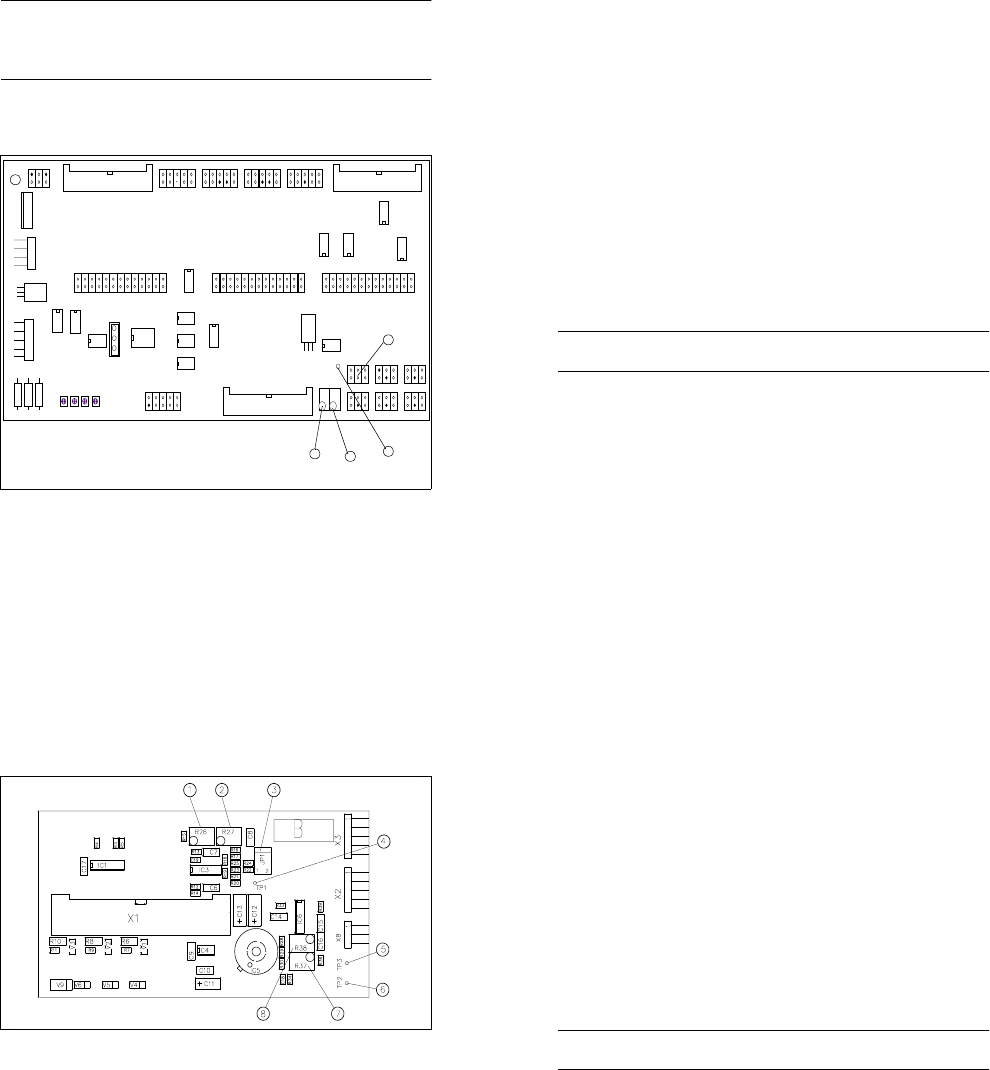
Fig. 10.3.2 Overview: Y0055 conversion board
Key to Fig. 10.3.2
1 Test point TP1 for temperature sensor PT 500
2 Potentiometer R74 for 0V adjustment ( 15
o
C)
3 Potentiometer R73 for 5V adjustment ( 40
o
C)
4 Jumper block X27
X9 X1 3
X1 1
X2 8
X2 9
1
IC1
IC19
X15
X16
X17
R71
R69
R72
R70
R1
R2
R3
IC20
R73
R74
X8 X1 0 X12
X27 X14 X2 3
X24 X25 X2 6
X22 X21 X20 X19 X18
TP1
1
Amplitude
Offset
Amplitude
Offset
Spur A
Spur B
1
3
2
1
4
Amplitude
Offset
Amplitude
Offset
Track A
Track B
^
=
^
=
SIPLACE 80S/80F/G Service Manual 10 Siplace G automatic glue applicator
Edition 06/98
10 - 33
Preparation:
● Load the SIKLEBER test program. Please read the warnings at the start of this chapter.
● A digital voltmeter is used to adjust the room temperature sensor. Set the voltmeter to a measuring range
of 20 V DC.
● Connect the test cable of the voltmeter as follows:
Connect the positive cable to TP1 on the small axis conversion board Y0055 (= board at the top of the gan-
try, see Fig. 10.3.2). Test point 1 is used for temperature sensor PT 500.
Connect the negative cable to TP 3 on board Y0052 (= glue head board, see Fig. 10.3.3). Test point 3 is
the ground terminal.
Adjustment:
● Connect the jumper of jumper block X27 to pin 1/2. Jumper block JP 1 is located on conversion board
Y0055 (see Fig. 10.3.2).
● Select the "Dispens. control" menu, followed by "Peltier functions" and then "Environm. temperature (ambi-
ent temperature)" to display the ambient temperature. Press Return to read the ambient temperature on
the right of the monitor.
● If the jumper setting is correct, the ambient temperature reading will be 15 °C.
● Use potentiometer R 74 to set TP1 to 0V (tolerance ± 20 mV). Potentiometer R 74 is located on conver-
sion board Y0055 (see Fig. 10.3.2).
● The set 0 V voltage corresponds to a temperature of 15 °C (tolerance ± 0.3 °C).
● Then connect the jumper of jumper block X27 to pin 3/4.
● Read the ambient temperature. If the jumper is set correctly the ambient temperature will be 40 °C.
● Use potentiometer R 73 to set TP1 to 5 V (tolerance ± 20 mV). Potentiometer R 73 is located on conver-
sion board Y0055 (see Fig. 10.3.2).
● The adjusted 5 V voltage corresponds to a temperature of 40 °C (tolerance ± 0.3 °C).
PLEASE NOTE
After adjustment, you must replace the jumper on pin 5/6, otherwise the temperature cannot be measured.
● Display the ambient temperature, which should now be approximately the same as the actual room tem-
perature.
10 Siplace G automatic glue applicator SIPLACE 80S/80F/G Service Manual
Edition 06/98
10 - 34
10.3.4.2 Adjusting the temperature sensor
Fig. 10.3.3 Overview: glue head conversion board (glue head board) Y0052
Key to Fig. 10.3.3
1 Potentiometer R26 (-5V temperature sensor setting 40
o
C)
2 Potentiometer R27 (0V temperature sensor setting 15
o
C)
3 Jumper block JP1 (return jumper to pin 5/6 after adjustment)
4 Test point TP1 (heat exchanger signal)
5 Test point TP3 ⊥ (ground)
6 Test point TP2 (dispensing pressure sensor signal)
7 Potentiometer R37 (dispensing pressure sensor setting for Pmax)
8 Potentiometer R38 (0V adjustment ambient pressure)
Preparation:
● Load the SIKLEBER test program. Please read the warnings at the start of this chapter.
● A digital voltmeter is used to adjust the temperature sensor. Set the voltmeter to a measuring range of 20
V DC.
● Connect the test cable of the voltmeter as follows:
Connect the positive cable to TP1 on board Y0052 (= glue head board of the glue application head to be
adjusted, see Fig. 10.3.3). Test point 1 is used for the PT 500 temperature sensor on the heat exchanger.
Connect the negative cable to TP 3 on board Y0052. Test point 3 is the ground terminal.
^
=
^
=
^
=
SIPLACE 80S/80F/G Service Manual 10 Siplace G automatic glue applicator
Edition 06/98
10 - 35
Adjustment:
● Select the "Dispens. control" menu and then "Gluing head 1" (or "2" or "3"), i.e. the glue application head
with the temperature sensor to be adjusted.
● Connect the jumper of jumper block JP 1 to pin 1/2. Jumper block JP 1 is located on glue head board
Y0052 (see Fig. 10.3.3).
● Select the "Dispens. control" menu, followed by "Peltier functions" and then "Actual temperature" to display
the actual temperature on screen. Press the Return key to read the actual temperature on the right of the
monitor.
● If the jumper is set correctly, the actual temperature will read 15 °C.
● Use potentiometer R 27 to set TP1 to 0 V (tolerance ± 20 mV). Potentiometer R 27 is also located on
board Y0052.
● The adjusted 0 V voltage corresponds to a temperature of 15 °C (tolerance ± 0.3 °C).
● Now connect the jumper of jumper block JP 1 to pin 3/4.
● Select the "Dispens. control" menu, followed by "Peltier functions" and then "Actual temperature" to display
the actual temperature on screen. Press the Return key to read the actual temperature on the right of the
monitor.
● If the jumper is set correctly, the actual temperature will read 40 °C.
● Use potentiometer R 26 to set TP1 to 5 V (tolerance ± 20 mV). Potentiometer R 26 is also located on
board Y0052.
● The adjusted 5 V voltage corresponds to a temperature of 40 °C (tolerance ± 0.3 °C).
● Adjust the temperature sensors of the other glue application heads, if necessary.
PLEASE NOTE
After adjustment, you must replace the jumper on pin 5/6, otherwise the temperature cannot be regulated.