00198171-02_Technical_Training_FSE_TX-Series_EN.pdf - 第153页
9 Station Software Overviews 9.9 Station GUI Shuttle Extension Technical Training FSE SIPLACE TX-Series 01/2018 153 9.9 Station GUI Shuttle Extension 1. Click Setup menu. 2. Select the SIPLACE Shuttle Extension on the ou…
9 Station Software Overviews
9.8 Embedded software (eSW) download
152 Technical Training FSE SIPLACE TX-Series 01/2018
9.8 Embedded software (eSW) download
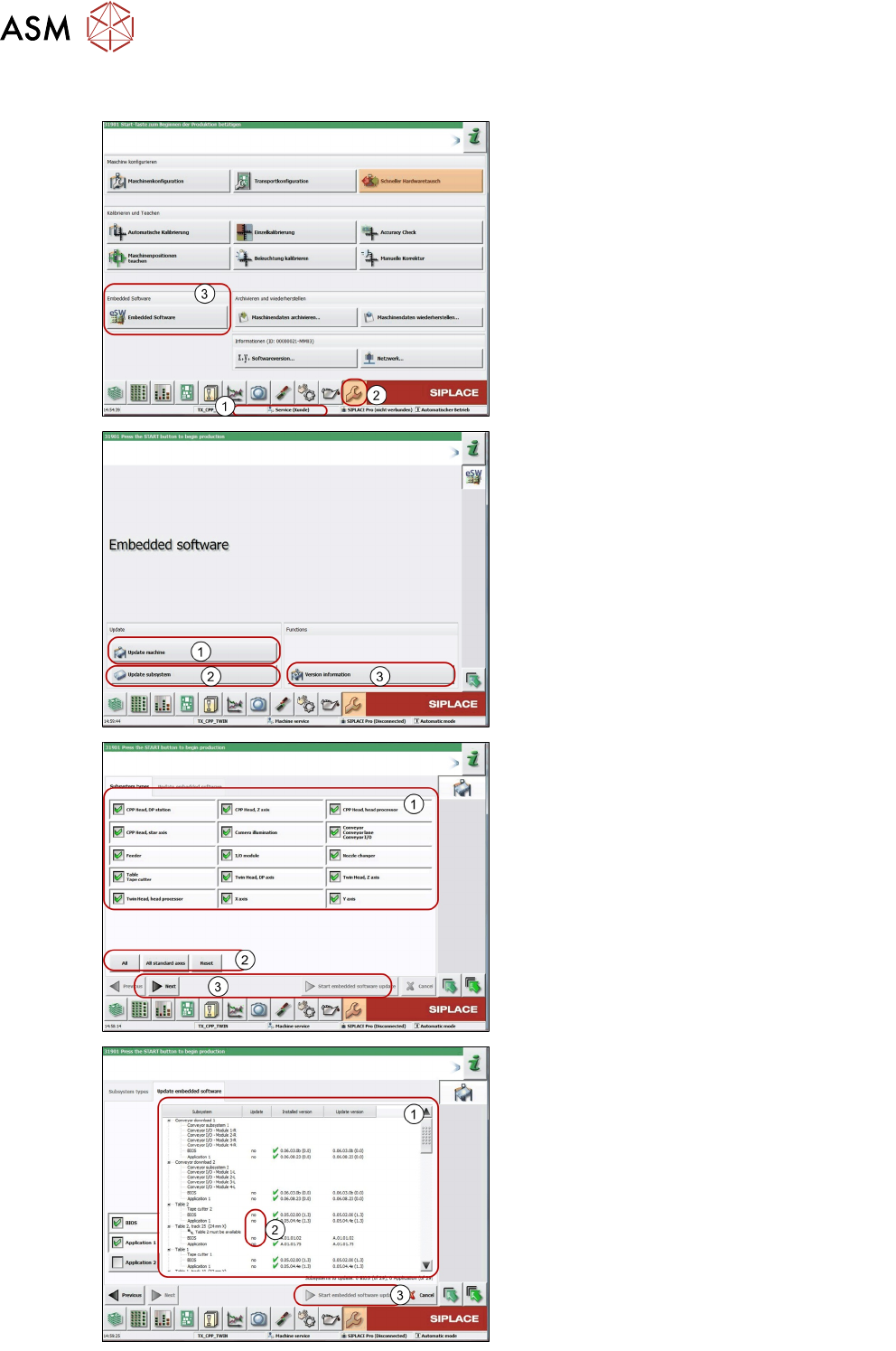
1. The function Embedded software Down-
load can be performed with the operation
levels Machine Service.
2. Switch over to the Service menu.
3. Select the button Embedded Software.
1. Select Update machine to check the en-
tire machine and to perform an eSW down-
load for multiple subsystems.
2. Select Update Subsystem to select and
check one subsystem, to perform an eSW
download.
3. Select Version information to view all
versions of the subsystems, BIOS and ap-
plication.
1. Selection button, machine part to be
checked.
2. Click Reset.
3. Click Next to continue and to view the cur-
rently installed and available versions.
1. This area displays the status of the indi-
vidual subsystems.
2. This column displays update information
about the number of subsystems which still
have to be downloaded.
3. Start embedded software update starts
the download.
9 Station Software Overviews
9.9 Station GUI Shuttle Extension
Technical Training FSE SIPLACE TX-Series 01/2018 153
9.9 Station GUI Shuttle Extension
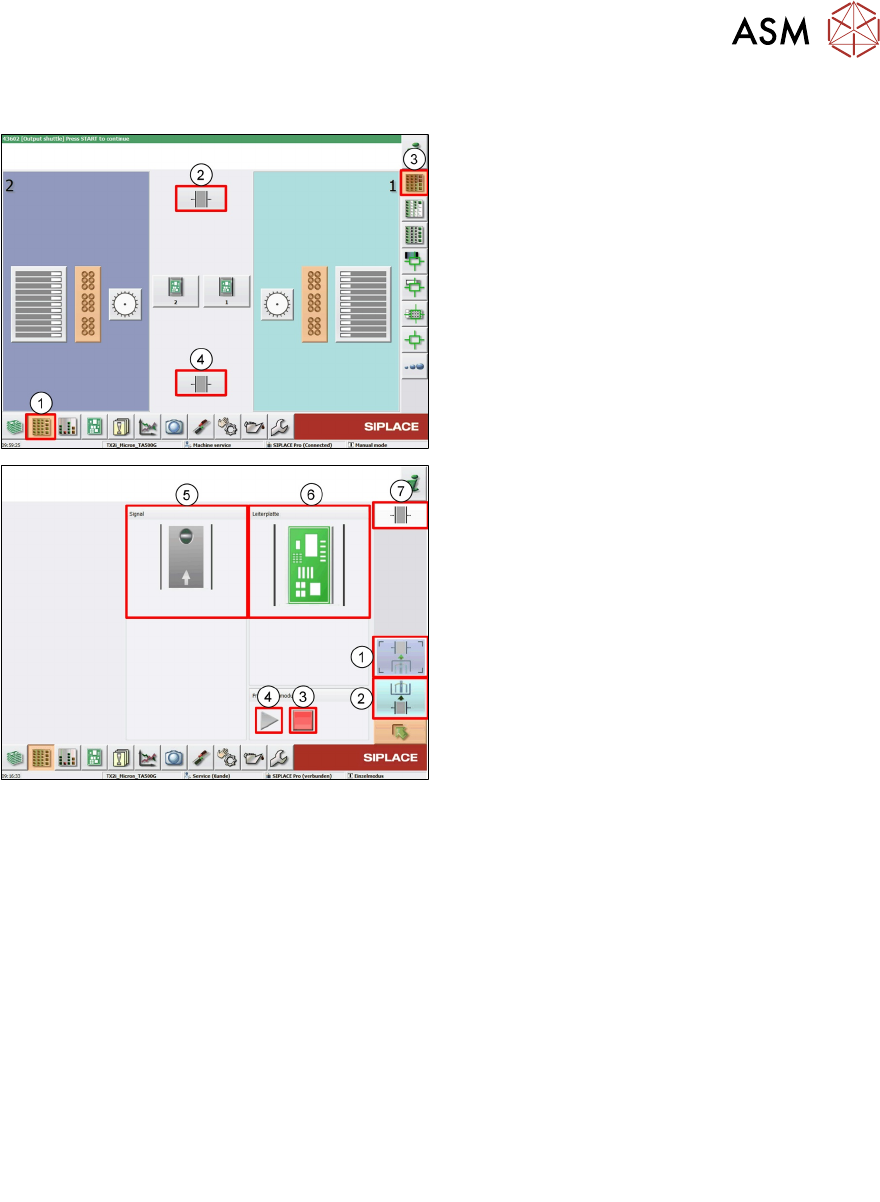
1. Click Setup menu.
2. Select the SIPLACE Shuttle Extension on
the output conveyor.
3. Click Location menu.
4. Select the SIPLACE Shuttle Extension on
the input conveyor.
1. Select the SIPLACE Shuttle Extension on
the output conveyor
2. Select the SIPLACE Shuttle Extension on
the input conveyor.
3. This button stops the automatic operation
of the Shuttle Extensions, single functions
can be executed.
4. This button starts the automatic operation
of the Shuttle Extensions i.e. meaning that
the boards which arrive at the Shuttle Ex-
tension are transported through and then
passed on to the next machine, according
to the configuration.
5. This button shows the current state of the
signal transmitter (laser light barrier). The
LED symbol shows whether there is a
board in the Shuttle Extension or, in other
words, whether the signal transmitter
(laser light barrier) has triggered.
9.10 Excercise: Station Software Overviews
1. What is the best answer regarding the maintenance GUI in SW 709?
A Maintenance GUI can be used for machine maintenance and head verification.
B Camera, feeder and conveyor rail verification is integrated into maintenance GUI.
C Maintenance GUI can show predictive information, to help customers do the maintenance on
time, reduce unplanned downtime.
D All of the above.
9 Station Software Overviews
Room for Your Sketches and Notes
154 Technical Training FSE SIPLACE TX-Series 01/2018
Room for Your Sketches and Notes