F5 SERVICE MAUNAL.pdf - 第195页
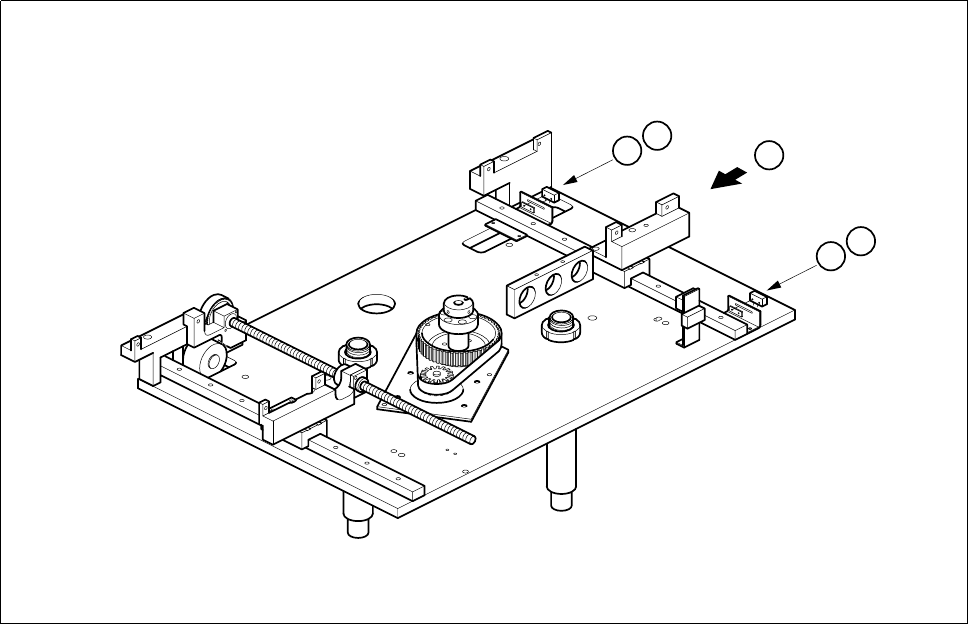
SIPLACE 80S-20/F4 Service Manual 6 PCB Handling Edition 01/96 6.8 Width Adjustment 6 - 39 Fig. 6.8.2 Replacing limit switches Key to Fig. 6.8.2 1 Limi t switch, maxi mum width 2 Limi t switch, minim um wid th T Di rectio…

6 PCB Handling SIPLACE 80S-20/F4 Service Manual
6.8 Width Adjustment Edition 01/96
6 - 38
● Tilt the synchronizing disk a little and change the toothed belt (B).
● Fasten the pressure flange.
● Carry out a function test as specified in the adjustment instructions.
● Fit the lifting table back as described in Section 6.7.2, Page 6 - 32.
6.8.2 Replacing the width adjustment stepping motor
Spare parts, auxiliary materials and equipment
Width adjustment stepping motor, Item No. 00300592-01
● Remove the Synchroflex toothed belt as described in Section 6.7.1, Page 6 - 31, steps (A) and (B).
● Undo the four M3 hexagon socket screws of the motor mounting (C).
● Disconnect the motor connection wires from terminals 7, 8, 9 and 10 of terminal strip X1rn of the ’Width
adjustment stepping motor A6’ conversion unit.
● Pull the connection cable carefully out of the cable ducts.
● Connect the cable ends of the new motor to the terminal strip and check against the circuit diagrams folder
to make sure you have connected the motor up correctly.
● Insert the connection cable in the cable ducts.
● Mount the width adjustment motor.
● Fit the synchronizing toothed belt.
● Carry out a function test as specified in the adjustment instructions.
● Fit the lifting table as described in Section 6.7.2, Page 6 - 32.
6.8.3 Replacing the width adjustment limit switches
Spare parts, auxiliary materials and equipment
Set of width adjustment limit switches, Item No. 00300594-04
NOTE OOO
You should also comply with the safety instructions in Chapter 1 and Section 6.7.1, Page 6 - 31.
● Remove the lifting table as described in Section 6.7.1, Page 6 - 31.
● Use a pin to mark the precise position of the microswitch and unsolder the connection wires. Remove the
limit switch (A).
● Fit the new limit switch at the place marked and resolder the connection wires.
● Carry out a function test as specified in the adjustment instructions.
6 PCB Handling SIPLACE 80S-20/F4 Service Manual
6.8 Width Adjustment Edition 01/96
6 - 40