SU_UM_TME20822_EN.pdf - 第29页
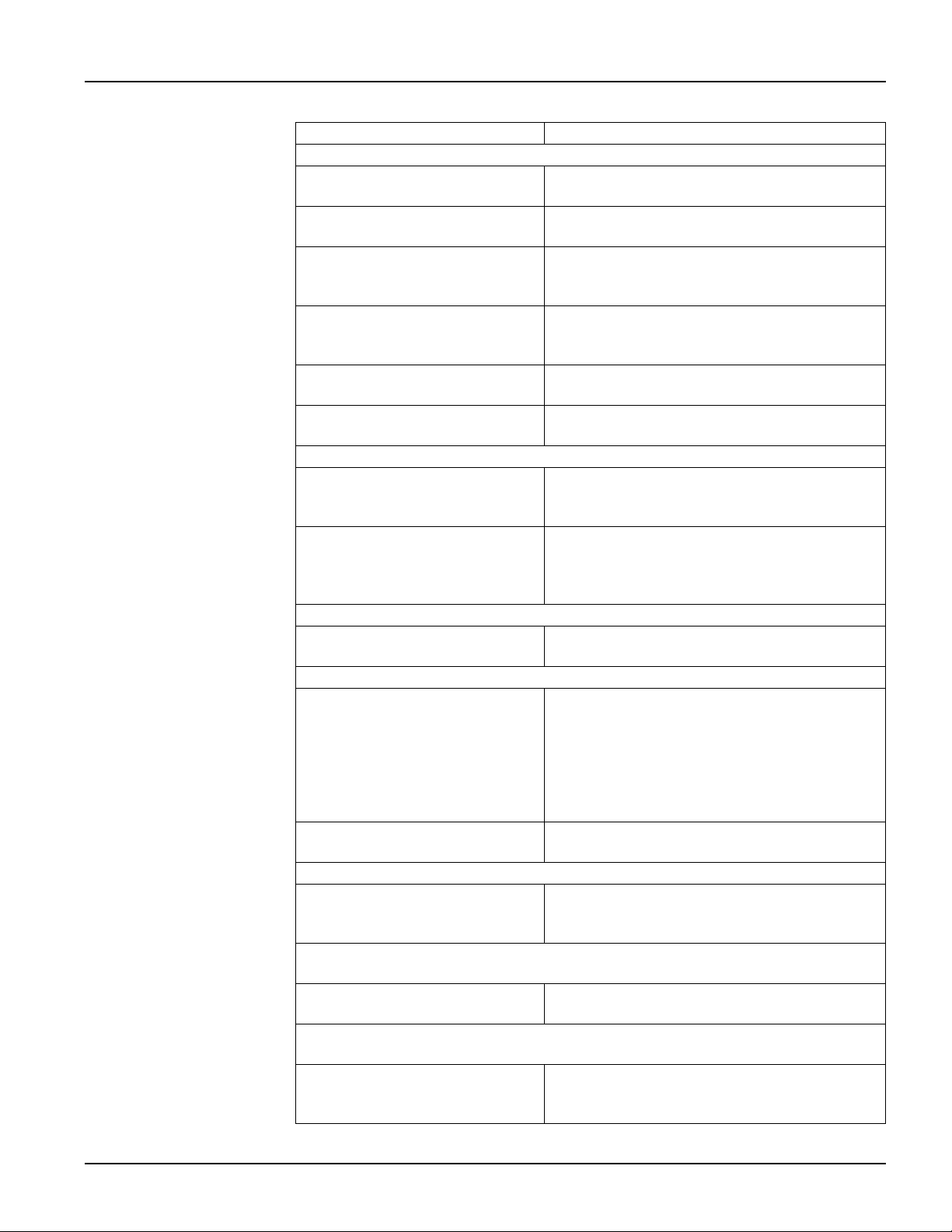
29 Troubl eshoot ing Smart-UPS SMTL 220 0/3000 RMI2UC/RMI2UCNC EN T ME2 0822 – 08 /202 3 T roubl eshoot i ng Pr obl em an d Po ssi bl e Ca us e Sol uti on The UPS wi l l n ot t u rn on or t her e i s no ou tpu t. The uni…

28
Smart-UPS SMTL 2200/3000 RMI2UC/RMI2UCNC
Emergency Power Off
EN TME20822 – 08/2023
Use one of the following cable types to connect the UPS to the EPO switch.
• CL2: Class 2 cable for general use.
• CL2P: Plenum cable for use in ducts, plenums, and other spaces used for
environmental air.
• CL2R: Riser cable for use in a vertical run in a floor-to-floor shaft.
• CLEX: Limited use cable for use in dwellings and for use in raceways.
• Installation in Canada: Use only CSA certified, type ELC, (extra low voltage control
cable).
• Installation in countries other than Canada and the USA: Use standard low voltage
cable in accordance with national and local regulations.
29
Troubleshooting
Smart-UPS SMTL 2200/3000 RMI2UC/RMI2UCNC
EN TME20822 – 08/2023
Troubleshooting
Problem and Possible Cause Solution
The UPS will not turn on or there is no output.
The unit has not been turned on. Press the
UPS ON/OFF key once to turn on the
UPS.
The UPS is not connected to AC
power.
Be sure the power cable is securely connected
to the unit and to the AC power supply.
The input circuit breaker has
tripped.
Reduce the load on the UPS. Disconnect
nonessential equipment and reset the circuit
breaker.
The unit shows very low or no
input AC voltage.
Check the AC power supply to the UPS by
plugging in a table lamp. If the light is very dim,
check the AC voltage.
The battery connector plug is not
securely connected.
Be sure that all battery connections are secure.
There is an internal UPS error
detected.
Do not attempt to use the UPS. Unplug the UPS
and have it serviced immediately.
The UPS is operating on battery, while connected to input AC power.
The input circuit breaker has
tripped.
Reduce the load on the UPS. Disconnect
nonessential equipment and reset the circuit
breaker.
There is very high, very low, or
distorted input line voltage.
Move the UPS to a different outlet on a different
circuit. Test the input voltage with the AC
voltage display. If acceptable to the connected
equipment, reduce the UPS sensitivity.
UPS is emitting intermittent beeps.
The UPS is operating normally. None. The UPS is helping protect the connected
equipment.
UPS does not provide expected backup time.
The UPS battery is weak due to a
recent power outage or is near the
end of its service life.
Charge the battery. Batteries require recharging
after extended outages and wear out faster
when put into service often or when operated at
elevated temperatures. If the battery is near the
end of its service life, consider replacing the
battery even if the replace battery indicator has
not illuminated.
The UPS is experiencing an
overload condition.
Check the UPS load display. Unplug
unnecessary equipment, such as printers.
Display interface LEDs flash sequentially.
The UPS has been shut down
remotely through software or an
optional accessory card.
None. The UPS will restart automatically when
AC power is restored.
The Error LED is illuminated. The UPS displays an error message and emits a
constant beeping sound.
Internal UPS error detected. Do not attempt to use the UPS. Turn the UPS off
and have it serviced immediately.
The Replace Battery icon is illuminated and the UPS beeps for one minute
every five hours.
The battery has a weak charge. Allow the battery to recharge for at least four
hours. Then, perform a self-test. If the problem
persists after recharging, replace the battery.
30
Smart-UPS SMTL 2200/3000 RMI2UC/RMI2UCNC
Limited Factory Warranty
EN TME20822 – 08/2023
Limited Factory Warranty
Schneider Electric IT Corporation (SEIT), warrants its products to be free from defects
in materials and workmanship for a period of five (5) years from the date of purchase.
The SEIT obligation under this warranty is limited to repairing or replacing, at its own
sole option, any such defective products. Repair or replacement of a defective product
or parts thereof does not extend the original warranty period.
This warranty applies only to the original purchaser who must have properly registered
the product within 10 days of purchase. Products may be registered online at
warranty.apc.com.
SEIT shall not be liable under the warranty if its testing and examination disclose that
the alleged defect in the product does not exist or was caused by end user’s or any
third person’s misuse, negligence, improper installation, testing, operation or use of
the product contrary to SEIT’s recommendations or specifications. Further, SEIT shall
not be liable for defects resulting from: 1) unauthorized attempts to repair or modify the
product, 2) incorrect or inadequate electrical voltage or connection, 3) inappropriate on
site operation conditions, 4) Acts of God, 5) exposure to the elements, or 6) theft. In no
event shall SEIT have any liability under this warranty for any product where the serial
number has been altered, defaced, or removed.
EXCEPT AS SET FORTH ABOVE, THERE ARE NO WARRANTIES, EXPRESS OR
IMPLIED, BY OPERATION OF LAW OR OTHERWISE, APPLICABLE TO
PRODUCTS SOLD, SERVICED OR FURNISHED UNDER THIS AGREEMENT OR
IN CONNECTION HEREWITH.
SEIT DISCLAIMS ALL IMPLIED WARRANTIES OF MERCHANTABILITY,
SATISFACTION AND FITNESS FOR A PARTICULAR PURPOSE.
SEIT EXPRESS WARRANTIES WILL NOT BE ENLARGED, DIMINISHED, OR
AFFECTED BY AND NO OBLIGATION OR LIABILITY WILL ARISE OUT OF, SEIT’S
RENDERING OF TECHNICAL OR OTHER ADVICE OR SERVICE IN CONNECTION
WITH THE PRODUCTS.
THE FOREGOING WARRANTIES AND REMEDIES ARE EXCLUSIVE AND IN LIEU
OF ALL OTHER WARRANTIES AND REMEDIES. THE WARRANTIES SET FORTH
ABOVE CONSTITUTE SEIT’S SOLE LIABILITY AND PURCHASER’S EXCLUSIVE
REMEDY FOR ANY BREACH OF SUCH WARRANTIES. SEIT WARRANTIES
EXTEND ONLY TO ORIGINAL PURCHASER AND ARE NOT EXTENDED TO ANY
THIRD PARTIES.
IN NO EVENT SHALL SEIT, ITS OFFICERS, DIRECTORS, AFFILIATES OR
EMPLOYEES BE LIABLE FOR ANY FORM OF INDIRECT, SPECIAL,
CONSEQUENTIAL OR PUNITIVE DAMAGES, ARISING OUT OF THE USE,
SERVICE OR INSTALLATION OF THE PRODUCTS, WHETHER SUCH DAMAGES
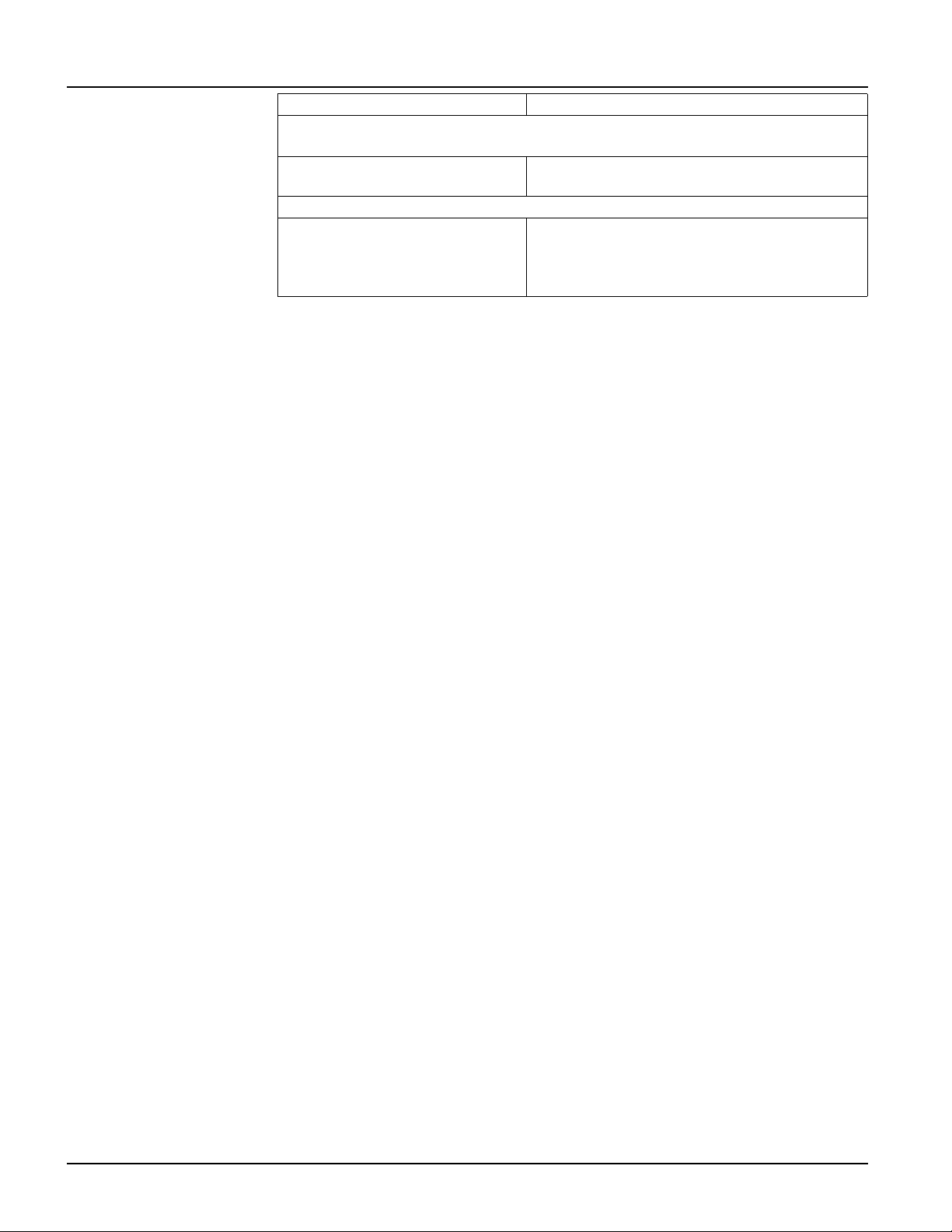
The Replace Battery icon is flashing and the UPS beeps for once every 2
seconds.
The replacement battery is not
properly connected.
Be sure that the battery connector is securely
connected.
The UPS displays a site wiring error message.
Site wiring errors detected include
missing ground, line-neutral
polarity reversal, and overloaded
neutral circuit.
If the UPS indicates a site wiring error, have a
qualified electrician inspect the building wiring.
Problem and Possible Cause Solution