Infinity EX High Throughput Conveyor Module.pdf - 第21页
INFINITY EX HIGH THROUG HPUT CONVE YOR MODULE SEQU ENCES Chapter Issu e 1 Aug 02 Technical Reference Manual 16.21 Three Stage Fast In three stage fast mode, the operation is the same a s three sta ge normal mode with one…
INFINITY
EX
HIGH THROUGHPUT CONVEYOR MODULE
SEQUENCES
16.20 Technical Reference Manual Chapter Issue 1 Aug 02
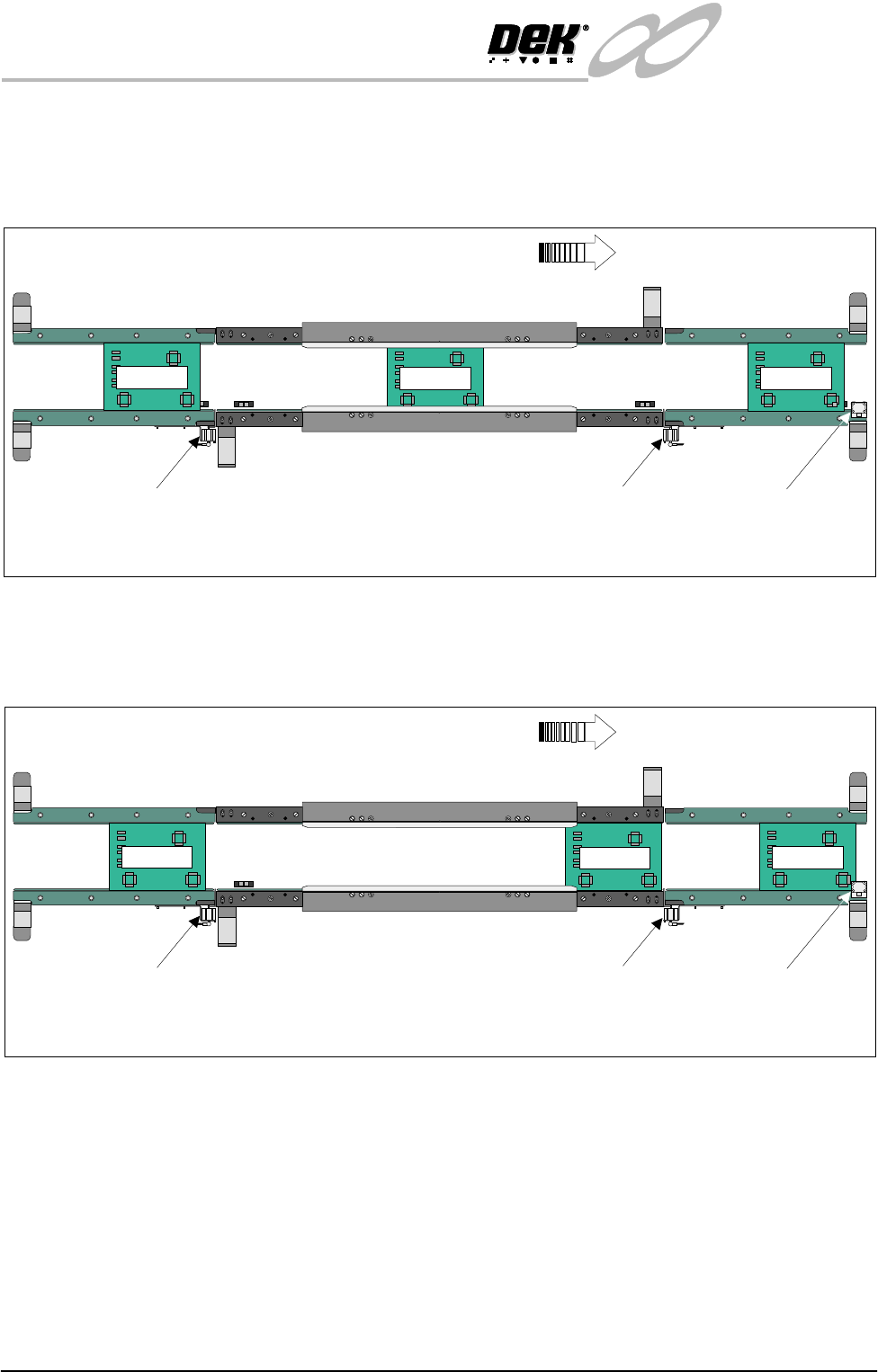
After the print cycle, the Board 1 is then transported to the downline auxiliary
conveyor. When the leading edge of the board activates the sensor, at the end of
the downline auxiliary conveyor, a signal is sent allowing Board 2 to enter the
print station and Board 3 to enter on the upline auxiliary conveyor.
Providing the downline machine is ready, the first board can leave the downline
auxiliary conveyor and the cycle be repeated. If the downline machine is busy,
the second board is printed and transported to the end of the print station
conveyor where it is held by the conveyor board stop.
K
E
Y
E
N
C
E
P
Z
-
4
2
L
Board 2
K
E
Y
E
N
C
E
P
Z
-4
2
L
K
E
Y
E
N
C
E
P
Z
-
4
2
L
K
E
Y
E
N
C
E
P
Z
-
4
2
L
WARNING SHARP EDGE
PATENT No 5157438
WARNING SHARP EDGE
PATENT No 5157438
Print StationConveyor
Board Stop
Downline Conveyor
Board Stop
Upline Conveyor
Board Stop
Plan View of Board Positioning with Downline Machine Delay (Three Stage Mode)
Board Direction from Left to Right
K
E
Y
E
N
C
E
P
Z
-
4
2
L
Board 1
K
E
Y
E
N
C
E
P
Z
-4
2
L
K
E
Y
E
N
C
E
P
Z
-
4
2
L
Board 3
K
E
Y
E
N
C
E
P
Z
-
4
2
L
K
E
Y
E
N
C
E
P
Z
-
4
2
L
K
E
Y
E
N
C
E
P
Z
-
4
2
L
K
E
Y
E
N
C
E
P
Z
-
4
2
L
WARNING SHARP EDGE
PATENT No 5157438
WARNING SHARP EDGE
PATENT No 5157438
Print Station Conveyor
Board Stop
Downline Conveyor
Board Stop
Upline Conveyor
Board Stop
Plan View of Board Positioning with Downline Machine Delay (Three Stage Mode)
Board Direction from Left to Right
Board 3
Board 2
Board 1
INFINITY
EX
HIGH THROUGHPUT CONVEYOR MODULE
SEQUENCES
Chapter Issue 1 Aug 02 Technical Reference Manual 16.21
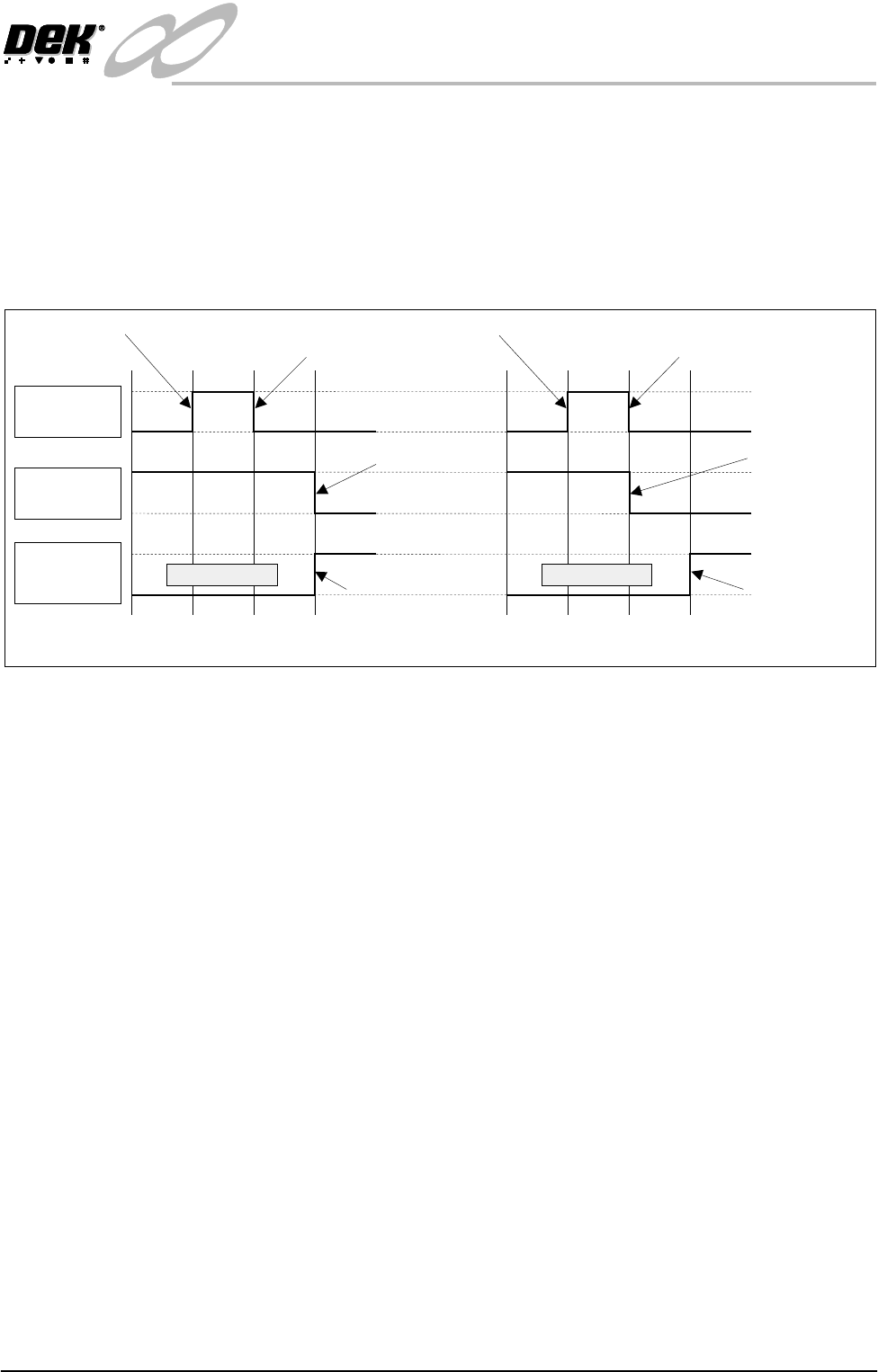
Three Stage Fast In three stage fast mode, the operation is the same as three stage normal mode
with one exception. The second board is transported on to the print station when
the trailing edge of the first board passes the board at right opto situated at the
end of the print station conveyor. This is achieved by the downline conveyor
returning a ‘Busy’ signal back to the centre as soon as it detects that its ‘Board
Available’ input has gone ‘low’, which completes a downline transfer as far as
the print station is concerned.
Figure 16-15 Normal/Fast Mode Timing Chart
Board
Available I/P
Downline
Auxiliary
Sensor I/P
Downline
Available O/P
Belts Running
Normal Mode
Board Available Upline Board Leaves
Upline Machine
Belts Running
Fast Mode
Board Available Upline Board Leaves
Upline Machine
Negative Edge
Frees Upline
Machine
Negative Edge
Frees Upline
Machine
Board Activates
Downline Auxiliary
Sensor
Board Activates
Downline Auxiliary
Sensor
INFINITY
EX
HIGH THROUGHPUT CONVEYOR MODULE
ADJUSTMENTS AND SETTINGS
16.22 Technical Reference Manual Chapter Issue 1 Aug 02
ADJUSTMENTS AND SETTINGS
Rail Lifted Sensors 1. From the run menu, select Maint.
2. Select Diagnost.
3. Select Rising Table. Select Select Module.
4. Select Home Rising Table. Select Run Diagnost, ensure the table moves
to its home position.
5. Select Exit.
6. Select Rail System. Select Select Module.
7. Select Home Rail Width. Select Run Diagnost, ensure the rear rail moves
to its home position.
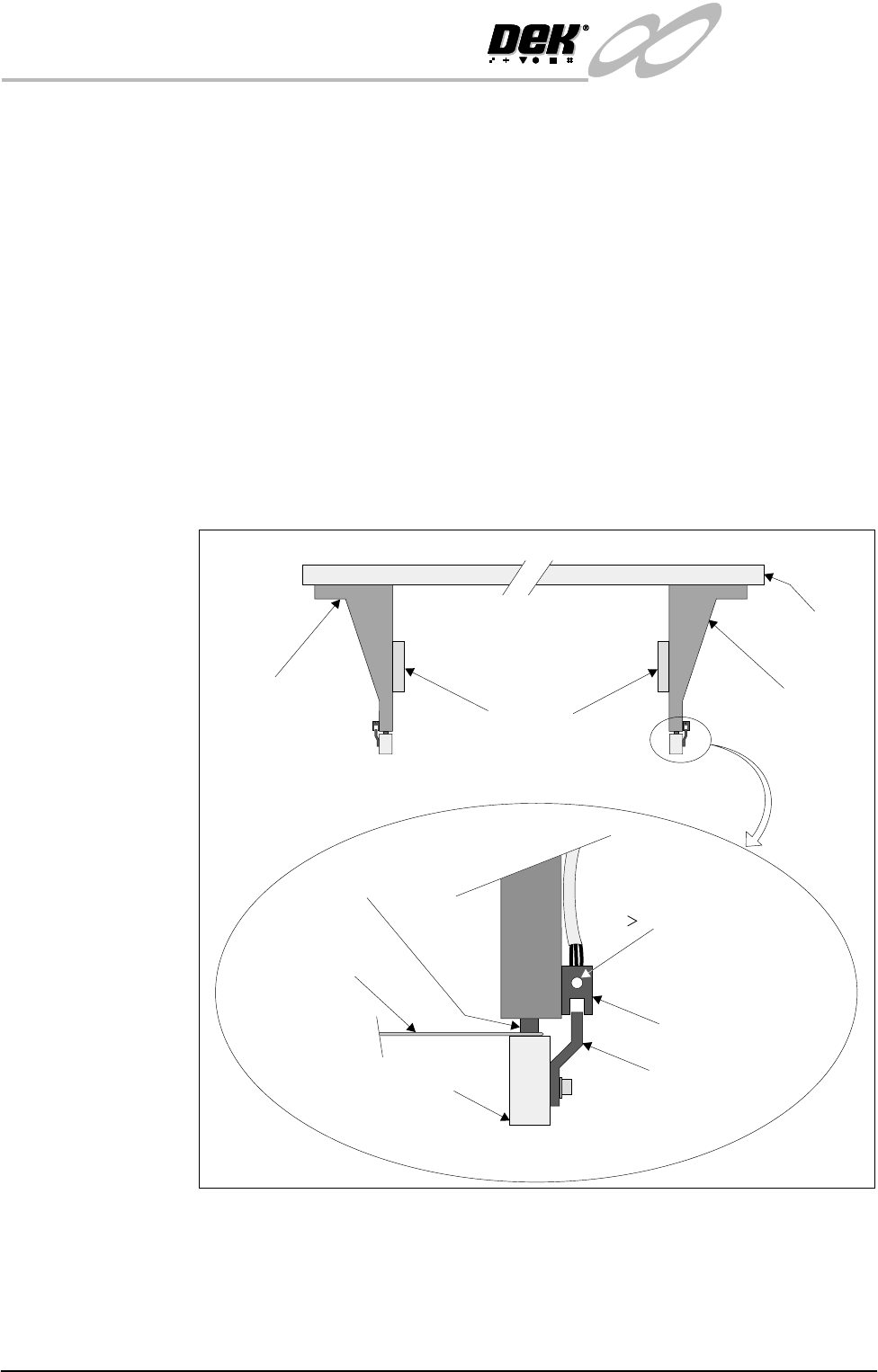
8. Place a 0.5mm feeler gauge between the shock absorber on the rear right rail
transport leg and the rail stop bar (clatter bar). Adjust the vane bracket using
a 2.5mm Allen key, so that the sensor LED is On with a 0.5mm feeler gauge
fitted and Off with a 0.7mm feeler gauge fitted. Lock adjusting screws.
9. Repeat Step 8 for left hand end of rear rail.
10.Select Drive Rail To Board Width. Select Run Diagnost.
Right Rail
Support Bracket
Main Rear
Rail
Front View of Rail System
Left Rail
Support Bracket
Feeler Gauge
(0.5mm)
Rail Stop Bar
Opto Vane
Bracket
Opto
Shock Absorber
Light Extinguishes
when Sensor lifted
0.5mm
Linear Rail
Enlarged View of Right Rail Opto