Infinity EX High Throughput Conveyor Module.pdf - 第40页
INFINITY EX HIGH THROUG HPUT CONVEY OR MODULE ADJUS TMEN TS AND SE TTINGS 16.4 0 Technical Reference Manual C hapter Issue 1 Aug 02 station. Ensure the plates abu t and are fully supported by the transport belts. 6. Usin…
INFINITY
EX
HIGH THROUGHPUT CONVEYOR MODULE
ADJUSTMENTS AND SETTINGS
Chapter Issue 1 Aug 02 Technical Reference Manual 16.39
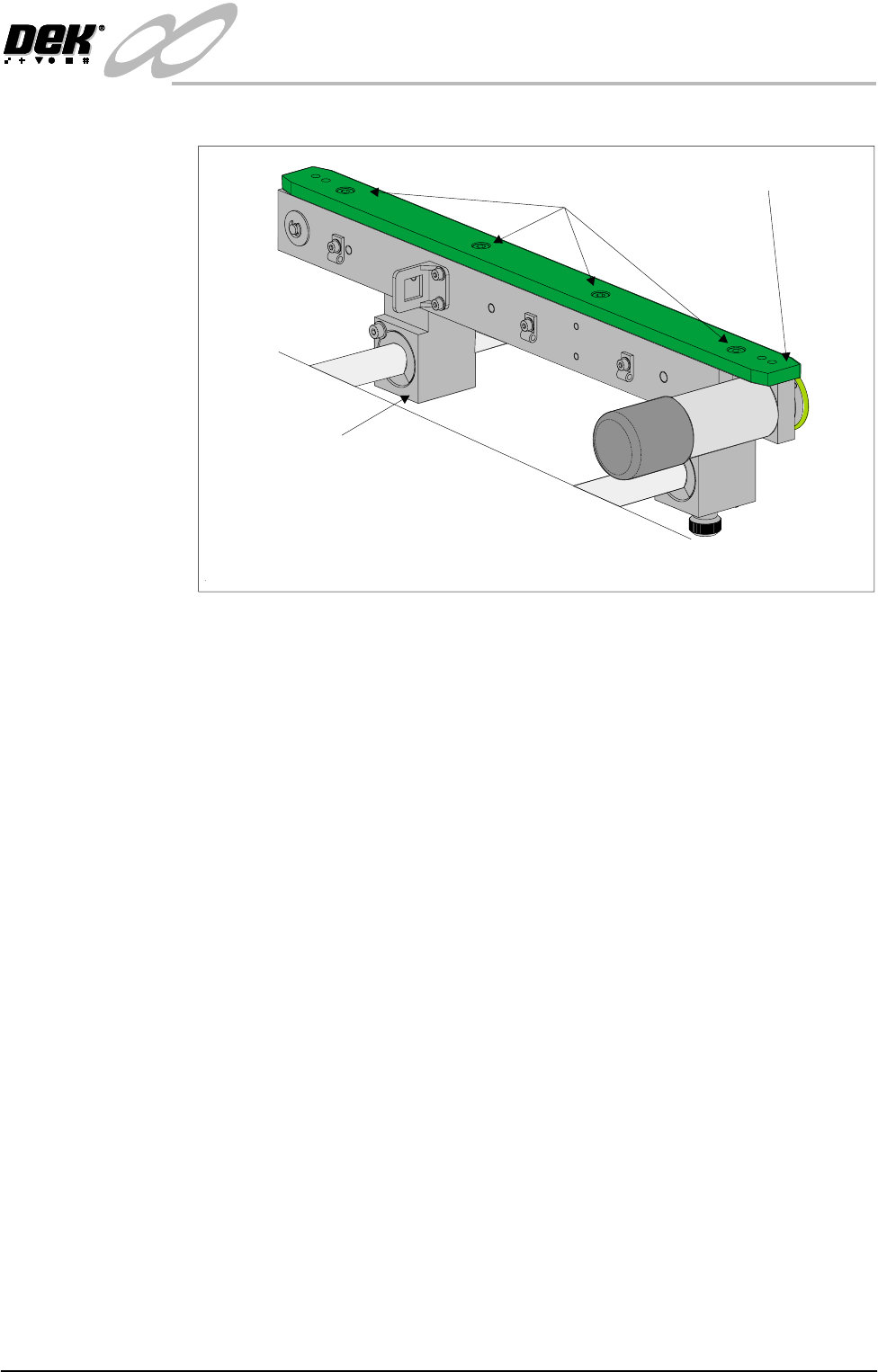
8. Loosen the four green wear insert securing bolts.
9. Adjust the insert to allow free movement of the clamp plate and tighten the
bolts.
10.Re-check the rail parallelism and repeat Steps 8 -10 as necessary.
For coarse adjustment carry out the following:
11.Remove the green wear insert securing bolts and remove the insert from the
rail.
12.Loosen the four rail to bearing block securing bolts.
13.Adjust the rail and re-tighten the securing bolts.
14.Refit the green wear insert and re-check the rail parallelism before securing
the insert.
15.If fine adjustments are required, carry out the fine adjustment procedure
above.
16.Tighten the insert securing bolts.
Auxiliary Conveyor Height Setting
Right Hand
Conveyor
To check and if required adjust the height of the right hand auxiliary conveyor
to the print station rails carry out the following at transport height:
1. In Rail System Diagnostics, select Adjust and alter board width to 250mm.
2. Select Drive Rail to Board Width. The rails are driven to the board width
selected.
3. Adjust the right hand auxiliary conveyor rail width to approximately
250mm.
4. Using a Board Clamp Setting Plate Pt No 140403, place the plate on the right
hand auxiliary conveyor transport belts.
5. Place a second board clamp setting plate onto the transport belts of the print
Rear view of Auxiliary Conveyor Rear Rail
Green Wear Insert
Insert Securing Bolts
(in 4 positions)
Bearing Block
(in 2 positions)
INFINITY
EX
HIGH THROUGHPUT CONVEYOR MODULE
ADJUSTMENTS AND SETTINGS
16.40 Technical Reference Manual Chapter Issue 1 Aug 02
station. Ensure the plates abut and are fully supported by the transport belts.
6. Using a spirit level, place across both setting plates and check the plates are
level.
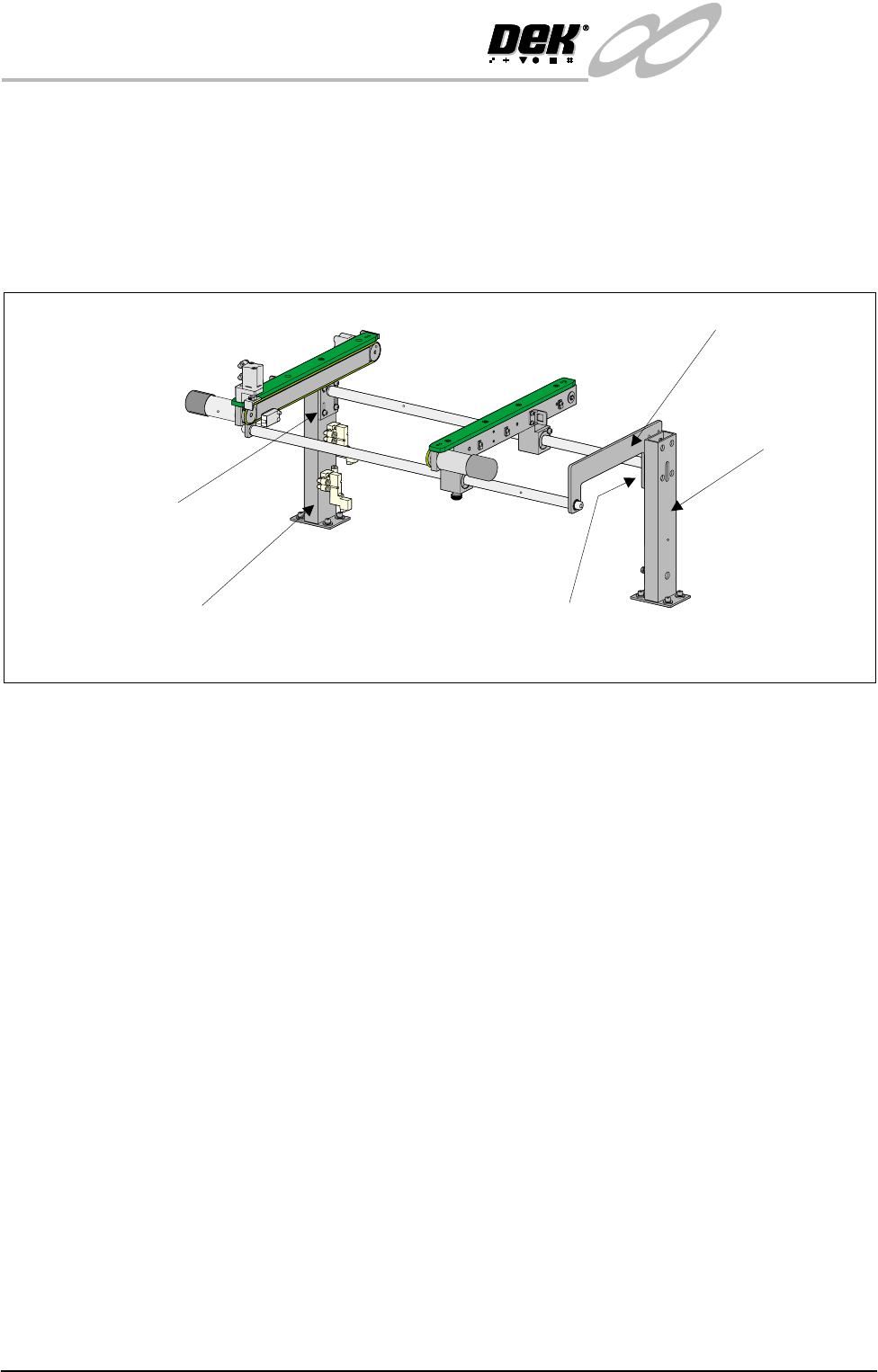
7. If adjustment is required, loosen the four bolts that secure the auxiliary
conveyor guide plate to rear rail support and the four bolts that secure the rail
bracket to front rail support.
8. Carefully adjust the height of the conveyor rails until they match the print
station rails.
9. Re-tighten the securing bolts loosened in Step 7 and repeat the check.
10.If adjustment has occurred, carry out Auxiliary Conveyor Levelling check.
Left Hand Conveyor To check and if required adjust the height of the left hand auxiliary conveyor to
the print station rails carry out the following at transport height:
1. In Rail System Diagnostics, select Adjust and alter board width to 250mm.
2. Select Drive Rail to Board Width. The rails are driven to the board width
selected.
3. Adjust the left hand auxiliary conveyor rail width to approximately 250mm.
4. Using a Board Clamp Setting Plate Pt No 140403, place the plate on the left
hand auxiliary conveyor transport belts.
5. Place a second board clamp setting plate onto the transport belts of the print
station. Ensure the plates abut and are fully supported by the transport belts.
6. Using a spirit level, place across both setting plates and check the plates are
level.
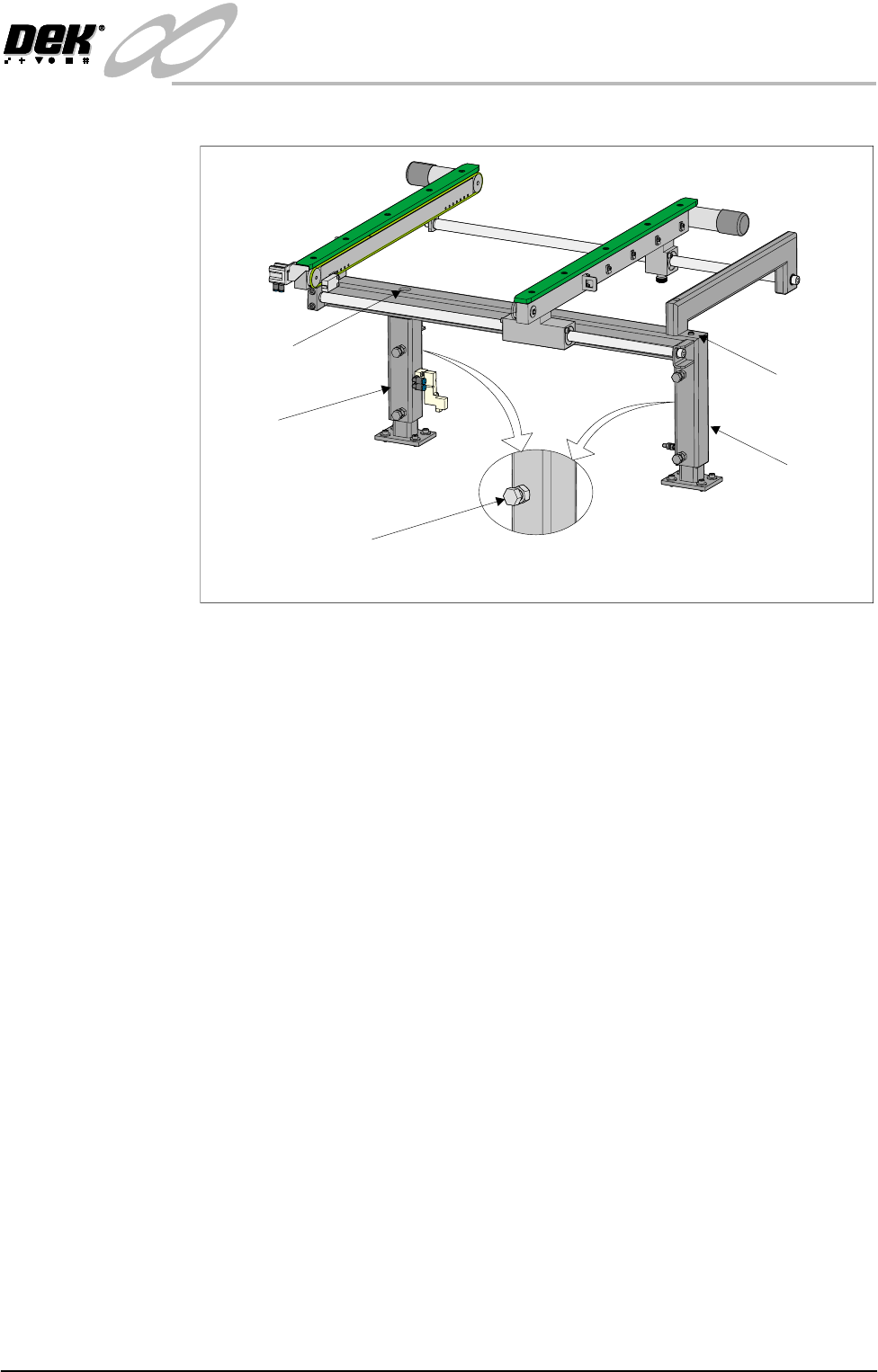
7. If adjustment is required, loosen bolt C on the outer face of both conveyor
frame uprights.
8. Adjust the height of the conveyor rails until they match the print station rails
by loosening or tightening height adjustment grub screw, fitted to the top of
Rear View of Right Auxiliary Conveyor
Front Auxiliary Conveyor
Rail Support
Rear Auxiliary Conveyor
Rail Support
Shaft Guide Plate
Shaft Guide Plate to Rear
Rail Support Bolts (4 off)
Rail Bracket to Front
Rail Support Bolts
(in 4 positions)
INFINITY
EX
HIGH THROUGHPUT CONVEYOR MODULE
ADJUSTMENTS AND SETTINGS
Chapter Issue 1 Aug 02 Technical Reference Manual 16.41
both uprights.
9. Re-tighten the bolts loosened in Step 7 and repeat the check.
10.If adjustment has occurred, carry out Auxiliary Conveyor Levelling check.
Rear View of Left Hand Auxiliary Conveyor
Bolt C on Outer Face
Of Conveyor Frame Uprights
Rear Upright of
Conveyor Frame
Front Upright of
Conveyor Frame
Height Adjustment
Grub Screw
Height Adjustment
Grub Screw