Infinity EX High Throughput Conveyor Module.pdf - 第44页
INFINITY EX HIGH THROUG HPUT CONVEY OR MODULE ADJUS TMEN TS AND SE TTINGS 16.4 4 Technical Reference Manual C hapter Issue 1 Aug 02 Snugger Clamp Setting (Parallelism) The adjustable snugger plate, rear rail guide and f …
INFINITY
EX
HIGH THROUGHPUT CONVEYOR MODULE
ADJUSTMENTS AND SETTINGS
Chapter Issue 1 Aug 02 Technical Reference Manual 16.43
Quick Fit Board Clamp Foil Replacement
WARNING
BOARD CLAMPS. EXTREME CARE MUST BE EXERCISED WHEN
WORKING IN THE TOOLING AREA OF THE MACHINE TO AVOID
INJURY. THE FOILS ON THE FRONT AND REAR BOARD CLAMPS
ARE VERY SHARP.
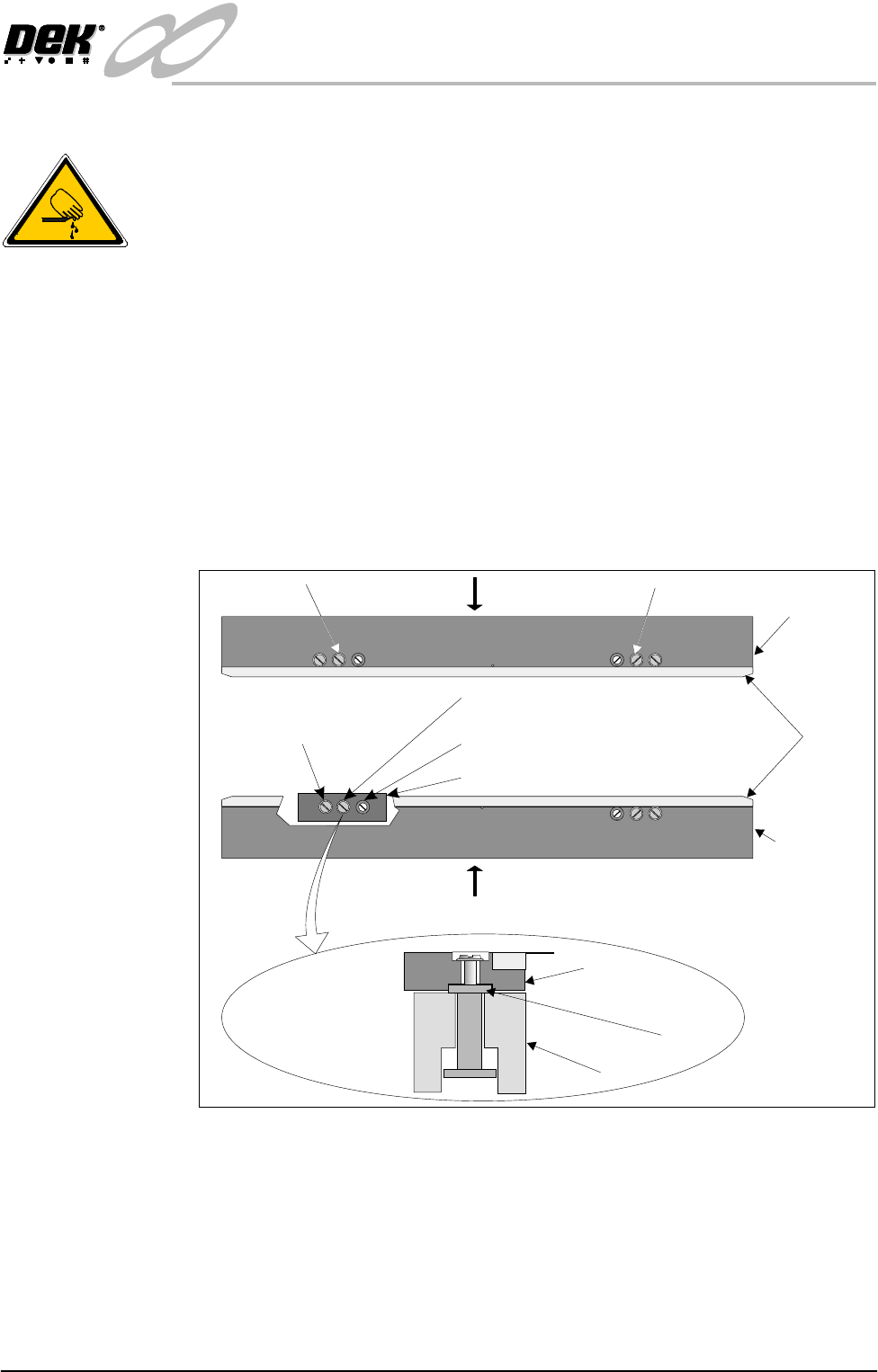
1. Remove screws C and lift off the board clamp (see Note 1). Retain the two
screws.
2. Remove the eight M2.5 x 6mm pan headed slotted screws securing the foil
to the board clamp. Discard the foil and retain the eight screws.
3. Fit the new foil with the screws removed in Step 2.
4. Place the board clamp with new foil into it’s original position.
5. Slide the board clamp in the direction of arrow A for the rear board clamp
and arrow B for the front board clamp. This ensures the board clamp butts
up against the outside face of the board clamp mounting plate.
6. Secure the board clamp with the screws removed in Step 1.
NOTE
1. Due to build tolerances the board clamps must be refitted to the same
position.
2. The board clamp setting up procedure is not required after board clamp
foil replacement.
WARNING SHARP EDGE
WARNING SHARP EDGE
PATENT No.5157438
PATENT No.5157438
C C
B
A
Rear Board
Clamp
Front Board
Clamp
Foils
Piston Screw
Carrier
Carrier Securing Screw
Cutaway showing a Carrier
Guide Locking Screw
Rail
Carrier
Board Clamp
Side View of Carrier
Plan View on Print Station showing Carrier Adjustment
INFINITY
EX
HIGH THROUGHPUT CONVEYOR MODULE
ADJUSTMENTS AND SETTINGS
16.44 Technical Reference Manual Chapter Issue 1 Aug 02
Snugger Clamp
Setting
(Parallelism)
The adjustable snugger plate, rear rail guide and fixed snugger plate are all
interchangeable with similar units to facilitate differences in board thicknesses
(0.8mm, 1.0mm and 1.6mm).
The following checks and adjustment settings for the snugger clamp is applica-
ble to all three size configurations.
The procedure for setting up snugger parallelism is as follows:
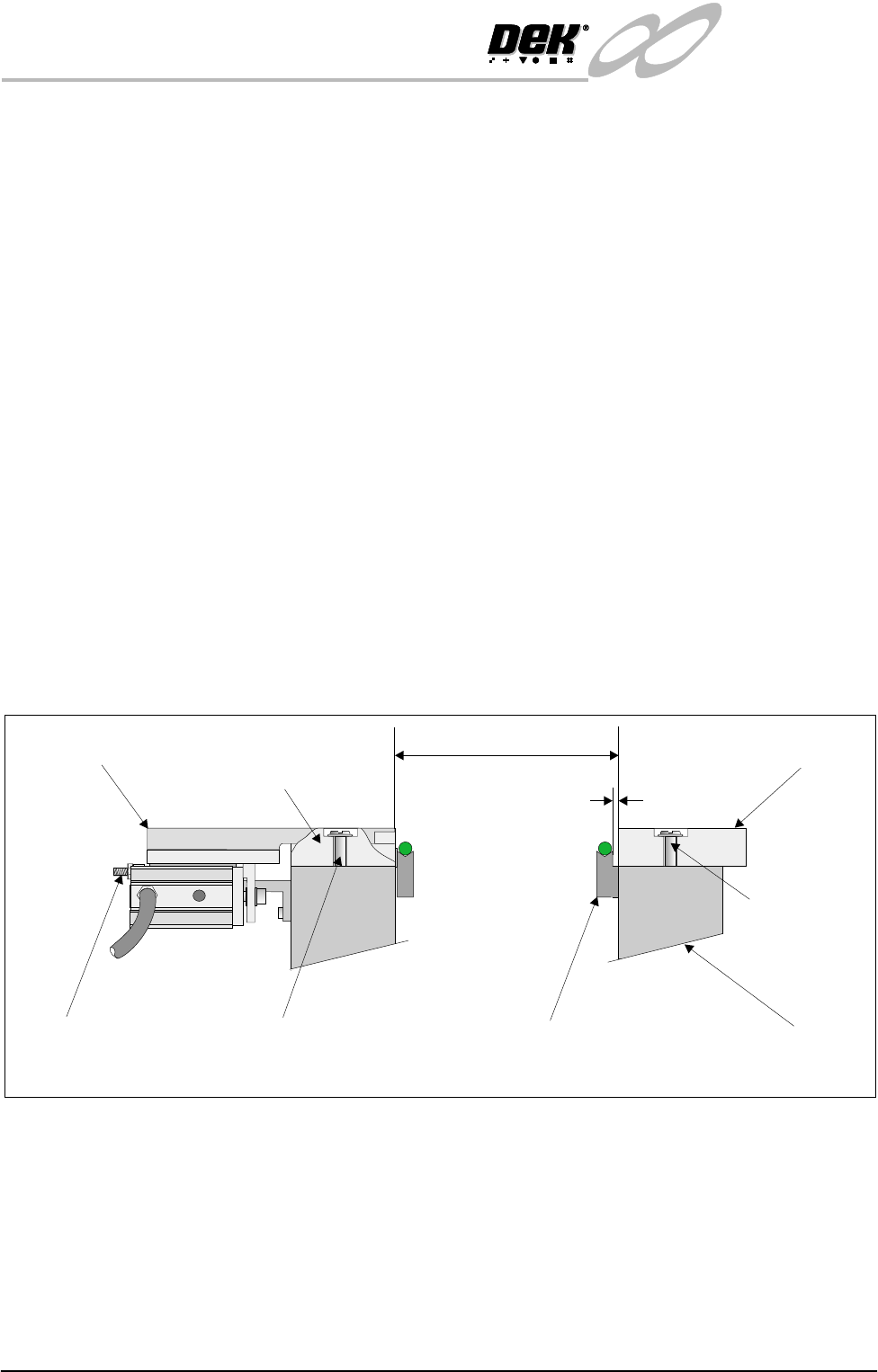
1. Using a 0.10mm feeler gauge check that the gap between the fixed snugger
plate and transport belt guide is set between 0.10mm - 0.15mm. Ensure that
parallelism is achieved along the full length of the snugger plate.
2. If adjustment is necessary. Slacken fixed snugger plate securing screws (3
in number) and adjust.
3. Using a vernier gauge measure the distance between the fixed snugger plate
and rear rail guide, gently move the rear rail forward until a gap of 250mm
±0.1mm is achieved. Ensure that parallelism is maintained along the full
length.
4. If adjustment is necessary. Slacken rear rail guide securing screws (3 in
number) and adjust.
5. Ensure that parallelism is achieved along the rear rail guide and adjustable
snugger plate. This is achieved by using a vernier gauge and checking that
the rear rail guide/adjustable snugger plate is the same distance to the front
snugger plate. Adjust the two stop mount bolts to move the snugger plate if
required.
Transport Belt Guide
Fixed Snugger Plate
Fixed Rail
0.1mm - 0.15mm
250mm +/- 0.1mm
Securing Screws
(3 in Number)
Securing Screws (3 in Number)
Stop Mount Bolts
(2 in Number)
Adjustable Snugger Plate
Rear Rail Guide
(Cutaway)
Side View showing Snugger Clamp Detail (Parallelism)
INFINITY
EX
HIGH THROUGHPUT CONVEYOR MODULE
ADJUSTMENTS AND SETTINGS
Chapter Issue 1 Aug 02 Technical Reference Manual 16.45
Snugger Clamp
Setting (Height)
The procedure for setting up the snugger height is as follows:
1. Before setting snugger height, check the rail to table height (Rising Table
Chapter).
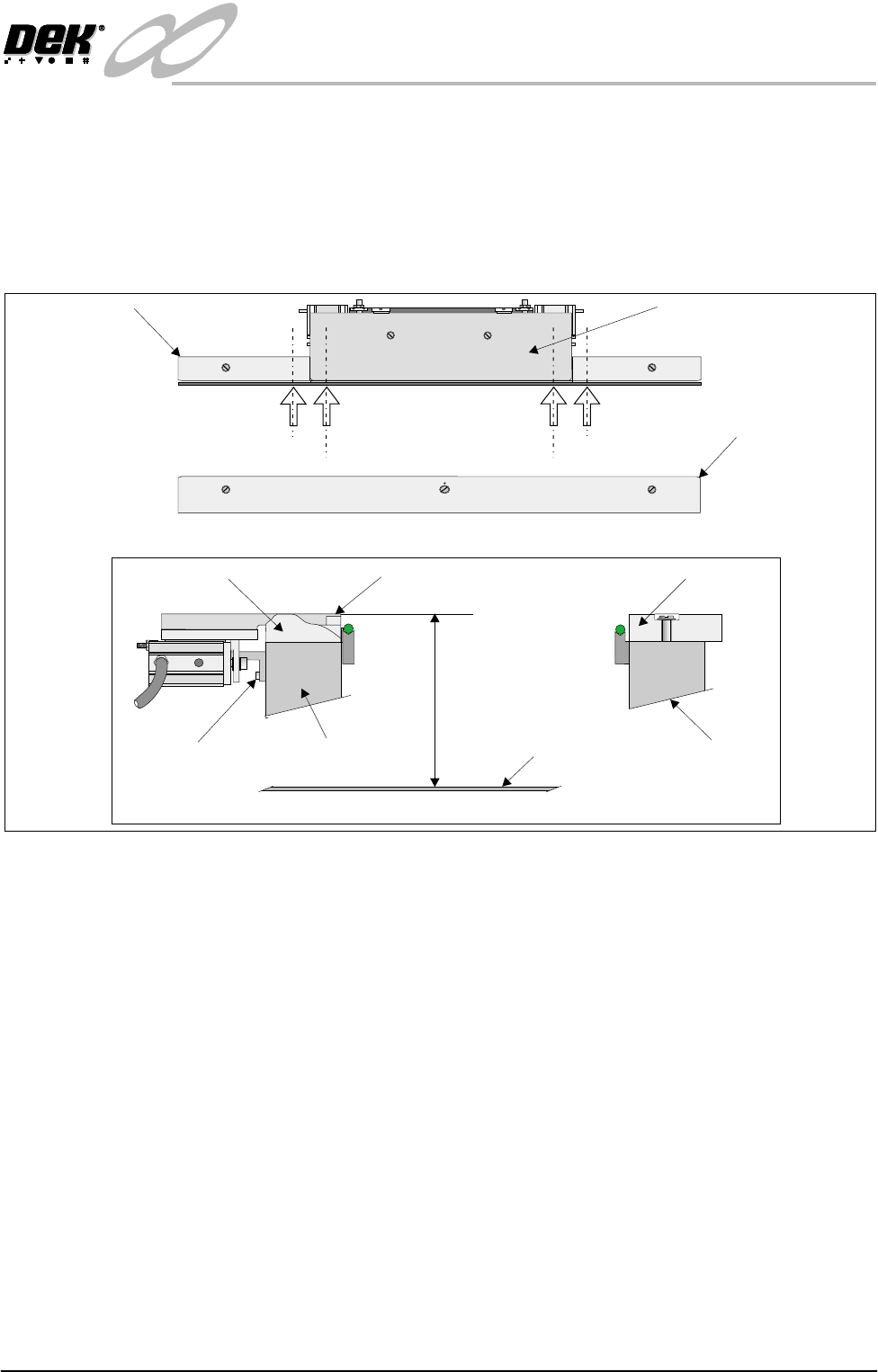
2. Place a straight edge on the top surface of the rear rail guide (Position A1 on
figure below refers). Using a depth gauge indicator measure the distance
from the top of the rising table to the top of the rear rail guide.
3. Carry out same operation at Position A2.
4. Check that the dimensions in Steps 2 and 3 are the same (to within 0.2mm).
If necessary adjust by slackening snugger support bracket securing screws.
Do not fully re-tighten screws at this point.
5. Carry out identical checks at other end of adjustable snugger plate (Position
B1 and B2). On completion of check/adjustments fully re-tighten bracket
securing screws.
NOTE
If adjustments are made ensure that a gap of 250mm is maintained as laid
out in Parallelism setting up.
6. On completion of setting up ensure that the board is free to move along the
transport rail without jamming.
7. Pneumatically operate the snugger clamp with a board fitted. Ensure that the
board is gripped evenly along its entire length.
Adjustable Snugger Plate
Fixed Snugger Plate
Plan View Print Station
Rear Rail Guide
I.O
Position A1
Position A2
Position B2
Position B1
Snugger Height Adjustment
Fixed Snugger Plate
Rear Rail Guide (Cutaway)
Fixed RailRear Rail (Moving)
Adjustable Snugger Plate
Rising Table
Dimension at Positions
A1/A2 and B1/B2
Snugger Support
Bracket Screws
(3 in Number)