1OPERATION_.pdf - 第124页
2.9 Starting , Emergency Stop and Temporary Stop ( Pause ) Operations for Automatic Operation ( “ PLACE ” Mode ) 2 , 9.4 Replacement of Tape Feeders during Operation When a feeder carriage component shortage error during…
2.9
Starting
,
Emergency
Stop
and
Temporary
Stop
(
Pause
)
Operations
for
Automatic
Operation
fPLACE
55
Mode
)
2.9
.
2
Temporary
Stop
Procedure
of
Automatic
Operation
(
“
PLACE
”
Mode
)
Press
the
[
PAUSE
]
button
on
the
front
operation
panel
.
The
machine
stops
after
the
minimum
cycle
of
operation
(
the
cycle
in
which
one
component
is
placed
)
.
Note
:
“
PAUSE
”
mode
does
not
mean
that
the
machine
is
completely
stopped
.
The
machine
starts
running
all
of
a
sudden
right
after
it
receives
a
start
signal
.
For
example
,
the
machine
will
receive
start
signal
and
start
running
when
the
[
START
]
or
the
[
MOVE
]
button
is
pressed
.
a
2.9
.
3
Start
Procedure
from
“
PAUSE
”
Mode
Press
the
[
START
]
or
the
[
MOVE
]
button
while
the
“
AUTO
OPN
.
MODE
〈
PLACEMENT
〉
”
display
is
open
.
(
1
)
When
the
[
START
]
button
is
pressed
,
the
machine
starts
automatic
operation
(
“
PLACE
”
Mode
)
from
the
step
No
.
which
is
displayed
on
the
screen
.
When
the
automatic
operation
starts
,
all
origin
marks
disappear
and
the
LED
of
the
[
START
]
button
and
the
tower
light
(
green
)
illuminate
.
(
2
)
When
the
[
MOVE
]
button
is
pressed
,
the
machine
places
the
component
related
to
the
step
No
.
displayed
on
the
screen
and
is
set
again
in
the
“
PAUSE
”
mode
.
Every
time
the
[
MOVE
]
button
is
pressed
,
the
machine
places
component
in
the
order
of
step
Nos
.
While
the
machine
is
activated
,
the
LED
of
the
[
MOVE
]
button
illuminates
.
a
2
~
33
9803
-
001
ACP
01
EOP
2
-
33
2.9
Starting
,
Emergency
Stop
and
Temporary
Stop
(
Pause
)
Operations
for
Automatic
Operation
(
“
PLACE
”
Mode
)
2
,
9.4
Replacement
of
Tape
Feeders
during
Operation
When
a
feeder
carriage
component
shortage
error
during
automatic
operation
,
replace
the
tape
feeder
as
follows
.
to
its
standby
position
due
to
moves
(
1
)
Occurrence
of
Component
Shortage
Error
•
The
feeder
carriage
where
a
component
shortage
error
has
occurred
moves
to
its
standby
position
and
the
LED
of
the
related
[
Cl
READY
]
or
[
C
2
READY
]
button
extinguishes
.
•
The
yellow
tower
light
flashes
.
(
In
case
of
standard
setting
)
•
An
error
message
appears
in
the
text
box
of
the
label
“
MGT
.
display
.
INFO
.
”
at
the
“
AUTO
OPN
.
MODE
〈
PLACEMENT
〉
:
(
2
)
Replacement
of
Tape
Feeder
•
Open
the
feeder
home
position
safety
guard
and
change
tape
feeders
.
Special
care
is
required
during
feeder
replacement
operation
although
a
feeder
carriage
at
the
standby
position
will
not
be
activated
until
the
related
[
C
1
READY
]
or
[
C
2
READY
]
button
is
turned
ON
.
A
CAUTION
(
3
)
“
ON
”
Setting
of
[
Cl
READY
]
and
[
C
2
READY
]
Buttons
•
Close
the
feeder
home
position
safety
guard
and
turn
on
the
[
Cl
READY
]
or
[
C
2
READY
]
button
.
•
The
LED
of
the
button
illuminates
and
the
feeder
carriage
is
set
in
its
standby
mode
(
activation
possible
)
.
•
When
a
component
shortage
error
occurs
on
the
other
feeder
carriage
during
automatic
operation
,
the
machine
operates
according
to
the
set
operation
mode
.
2
-
34
0104
-
002
ACP
01
EOP
2
-
34
2.9
Starting
,
Emergency
Stop
and
Temporary
Stop
(
Pause
)
Operations
for
Automatic
Operation
(
“
PLACE
”
Mode
)
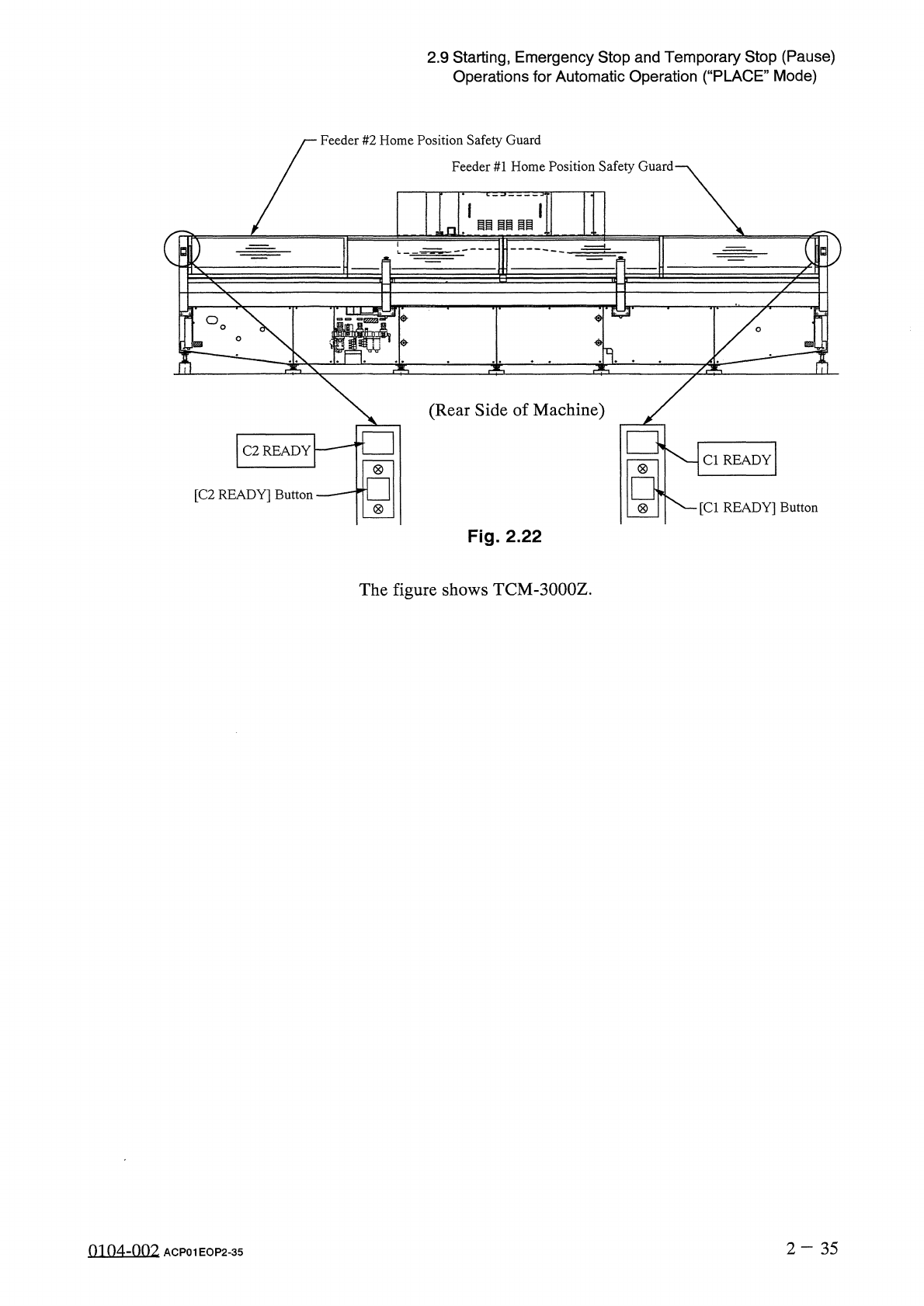
Feeder
#
2
Home
Position
Safety
Guard
Feeder
#
1
Home
Position
Safety
Guard
國画國国
i
画
□
ii
O
\
(
Rear
Side
of
Machine
)
C
2
READY
Cl
READY
一
,
□
[
C
2
READY
]
Button
[
Cl
READY
]
Button
(
8
)
Fig
.
2.22
The
figure
shows
TCM
-
3000
Z
.
2
-
35
0104
-
002
ACP
01
EOP
2
-
35