1OPERATION_.pdf - 第146页
3.7 Alternate Mode ( 2 ) Set alternate feeder axis data . When the [ ALTERNATE FEEDER AXIS DATA ] key is pressed , the following display appears on the screen . 〈 ALTERNATE FEEDER AXIS DATA 〉 NOV EDITING : 12345678 ( 123…
3.7
Alternate
Mode
3.7
Alternate
Mode
Every
time
a
component
shortage
error
occurs
at
a
feeder
,
the
machine
selects
the
other
feeders
in
the
specified
order
,
reducing
downtime
of
the
machine
for
component
replenishment
.
3.7
.
1
Alternate
Feeder
Axis
Data
arranged
equally
on
feeder
carriages
#
1
and
#
2
Tape
feeders
located
on
the
right
and
left
sides
of
the
machine
.
When
a
component
are
shortage
error
or
a
chuck
error
(
continuous
errors
on
the
same
lane
)
is
detected
on
one
feeder
carriage
,
the
machine
automatically
selects
the
other
feeder
carriage
and
continues
to
produce
P
.
C
.
B
.
’
s
.
The
error
-
caused
feeder
carriage
returns
to
its
home
position
and
is
set
in
the
standby
mode
,
enabling
the
operator
to
replace
an
empty
feeder
with
a
full
one
(
component
replenishment
)
.
When
this
function
is
used
,
deterioration
of
operation
rate
can
be
prevented
.
•
When
80
(
4
Q
)
or
less
types
of
components
(
8
mm
tape
feeders
)
used
and
only
one
carriage
is
required
for
component
placement
on
all
P
.
C
.
B
/
s
,
the
alternate
feeder
axis
function
can
be
used
effectively
to
avoid
down
time
(
deterioration
of
operation
rate
)
of
the
machine
for
component
replenishment
and
maintain
total
productivity
.
are
Note
:
The
underlined
feeder
Nos
.
apply
to
TCM
-
3100
J
.
To
Implement
Alternate
Feeder
Axis
Function
(
1
)
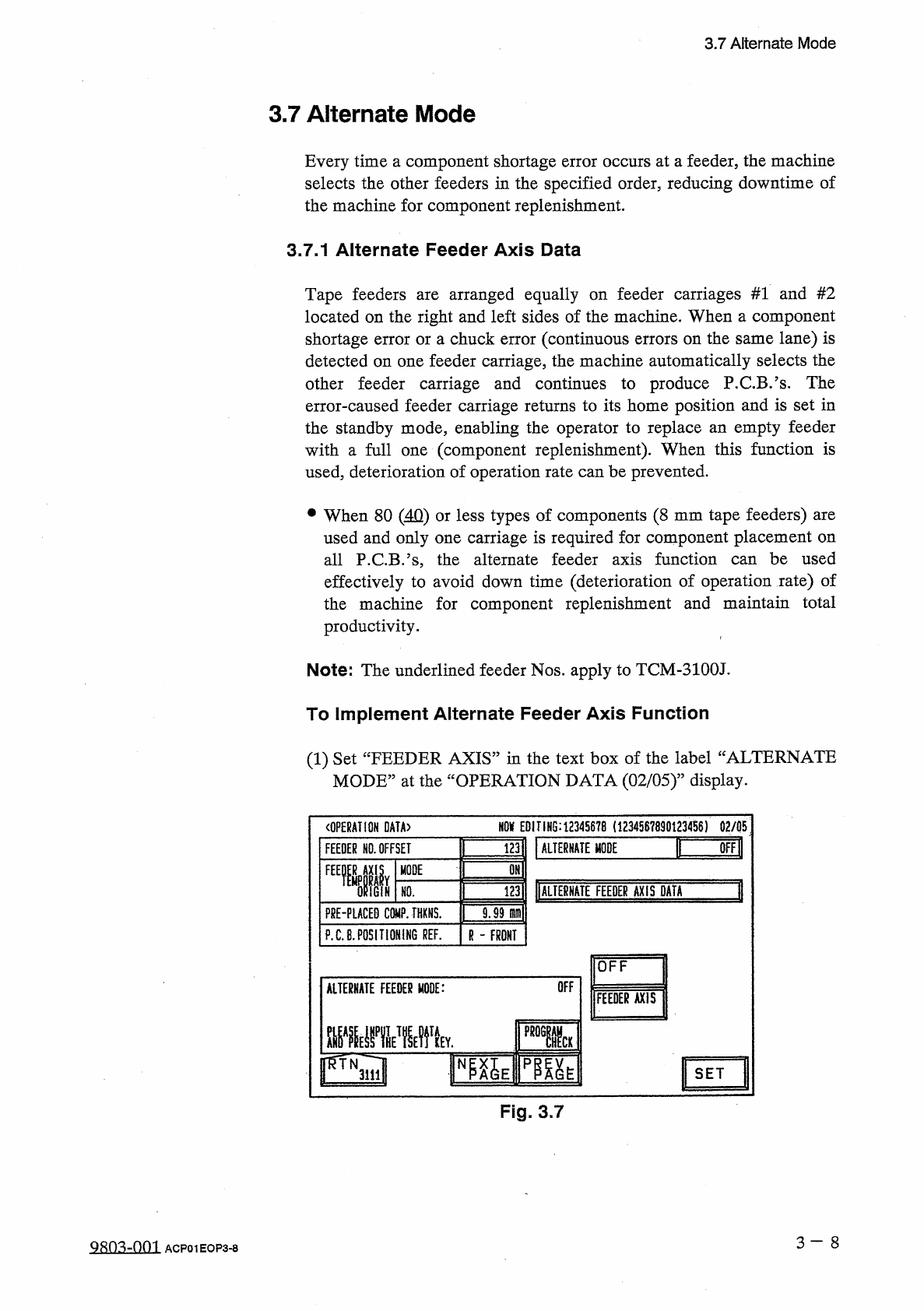
Set
“
FEEDER
AXIS
”
in
the
text
box
of
the
label
“
ALTERNATE
MODE
,
,
at
the
“
OPERATION
DATA
(
02
/
05
)
”
display
.
m
EDITING
:
12345678
(
1234567890123456
)
02
/
05
〈
OPERATION
DATA
〉
I
画
謹
ALTERNATE
MODE
FEEDER
NO
.
OFFSET
OMl
FEEMIIY
MODE
1
调
DALIE
臟
TE
FEEDER
AXIS
DATA
IGiN
HO
.
F
8
E
-
PLACED
COMP
.
THXNS
.
9.99
m
\
P
.
C
.
B
.
POSITIONING
REF
.
R
-
FRONT
OFF
OFF
ALTERNATE
FEEDER
MODE
:
FEEDER
AXIS
■
■
MV
l
SET
Fig
.
3.7
3
一
8
QRO
^
-
001
ACP
01
EOP
3
-
8
3.7
Alternate
Mode
(
2
)
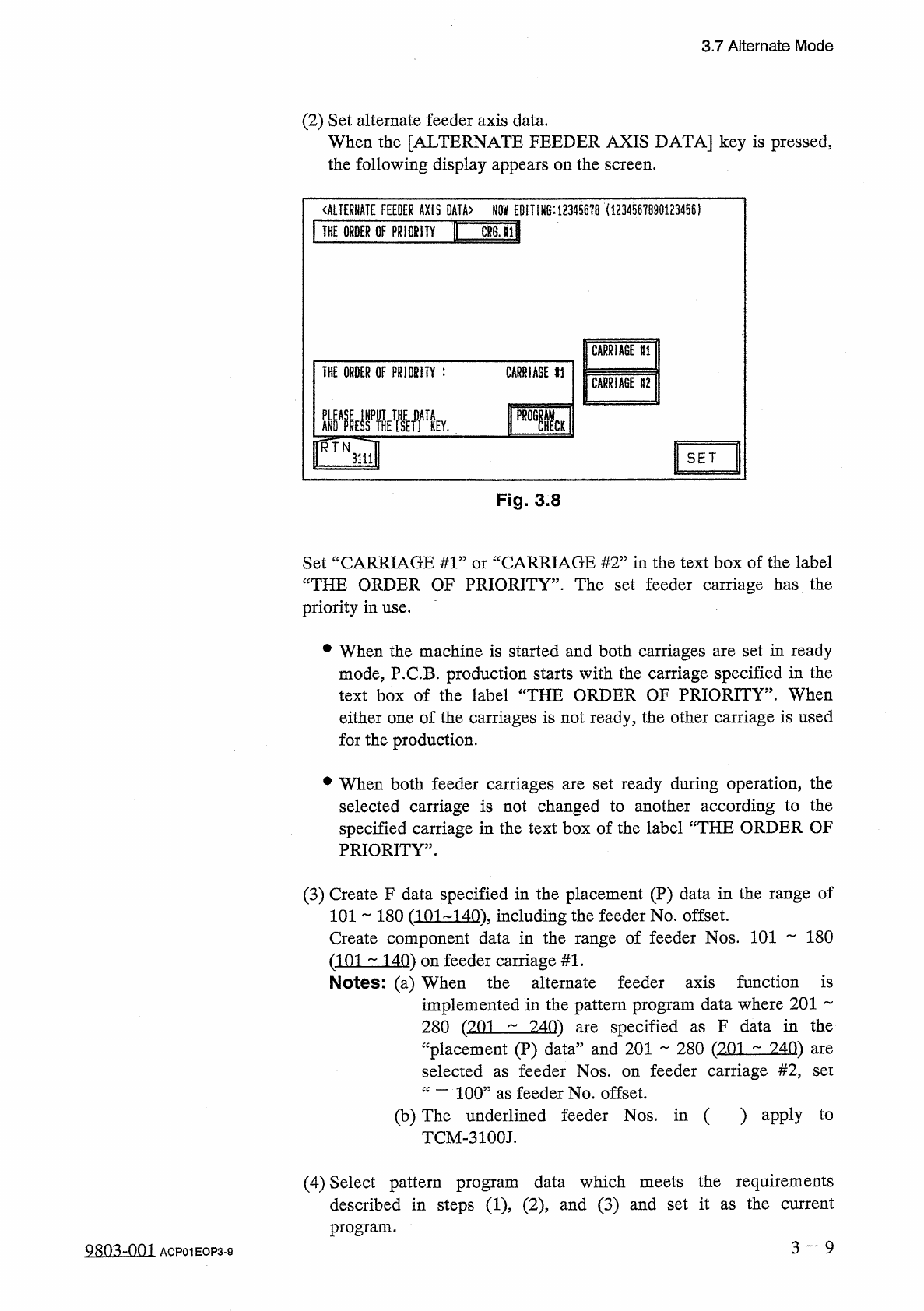
Set
alternate
feeder
axis
data
.
When
the
[
ALTERNATE
FEEDER
AXIS
DATA
]
key
is
pressed
,
the
following
display
appears
on
the
screen
.
〈
ALTERNATE
FEEDER
AXIS
DATA
〉
NOV
EDITING
:
12345678
(
1234567890123456
)
Mill
THE
ORDER
OF
PRIORITY
CARRIAGE
U
THE
ORDER
OF
PRIORITY
:
CARRIAGE
SI
CARRIAGE
112
ME
驟
RTN
SET
3111
Fig
.
3.8
CARRIAGE
#
2
”
in
the
text
box
of
the
label
Set
“
CARRIAGE
#
1
:
“
THE
ORDER
OF
PRIORITY
”
.
The
set
feeder
carriage
has
the
priority
in
use
.
or
#
When
the
machine
is
started
and
both
carriages
are
set
in
ready
mode
,
P
.
C
.
B
.
production
starts
with
the
carriage
specified
in
the
text
box
of
the
label
“
THE
ORDER
OF
PRIORITY
”
.
When
either
one
of
the
carriages
is
not
ready
,
the
other
carriage
is
used
for
the
production
.
•
When
both
feeder
carriages
are
set
ready
during
operation
,
the
selected
carriage
is
not
changed
to
another
according
to
the
specified
carriage
in
the
text
box
of
the
label
“
THE
ORDER
OF
PRIORITY
”
.
(
3
)
Create
F
data
specified
in
the
placement
(
P
)
data
in
the
range
of
101
~
180
(
101
-
140
)
.
including
the
feeder
No
.
offset
.
Create
component
data
in
the
range
of
feeder
Nos
.
101
180
(
101
140
)
on
feeder
carriage
#
1
.
Notes
:
(
a
)
When
the
alternate
feeder
axis
function
is
implemented
in
the
pattern
program
data
where
201
specified
F
data
in
the
280
(
201
240
)
“
placement
(
P
)
data
”
and
201
280
(
201
^
240
)
selected
are
as
are
feeder
carriage
#
2
,
set
feeder
Nos
.
on
as
“
—
100
”
as
feeder
No
.
offset
.
(
b
)
The
underlined
feeder
Nos
.
in
(
)
apply
TCM
-
3100
J
.
to
(
4
)
Select
pattern
program
data
which
meets
the
requirements
described
in
steps
(
1
)
(
2
)
and
(
3
)
and
set
it
as
the
current
program
.
3
一
9
Q
803
-
0
fi
1
ACP
01
EOP
3
-
9
3.7
Alternate
Mode
(
5
)
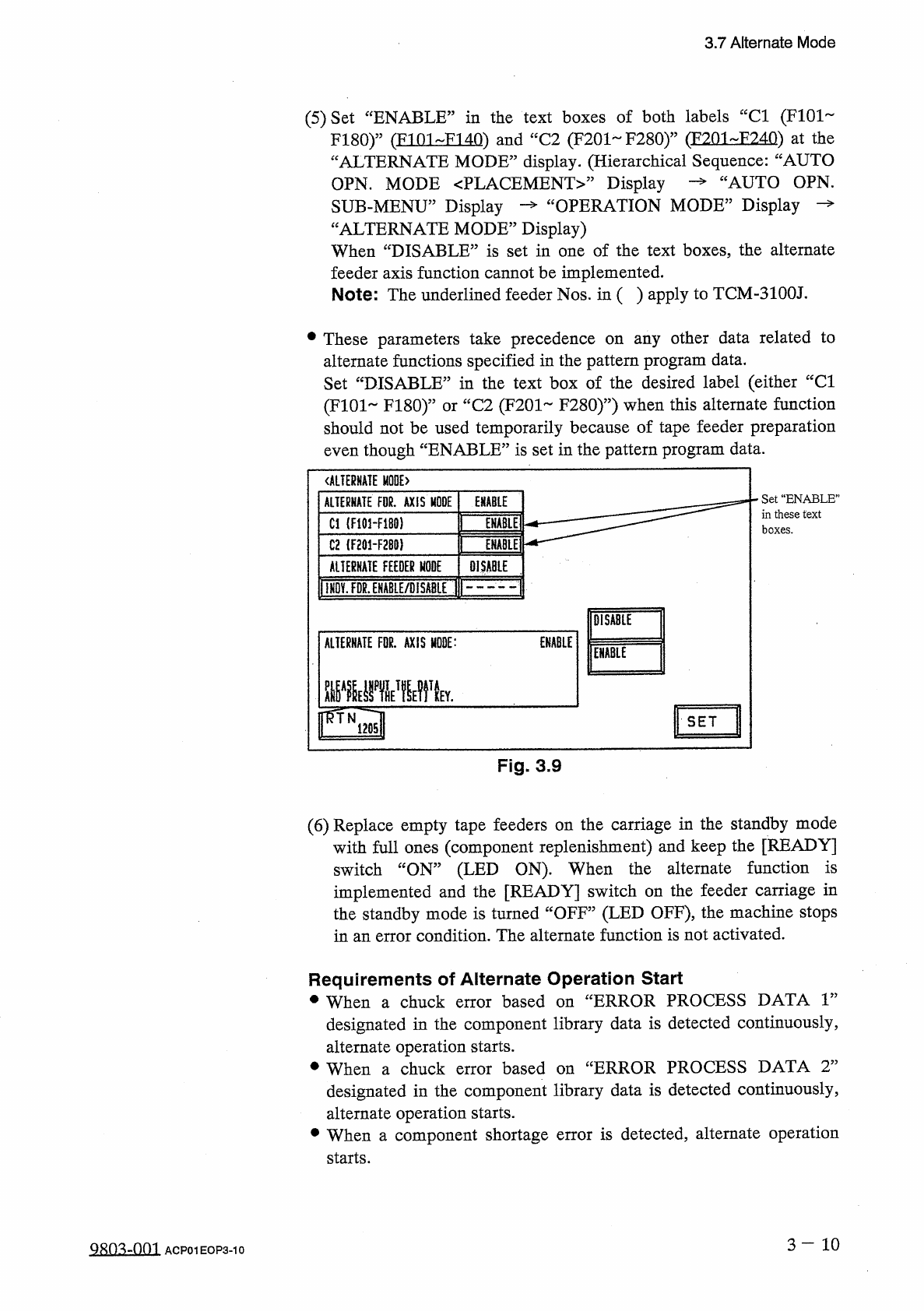
Set
“
ENABLE
”
in
the
text
boxes
of
both
labels
“
Cl
(
F
101
F
180
)
”
(
FI
01
FI
40
)
and
“
C
2
(
F
201
~
F
280
)
”
(
F
201
-
F
240
)
at
the
“
ALTERNATE
MODE
”
display
.
(
Hierarchical
Sequence
:
“
AUTO
OPN
.
MODE
PLACEMENT
Display
SUB
-
MENU
”
Display
—
“
OPERATION
MODE
”
Display
“
ALTERNATE
MODE
”
Display
)
When
“
DISABLE
”
is
set
in
one
of
the
text
boxes
the
alternate
feeder
axis
function
cannot
be
implemented
.
Note
:
The
underlined
feeder
Nos
.
in
(
)
apply
to
TCM
-
3100
J
.
cAUTO
OPN
.
•
These
parameters
take
precedence
on
any
other
data
related
to
alternate
functions
specified
in
the
pattern
program
data
.
Set
“
DISABLE
”
in
the
text
box
of
the
desired
label
(
either
“
Cl
(
F
101
FI
80
)
”
or
“
C
2
(
F
201
F
280
)
”
)
when
this
alternate
function
should
not
be
used
temporarily
because
of
tape
feeder
preparation
even
though
“
ENABLE
”
is
set
in
the
pattern
program
data
.
ALTERNATE
E
>
Set
“
ENABLE
”
in
these
text
boxes
.
ALTERNATE
FOR
.
AXIS
MODE
ENABLE
Cl
(
F
101
-
F
180
)
ENABLE
C
2
(
F
201
-
F
2
B
0
)
ENABLE
AUERHATE
FEEDER
MODE
DISABLE
llHDv
!
FDg
^
HABLE
/
DlSA
8
LE
(
F
DISABLE
ALTERNATE
FDR
.
AXIS
MODE
:
ENABLE
ENABLE
rTNia
"
"
"
"
"
SET
Fig
.
3.9
(
6
)
Replace
empty
tape
feeders
on
the
carriage
in
the
standby
mode
with
full
ones
(
component
replenishment
)
and
keep
the
[
READY
]
switch
“
ON
”
(
LED
ON
)
.
When
the
alternate
function
is
implemented
and
the
[
READY
]
switch
on
the
feeder
carriage
in
the
standby
mode
is
turned
“
OFF
”
(
LED
OFF
)
,
the
machine
stops
in
an
error
condition
.
The
alternate
function
is
not
activated
.
Requirements
of
Alternate
Operation
Start
•
When
a
chuck
error
based
on
“
ERROR
PROCESS
DATA
r
designated
in
the
component
library
data
is
detected
continuously
,
alternate
operation
starts
.
•
When
a
chuck
error
designated
in
the
component
library
data
is
detected
continuously
,
alternate
operation
starts
.
•
When
a
component
shortage
error
is
detected
,
alternate
operation
starts
.
based
on
uERROR
PROCESS
DATA
T
3
-
10
QRO
^
-
OOI
ACP
01
EOP
3
-
10