1OPERATION_.pdf - 第148页
3.7 Alternate Mode Management Information at Alternate Feeder Axis Operation Start When the alternate feeder axis operation ( automatic selection of feeder carriages ) starts , a message appears in the text box of the la…
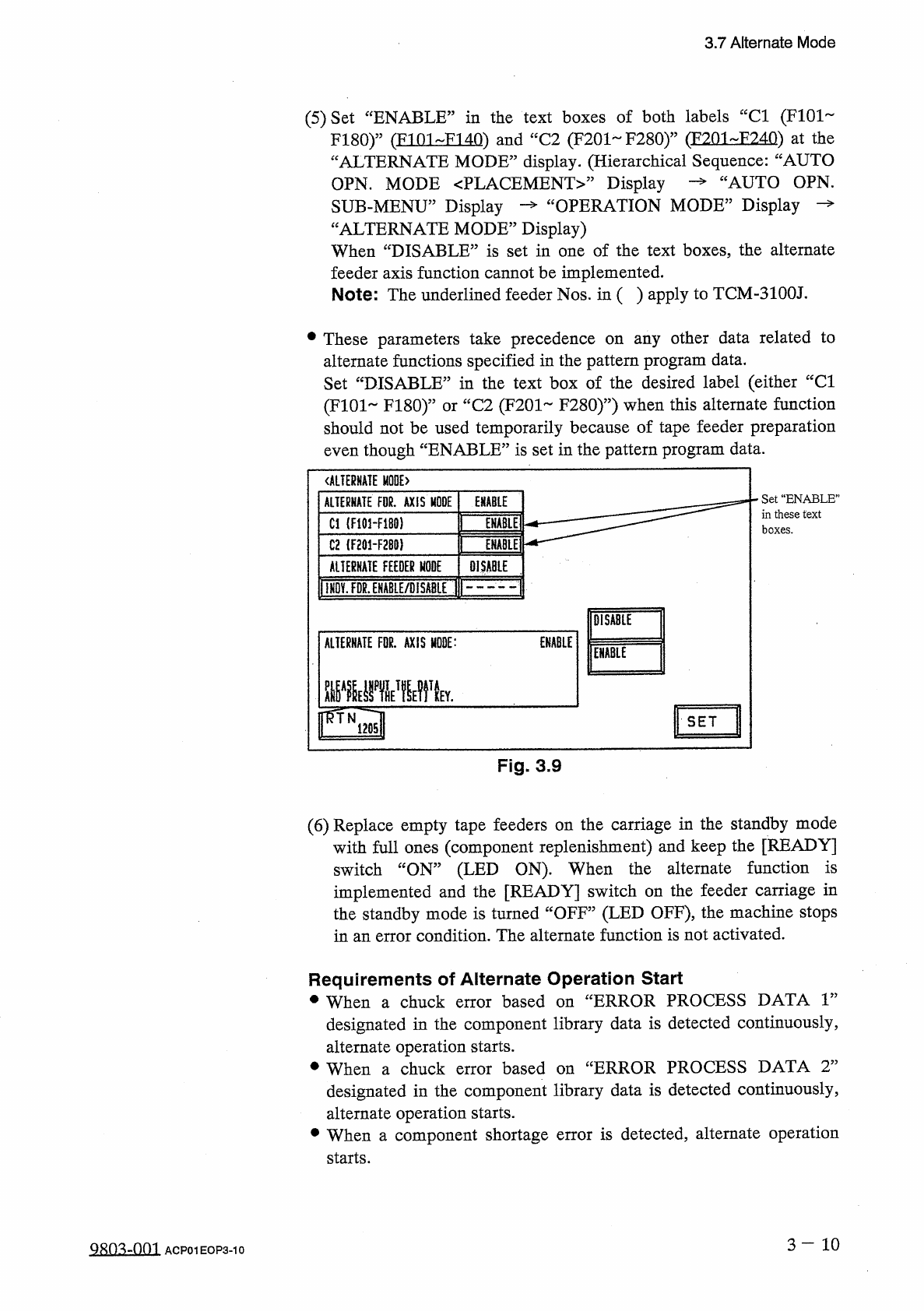
3.7
Alternate
Mode
(
5
)
Set
“
ENABLE
”
in
the
text
boxes
of
both
labels
“
Cl
(
F
101
F
180
)
”
(
FI
01
FI
40
)
and
“
C
2
(
F
201
~
F
280
)
”
(
F
201
-
F
240
)
at
the
“
ALTERNATE
MODE
”
display
.
(
Hierarchical
Sequence
:
“
AUTO
OPN
.
MODE
PLACEMENT
Display
SUB
-
MENU
”
Display
—
“
OPERATION
MODE
”
Display
“
ALTERNATE
MODE
”
Display
)
When
“
DISABLE
”
is
set
in
one
of
the
text
boxes
the
alternate
feeder
axis
function
cannot
be
implemented
.
Note
:
The
underlined
feeder
Nos
.
in
(
)
apply
to
TCM
-
3100
J
.
cAUTO
OPN
.
•
These
parameters
take
precedence
on
any
other
data
related
to
alternate
functions
specified
in
the
pattern
program
data
.
Set
“
DISABLE
”
in
the
text
box
of
the
desired
label
(
either
“
Cl
(
F
101
FI
80
)
”
or
“
C
2
(
F
201
F
280
)
”
)
when
this
alternate
function
should
not
be
used
temporarily
because
of
tape
feeder
preparation
even
though
“
ENABLE
”
is
set
in
the
pattern
program
data
.
ALTERNATE
E
>
Set
“
ENABLE
”
in
these
text
boxes
.
ALTERNATE
FOR
.
AXIS
MODE
ENABLE
Cl
(
F
101
-
F
180
)
ENABLE
C
2
(
F
201
-
F
2
B
0
)
ENABLE
AUERHATE
FEEDER
MODE
DISABLE
llHDv
!
FDg
^
HABLE
/
DlSA
8
LE
(
F
DISABLE
ALTERNATE
FDR
.
AXIS
MODE
:
ENABLE
ENABLE
rTNia
"
"
"
"
"
SET
Fig
.
3.9
(
6
)
Replace
empty
tape
feeders
on
the
carriage
in
the
standby
mode
with
full
ones
(
component
replenishment
)
and
keep
the
[
READY
]
switch
“
ON
”
(
LED
ON
)
.
When
the
alternate
function
is
implemented
and
the
[
READY
]
switch
on
the
feeder
carriage
in
the
standby
mode
is
turned
“
OFF
”
(
LED
OFF
)
,
the
machine
stops
in
an
error
condition
.
The
alternate
function
is
not
activated
.
Requirements
of
Alternate
Operation
Start
•
When
a
chuck
error
based
on
“
ERROR
PROCESS
DATA
r
designated
in
the
component
library
data
is
detected
continuously
,
alternate
operation
starts
.
•
When
a
chuck
error
designated
in
the
component
library
data
is
detected
continuously
,
alternate
operation
starts
.
•
When
a
component
shortage
error
is
detected
,
alternate
operation
starts
.
based
on
uERROR
PROCESS
DATA
T
3
-
10
QRO
^
-
OOI
ACP
01
EOP
3
-
10
3.7
Alternate
Mode
Management
Information
at
Alternate
Feeder
Axis
Operation
Start
When
the
alternate
feeder
axis
operation
(
automatic
selection
of
feeder
carriages
)
starts
,
a
message
appears
in
the
text
box
of
the
label
“
MGT
.
INFO
.
”
,
indicating
that
the
operation
has
started
.
At
the
same
time
,
the
pertinent
lane
number
,
component
ID
name
,
and
the
reason
why
the
alternate
operation
was
started
are
displayed
on
the
screen
.
3
—
11
QRO
^
-
OOl
ACP
01
E
0
P
3
-
11
3.7
Alternate
Mode
3.7
.
2
Alternate
Feeder
Function
When
a
feeder
becomes
short
of
components
,
this
function
selects
a
prepared
spare
feeder
.
After
all
components
are
picked
up
from
the
spare
feeder
,
another
spare
feeder
is
selected
as
if
a
baton
was
handed
over
to
the
next
runner
.
The
prepared
spare
feeders
must
contain
the
components
of
frequently
used
types
.
and
this
function
is
•
When
a
component
shortage
activated
,
the
interval
time
for
component
replenishment
can
be
prolonged
and
the
feeders
short
of
components
can
be
replenished
with
components
collectively
.
error
occurs
To
Implement
Alternate
Feeder
Function
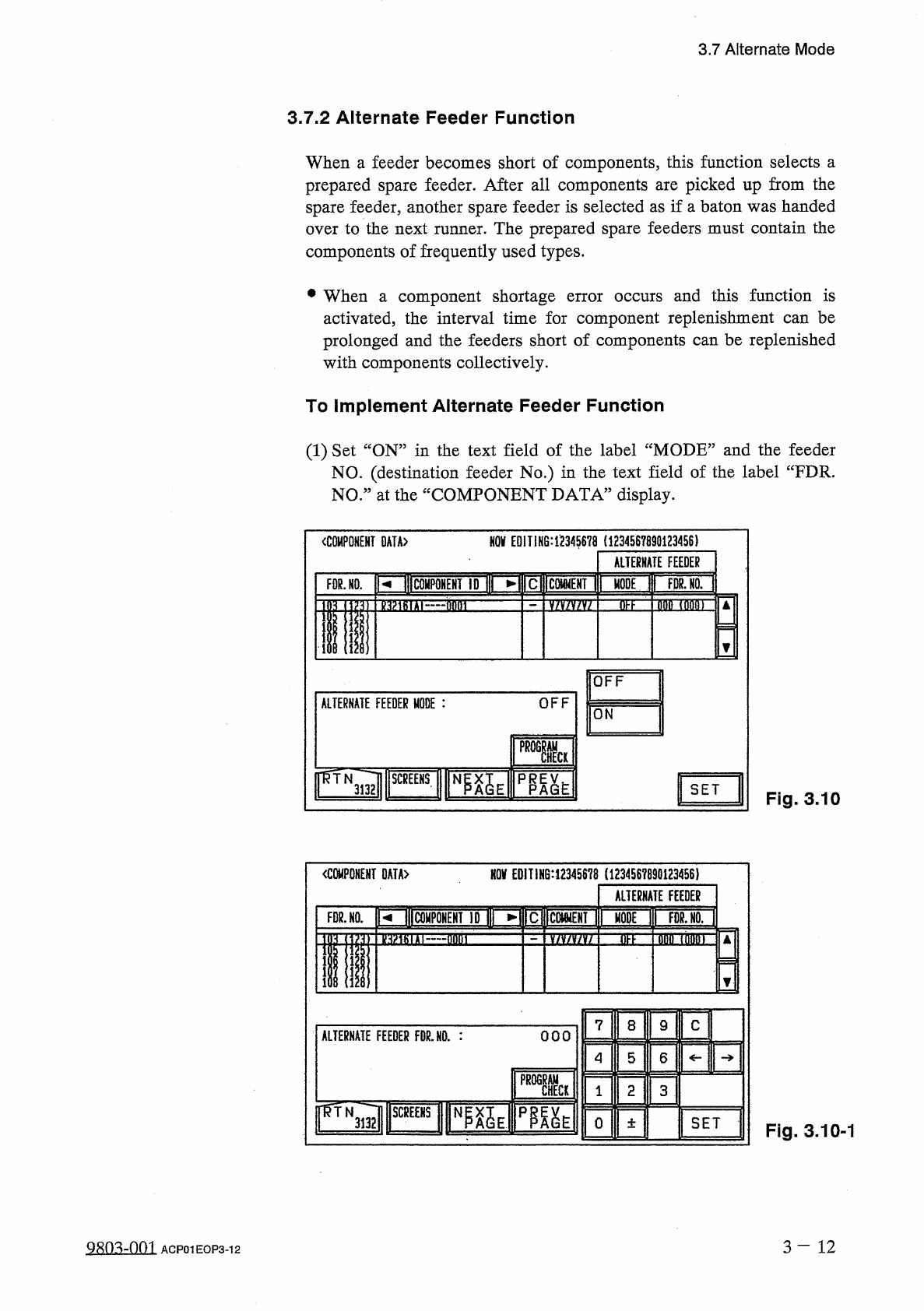
(
1
)
Set
“
ON
”
in
the
text
field
of
the
label
“
MODE
”
and
the
feeder
NO
.
(
destination
feeder
No
.
)
in
the
text
field
of
the
label
“
FDR
.
NO
.
”
at
the
“
COMPONENT
DATA
”
display
.
NOV
EDIT
1
H
6
:
1234
S
678
(
1234567890123456
)
COMPONENT
DATA
〉
ALTERNATE
FEEDER
RIBCOHPQHEHT
ID
I
MODE
T
|
TWoTl
FOR
.
NO
.
3
EE
fififl
TflMT
nmrrr
OFF
OFF
ALTERNATE
FEEDER
MODE
:
ON
SET
Fig
.
3.10
NOV
EDIT
!
N
6
:
12345678
(
123456789
Q
1234
S
6
)
mmm
OATA
>
ALTERNATE
FEEDER
prltolPONEHf
ID
I
►
FDR
.
NO
.
dtfn
加
tiT
M
flnni
v
/
v
/
v
/
v
/
DFF
7
C
8
9
ALTERNATE
FEEDER
FDR
.
NO
.
:
OOO
4
5
6
PROGRAM
CHECK
2
3
1
ir
^
TNTTi
mm
3132
0
SET
土
Fig
.
3.10
-
1
3
-
12
9
m
=
m
ACP
01
EOP
3
-
12