1OPERATION_.pdf - 第153页
本 窣 本 窣 本 ORIGIN MONITOR 本 本 本 本 本 mp ^ : \ m - opmmmi F 2 0 1 CP . C . B . COUNTER > 關 : 1 ^ 8 8 8 8 < P . C . B . PRCS . TIME 〉 300 SEC . ( FEEDER CHAN 6 E - 0 VER PREPARATION COMPLETE ) IT ^ I FO [ C 2 Cl [ PAUS…
3.7
Alternate
Mode
(
3
)
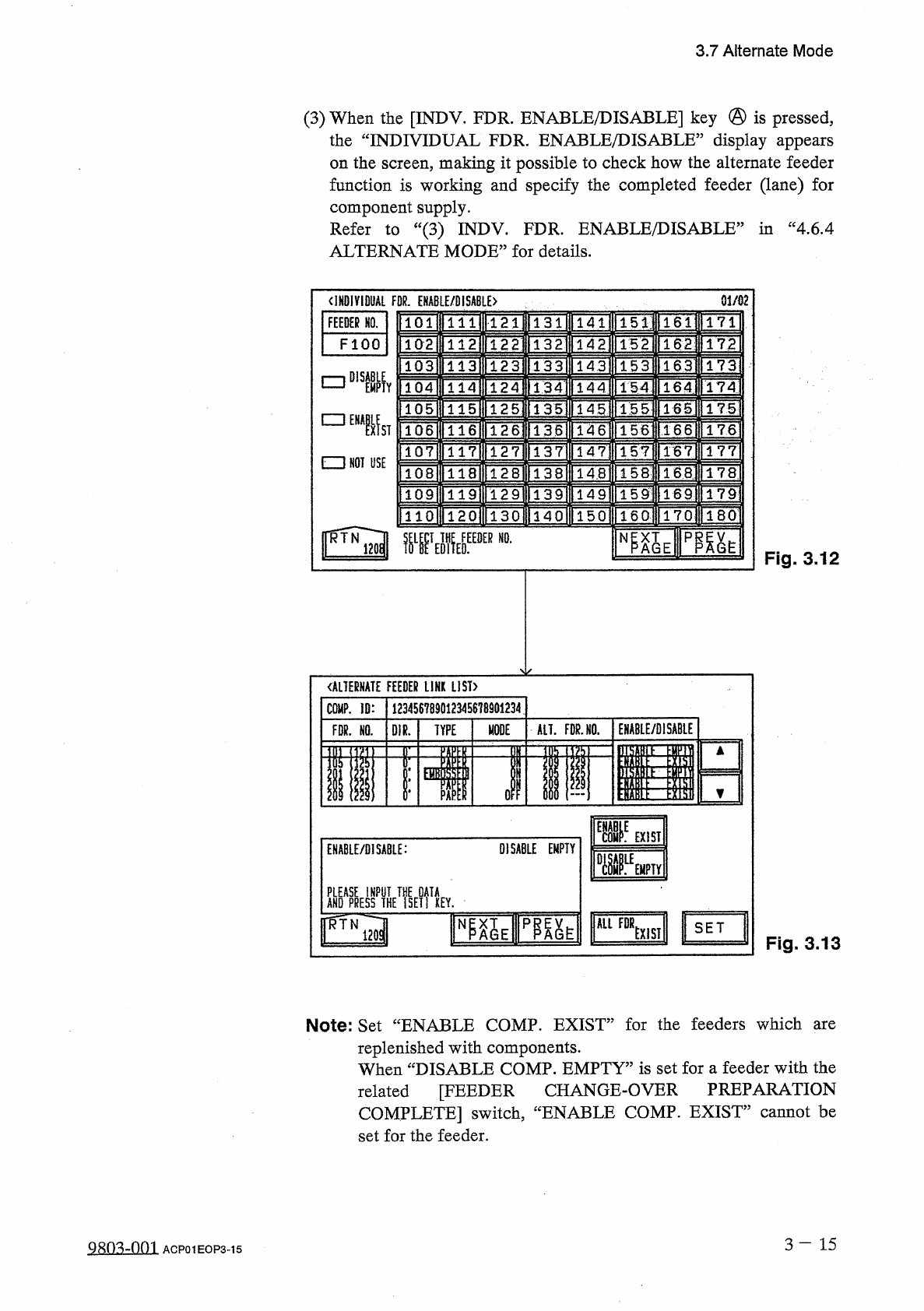
When
the
[
INDV
.
FDR
.
ENABLE
/
DISABLE
]
key
®
is
pressed
,
the
“
INDIVIDUAL
FDR
.
ENABLE
/
DISABLE
”
display
appears
on
the
screen
,
making
it
possible
to
check
how
the
alternate
feeder
function
is
working
and
specify
the
completed
feeder
(
lane
)
for
component
supply
.
Refer
to
“
(
3
)
INDV
.
FDR
.
ENABLE
/
DISABLE
1
ALTERNATE
MODE
”
for
details
.
in
“
4.6
.
4
01
/
02
<
IH
01
VI
0
UAL
FOR
.
EHA
6
LE
/
DISABL
£
>
16
H
171
FEEDER
HO
.
101
121
131
141
151
TeE
152
F
100
102
172
122
132
142
1631
133
153
173
113 123
143
DISABLE
口
164
J
174
134
114
124
144
154
EMPTY
165
]
175
115
125
IBS
135
145
□
EZ
3
NOT
USE
1661
176
116
136
14
6
156
126
ST
IBTj
147
177
127
137
157
rem
128
158
178
14
8
lHI
179
159
:
129
149
TTQI
IITTQ
1
T
2
OI
TAP
]
160
150
180
130
PP
^
E
NP
XT
DER
NO
.
AGE
Fig
.
3.12
《
ALTERNATE
FEEDER
LINK
LIST
)
123456789012345678901234
COMP
.
ID
:
EHABLE
/
DISABLE
MODE
ALT
.
FDR
.
HO
.
亂
TYPE
FDR
.
NO
.
1
FI
f
EHE
IN
iiw
^
l
3
;
M
:
1
I
tim
w
EXIST
0
ISA
8
LE
EMPTY
ENABLE
/
DISABLE
:
WW
]
Uum
.
ANDAPRE
5
SPTHE
ALL
FDR
版
PP
^
E
N
SET
EXIST
mi
Fig
.
3.13
Note
:
Set
“
ENABLE
COMP
.
EXIST
”
for
the
feeders
which
are
replenished
with
components
.
When
“
DISABLE
COMP
.
EMPTY
”
is
set
for
a
feeder
with
the
related
[
FEEDER
CHANGE
-
OVER
PREPARATION
COMPLETE
]
switch
,
“
ENABLE
COMP
.
EXIST
”
cannot
be
set
for
the
feeder
.
3
-
15
Q
只
m
-
om
ACP
01
EOP
3
-
15
本 窣 本 窣 本
ORIGIN
MONITOR
本 本 本 本 本
mp
^
:
\
m
-
opmmmi
F
201
CP
.
C
.
B
.
COUNTER
>
關
:
1
^
8888
<
P
.
C
.
B
.
PRCS
.
TIME
〉
300
SEC
.
(
FEEDER
CHAN
6
E
-
0
VER
PREPARATION
COMPLETE
)
IT
^
I
FO
[
C
2
Cl
[
PAUSE
3.8
One
-
Touch
Jump
Function
3.8
One
-
Touch
Jump
Function
(
Jump
to
Substitute
“
AUTO
OPN
.
MODE
〈
PLACEMENT
〉
,
,
Display
)
This
function
enables
the
operator
to
shift
quickly
to
the
substitute
“
AUTO
OPN
.
MODE
〈
PLACEMENT
〉
”
display
from
another
display
by
pressing
the
[
RTN
]
key
(
one
-
touch
operation
)
.
•
When
〈
PLACEMENT
〉
”
display
is
on
the
display
other
than
the
“
AUTO
OPN
.
MODE
during
automatic
operation
and
the
machine
stops
in
an
error
condition
,
the
operator
rrmst
find
the
“
AUTO
OPN
.
MODR
<
PT
;
Ar
:
RMRNT
>
?
?
display
open
it
to
re
-
start
the
operation
.
This
is
regulated
in
the
touch
-
screen
operation
system
for
security
reason
.
However
,
if
the
operator
follows
this
regulation
,
he
has
to
go
through
many
hierarchical
tree
branches
before
reaching
the
“
AUTO
OPN
.
MODE
<
PLACEMENT
>
”
display
,
losing
precious
time
before
the
machine
can
be
re
-
started
.
To
avoid
this
,
a
substitute
display
of
the
a
screen
“
AUTO
OPN
.
MODE
<
PLACEMENT
>
”
display
is
provided
to
give
a
series
of
operations
such
as
machine
re
-
start
instructions
and
operation
,
quick
shift
to
the
original
display
,
etc
.
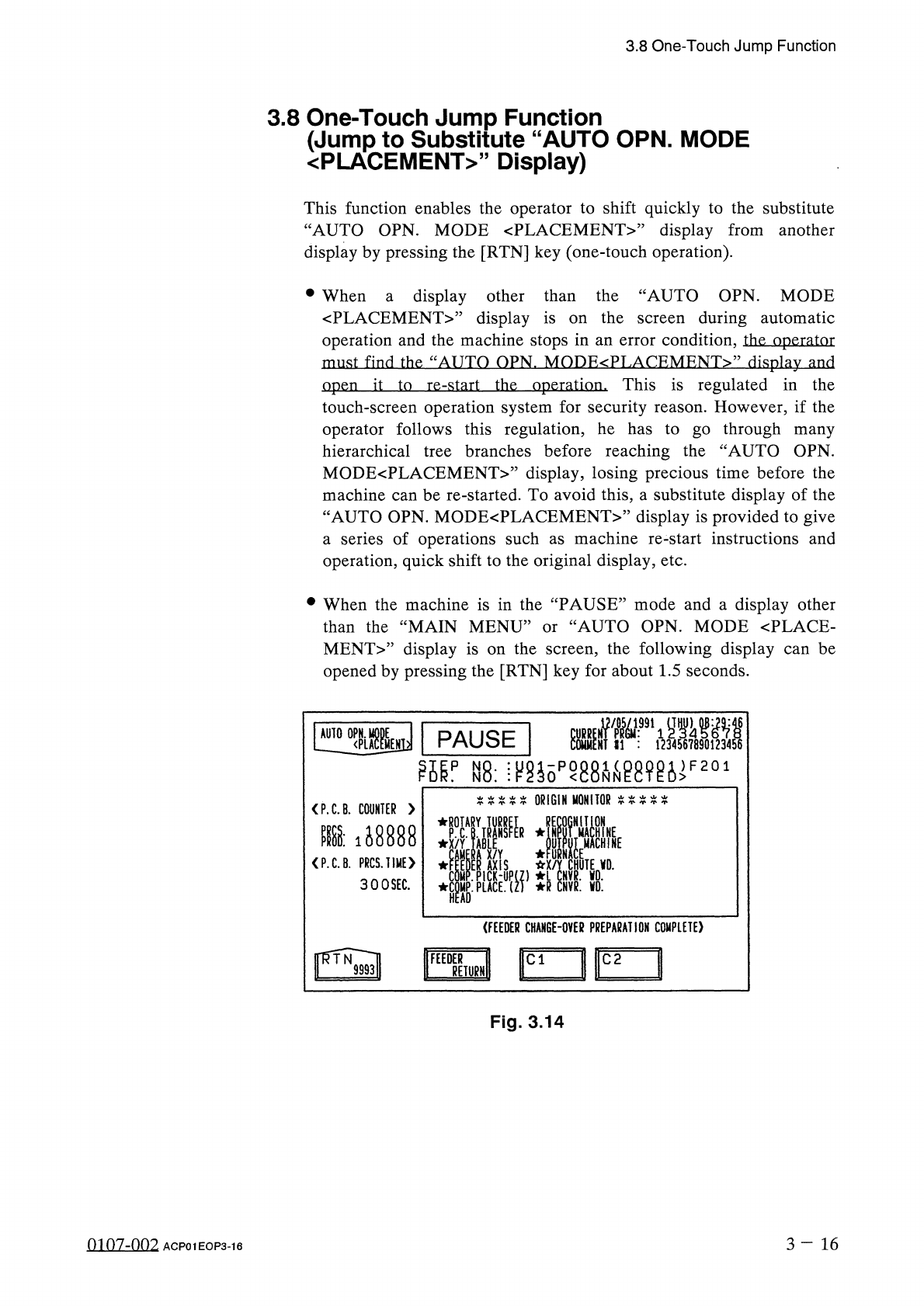
•
When
the
machine
is
in
the
“
PAUSE
”
mode
and
a
display
other
than
the
“
MAIN
MENU
”
or
“
AUTO
OPN
.
MODE
<
PLACE
-
MENT
>
”
display
is
opened
by
pressing
the
[
RTN
]
key
for
about
1.5
seconds
.
the
screen
,
the
following
display
can
be
on
Fig
.
3.14
3
-
16
0107
-
002
ACP
01
EOP
3
-
16
up
•
.
Do
Ew
N
TIC
^
R
.
D
^
GIMVACVV
OHUPN
NN
cpvlonYCC
EHUU
/
R
—
OFXLDn
ON
R
z
CL
RSFSUP
'
~
T
RN
Y
—
-
E
MUAE
/
XKC
TRLXACA
_
—
nD
—
.
—
_
Y
.
AARPP
A
-
-
-
fcuDIPD
TCYMEMMA
o
.
/
AFWOnyt
RPXALPCCH
3.8
One
-
Touch
Jump
Function
•
When
the
above
display
is
opened
,
pressing
the
[
START
]
button
validates
the
function
and
the
machine
can
easily
be
re
-
started
after
it
has
stopped
in
an
error
condition
.
Pressing
the
[
RTN
]
key
also
shifts
to
the
original
display
.
Therefore
,
the
operation
(
such
as
data
editing
)
or
display
(
such
as
management
data
information
)
being
performed
before
error
condition
can
be
easily
and
quickly
resumed
and
the
job
engaged
continuously
.
Notes
:
(
a
)
The
same
label
and
keys
as
the
“
AUTO
OPN
.
MODE
〈
PLACEMENT
〉
’
’
display
appear
on
this
display
except
the
“
〈
FEEDER
CHANGE
-
OVER
PREPARATION
COMPLETE
〉
”
keys
(
Cl
and
C
2
)
.
These
keys
appear
in
place
of
the
label
“
MGT
.
INFO
.
”
and
its
data
field
.
The
“
AUTO
OPN
.
SUB
-
MENU
”
display
cannot
be
opened
from
this
display
.
(
b
)
The
[
FEEDER
RETURN
]
button
on
the
rear
touch
screen
can
be
used
.
The
[
FEEDER
RETURN
]
button
screen
is
not
ready
for
use
.
the
front
touch
on
3
-
17
01
07
-
002
ACP
01
EOP
3
-
17