1OPERATION_.pdf - 第17页
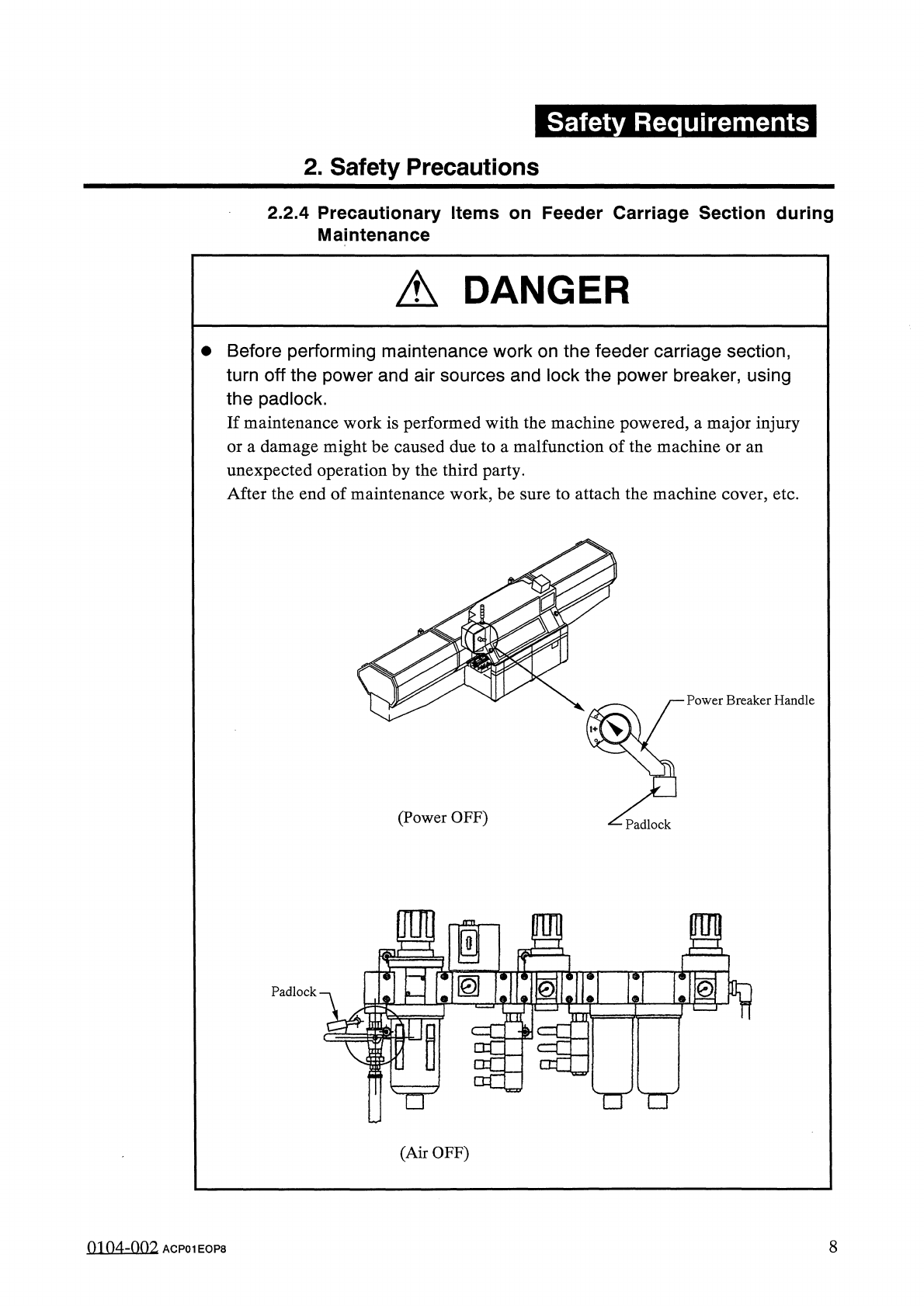
Safety Requirements 2 . Safety Precautions 2.2 . 4 Precautionary Items on Feeder Carriage Section during Maintenance A DANGER • Before performing maintenance work on the feeder carriage section , turn off the power and a…
Safety
Requirements
2
.
Safety
Precautions
2.2
.
3
Precautionary
Items
on
Feeder
Carriage
Section
during
Setup
Operation
A
DANGER
A
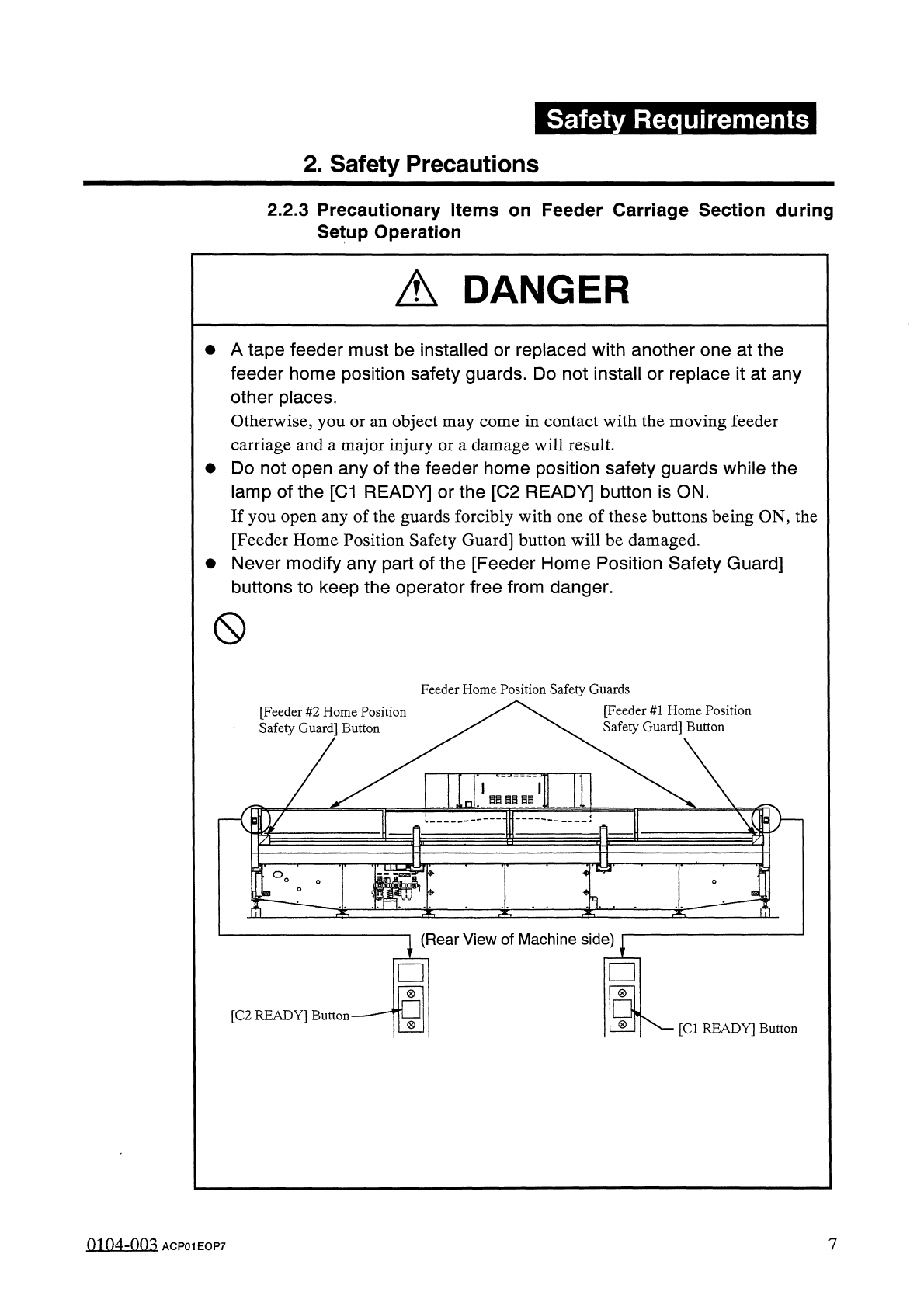
tape
feeder
must
be
installed
or
replaced
with
another
one
at
the
feeder
home
position
safety
guards
.
Do
not
install
or
replace
it
at
any
other
places
.
Otherwise
,
you
or
an
object
may
come
in
contact
with
the
moving
feeder
carriage
and
a
major
injury
or
a
damage
will
result
.
Do
not
open
any
of
the
feeder
home
position
safety
guards
while
the
lamp
of
the
[
C
1
READY
]
or
the
[
C
2
READY
]
button
is
ON
.
If
you
open
any
of
the
guards
forcibly
with
one
of
these
buttons
being
ON
,
the
[
Feeder
Home
Position
Safety
Guard
]
button
will
be
damaged
.
Never
modify
any
part
of
the
[
Feeder
Home
Position
Safety
Guard
]
buttons
to
keep
the
operator
free
from
danger
.
參
(
S
)
[
Feeder
#
1
Home
Position
[
Feeder
#
2
Home
Position
Safety
Guard
]
Button
Safety
Guardi
Button
7
0104
-
003
ACPOIEOP
7
Safety
Requirements
2
.
Safety
Precautions
2.2
.
4
Precautionary
Items
on
Feeder
Carriage
Section
during
Maintenance
A
DANGER
•
Before
performing
maintenance
work
on
the
feeder
carriage
section
,
turn
off
the
power
and
air
sources
and
lock
the
power
breaker
,
using
the
padlock
.
If
maintenance
work
is
performed
with
the
machine
powered
,
a
major
injury
or
a
damage
might
be
caused
due
to
a
malfunction
of
the
machine
or
an
unexpected
operation
by
the
third
party
.
After
the
end
of
maintenance
work
,
be
sure
to
attach
the
machine
cover
,
etc
.
Power
Breaker
Handle
(
Power
OFF
)
Padlock
ffl
a
二
MI
■
y
■
51
©
Padlock
TrTr
n
(
Air
OFF
)
8
0104
-
002
ACPOIEOP
8
Safety
Requirements
2
.
Safety
Precautions
2.3
Other
Precautionary
Items
A
WARNING
•
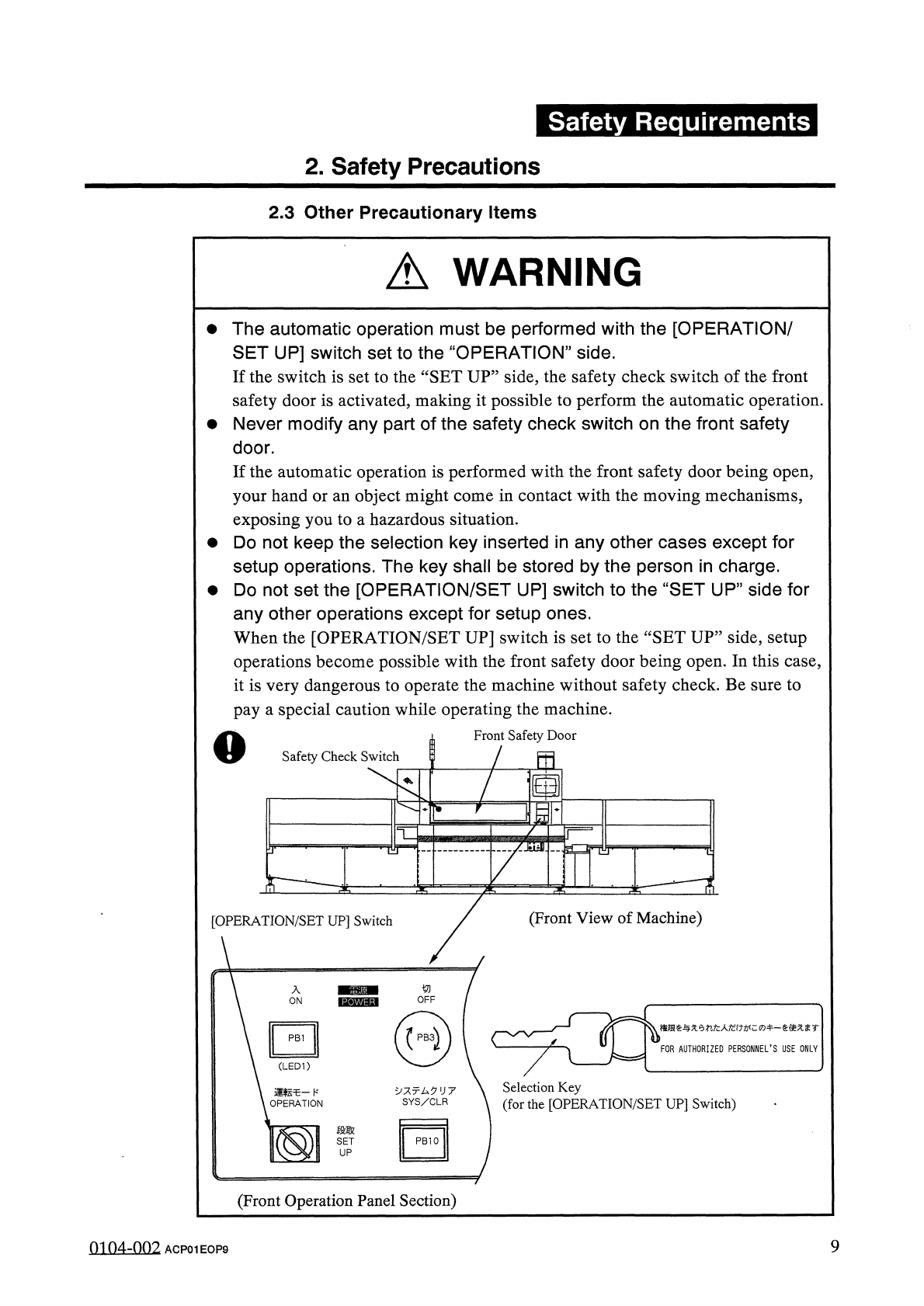
The
automatic
operation
must
be
performed
with
the
[
OPERATION
/
SET
UP
]
switch
set
to
the
“
OPERATION
”
side
.
If
the
switch
is
set
to
the
“
SET
UP
”
side
,
the
safety
check
switch
of
the
front
safety
door
is
activated
,
making
it
possible
to
perform
the
automatic
operation
.
•
Never
modify
any
part
of
the
safety
check
switch
on
the
front
safety
door
.
If
the
automatic
operation
is
performed
with
the
front
safety
door
being
open
,
your
hand
or
an
object
might
come
in
contact
with
the
moving
mechanisms
,
exposing
you
to
a
hazardous
situation
.
•
Do
not
keep
the
selection
key
inserted
in
any
other
cases
except
for
setup
operations
.
The
key
shall
be
stored
by
the
person
in
charge
.
•
Do
not
set
the
[
OPERATION
/
SET
UP
]
switch
to
the
“
SET
UP
”
side
for
any
other
operations
except
for
setup
ones
.
When
the
[
OPERATION
/
SET
UP
]
switch
is
set
to
the
“
SET
UP
”
side
,
setup
operations
become
possible
with
the
front
safety
door
being
open
.
In
this
case
,
it
is
very
dangerous
to
operate
the
machine
without
safety
check
.
Be
sure
to
pay
a
special
caution
while
operating
the
machine
.
Front
Safety
Door
|
Safety
Check
Switch
as
rt
^
(
Front
View
of
Machine
)
[
OPERATION
/
SET
UP
]
Switch
ON
権限在与无今打汔人如
:
wc
®
牛一奁使龙求
r
PB
1
FOR
AUTHORIZED
PERSONNEL
'
S
USE
ONLY
(
LED
1
)
Selection
Key
(
for
the
[
OPERATION
/
SET
UP
]
Switch
)
5
/
只亍厶夕
1
J
7
SYS
/
CLR
運転乇一
K
OPERATION
段取
SET
UP
(
Front
Operation
Panel
Section
)
9
0104
-
002
ACPOIEOP
9