1OPERATION_.pdf - 第179页
4.2 “ AUTO OPN . MODE < PLACEMENT > ” Display ⑬ [ SCREENS ] key When this key is pressed , the information in “ ORIGIN MONITOR ” ⑭ changes . ⑭ Monitor Information Every time the [ SCREENS ] ⑬ key is pressed , the i…
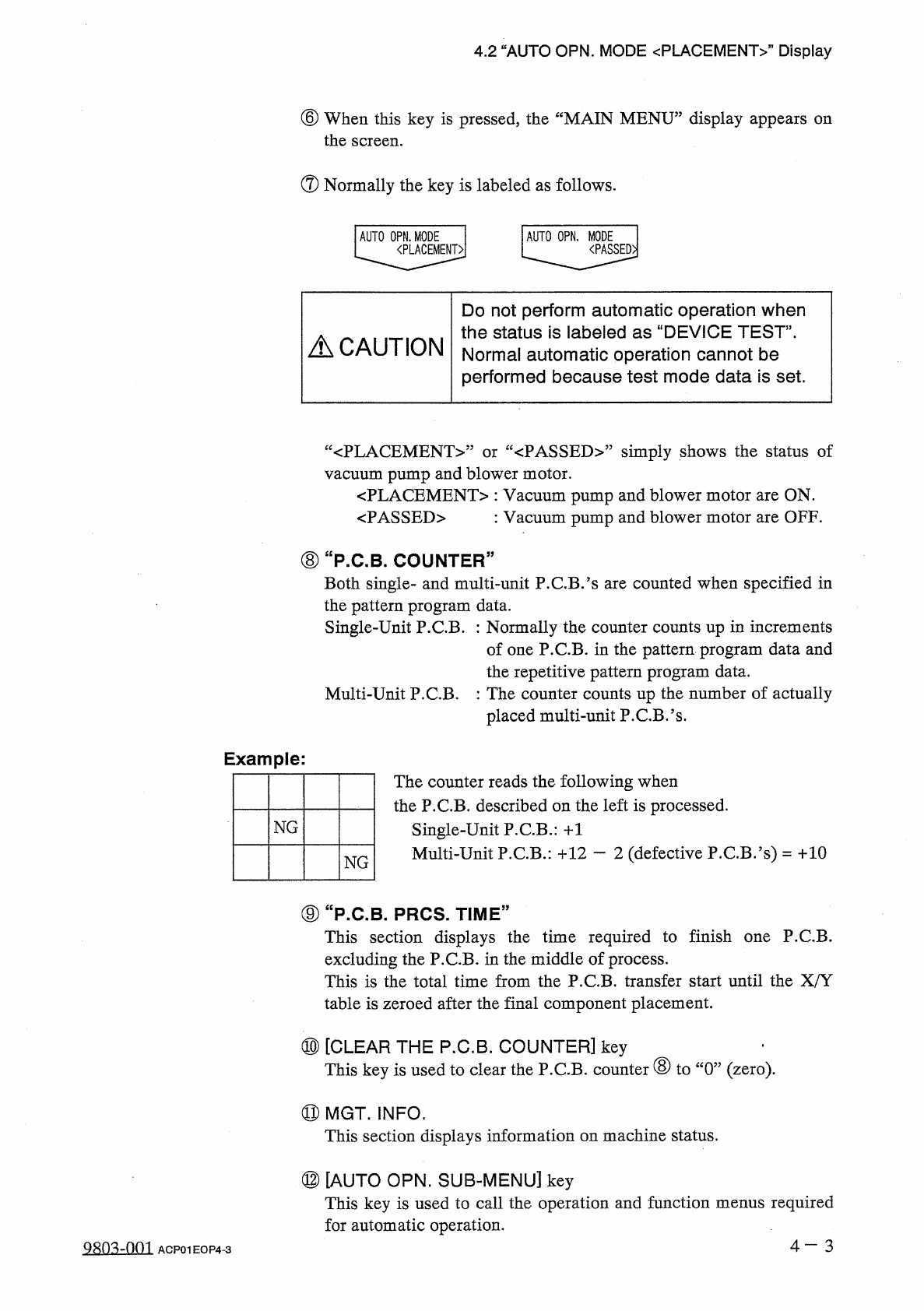
4.2
“
AUTO
OPN
.
MODE
〈
PLACEMENT
〉
”
Display
⑥
When
this
key
is
pressed
,
the
“
MAIN
MENU
”
display
appears
the
screen
.
on
⑦
Normally
the
key
is
labeled
as
follows
.
AUTO
OPN
.
MODE
I
AUTO
OPN
.
MODE
<
PLACEMENT
>
|
<
PASSED
>
|
Do
not
perform
automatic
operation
when
the
status
is
labeled
as
“
DEVICE
TEST
,,
.
Normal
automatic
operation
cannot
be
performed
because
test
mode
data
is
set
.
A
CAUTION
:
<
PLACEMENT
>
”
or
“
<
PASSED
>
”
simply
shows
the
status
of
vacuum
pump
and
blower
motor
.
〈
PLACEMENT
〉
:
Vacuum
pump
and
blower
motor
are
ON
.
<
PASSED
>
:
Vacuum
pump
and
blower
motor
are
OFF
.
⑧
"
P
.
C
.
B
.
COUNTER
”
Both
single
-
and
multi
-
unit
P
.
C
.
B
/
s
are
counted
when
specified
in
the
pattern
program
data
.
Single
-
Unit
P
.
C
.
B
.
:
Normally
the
counter
counts
up
in
increments
of
one
P
.
C
.
B
.
in
the
pattern
program
data
and
the
repetitive
pattern
program
data
.
Multi
-
Unit
P
.
C
.
B
.
:
The
counter
counts
up
the
number
of
actually
placed
multi
-
unit
P
.
C
.
B
.
’
s
.
Example
:
The
counter
reads
the
following
when
the
P
.
C
.
B
.
described
on
the
left
is
processed
.
Single
-
Unit
P
.
C
.
B
.
:
+
1
Multi
-
Unit
P
.
C
.
B
.
:
十
12
—
2
(
defective
P
.
C
.
B
.
’
s
)
=
十
10
NG
NG
⑨
“
P
.
C
.
B
_
PRCS
.
TIME
”
This
section
displays
the
time
required
to
finish
one
P
.
C
.
B
.
excluding
the
P
.
C
.
B
.
in
the
middle
of
process
.
This
is
the
total
time
from
the
P
.
C
.
B
.
transfer
start
until
the
X
/
Y
table
is
zeroed
after
the
final
component
placement
.
⑩
[
CLEAR
THE
P
.
C
.
B
.
COUNTER
]
key
This
key
is
used
to
clear
the
P
.
C
.
B
.
counter
⑧
to
“
0
”
(
zero
)
.
⑪
MGT
.
INFO
.
This
section
displays
information
on
machine
status
.
⑫
[
AUTO
OPN
.
SUB
-
MENU
]
key
This
key
is
used
to
call
the
operation
and
function
menus
required
for
automatic
operation
.
4
一
3
0803
=
001
ACP
01
EOP
4
-
3
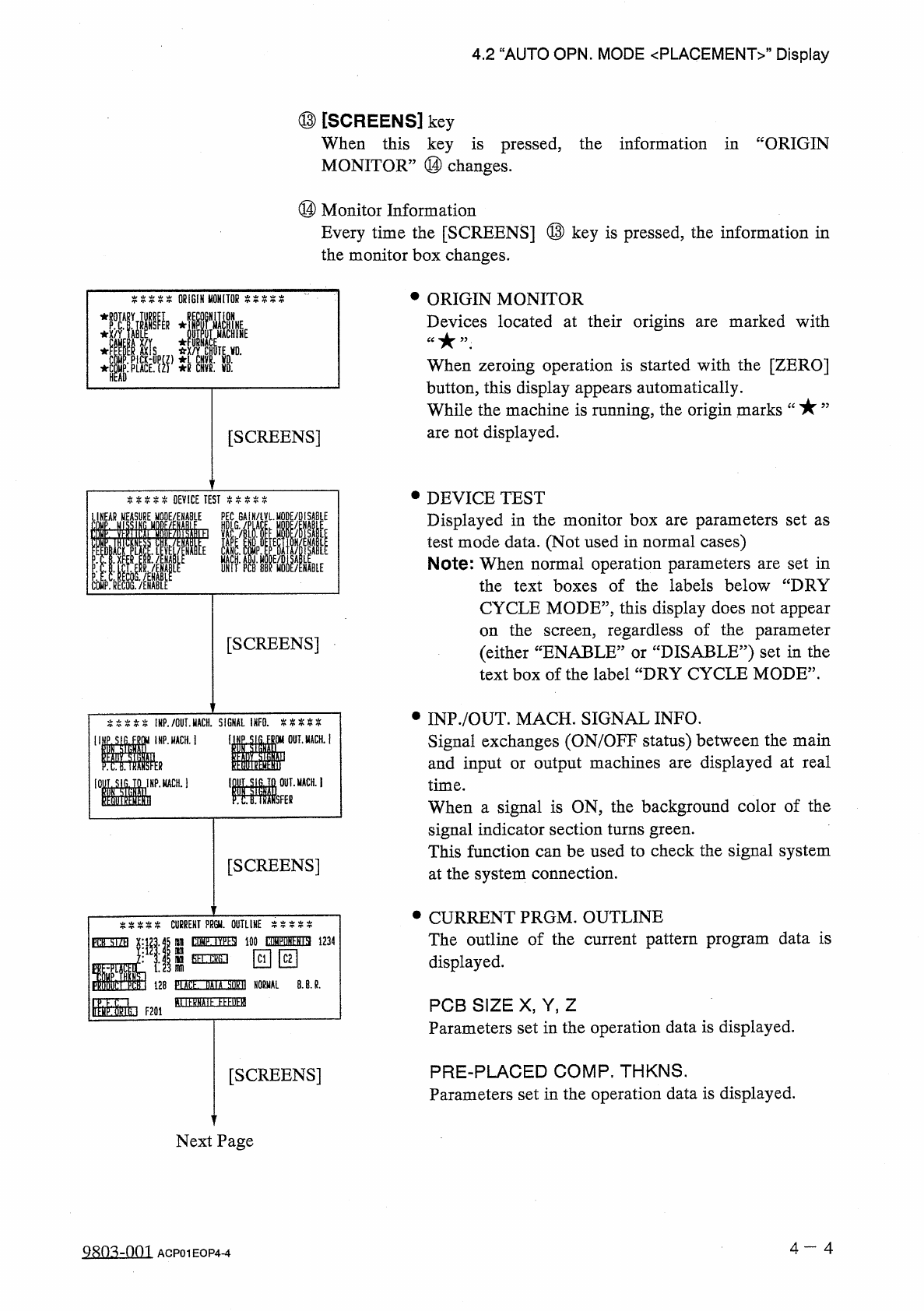
4.2
“
AUTO
OPN
.
MODE
<
PLACEMENT
>
”
Display
⑬
[
SCREENS
]
key
When
this
key
is
pressed
,
the
information
in
“
ORIGIN
MONITOR
”
⑭
changes
.
⑭
Monitor
Information
Every
time
the
[
SCREENS
]
⑬
key
is
pressed
,
the
information
in
the
monitor
box
changes
.
•
ORIGIN
MONITOR
Devices
located
at
their
origins
are
marked
with
ORIGIN
MONITOR
E
:
i
When
zeroing
operation
is
started
with
the
[
ZERO
]
button
,
this
display
appears
automatically
.
While
the
machine
is
running
,
the
origin
marks
are
not
displayed
.
[
SCREENS
]
•
DEVICE
TEST
Displayed
in
the
monitor
box
are
parameters
set
as
test
mode
data
.
(
Not
used
in
normal
cases
)
Note
:
When
normal
operation
parameters
are
set
in
the
text
boxes
of
the
labels
below
“
DRY
%
%
%
%
%
DEVICE
TEST
P
COMP
.
RECOG
.
/
ENABLE
LINEAR
MODE
/
ENABLE
HDLG
GAIN
/
iVLMQDE
/
DISABlE
CYCLE
MODE
”
,
this
display
does
not
appear
the
screen
,
regardless
of
the
parameter
:
DISABLE
?
?
)
set
in
the
on
[
SCREENS
]
(
either
“
ENABLE
:
text
box
of
the
label
“
DRY
CYCLE
MODE
”
.
or
•
INP
.
/
OUT
.
MACH
.
SIGNAL
INFO
.
Signal
exchanges
(
ON
/
OFF
status
)
between
the
main
and
input
or
output
machines
are
displayed
at
real
time
.
When
a
signal
is
ON
,
the
background
color
of
the
signal
indicator
section
turns
green
.
This
function
can
be
used
to
check
the
signal
system
at
the
system
connection
.
%
%
%
%
%
!
HP
.
/
OUT
.
MACH
.
SIGNAL
INFO
.
%
%
%
%
%
INP
.
MACH
.
j
醒
。
_
ii
IDf
.
SIG
.
TO
IMP
.
MCH
.
1
MM
[
SCREENS
]
•
CURRENT
PRGM
.
OUTLINE
The
outline
of
the
current
pattern
program
data
is
displayed
.
CURRENT
PPGU
.
OUTLINE
tOMF
.
IV
^
SI
100
WuN
^
ia
1234
fih
.
ckG
.
i
PflH
■
X
nn
回回
sm
128
PLACL
DAIA
M
NORMAL
8
.
B
.
R
.
B
USSDE
EEEBEfl
Ir
^
CTikt
F
20
i
PCB
SIZE
X
,
Y
,
Z
Parameters
set
in
the
operation
data
is
displayed
.
PRE
-
PLACED
COMP
.
THKNS
.
Parameters
set
in
the
operation
data
is
displayed
.
[
SCREENS
]
Next
Page
4
一
4
Q
8
n
^
-
001
ACP
01
EOP
4
-
4
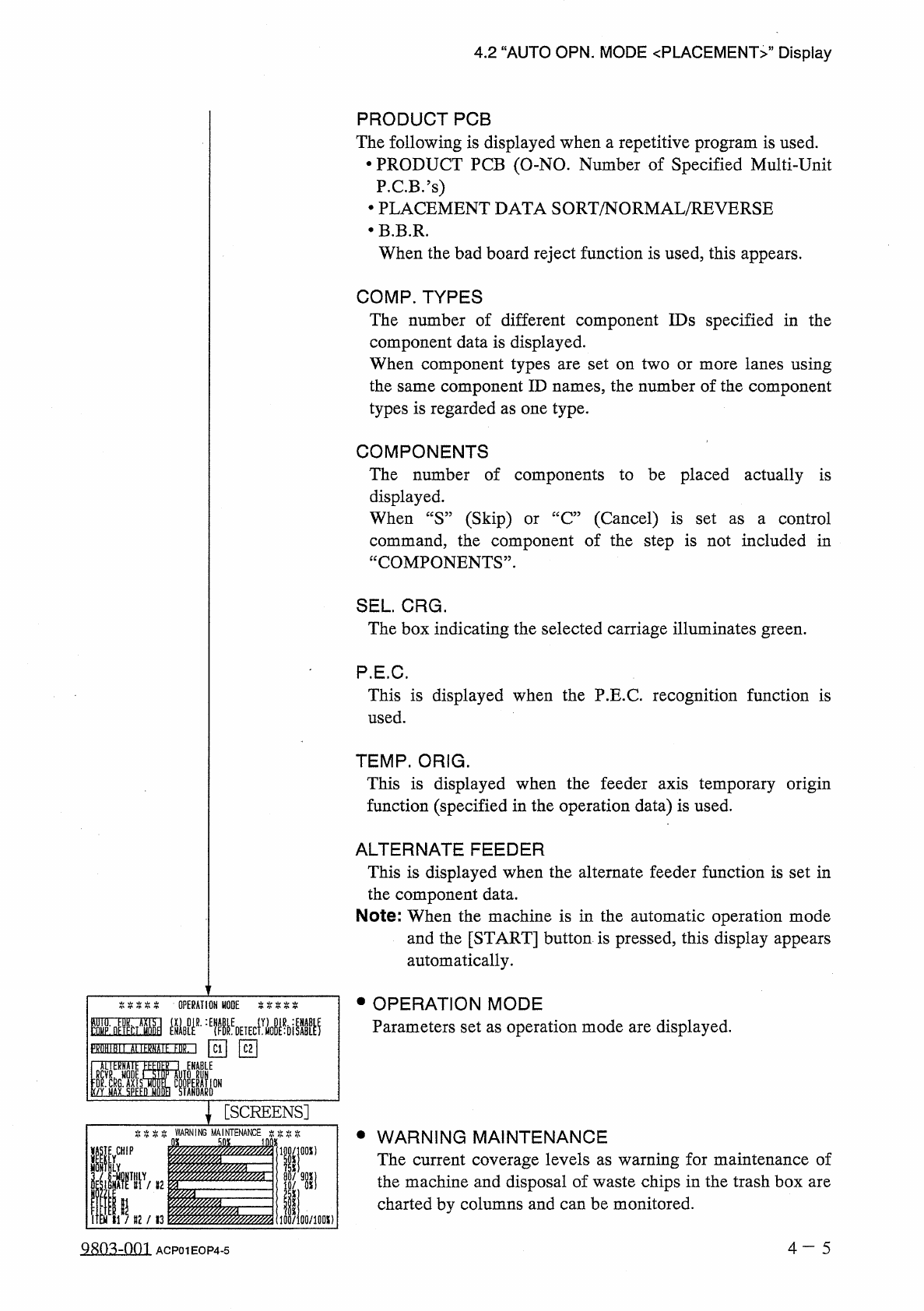
4.2
“
AUTO
OPN
.
MODE
〈
PLACEMENT
〉
,,
Display
PRODUCT
PCB
The
following
is
displayed
when
a
repetitive
program
is
used
.
•
PRODUCT
PCB
(
O
-
NO
.
Number
of
Specified
Multi
-
Unit
P
.
C
.
B
/
s
)
•
PLACEMENT
DATA
SORT
/
NORMAL
/
REVERSE
•
B
.
B
.
R
.
When
the
bad
board
reject
function
is
used
,
this
appears
.
COMP
.
TYPES
The
number
of
different
component
IDs
specified
in
the
component
data
is
displayed
.
When
component
types
are
set
on
two
or
more
lanes
using
the
same
component
ID
names
,
the
number
of
the
component
types
is
regarded
as
one
type
.
COMPONENTS
The
number
of
components
to
be
placed
actually
is
displayed
.
When
“
S
”
(
Skip
)
or
“
C
”
(
Cancel
)
is
set
as
a
control
command
,
the
component
of
the
step
is
not
included
in
“
COMPONENTS
”
.
SEL
.
CRG
.
The
box
indicating
the
selected
carriage
illuminates
green
.
P
.
E
.
C
.
This
is
displayed
when
the
P
.
E
.
C
.
recognition
function
is
used
.
TEMP
.
ORIG
.
This
is
displayed
when
the
feeder
axis
temporary
origin
function
(
specified
in
the
operation
data
)
is
used
.
ALTERNATE
FEEDER
This
is
displayed
when
the
alternate
feeder
function
is
set
in
the
component
data
.
Note
:
When
the
machine
is
in
the
automatic
operation
mode
and
the
[
START
]
button
is
pressed
,
this
display
appears
automatically
.
•
OPERATION
MODE
Parameters
set
as
operation
mode
are
displayed
.
IHM
■
孤墨麵
\
[
SCREENS
]
WARNING
•
WARNING
MAINTENANCE
The
current
coverage
levels
as
warning
for
maintenance
of
the
machine
and
disposal
of
waste
chips
in
the
trash
box
are
charted
by
columns
and
can
be
monitored
.
[
WHIP
iOO
/
lflOX
)
4
—
5
9803
-
001
ACP
01
EOP
4
-
5