1OPERATION_.pdf - 第198页
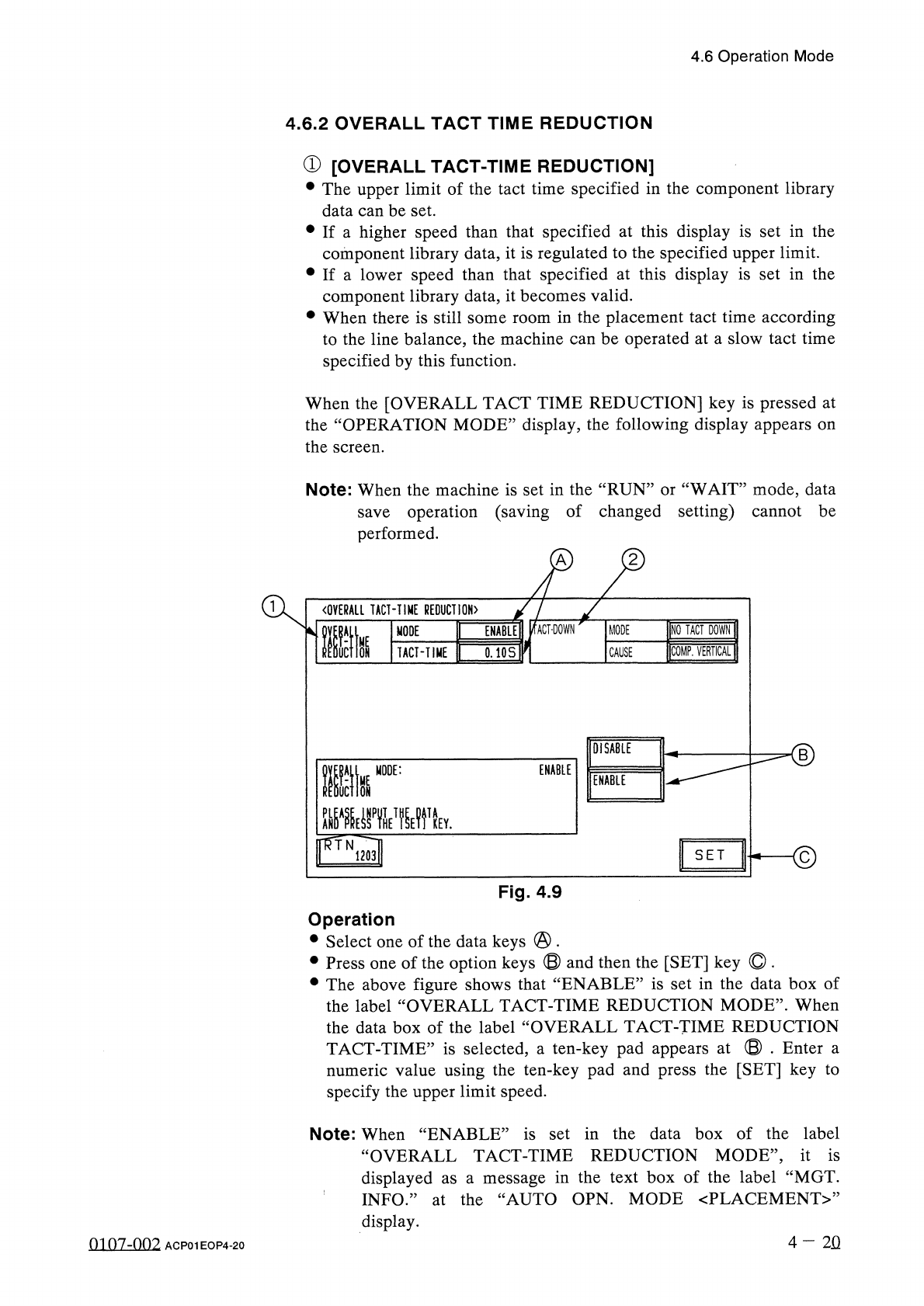
4.6 Operation Mode ② [ TACT - DOWN ] When it is detected that a component is picked up in unstable condition , this function can be used to slow down the speed of the rotary turret to the specified falling down to the P …
4.6
Operation
Mode
4.6
.
2
OVERALL
TACT
TIME
REDUCTION
①
[
OVERALL
TACT
-
TIME
REDUCTION
]
•
The
upper
limit
of
the
tact
time
specified
in
the
component
library
data
can
be
set
.
•
If
a
higher
speed
than
that
specified
at
this
display
is
set
in
the
component
library
data
,
it
is
regulated
to
the
specified
upper
limit
.
•
If
a
lower
speed
than
that
specified
at
this
display
is
set
in
the
component
library
data
,
it
becomes
valid
.
•
When
there
is
still
some
room
in
the
placement
tact
time
according
to
the
line
balance
,
the
machine
can
be
operated
at
a
slow
tact
time
specified
by
this
function
.
When
the
[
OVERALL
TACT
TIME
REDUCTION
]
key
is
pressed
at
the
“
OPERATION
MODE
”
display
,
the
following
display
appears
on
the
screen
.
Note
:
When
the
machine
is
set
in
the
“
RUN
”
or
“
WAIT
”
mode
,
data
save
operation
(
saving
of
changed
setting
)
cannot
be
performed
.
A
〈
OVERALL
TACT
-
TIME
REDUCTION
〉
INQ
TACT
DOWN
ENABLE
!
/
fACT
-
DOWN
MODE
lltk
MODE
COMP
.
VERTICAL
1
TACT
-
TIME
0.10
S
CAUSE
DISABLE
■
©
ENABLE
Ilk
MODE
:
ENABLE
mE
»
T
關
v
flff
.
N
.
S E T
1203
Fig
.
4.9
Operation
•
Select
one
of
the
data
keys
@
.
•
Press
one
of
the
option
keys
®
and
then
the
[
SET
]
key
O
.
•
The
above
figure
shows
that
“
ENABLE
”
is
set
in
the
data
box
of
the
label
“
OVERALL
TACT
-
TIME
REDUCTION
MODE
”
.
When
the
data
box
of
the
label
“
OVERALL
TACT
-
TIME
REDUCTION
TACT
-
TIME
”
is
selected
,
a
ten
-
key
pad
appears
at
©
.
Enter
a
numeric
value
using
the
ten
-
key
pad
and
press
the
[
SET
]
key
to
specify
the
upper
limit
speed
.
Note
:
When
“
ENABLE
”
is
set
in
the
data
box
of
the
label
“
OVERALL
TACT
-
TIME
REDUCTION
MODE
,
,
,
it
is
displayed
as
a
message
in
the
text
box
of
the
label
“
MGT
.
INFO
.
”
at
the
“
AUTO
OPN
.
MODE
〈
PLACEMENT
〉
,
,
display
.
4
-
2
Q
0107
-
002
ACP
01
EOP
4
-
20
4.6
Operation
Mode
②
[
TACT
-
DOWN
]
When
it
is
detected
that
a
component
is
picked
up
in
unstable
condition
,
this
function
can
be
used
to
slow
down
the
speed
of
the
rotary
turret
to
the
specified
falling
down
to
the
P
.
C
.
B
.
to
prevent
the
component
from
one
[
MODE
]
The
tact
-
down
rate
can
be
designated
.
NO
TACT
DOWN
:
The
tact
-
down
function
is
not
used
.
1
/
2
SLOWDOWN
:
The
speed
is
slowed
down
to
“
0.141
seconds
”
.
1
/
4
SLOW
DOWN
:
The
speed
is
slowed
down
to
“
0.200
seconds
”
.
1
/
8
SLOWDOWN
:
The
speed
is
slowed
down
to
“
0.283
seconds
”
.
[
CAUSE
]
Select
one
of
the
following
options
that
represent
the
cause
of
the
tact
-
down
designation
.
COMP
.
VERTICAL
:
The
speed
is
slowed
down
when
a
vertical
component
error
is
detected
.
VRTCL
.
&
RECOG
.
:
The
speed
is
slowed
down
when
a
vertical
component
error
or
a
recognition
error
is
detected
,
component
missing
detected
,
the
speed
is
not
slowed
down
.
(
a
recognition
error
)
is
Note
:
When
error
a
4
—
20
-
1
0107
-
001
ACP
01
EOP
4
-
20
-
1
4.6
Operation
Mode
4.6
.
3
SHORTAGE
OF
COMP
.
DETECTION
MODE
①
[
DETECTION
MODE
]
“
ENABLE
DISABLE
”
can
be
set
in
the
text
box
of
the
label
“
DETECTION
MODE
”
.
When
“
ENABLE
”
is
set
,
the
“
SHORTAGE
OF
COMP
.
DETECTION
MODE
”
is
set
to
activate
the
material
shortage
warning
function
at
the
detection
of
the
tape
end
and
the
material
shortage
error
detection
function
at
the
occurrence
of
a
pick
-
up
error
(
missing
component
error
)
after
the
tape
end
detection
.
•
When
“
ENABLE
”
is
set
and
the
tape
end
of
the
same
tape
feeder
is
detected
continuously
3
times
,
the
error
message
“
SHORTAGE
OF
COMPONENT
”
appears
in
the
text
box
of
the
label
“
MGT
.
INFO
.
”
,
indicating
that
component
shortage
error
has
occurred
at
the
feeder
(
lane
)
.
•
When
the
component
shortage
detection
function
is
set
,
the
component
shortage
warning
function
is
also
activated
.
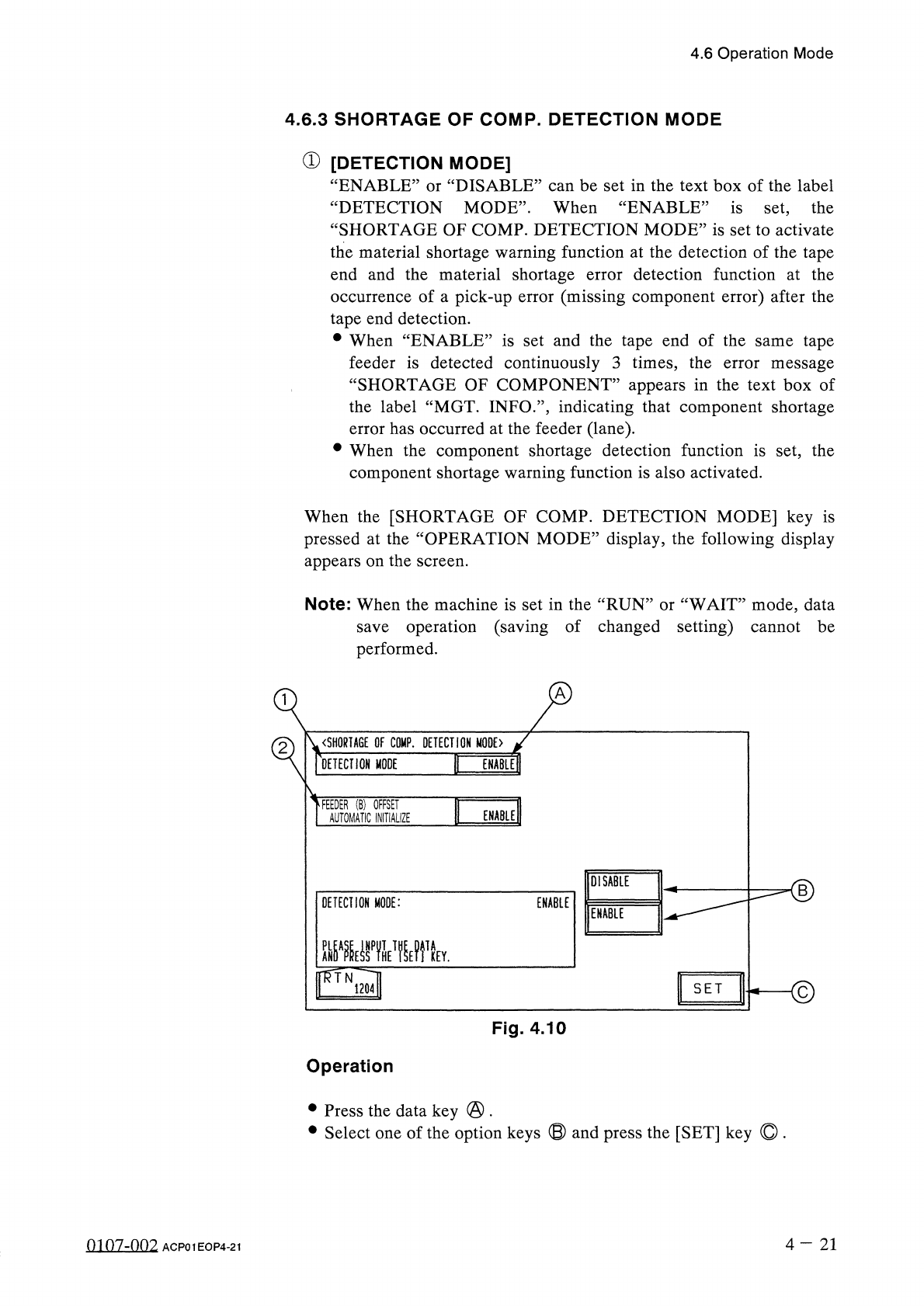
or
When
the
[
SHORTAGE
OF
COMP
.
DETECTION
MODE
]
key
is
pressed
at
the
“
OPERATION
MODE
”
display
,
the
following
display
appears
on
the
screen
.
Note
:
When
the
machine
is
set
in
the
“
RUN
”
or
“
WAIT
”
mode
,
data
save
operation
(
saving
of
changed
setting
)
cannot
be
performed
.
〈
SHORTAGE
OF
COMP
.
DETECTION
MODE
〉
DETECTION
MODE
FEEDER
(
B
)
OFFSET
AUTOMATIC
INITIALIZE
ENABLE
DISABLE
<
D
DETECTION
MODE
:
ENABLE
ENABLE
©
SET
Fig
.
4.10
Operation
•
Press
the
data
key
@
.
•
Select
one
of
the
option
keys
⑬
and
press
the
[
SET
]
key
©
.
4
-
21
0107
-
002
ACP
01
EOP
4
-
21