1OPERATION_.pdf - 第212页
4.6 Operation Mode [ Warning Messages for Trash Box Full of Waste Chips ] ① When the parameter in the “ COUNT parameter in the “ NOTICE ” text box , a warning message is displayed . text box exceeds the B 圏 CLEAR I INFO …
4.6
Operation
Mode
[
Counts
of
Tape
Waste
Chips
]
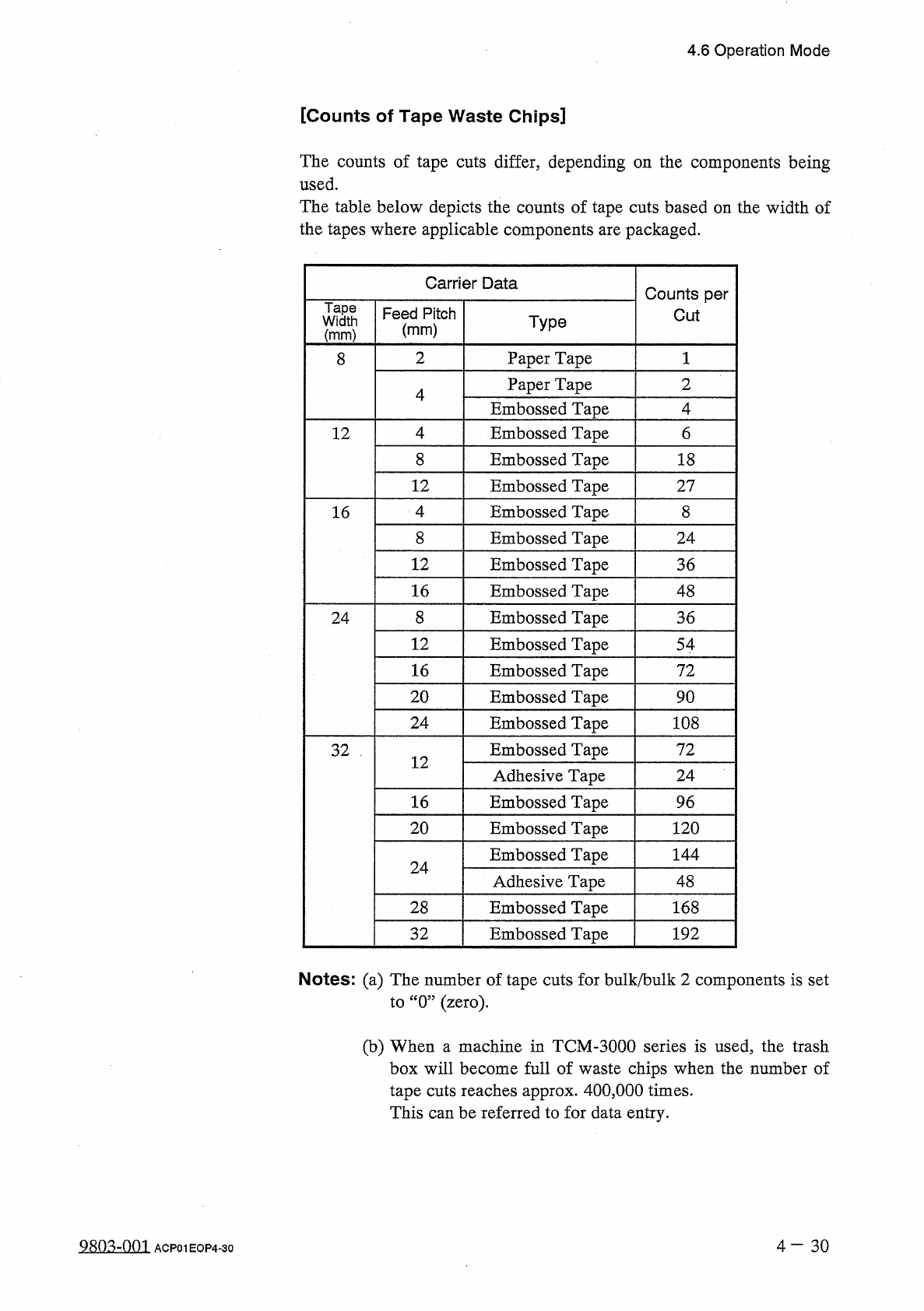
The
counts
of
tape
cuts
differ
,
depending
on
the
components
being
used
.
The
table
below
depicts
the
counts
of
tape
cuts
based
on
the
width
of
the
tapes
where
applicable
components
are
packaged
.
Carrier
Data
Counts
per
Tape
Width
Feed
Pitch
Cut
Type
(
mm
)
(
mm
)
2
Paper
Tape
8
Paper
Tape
2
4
Embossed
Tape
4
Embossed
Tape
4
6
12
8
Embossed
Tape
18
12
Embossed
Tape
27
4
Embossed
Tape
8
16
Embossed
Tape
8
24
12
Embossed
Tape
36
16
Embossed
Tape
48
8
Embossed
Tape
36
24
12
Embossed
Tape
54
16
Embossed
Tape
72
20
Embossed
Tape
90
24
Embossed
Tape
108
Embossed
Tape
72
32
.
12
Adhesive
Tape
24
16
Embossed
Tape
96
20
Embossed
Tape
120
Embossed
Tape
144
24
Adhesive
Tape
48
28
Embossed
Tape
168
Embossed
Tape
32
192
Notes
:
(
a
)
The
number
of
tape
cuts
for
bulk
/
bulk
2
components
is
set
to
“
0
”
(
zero
)
.
(
b
)
When
a
machine
in
TCM
-
3000
series
is
used
,
the
trash
box
will
become
full
of
waste
chips
when
the
number
of
tape
cuts
reaches
approx
.
400
,
000
times
.
This
can
be
referred
to
for
data
entry
.
9803
-
001
ACP
01
EOP
4
-
30
4.6
Operation
Mode
[
Warning
Messages
for
Trash
Box
Full
of
Waste
Chips
]
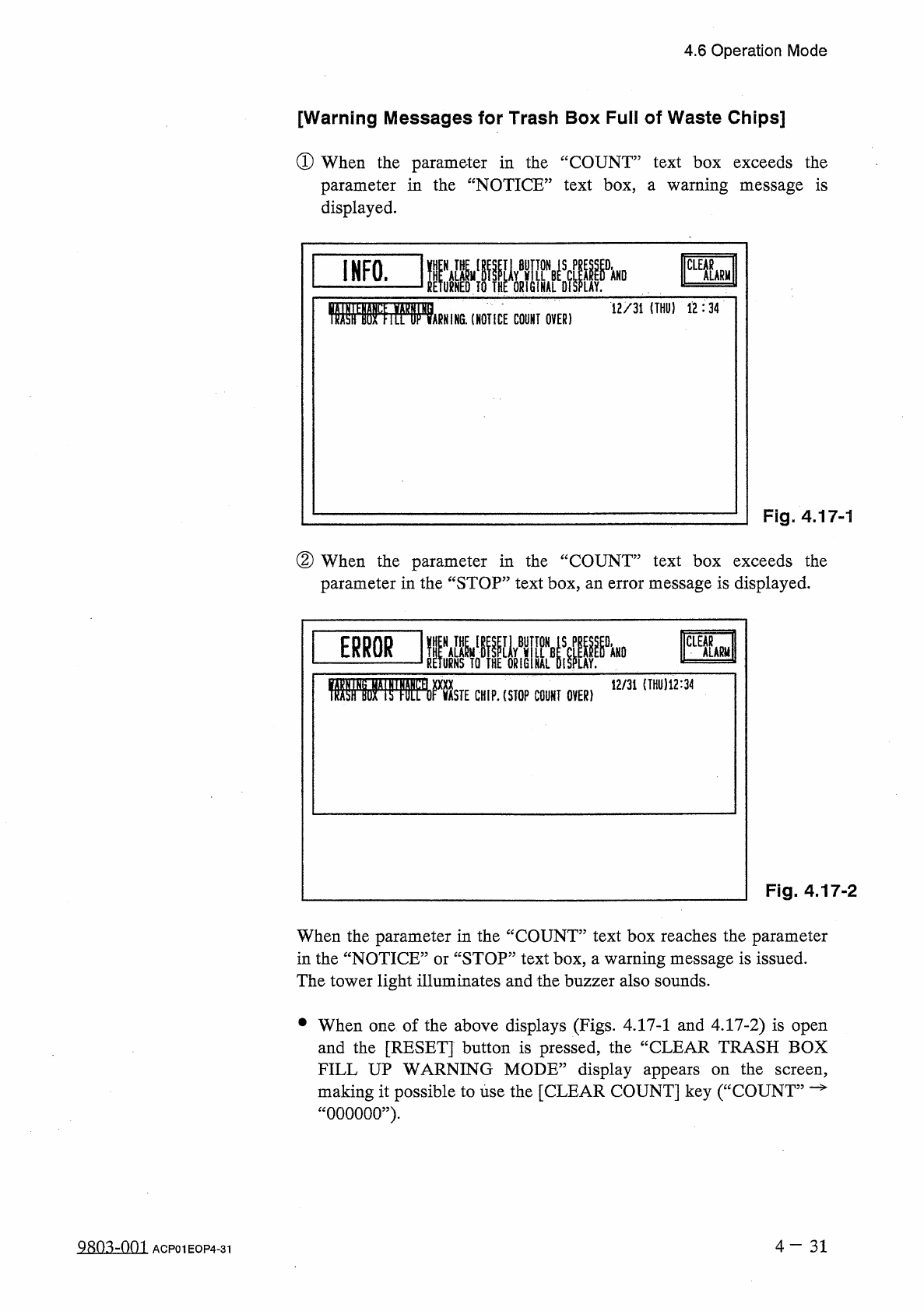
①
When
the
parameter
in
the
“
COUNT
parameter
in
the
“
NOTICE
”
text
box
,
a
warning
message
is
displayed
.
text
box
exceeds
the
B
圏
CLEAR
I
INFO
.
ALARM
12
/
31
(
THO
)
12
:
34
ARNiNG
.
(
NOTICE
COUNT
OVER
)
Fig
.
4.17
-
1
②
When
the
parameter
in
the
“
COUNT
parameter
in
the
“
STOP
”
text
box
,
an
error
message
is
displayed
.
text
box
exceeds
the
12
/
31
(
THU
)
12
:
34
TOWfliS
'
1
»
WsTECH
.
P
.
(
STOP
COUNT
OVER
)
Fig
.
4.17
-
2
When
the
parameter
in
the
“
COUNT
”
text
box
reaches
the
parameter
in
the
“
NOTICE
”
or
“
STOP
”
text
box
,
a
warning
message
is
issued
.
The
tower
light
illuminates
and
the
buzzer
also
sounds
.
•
When
one
of
the
above
displays
(
Figs
.
4.17
-
1
and
4.17
-
2
)
is
open
and
the
[
RESET
]
button
is
pressed
,
the
“
CLEAR
TRASH
BOX
FILL
UP
WARNING
MODE
”
display
appears
on
the
screen
,
making
it
possible
to
use
the
[
CLEAR
COUNT
]
key
(
“
COUNT
”
—
“
000000
”
)
.
4
-
31
Q
80
^
-
nm
ACP
01
EOP
4
-
31
4.7
RECOVERY
OPN
.
TEACHING
OPN
.
4.7
RECOVERY
OPN
.
TEACHING
OPN
.
Menus
are
provided
to
edit
component
library
data
,
change
the
feeding
angle
of
a
packaged
component
,
and
check
feeder
(
B
)
offset
data
.
correct
pattern
program
data
,
edit
or
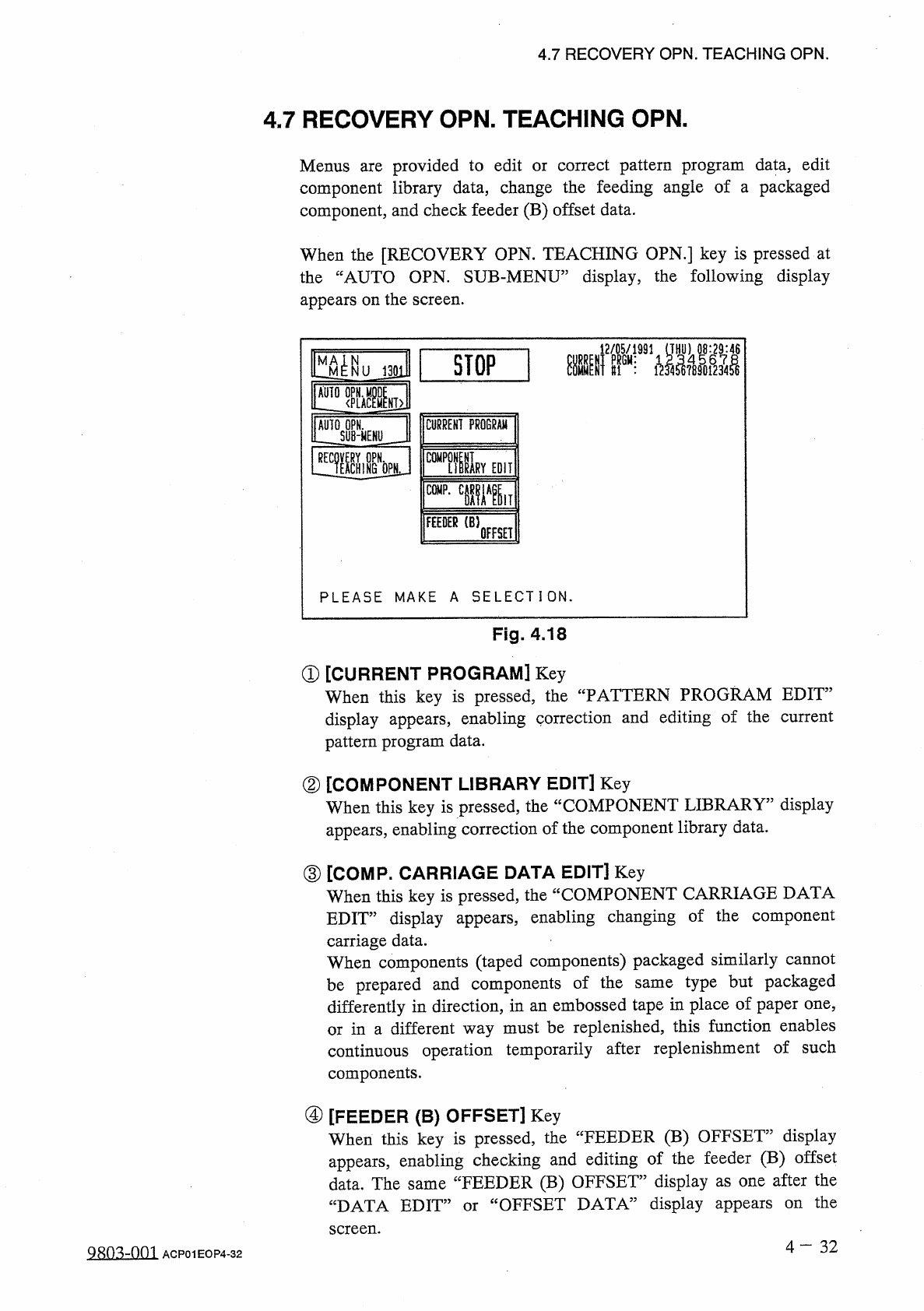
When
the
[
RECOVERY
OPN
.
TEACHING
OPN
.
]
key
is
pressed
at
the
“
AUTO
OPN
.
SUB
-
MENU
”
display
,
the
following
display
appears
on
the
screen
.
趣
SI
1
STOP
1
MA
^
N
NUJ
301
M
麵
Mid
AUTO
OPN
.
SUB
-
MENU
RECOVERY
OPN
.
^
TEACHING
CURRENT
PROGRAM
睡
t
OPN
EDIT
Li
m
?
.
C
iWlT
FEEDER
(
B
)
OFFSET
PLEASE
MAKE
A
SELECT
I
ON
.
Fig
.
4.18
①
[
CURRENT
PROGRAM
]
Key
When
this
key
is
pressed
,
the
“
PATTERN
PROGRAM
EDIT
”
display
appears
,
enabling
correction
and
editing
of
the
current
pattern
program
data
.
②
[
COMPONENT
LIBRARY
EDIT
]
Key
When
this
key
is
pressed
,
the
“
COMPONENT
LIBRARY
”
display
appears
,
enabling
correction
of
the
component
library
data
.
③
[
COMP
.
CARRIAGE
DATA
EDIT
]
Key
When
this
key
is
pressed
,
the
“
COMPONENT
CARRIAGE
DATA
EDIT
”
display
appears
,
enabling
changing
of
the
component
carriage
data
.
When
components
(
taped
components
)
packaged
similarly
cannot
be
prepared
and
components
of
the
differently
in
direction
,
in
an
embossed
tape
in
place
of
paper
one
,
or
in
a
different
way
must
be
replenished
,
this
function
enables
continuous
operation
temporarily
after
replenishment
of
such
components
.
type
but
packaged
same
④
[
FEEDER
(
B
)
OFFSET
]
Key
When
this
key
is
pressed
,
the
“
FEEDER
(
B
)
OFFSET
”
display
appears
,
enabling
checking
and
editing
of
the
feeder
(
B
)
offset
data
.
The
same
“
FEEDER
(
B
)
OFFSET
”
display
as
one
after
the
“
DATA
EDIT
”
or
“
OFFSET
DATA
”
display
appears
screen
.
the
on
4
-
32
QRO
^
-
nm
ACP
01
EOP
4
-
32