1OPERATION_.pdf - 第222页
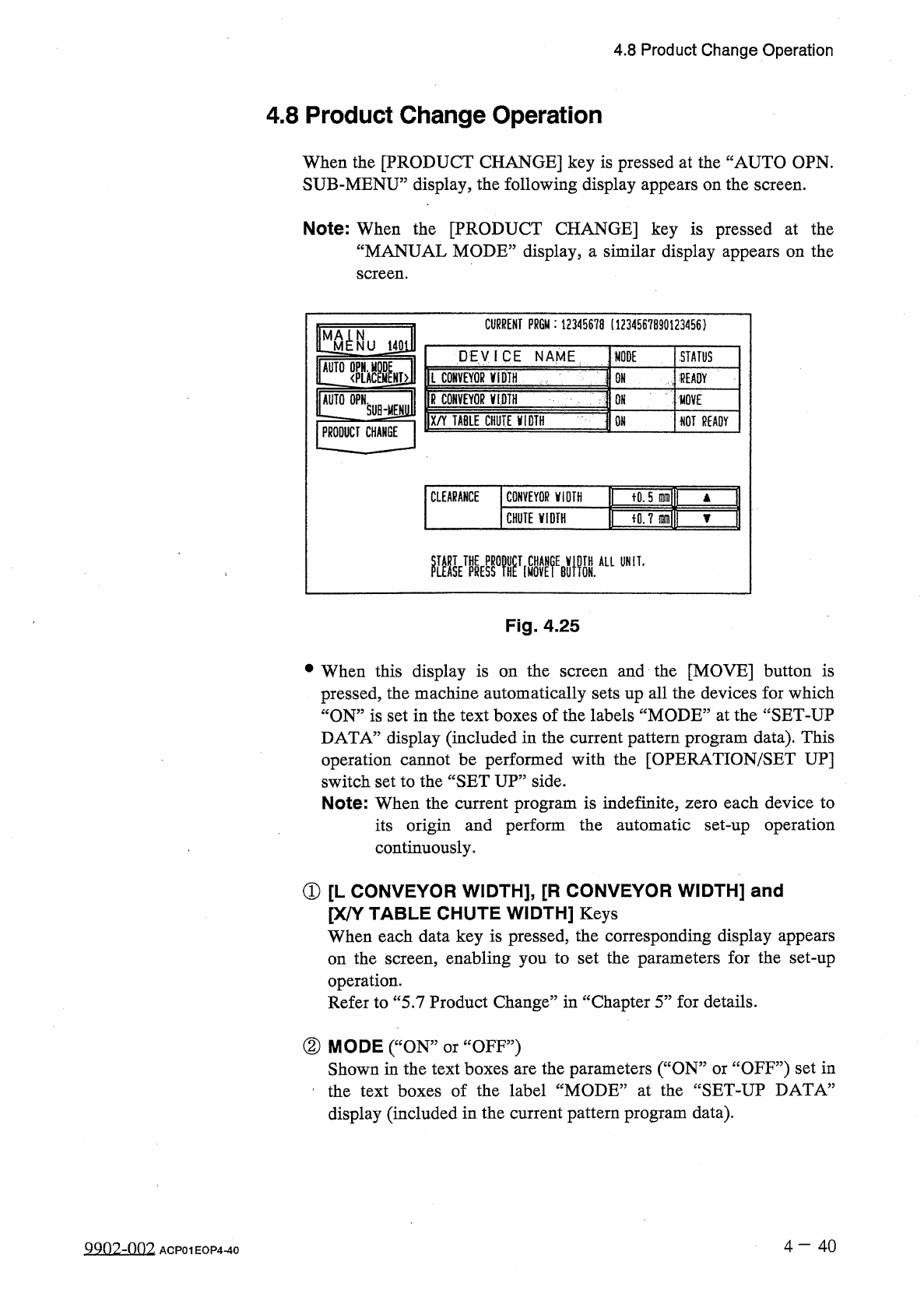
4.8 Product Change Operation ③ STATUS “ MOVE , , “ READY 5 : The machine is performing the set - up operation . The set - up operation is completed and the width is set as “ P . C . B . Width + Clearance ” • fNOT READY ”…
4.8
Product
Change
Operation
4.8
Product
Change
Operation
When
the
[
PRODUCT
CHANGE
]
key
is
pressed
at
the
“
AUTO
OPN
.
SUB
-
MENU
”
display
,
the
following
display
appears
on
the
screen
.
Note
:
When
the
[
PRODUCT
CHANGE
]
key
is
pressed
at
the
“
MANUAL
MODE
”
display
,
a
similar
display
appears
on
the
screen
.
CURRENT
PR
6
M
:
12345678
(
1234567890123456
)
STATUS
DEVICE
NAME
MODE
AUTO
OPN
.
M
L
CONVEYOR
V
1
DTH
<
PLAC
fEAOY
OH
R
CONVEYOR
麵
PRODUCT
CHANGE
QN
HOVE
X
/
Y
TABLE
CHUTE
jflQTH
m
NOT
READY
fO
.
5
晒
CLEARANCE
CONVEYOR
V
10
TH
iO
.
7
m
\
CHUTE
WIDTH
醚
kmifi
鼴
M
醞
A
“
UNIT
-
Fig
.
4.25
and
the
[
MOVE
]
button
is
pressed
,
the
machine
automatically
sets
up
all
the
devices
for
which
“
ON
”
is
set
in
the
text
boxes
of
the
labels
“
MODE
”
at
the
“
SET
-
UP
DATA
”
display
(
included
in
the
current
pattern
program
data
)
.
This
operation
cannot
be
performed
with
the
[
OPERATION
/
SET
UP
]
switch
set
to
the
“
SET
UP
”
side
.
Note
:
When
the
current
program
is
indefinite
,
zero
each
device
to
its
origin
and
perform
the
automatic
set
-
up
operation
continuously
.
•
When
this
display
is
on
the
screen
①
[
L
CONVEYOR
WIDTH
]
,
[
R
CONVEYOR
WIDTH
]
and
[
X
/
Y
TABLE
CHUTE
WIDTH
]
Keys
When
each
data
key
is
pressed
,
the
corresponding
display
appears
on
the
screen
,
enabling
you
to
set
the
parameters
for
the
set
-
up
operation
.
Refer
to
“
5.7
Product
Change
”
in
“
Chapter
5
”
for
details
.
②
MODE
(
“
ON
:
Shown
in
the
text
boxes
are
the
parameters
(
“
ON
”
or
ccOFF
?
?
)
set
in
the
text
boxes
of
the
label
“
MODE
”
at
the
“
SET
-
UP
DATA
”
display
(
included
in
the
current
pattern
program
data
)
.
OFF
”
)
or
4
—
4 0
9902
-
002
ACP
01
EOP
4
-
40
4.8
Product
Change
Operation
③
STATUS
“
MOVE
,,
“
READY
5
:
The
machine
is
performing
the
set
-
up
operation
.
The
set
-
up
operation
is
completed
and
the
width
is
set
as
“
P
.
C
.
B
.
Width
+
Clearance
”
•
fNOT
READY
”
:
The
width
is
set
as
“
P
.
C
.
B
.
Width
+
Clearance
”
but
the
current
position
is
not
located
(
managed
)
.
”
:
The
current
position
or
program
is
indefinite
.
f
”
(
Red
)
:
“
OFF
”
is
set
as
set
-
up
data
.
④
CLEARANCE
“
CLEARANCE
”
is
the
data
which
gives
some
leeway
to
the
actual
conveyor
and
chute
widths
,
adding
some
value
to
the
parameter
Y
set
as
P
.
C
.
B
.
size
in
the
current
pattern
program
data
.
(
This
is
not
related
to
the
P
.
C
.
B
.
support
pins
up
/
down
movement
.
)
(
No
parameter
can
be
set
for
each
individual
pattern
program
data
.
)
•
The
data
input
range
is
The
actual
conveyor
and
X
/
Y
table
chute
widths
must
be
“
P
.
C
.
B
.
Size
Y
+
Clearance
(
Recommended
Value
0.5
mm
)
”
.
一
5.0
十
5.0
mm
”
.
Input
Method
of
Clearance
Data
•
After
selecting
the
key
of
the
data
to
be
set
,
press
the
[
A
]
key
to
the
value
or
[
▼
]
key
to
decrease
in
the
increments
or
increase
decrements
of
0.1
mm
.
•
When
the
value
is
out
of
the
input
range
,
the
buzzer
in
the
touch
screen
sounds
but
no
change
is
made
in
the
parameter
.
of
the
devices
is
being
Note
:
No
data
can
be
changed
while
activated
.
one
4
-
41
ACP
01
EOP
4
-
41
4.9
RECALL
MESSAGES
4.9
RECALL
MESSAGES
provided
to
recall
device
errors
,
handling
errors
,
Menus
recognition
errors
,
machine
information
which
occurred
in
the
past
.
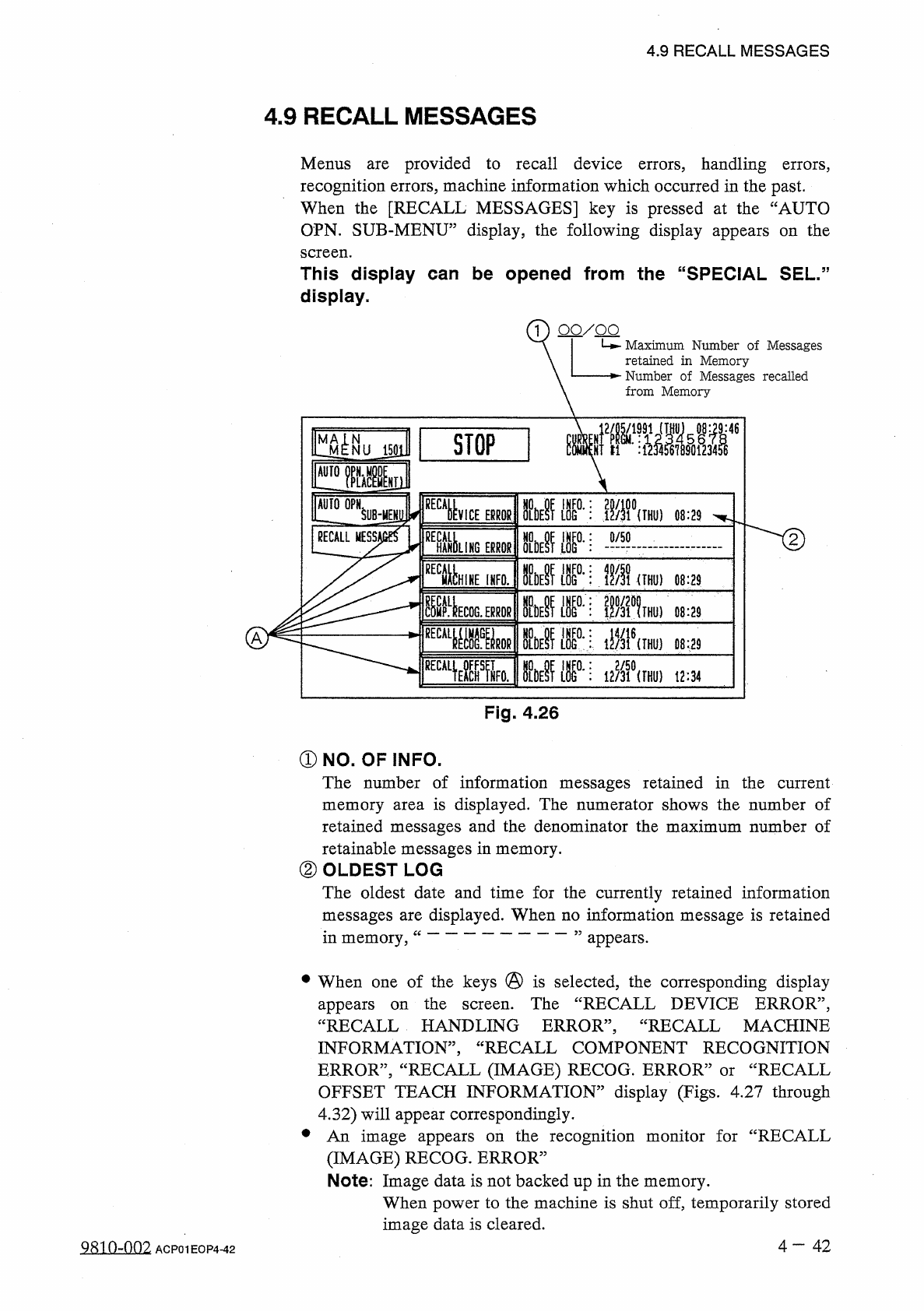
When
the
[
RECALL
MESSAGES
]
key
is
pressed
at
the
“
AUTO
OPN
.
SUB
-
MENU
”
display
,
the
following
display
appears
on
the
are
screen
.
This
display
can
be
opened
from
the
“
SPECIAL
SEL
.
display
.
1
)
QO
/
QQ
Maximum
Number
of
Messages
retained
in
Memory
Number
of
Messages
recalled
from
Memory
:
46
M
4
^
NU
J
50
ll
l
STOP
~
~
l
[
I
FMSyl
AUTO
OPN
ll
°
'
:
.
翻
0
{
THU
}
SUHIENli
VICE
EPROR
08
:
29
RECALL
MESS
)
UNG
Mm
:
0
/
50
ERRORS
HHINE
IHFO
.
Mr
:
\
m
1
um
)
08
:
29
圓
0
.
霸
im
THU
)
08
:
29
ECOG
.
ERROR
M
m
Mm
mkirnrnm
A
08
:
29
眶
Wk
IhSi
:
i
•
游
G
)
t
2
:
34
Fig
.
4.26
①
NO
.
OF
INFO
.
The
number
of
information
messages
retained
in
the
current
memory
area
is
displayed
.
The
numerator
shows
the
number
of
retained
messages
and
the
denominator
the
maximum
number
of
retainable
messages
in
memory
.
②
OLDEST
LOG
The
oldest
date
and
time
for
the
currently
retained
information
messages
are
displayed
.
When
no
information
message
is
retained
in
memory
,
appears
.
•
When
one
of
the
keys
@
is
selected
,
the
corresponding
display
appears
“
RECALL
HANDLING
ERROR
,,
,
INFORMATION
,
,
,
ERROR
”
,
“
RECALL
(
IMAGE
)
RECOG
.
ERROR
:
OFFSET
TEACH
INFORMATION
”
display
(
Figs
,
4.27
through
4.32
)
will
appear
correspondingly
.
•
An
image
appears
(
IMAGE
)
RECOG
.
ERROR
”
Note
:
Image
data
is
not
backed
up
in
the
memory
.
When
power
to
the
machine
is
shut
of
£
?
temporarily
stored
image
data
is
cleared
.
the
The
“
RECALL
DEVICE
ERROR
,,
,
RECALL
MACHINE
on
screen
.
RECALL
COMPONENT
RECOGNITION
RECALL
or
the
recognition
monitor
for
“
RECALL
on
4
一
42
QRio
~
nn
2
ACP
01
EOP
4
-
42