1OPERATION_.pdf - 第225页
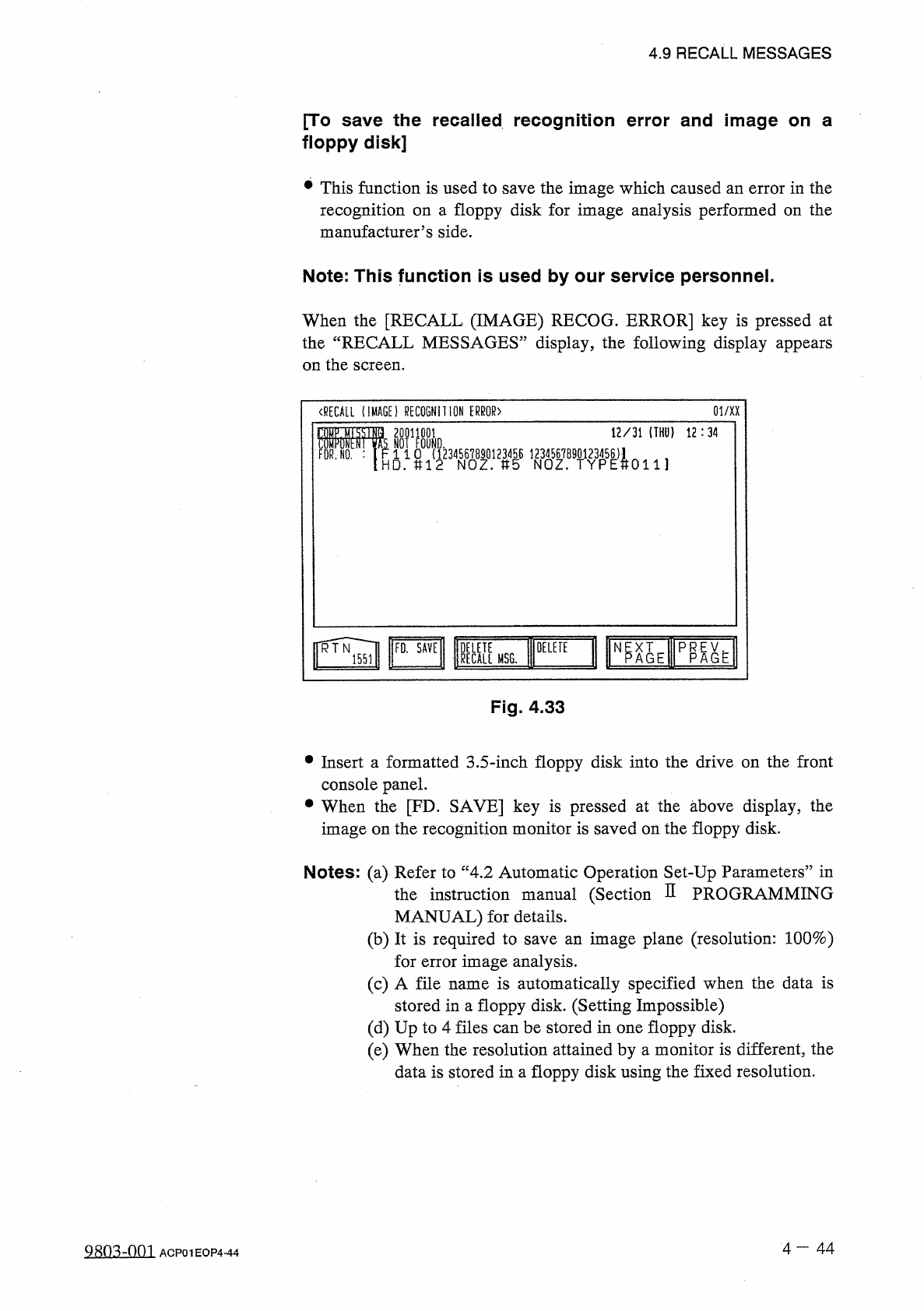
4.9 RECALL MESSAGES [ To save the recalled recognition error and image on a floppy disk ] This function is used to save the image which caused an error in the recognition on a floppy disk for image analysis performed on …
4.9
RECALL
MESSAGES
〈
RECALL
OFFSET
TEACH
INFORMATION
〉
01
/
XX
12
/
31
(
THU
)
12
:
50
GOOD
lAiiiiitiaMaaw
.
wifiyiimi
01
/
XX
〈
RECALL
(
IMAGE
)
RECOGNITION
ERROR
)
34
12
/
31
(
THU
)
12
:
34
ffio
.
:
1234567
B
90123456
U
,
〈
RECALL
COMPONENT
RECOGNITION
ERROR
)
01
/
XX
4
12
/
31
(
THU
)
12
:
34
OI
^
OUI
1
I
!
l
234561890123456
1234517890123456
)
1
11
Oi
/
XX
〈
RECALL
MACHINE
INFORMATION
)
34
12
/
31
(
THU
)
12
:
34
〈
RECALL
HANDLING
ERROR
)
64
01
/
XX
riIHU
,
l
:
(
)
MP
MISSIS
SI
-
NSHj
|
M
Nn
i l F l
10
^
(
?
?
34
?
6
%
12
/
31
U
灘
DA
12
:
34
Latest
Data
Fig
.
4.32
34
3
E
01
/
XX
14
〈
RECALL
DEVICE
ERROR
)
Fig
.
4.31
12
/
31
(
THU
)
12
:
34
12
/
31
(
THU
)
12
:
34
12
/
31
(
THU
)
12
:
34
12
/
31
(
THU
)
12
:
34
12
/
31
(
THU
)
12
:
34
12
/
31
(
THU
)
12
:
34
12
/
31
(
THU
)
12
:
34
12
/
31
(
THU
)
12
:
34
12
/
31
(
THU
)
12
:
34
m
TFOB
xxxx
IMIllflM
wmmm
:
<
»
«
i
酬
DETECTED
.
34
XXX
!
4
M
DE
)
VAS
NOT
DETECTED
.
:
PHS
49
E
/
R
DEHAS
NOT
DETECTED
.
:
PHS
49
E
/
R
xxxx
DE
)
VAS
NOT
DETECTED
.
:
PHS
49
E
/
R
I
xxxx
DE
)
VAS
NOT
DETECTED
.
:
PHS
49
E
/
R
r
XXXX
DE
)
VAS
NOT
DETECTED
.
:
PHS
49
E
/
R
I
YYXX
DE
)
VAS
NOT
DETECTED
.
:
PHS
49
E
/
R
DEl
^
AS
NOT
DETECTED
.
;
PHS
49
E
/
R
NOT
DETECTED
.
:
PHS
49
E
/
R
謂
側
f
»
1
h
X
-
Fig
_
4.30
i
N
S
!
4
IMIlflil
1
:
4
!
1
謂
:
Ml
■
U
1
IMillflli
immui
iraiifiii
腳
:
ui
H
V
.
GE
25
Fig
.
4.29
ir
:
i
;
Old
Data
3
E
m
\
IM
Fig
.
4.28
i
m
TGIFS
]
5
L
P
^
E
OELETE
RECALL
MSG
.
Fig
.
4.27
•
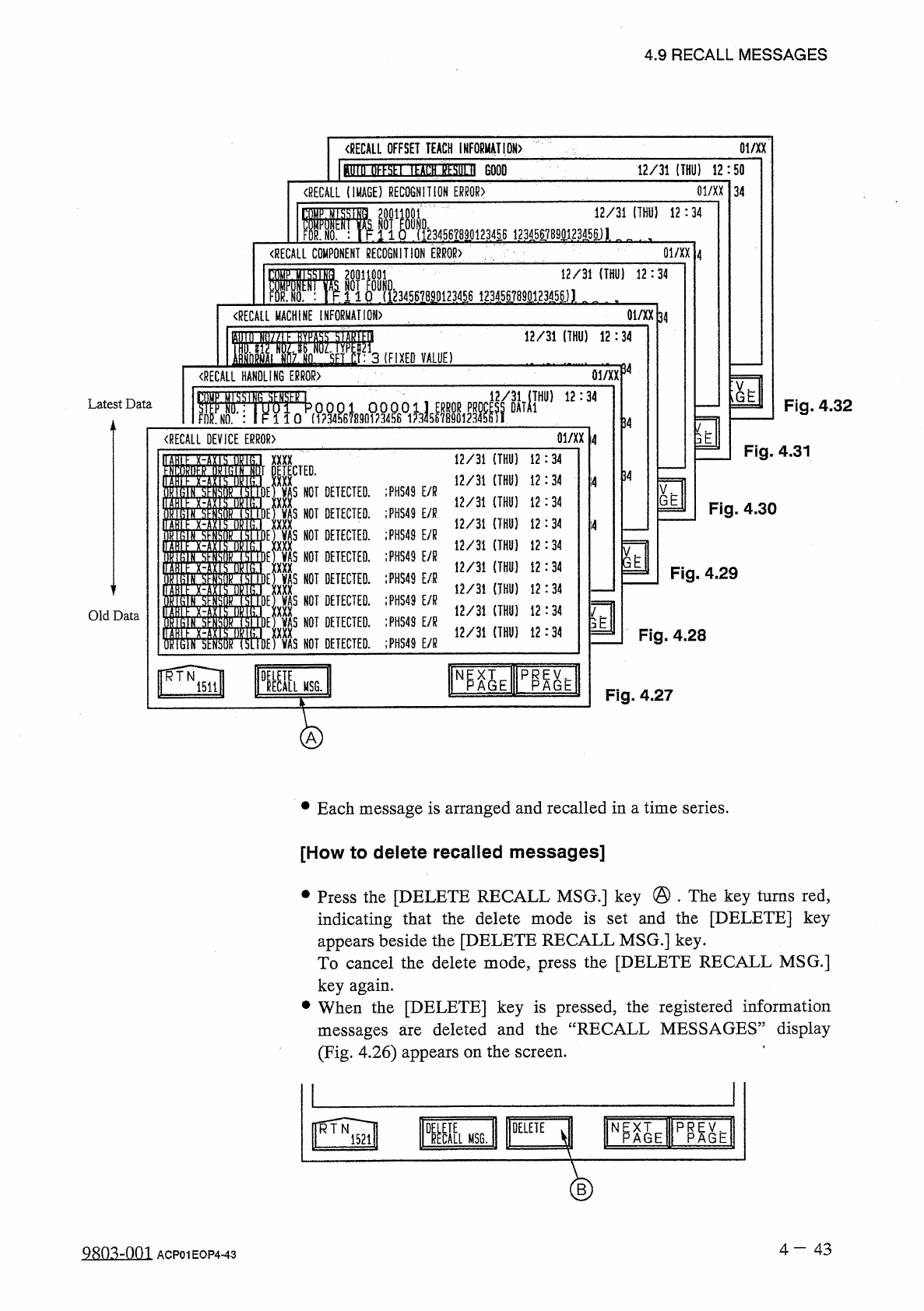
Each
message
is
arranged
and
recalled
in
a
time
series
.
[
How
to
delete
recalled
messages
]
•
Press
the
[
DELETE
RECALL
MSG
.
]
key
@
.
The
key
turns
red
,
indicating
that
the
delete
mode
is
set
and
the
[
DELETE
]
key
appears
beside
the
[
DELETE
RECALL
MSG
.
]
key
.
To
cancel
the
delete
mode
,
press
the
[
DELETE
RECALL
MSG
.
]
key
again
.
•
When
the
[
DELETE
]
key
is
pressed
,
the
registered
information
deleted
and
the
“
RECALL
MESSAGES
”
display
messages
are
(
Fig
.
4.26
)
appears
on
the
screen
.
H
^
AIE
TOE
DELETE
1
ECI
[
L
RTN
MSG
.
1521
B
4
-
43
9
EDMIQ
1
ACP
01
EOP
443
4.9
RECALL
MESSAGES
[
To
save
the
recalled
recognition
error
and
image
on
a
floppy
disk
]
This
function
is
used
to
save
the
image
which
caused
an
error
in
the
recognition
on
a
floppy
disk
for
image
analysis
performed
on
the
manufacturer
’
s
side
.
Note
:
This
function
is
used
by
our
service
personnel
.
When
the
[
RECALL
(
IMAGE
)
RECOG
.
ERROR
]
key
is
pressed
at
the
“
RECALL
MESSAGES
”
display
,
the
following
display
appears
on
the
screen
.
(
RECALL
(
IMAGE
)
RECOGNITION
ERROR
〉
01
/
XX
12
/
31
(
THU
}
12
:
34
20011001
NOT
FOUND
.
r
.
1
1
0
(
1234567890123456
八
HD
.
U
12
NOZ
.
»
5
NOZ
.
微
?
8
娜
FDR
.
N O
.
:
0111
ff
^
Vl
Np XT
A G E
KMSG
.
DELETE
PR
AGE
P
Fig
.
4.33
•
Insert
a
formatted
3.5
-
inch
floppy
disk
into
the
drive
on
the
front
console
panel
.
•
When
the
[
FD
.
SAVE
]
key
is
pressed
at
the
above
display
,
the
image
on
the
recognition
monitor
is
saved
on
the
floppy
disk
.
Notes
:
(
a
)
Refer
to
“
4
,
2
Automatic
Operation
Set
-
Up
Parameters
”
in
instruction
manual
(
Section
D
PROGRAMMING
MANUAL
)
for
details
.
(
b
)
It
is
required
to
save
an
image
plane
(
resolution
:
100
%
)
for
error
image
analysis
.
(
c
)
A
file
name
is
automatically
specified
when
the
data
is
stored
in
a
floppy
disk
.
(
Setting
Impossible
)
(
d
)
Up
to
4
files
can
be
stored
in
one
floppy
disk
.
(
e
)
When
the
resolution
attained
by
a
monitor
is
different
,
the
data
is
stored
in
a
floppy
disk
using
the
fixed
resolution
.
the
4
-
44
9
R
0
^
00
^
ACP
01
EOP
4
-
44
4.10
MANAGEMENT
DATA
4.10
MANAGEMENT
DATA
Menus
are
provided
to
manage
operation
rate
,
production
rate
,
running
condition
,
etc
.
,
of
the
machine
.
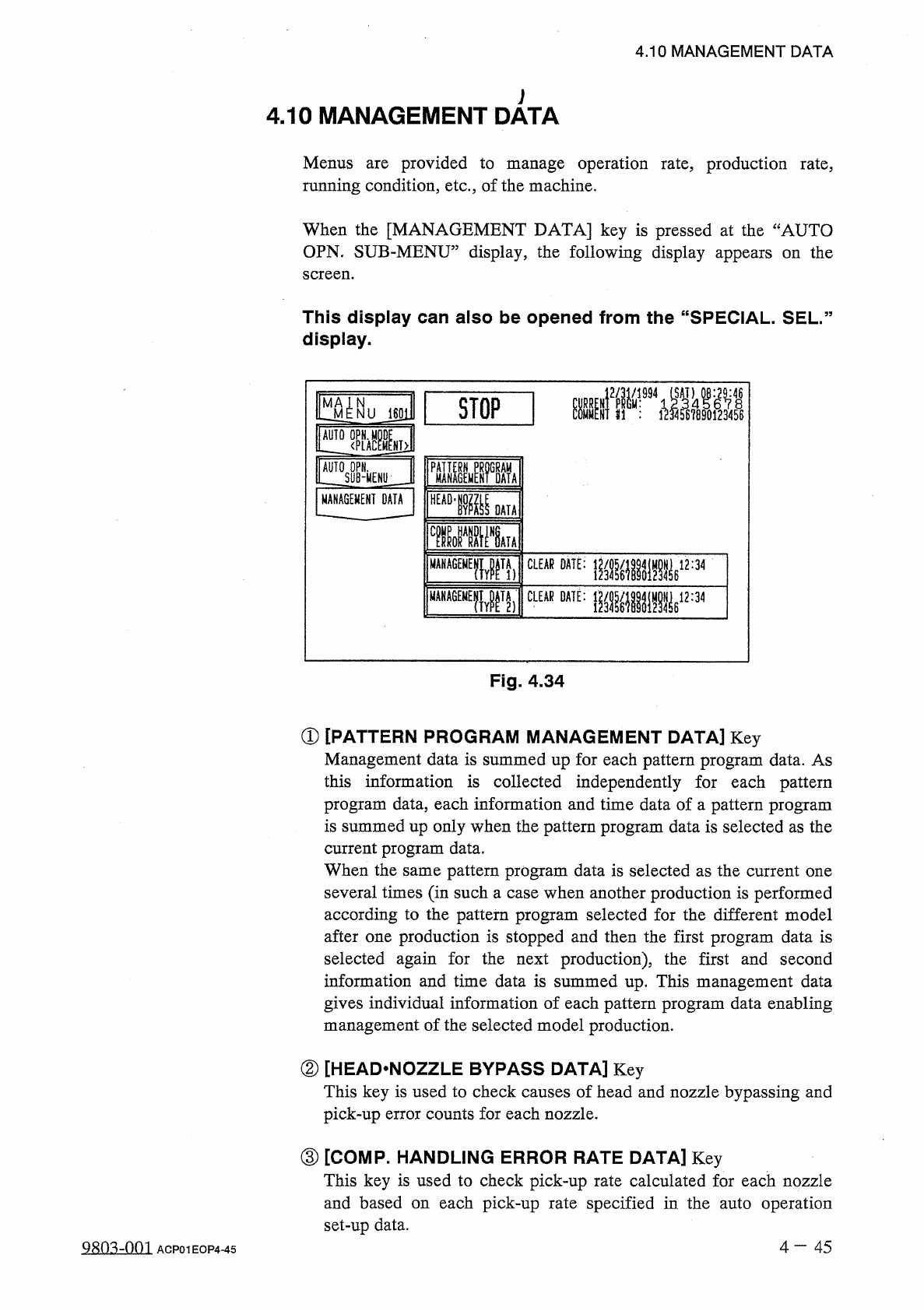
When
the
[
MANAGEMENT
DATA
]
key
is
pressed
at
the
“
AUTO
OPN
.
SUB
-
MENU
”
display
,
the
following
display
appears
on
the
screen
.
This
display
can
also
be
opened
from
the
“
SPECIAL
.
SEL
.
”
display
.
ffiil
糧
■
!
STOP
i
601
MANAGEMENT
DATA
HEAD
-
匯
0
ATA
wvu
贈隱
W
_
W
2
:
34
MANA
6
EME
GE
«
EpTf
)
CLEAR
DATE
:
麵讀
⑽
MANAi
Fig
.
4.34
①
[
PATTERN
PROGRAM
MANAGEMENT
DATA
]
Key
Management
data
is
summed
up
for
each
pattern
program
data
.
As
this
information
is
collected
independently
for
each
pattern
program
data
,
each
information
and
time
data
of
a
pattern
program
is
summed
up
only
when
the
pattern
program
data
is
selected
as
the
current
program
data
.
When
the
same
pattern
program
data
is
selected
as
the
current
one
several
times
(
in
such
a
case
when
another
production
is
performed
according
to
the
pattern
program
selected
for
the
different
model
after
one
production
is
stopped
and
then
the
first
program
data
is
selected
again
for
the
next
production
)
,
the
first
and
second
information
and
time
data
is
summed
up
.
This
management
data
gives
individual
information
of
each
pattern
program
data
enabling
management
of
the
selected
model
production
.
②
[
HEAD
^
NOZZLE
BYPASS
DATA
]
Key
This
key
is
used
to
check
causes
of
head
and
nozzle
bypassing
and
pick
-
up
error
counts
for
each
nozzle
.
③
[
COMP
.
HANDLING
ERROR
RATE
DATA
]
Key
This
key
is
used
to
check
pick
-
up
rate
calculated
for
each
nozzle
and
based
on
each
pick
-
up
rate
specified
in
the
auto
operation
set
-
up
data
.
4
-
4 5
98
(
13
-
001
ACP
01
EOP
4
-
45