1OPERATION_.pdf - 第253页
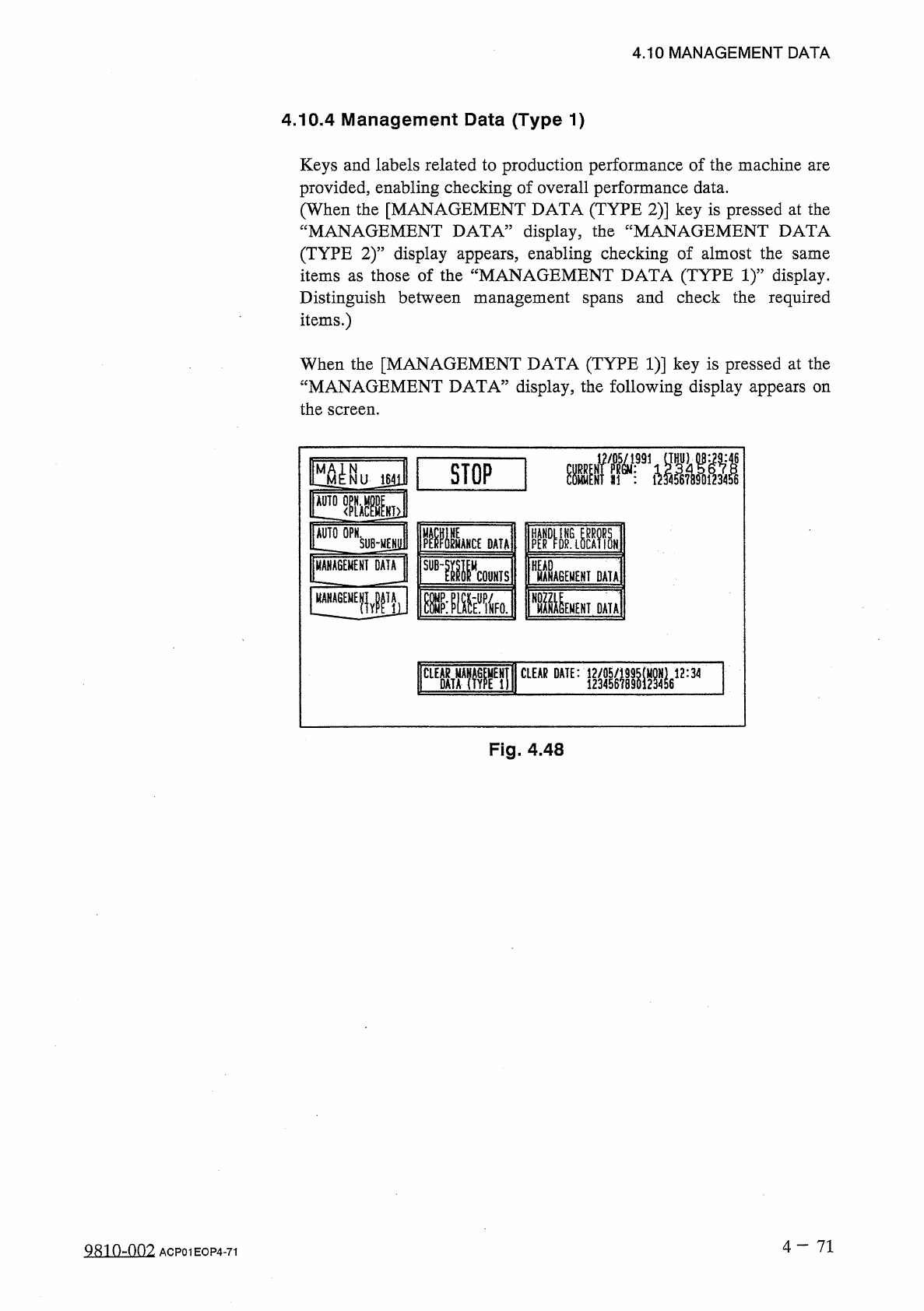
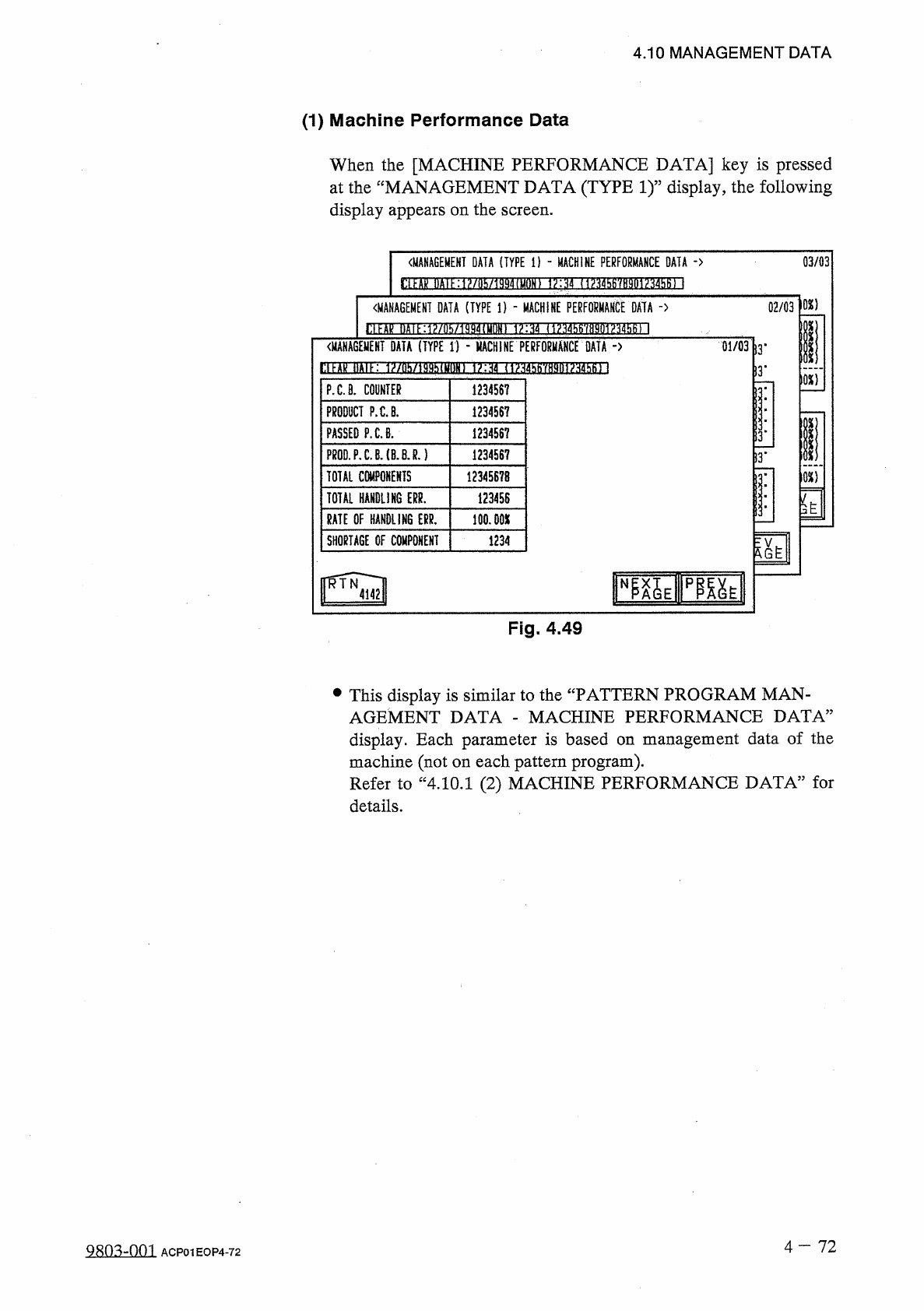
4.10 MANAGEMENT DATA ( 1 ) Machine Performance Data When the [ MACHINE PERFORMANCE DATA ] key is pressed at the “ MANAGEMENT DATA ( TYPE 1 ) ” display , the following display appears on the screen . 03 / 03 《 MANAGEMENT …
4.10
MANAGEMENT
DATA
4.10
.
4
Management
Data
(
Type
1
)
Keys
and
labels
related
to
production
performance
of
the
machine
are
provided
,
enabling
checking
of
overall
performance
data
.
(
When
the
[
MANAGEMENT
DATA
(
TYPE
2
)
]
key
is
pressed
at
the
“
MANAGEMENT
DATA
”
display
,
the
“
MANAGEMENT
DATA
(
TYPE
2
)
”
display
appears
,
enabling
checking
of
almost
the
items
as
those
of
the
“
MANAGEMENT
DATA
(
TYPE
1
)
”
display
.
Distinguish
between
management
spans
and
check
the
required
items
.
)
same
When
the
[
MANAGEMENT
DATA
(
TYPE
1
)
]
key
is
pressed
at
the
“
MANAGEMENT
DATA
”
display
,
the
following
display
appears
on
the
screen
.
曬
»
KI
1
■
STOP
1641
]
HT
>
^
°
PNSlJBjjEl
ESMi
mu
MAHCE
DATA
UANUGEMENI
DATA
SUB
-
w
HEAD
COUNTS
MANAGEMENT
DATA
^
IMENEH
!
DATA
DA
«
!
CLEAR
DATE
:
M
蠢
12
:
34
CLEAR
Fig
.
4.48
4
-
71
QS
10
-
007
.
ACP
01
EOP
4
-
71
4.10
MANAGEMENT
DATA
(
1
)
Machine
Performance
Data
When
the
[
MACHINE
PERFORMANCE
DATA
]
key
is
pressed
at
the
“
MANAGEMENT
DATA
(
TYPE
1
)
”
display
,
the
following
display
appears
on
the
screen
.
03
/
03
《
MANAGEMENT
DATA
(
TYPE
i
)
-
MACHINE
PERFORMANCE
DATA
-
>
狀 漏
?
抑 册
!
肫
》
嫌 通 僅 眈 砌 邶
MiiW
{
砌
Ml
102
)
〈
MANAGEMENT
DATA
(
TYPE
1
)
-
MACHINE
PERFOUMAKCt
DATA
-
>
02
/
03
H
屋汜邏咖
1881
11
收册
!
10
■
嫌隨
1
抽撕柳
1
砌棚
|
(
MANAGEMENT
DATA
(
TYPE
1
)
-
MACHINE
PERFORMANCE
DATA
-
>
01
/
03
13
'
)
3
*
10
X
1
PXB
.
COUNTER
1234567
PRODUCT
P
.
C
.
B
.
1234567
PASSED
P
.
C
.
8
.
1234567
13
.
PR
0
D
.
P
.
C
.
B
.
(
B
.
BJ
.
)
123456
?
!
3
.
TOTAL
COMPONENTS
12345678
m
TOTAL
HANDLING
ERR
.
123456
y
S
3
'
RATE
OF
HANDLING
ERR
.
100.00
X
SHORTAGE
OF
COMPONENT
1234
N
Fig
.
4.49
•
This
display
is
similar
to
the
“
PATTERN
PROGRAM
MAN
-
AGEMENT
DATA
-
MACHINE
PERFORMANCE
DATA
”
display
.
Each
parameter
is
based
on
management
data
of
the
machine
(
not
on
each
pattern
program
)
.
Refer
to
“
4.10
.
1
(
2
)
MACHINE
PERFORMANCE
DATA
”
for
details
.
4
-
72
9803
-
001
ACP
01
EOP
4
-
72
4.10
MANAGEMENT
DATA
(
2
)
SUB
-
SYSTEM
ERROR
COUNTS
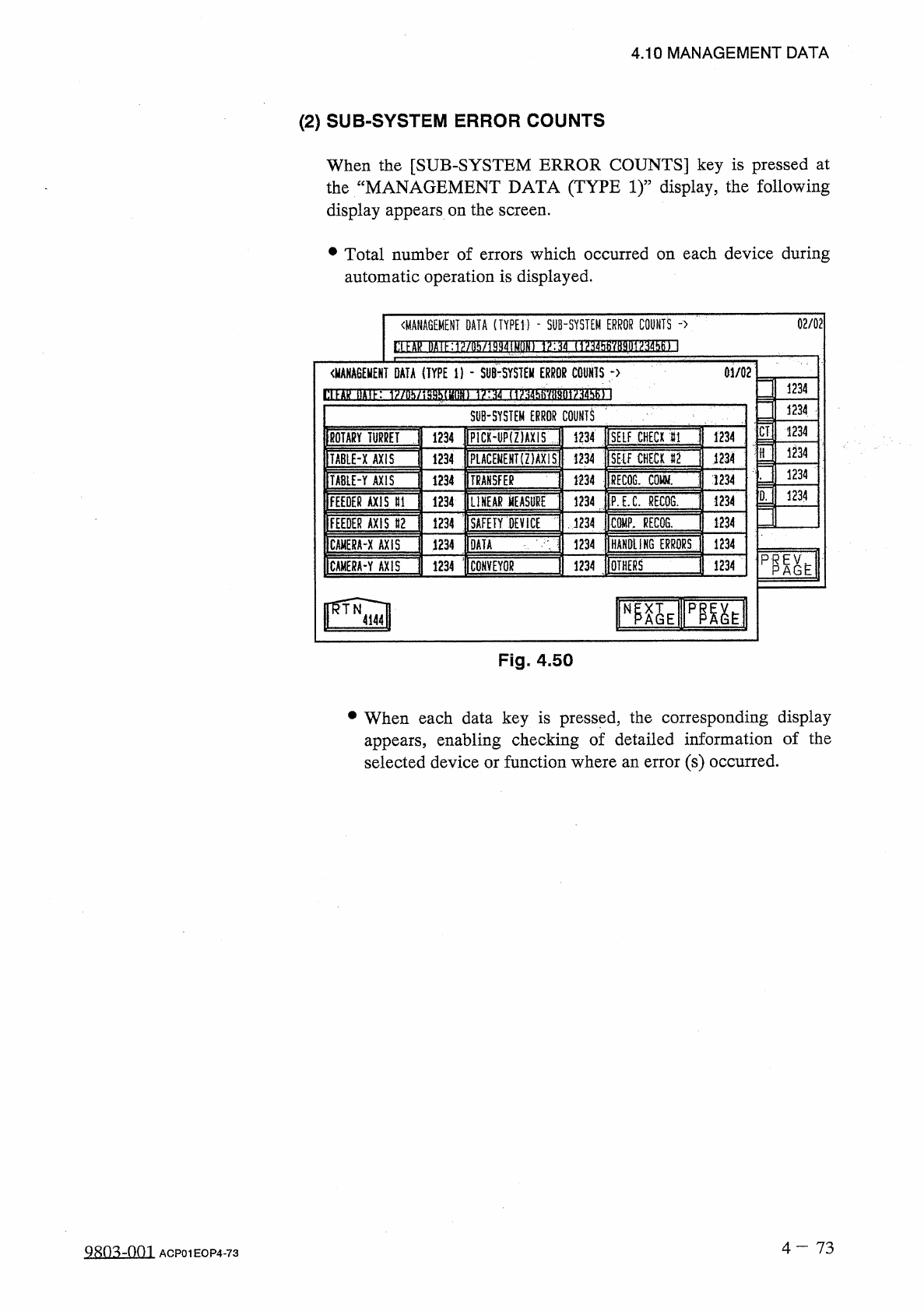
When
the
[
SUB
-
SYSTEM
ERROR
COUNTS
]
key
is
pressed
at
the
“
MANAGEMENT
DATA
(
TYPE
I f
display
,
the
following
display
appears
on
the
screen
.
•
Total
number
of
errors
which
occurred
on
each
device
during
automatic
operation
is
displayed
.
02
/
02
{
MANAGEMENT
DATA
(
TYPED
-
SUB
-
SYSTEM
ERROR
COUNTS
-
>
<
MANA
6
EUENT
DATA
(
TYPE
i
)
-
SUB
-
SYSTEM
ERROR
COUNTS
-
>
M
/
02
1234
闢 耵 通 肋
1
川 相 枕 讓 砌
iw
;
脱
?
>
】
j
234
SUB
-
SYSTEM
ERROR
COUNTS
1234
:
CI
P
1
CK
>
UP
(
Z
)
AXIS
1
SELF
CHECK
1234
1234
ROTARY
TURRET
1234
n
1234
PiACEMEKT
(
Z
)
AXISl
SEIF
CHECK
«
2
1234
1234
TABLE
-
X
AXIS
1234
1234
REC
06
.
COW
.
1234
TABLE
-
Y
AXIS
1234
1234
TRANSFER
1234
D
.
1234
FEEDER
AXIS
HI
1234
LINEAR
MEASURE
1234
1
PJX
RECQG
.
1234
[
SAFETY
DEVICE
1234
1234
m
?
,
RECOG
.
FEEDER
AXIS
112
HANDLING
E
刚
RS
1234
1234
CAHERA
-
X
AXIS
1234
DATA
1234
;
CONVEYOR
1234
1234
OTHERS
CAMERA
-
Y
AXIS
RTN
pnh
N
4144
Fig
.
4.50
•
When
each
data
key
is
pressed
,
the
corresponding
display
appears
,
enabling
checking
of
detailed
information
of
the
selected
device
or
function
where
an
error
(
s
)
occurred
.
4
—
7 3
Q
^
O
^
-
001
ACP
01
EOP
4
-
73