1OPERATION_.pdf - 第256页
4.10 MANAGEMENT DATA ( 4 ) HEAD MANAGEMENT DATA When the [ HEAD MANAGEMENT DATA ] key is pressed at the “ MANAGEMENT DATA ( TYPE 1 ) ” display , the following display appears on the screen . 〈 MANAGEMENT DATA ( TYPED - H…
CARRIAGE
SELpOnlCRG
.
82
Si
NPAGE
p
微
y
»
i f r
F
|
I
0
?
L
-
fc
,
:
k
:
f e d
OMP
.
〈
MANAGEMENT
DATA
(
TYPE
1
)
-
HANDLING
ERRORS
PER
FEEDER
LACATION
-
>
□
Effi
SHE
EZEI
53
BMIIZIB
HZ
5
EEMIZ
3
EED
4.10
MANAGEMENT
DATA
(
3
)
HANDLING
ERRORS
PER
FDR
.
LOCATION
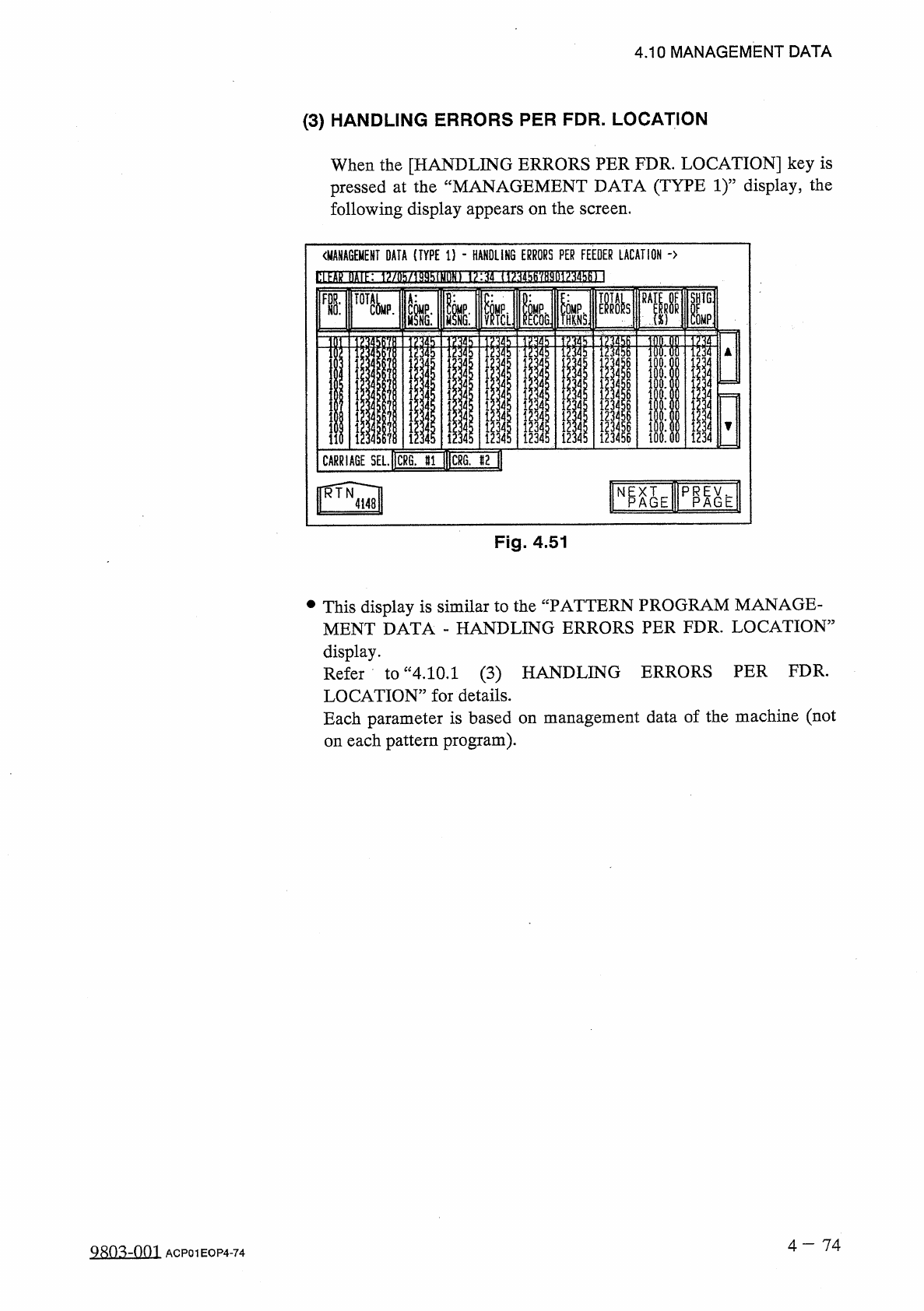
When
the
[
HANDLING
ERRORS
PER
FDR
.
LOCATION
]
key
is
pressed
at
the
“
MANAGEMENT
DATA
(
TYPE
1
)
”
display
,
the
following
display
appears
on
the
screen
.
Fig
.
4.51
•
This
display
is
similar
to
the
“
PATTERN
PROGRAM
MANAGE
-
MENT
DATA
-
HANDLING
ERRORS
PER
FDR
.
LOCATION
,
display
.
Refer
toM
4.10
.
1
(
3
)
HANDLING
ERRORS
PER
FDR
.
LOCATION
”
for
details
.
Each
parameter
is
based
on
each
pattern
program
)
.
management
data
of
the
machine
(
not
on
4
-
7 4
98
Q
3
dQQ
]
ACP
01
EOP
4
-
74
34343434
12
iooooooggggg
暴
4
-
*
-
-
-
1
J
7
-
•
^
i
.
.
ssss
234
s
?
!
34
U
12
A
1
X
4141414
i
4.10
MANAGEMENT
DATA
(
4
)
HEAD
MANAGEMENT
DATA
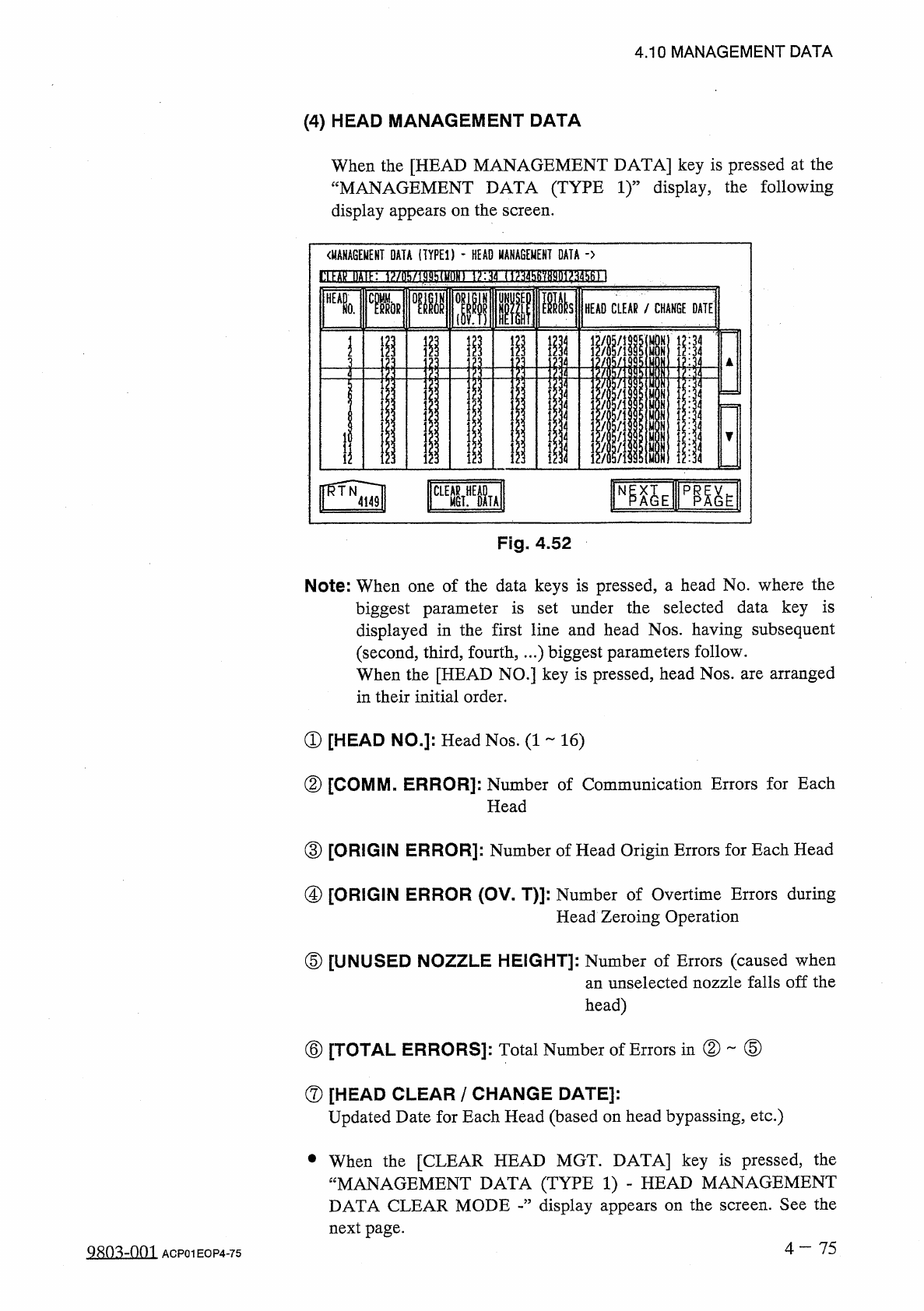
When
the
[
HEAD
MANAGEMENT
DATA
]
key
is
pressed
at
the
“
MANAGEMENT
DATA
(
TYPE
1
)
”
display
,
the
following
display
appears
on
the
screen
.
〈
MANAGEMENT
DATA
(
TYPED
-
HEAD
MANAGEMENT
DATA
-
>
l
!
ll
■
敁
IHIK
1
?
/
ll
!
i
/
lj
)
!
thiyf
)
lll
1
>
:
如
(
1
^
456
'
/
8901
?
34561
]
■
■
ia
si
HEAD
CLEAR
/
CHANGE
DATE
0
.
minx
mi
i
i
;
|
ij
i
I
i
11
■
ill
4
4
1
4
1
1
4
i
;
ii
12
:
34
r
榀
Eip
職
E
iSl
CLEAR
MGT
^
OL
Fig
.
4.52
Note
:
When
one
of
the
data
keys
is
pressed
,
a
head
No
.
where
the
biggest
parameter
is
set
under
the
selected
data
key
is
displayed
in
the
first
line
and
head
Nos
.
having
subsequent
(
second
,
third
,
fourth
,
…
)
biggest
parameters
follow
.
When
the
[
HEAD
NO
.
]
key
is
pressed
,
head
Nos
.
are
arranged
in
their
initial
order
.
①
[
HEAD
NO
.
]
:
Head
Nos
.
(
1
16
)
②
[
COMM
.
ERROR
]
:
Number
of
Communication
Errors
for
Each
Head
③
[
ORIGIN
ERROR
]
:
Number
of
Head
Origin
Errors
for
Each
Head
④
[
ORIGIN
ERROR
(
OV
-
T
)
]
:
Number
of
Overtime
Errors
during
Head
Zeroing
Operation
⑤
[
UNUSED
NOZZLE
HEIGHT
]
:
Number
of
Errors
(
caused
when
an
unselected
nozzle
falls
off
the
head
)
②
⑤
⑥
[
TOTAL
ERRORS
]
:
Total
Number
of
Errors
in
⑦
[
HEAD
CLEAR
/
CHANGE
DATE
]
:
Updated
Date
for
Each
Head
(
based
on
head
bypassing
,
etc
.
)
•
When
the
[
CLEAR
HEAD
MGT
.
DATA
]
key
is
pressed
,
the
“
MANAGEMENT
DATA
(
TYPE
1
)
-
HEAD
MANAGEMENT
DATA
CLEAR
MODE
display
appears
on
the
screen
.
See
the
next
page
.
4
一
75
Q
^
o
^
-
nm
ACP
01
EOP
4
-
75
4.10
MANAGEMENT
DATA
[
How
to
Clear
Head
Management
Data
]
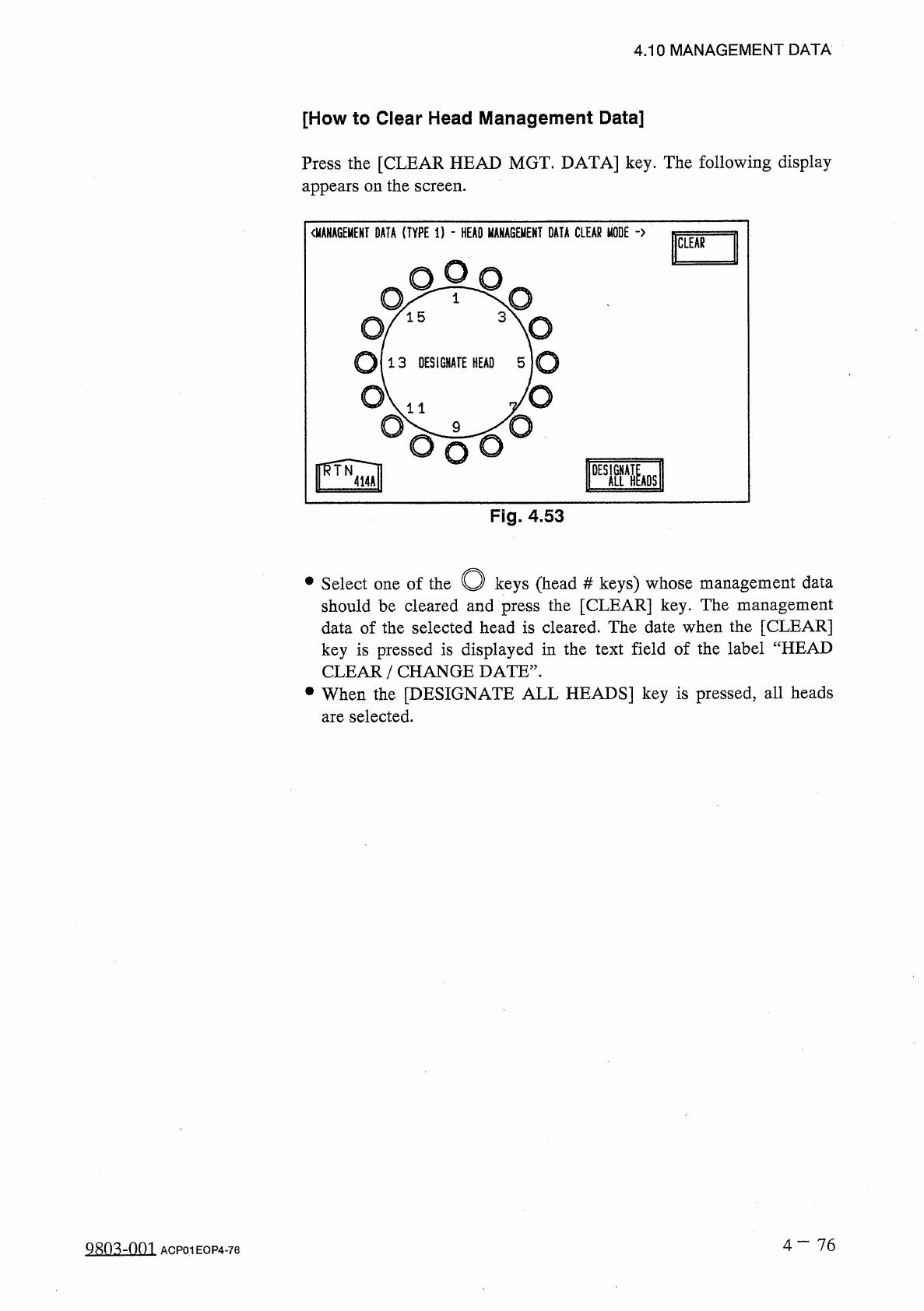
Press
the
[
CLEAR
HEAD
MGT
.
DATA
]
key
.
The
following
display
appears
on
the
screen
.
Fig
.
4.53
O
keys
(
head
should
be
cleared
and
press
the
[
CLEAR
]
key
.
The
management
data
of
the
selected
head
is
cleared
.
The
date
when
the
[
CLEAR
]
key
is
pressed
is
displayed
in
the
text
field
of
the
label
“
HEAD
CLEAR
/
CHANGE
DATE
”
.
•
When
the
[
DESIGNATE
ALL
HEADS
]
key
is
pressed
,
all
heads
are
selected
.
#
keys
)
whose
management
data
•
Select
one
of
the
4
-
76
9
MMM
ACP
01
EOP
4
-
76