1OPERATION_.pdf - 第257页
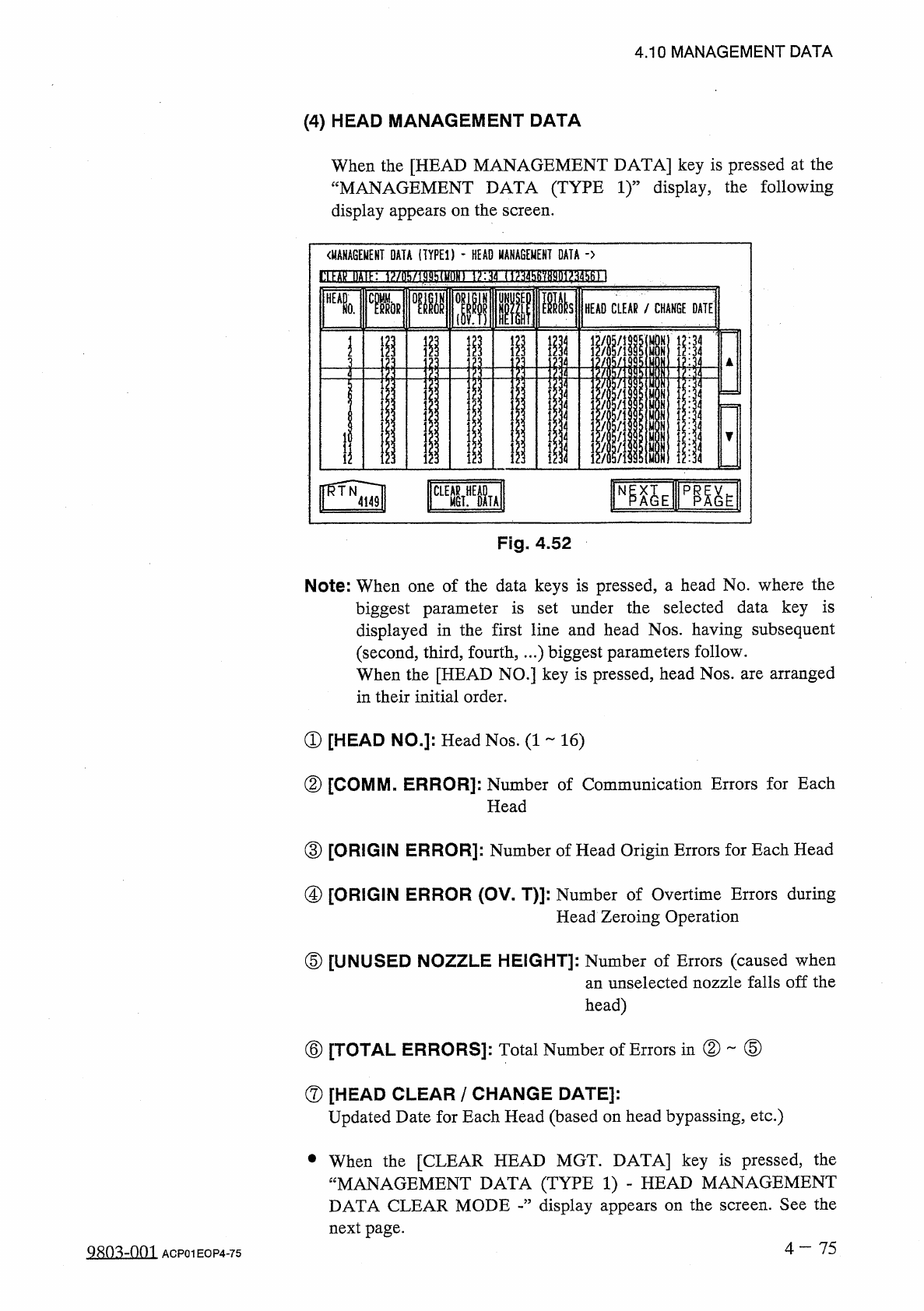
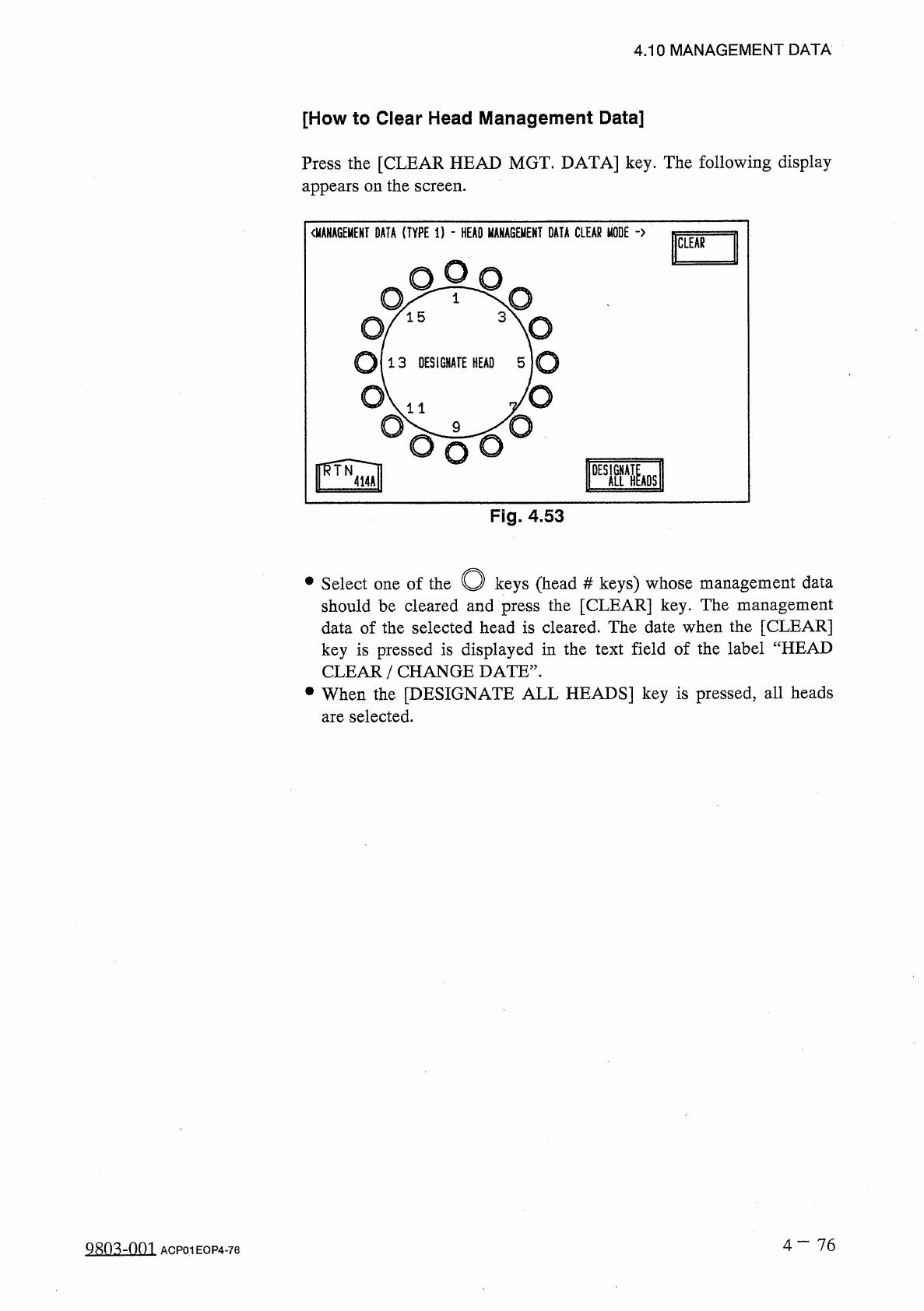
4.10 MANAGEMENT DATA [ How to Clear Head Management Data ] Press the [ CLEAR HEAD MGT . DATA ] key . The following display appears on the screen . Fig . 4.53 O keys ( head should be cleared and press the [ CLEAR ] key . …
4.10
MANAGEMENT
DATA
(
4
)
HEAD
MANAGEMENT
DATA
When
the
[
HEAD
MANAGEMENT
DATA
]
key
is
pressed
at
the
“
MANAGEMENT
DATA
(
TYPE
1
)
”
display
,
the
following
display
appears
on
the
screen
.
〈
MANAGEMENT
DATA
(
TYPED
-
HEAD
MANAGEMENT
DATA
-
>
l
!
ll
■
敁
IHIK
1
?
/
ll
!
i
/
lj
)
!
thiyf
)
lll
1
>
:
如
(
1
^
456
'
/
8901
?
34561
]
■
■
ia
si
HEAD
CLEAR
/
CHANGE
DATE
0
.
minx
mi
i
i
;
|
ij
i
I
i
11
■
ill
4
4
1
4
1
1
4
i
;
ii
12
:
34
r
榀
Eip
職
E
iSl
CLEAR
MGT
^
OL
Fig
.
4.52
Note
:
When
one
of
the
data
keys
is
pressed
,
a
head
No
.
where
the
biggest
parameter
is
set
under
the
selected
data
key
is
displayed
in
the
first
line
and
head
Nos
.
having
subsequent
(
second
,
third
,
fourth
,
…
)
biggest
parameters
follow
.
When
the
[
HEAD
NO
.
]
key
is
pressed
,
head
Nos
.
are
arranged
in
their
initial
order
.
①
[
HEAD
NO
.
]
:
Head
Nos
.
(
1
16
)
②
[
COMM
.
ERROR
]
:
Number
of
Communication
Errors
for
Each
Head
③
[
ORIGIN
ERROR
]
:
Number
of
Head
Origin
Errors
for
Each
Head
④
[
ORIGIN
ERROR
(
OV
-
T
)
]
:
Number
of
Overtime
Errors
during
Head
Zeroing
Operation
⑤
[
UNUSED
NOZZLE
HEIGHT
]
:
Number
of
Errors
(
caused
when
an
unselected
nozzle
falls
off
the
head
)
②
⑤
⑥
[
TOTAL
ERRORS
]
:
Total
Number
of
Errors
in
⑦
[
HEAD
CLEAR
/
CHANGE
DATE
]
:
Updated
Date
for
Each
Head
(
based
on
head
bypassing
,
etc
.
)
•
When
the
[
CLEAR
HEAD
MGT
.
DATA
]
key
is
pressed
,
the
“
MANAGEMENT
DATA
(
TYPE
1
)
-
HEAD
MANAGEMENT
DATA
CLEAR
MODE
display
appears
on
the
screen
.
See
the
next
page
.
4
一
75
Q
^
o
^
-
nm
ACP
01
EOP
4
-
75
4.10
MANAGEMENT
DATA
[
How
to
Clear
Head
Management
Data
]
Press
the
[
CLEAR
HEAD
MGT
.
DATA
]
key
.
The
following
display
appears
on
the
screen
.
Fig
.
4.53
O
keys
(
head
should
be
cleared
and
press
the
[
CLEAR
]
key
.
The
management
data
of
the
selected
head
is
cleared
.
The
date
when
the
[
CLEAR
]
key
is
pressed
is
displayed
in
the
text
field
of
the
label
“
HEAD
CLEAR
/
CHANGE
DATE
”
.
•
When
the
[
DESIGNATE
ALL
HEADS
]
key
is
pressed
,
all
heads
are
selected
.
#
keys
)
whose
management
data
•
Select
one
of
the
4
-
76
9
MMM
ACP
01
EOP
4
-
76
iciE
^
No
^
aHM
臨
E
PP
^
E
ZZLE
SCREENS
N
DATA
.
4.54
4.10
MANAGEMENT
DATA
(
5
)
NOZZLE
MANAGEMENT
DATA
When
the
[
NOZZLE
MANAGEMENT
DATA
]
key
is
pressed
at
the
“
MANAGEMENT
DATA
(
TYPE
1
)
”
display
,
the
following
display
appears
on
the
screen
.
〈
MANAGEMENT
DATA
(
TYPED
-
NOZZLE
MANAGEMENT
DATA
-
>
DmE
3
ZZIEZ
3
MMnZ
!
3
ni
Z
15
SMIZ
335
ED
[
SCREENS
]
Fig
.
4.54
-
1
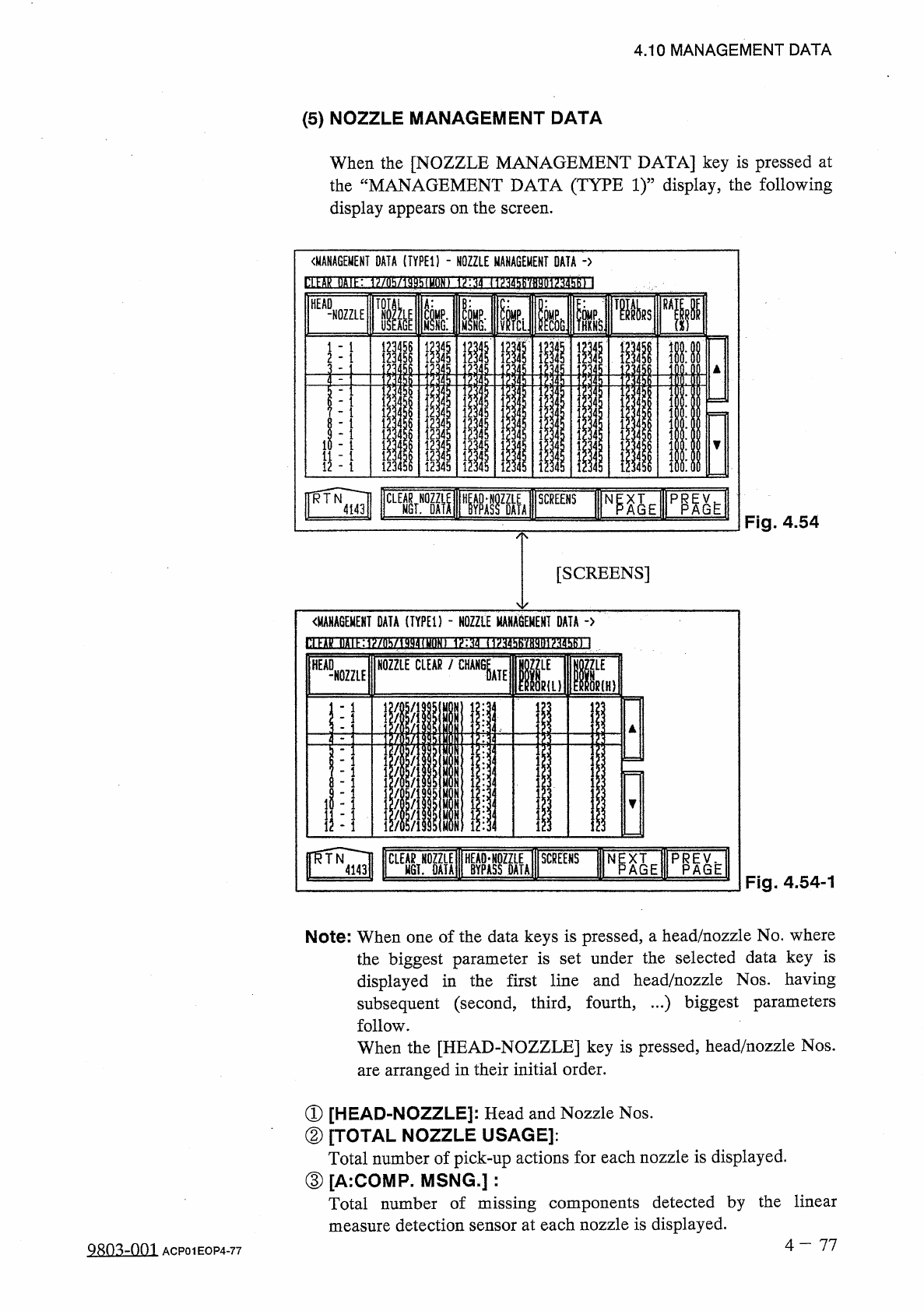
Note
:
When
one
of
the
data
keys
is
pressed
,
a
head
/
nozzle
No
.
where
the
biggest
parameter
is
set
under
the
selected
data
key
is
displayed
in
the
first
line
and
head
/
nozzle
Nos
.
having
subsequent
(
second
,
third
,
fourth
,
…
)
biggest
parameters
follow
.
When
the
[
HEAD
-
NOZZLE
]
key
is
pressed
,
head
/
nozzle
Nos
.
are
arranged
in
their
initial
order
.
①
[
HEAD
-
NOZZLE
]
:
②
[
TOTAL
NOZZLE
USAGE
]
:
Total
number
of
pick
-
up
actions
for
each
nozzle
is
displayed
.
③
[
A
:
COMP
.
MSNG
.
]
:
Total
number
of
missing
components
detected
by
the
linear
measure
detection
sensor
at
each
nozzle
is
displayed
.
Head
and
Nozzle
Nos
.
4
-
77
QRO
^
-
Om
ACP
01
EOP
4
-
77
HEAD
NOZZLE
CLEAR
-
NOZZLE
MANAGEMENT
DATA
(
TYPED
-
NOZZLE
MANA
8
EMEHI
DATA
-
>
H
PU
-
E
u
I
IRA
SRS
1
,
&
ii
n
I
—
^
1
156156
;
i
^
UNy
NOZZLE
AD
-
t
I
I
I
I
I
押
HE
BUWMUWUWUHUH
<
■
-
J
-
«
-
«
-
«
i
«
•
-
4
-
J
-
-
r
-
-
4
A
i
寿