1OPERATION_.pdf - 第260页
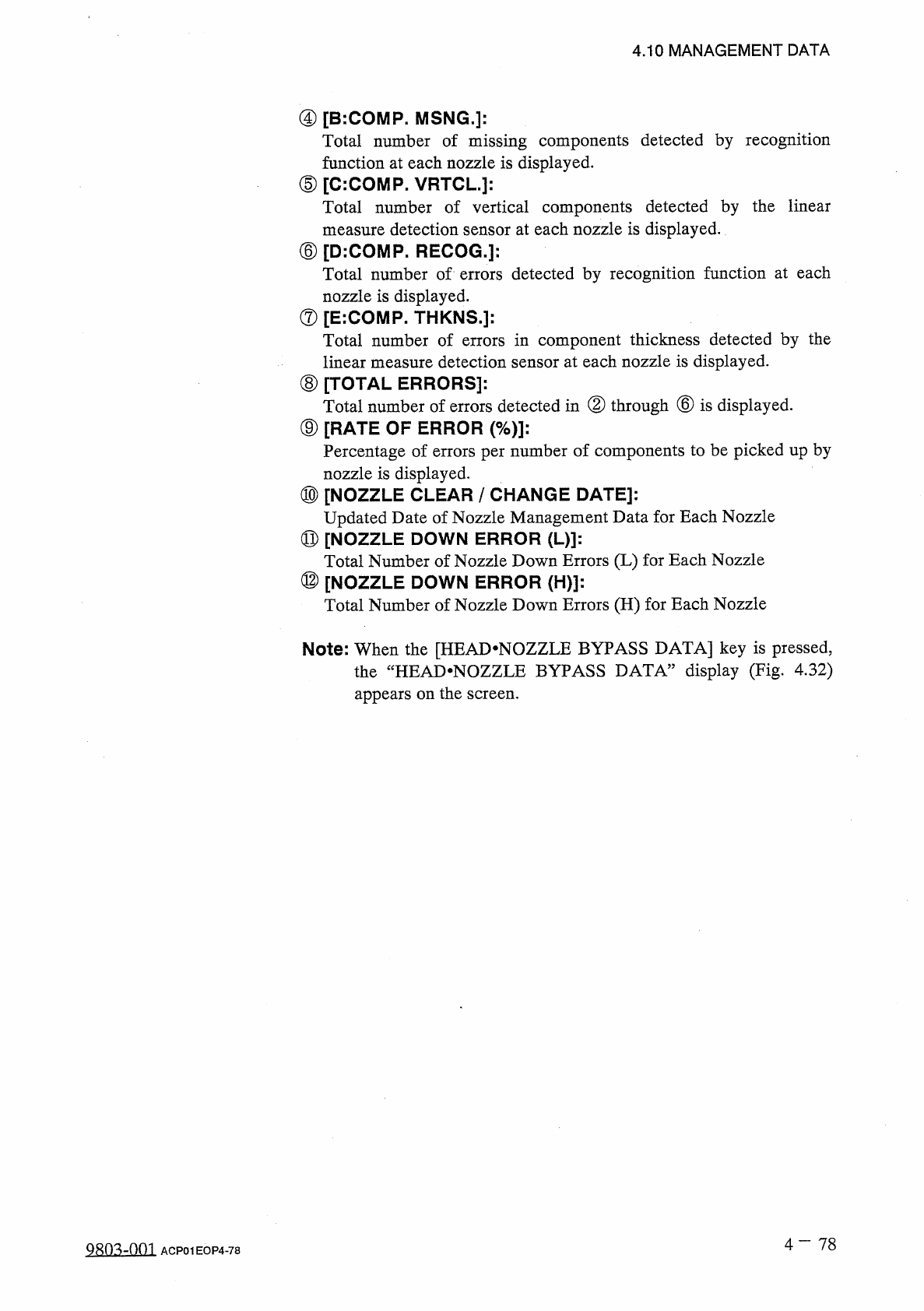
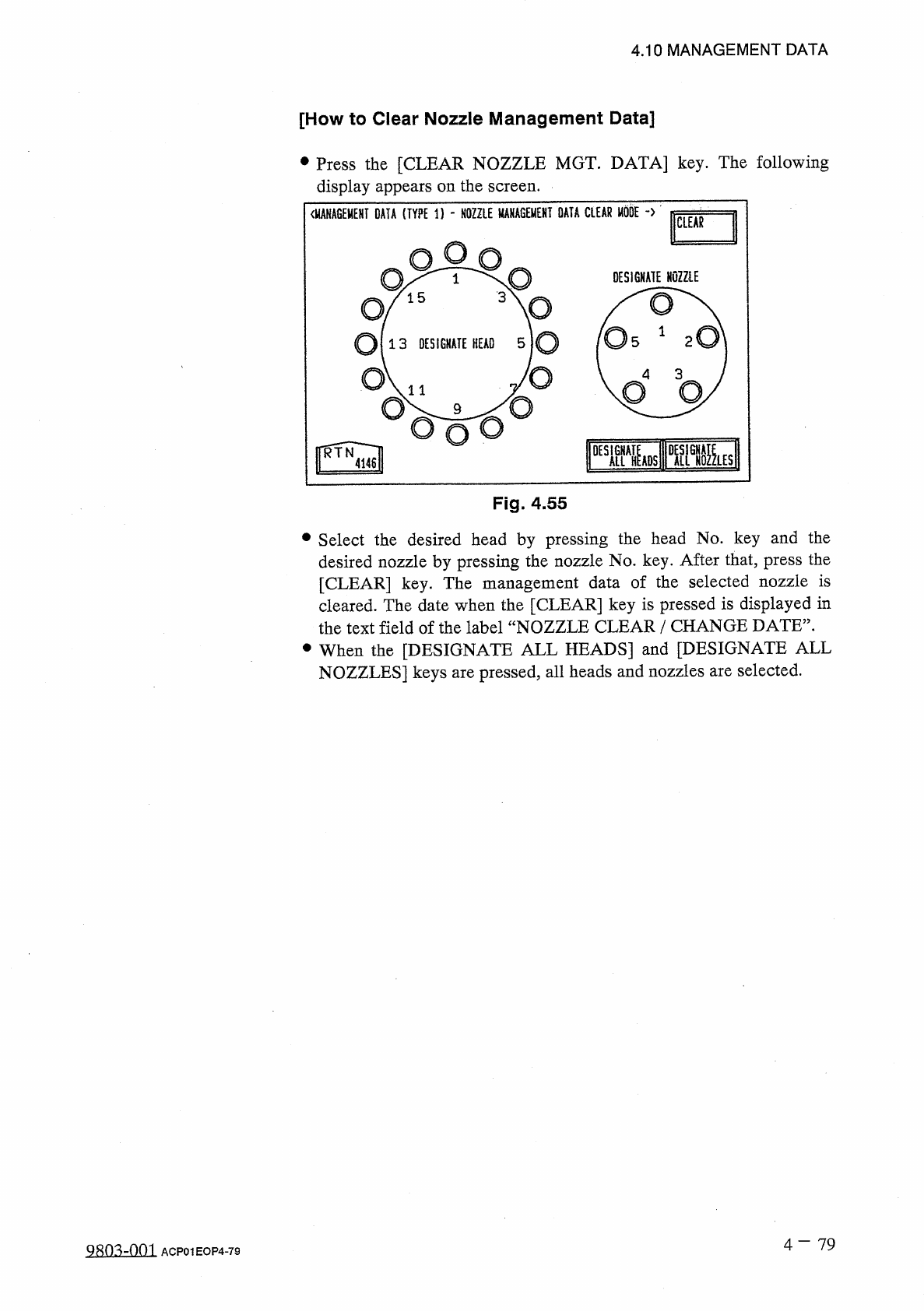
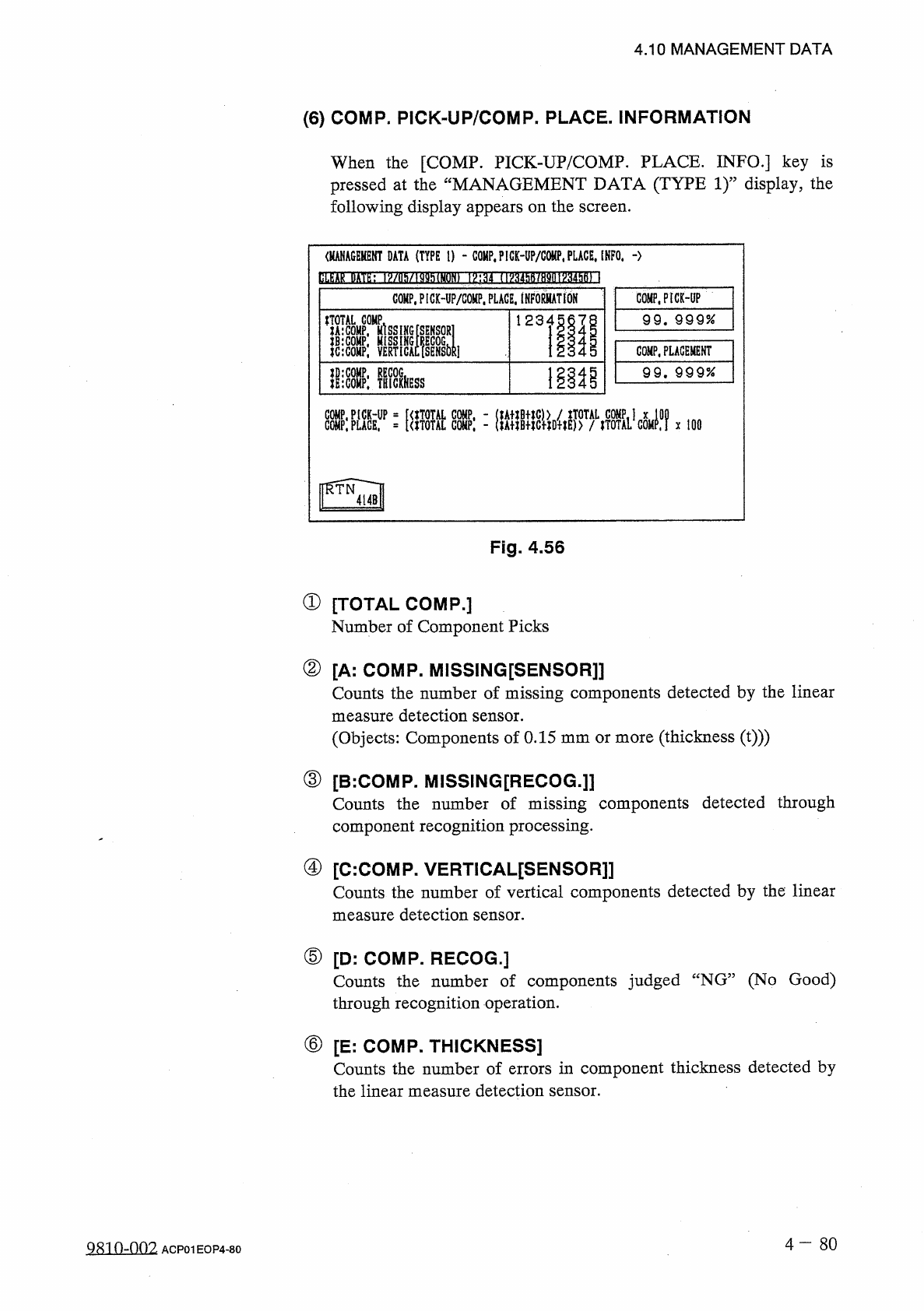
4.10 MANAGEMENT DATA [ How to Clear Nozzle Management Data ] • Press the [ CLEAR NOZZLE MGT . DATA ] key . The following display appears on the screen . Fig . 4.55 • Select the desired head by pressing the head No . key …
4.10
MANAGEMENT
DATA
④
[
B
:
COMP
.
MSNG
.
]
:
Total
number
of
missing
components
detected
by
recognition
function
at
each
nozzle
is
displayed
.
⑤
[
C
:
COMP
.
VRTCL
.
]
:
Total
number
of
vertical
components
detected
by
the
linear
measure
detection
sensor
at
each
nozzle
is
displayed
.
⑥
[
D
:
COMP
.
RECOG
.
]
:
Total
number
of
errors
detected
by
recognition
function
at
each
nozzle
is
displayed
.
⑦
[
E
:
COMP
.
THKNS
.
]
:
Total
number
of
errors
in
component
thickness
detected
by
the
linear
measure
detection
sensor
at
each
nozzle
is
displayed
.
⑧
[
TOTAL
ERRORS
]
:
Total
number
of
errors
detected
in
(
D
through
®
is
displayed
.
⑨
[
RATE
OF
ERROR
(
%
)
]
:
Percentage
of
errors
per
number
of
components
to
be
picked
up
by
nozzle
is
displayed
.
⑩
[
NOZZLE
CLEAR
/
CHANGE
DATE
]
:
Updated
Date
of
Nozzle
Management
Data
for
Each
Nozzle
⑪
[
NOZZLE
DOWN
ERROR
(
L
)
]
:
Total
Number
of
Nozzle
Down
Errors
(
L
)
for
Each
Nozzle
⑫
[
NOZZLE
DOWN
ERROR
(
H
)
]
:
Total
Number
of
Nozzle
Down
Errors
(
H
)
for
Each
Nozzle
Note
:
When
the
[
HEAD
.
NOZZLE
BYPASS
DATA
]
key
is
pressed
,
the
“
HEAI
>
NOZZLE
BYPASS
DATA
”
display
(
Fig
.
4.32
)
appears
on
the
screen
.
4
-
78
QRO
^
-
Om
ACP
01
EOP
4
-
78
4.10
MANAGEMENT
DATA
[
How
to
Clear
Nozzle
Management
Data
]
•
Press
the
[
CLEAR
NOZZLE
MGT
.
DATA
]
key
.
The
following
display
appears
on
the
screen
.
Fig
.
4.55
•
Select
the
desired
head
by
pressing
the
head
No
.
key
and
the
desired
nozzle
by
pressing
the
nozzle
No
.
key
.
After
that
,
press
the
[
CLEAR
]
key
.
The
management
data
of
the
selected
nozzle
is
cleared
.
The
date
when
the
[
CLEAR
]
key
is
pressed
is
displayed
in
the
text
field
of
the
label
“
NOZZLE
CLEAR
/
CHANGE
DATE
”
.
•
When
the
[
DESIGNATE
ALL
HEADS
]
and
[
DESIGNATE
ALL
NOZZLES
]
keys
are
pressed
,
all
heads
and
nozzles
are
selected
.
4
-
79
Q
80
^
-
nm
ACP
01
EOP
4
-
79
4.10
MANAGEMENT
DATA
⑹
COMP
.
PICK
-
UP
/
COMP
.
PLACE
.
INFORMATION
When
the
[
COMP
.
PICK
-
UP
/
COMP
.
PLACE
.
INFO
.
]
key
is
pressed
at
the
“
MANAGEMENT
DATA
(
TYPE
1
)
”
display
,
the
following
display
appears
on
the
screen
.
<
MANAGEKENT
DATA
(
TYPE
I
)
-
COMP
,
P
!
CK
-
UP
/
G
0
«
P
,
PLACE
.
INFO
.
-
>
bLfeAkHn
>
/
nMMh
(
MON
)
1
㈣
f
HV
34
hft
/
H
9
(
H
^
34
hB
)
\
COMP
.
PICMP
/
COHP
.
PLAGE
.
INFoSATtON
COMP
.
PICK
-
UP
99
.
999
%
liiCOHP
;
VERTlcAcfsENSblii
l llls
COMP
.
PLACEMENT
1
離
99
.
9 9 9
%
lIlcOMP
:
TRICIHESS
:
腦鼷
X
100
Fig
.
4.56
①
[
TOTAL
COMP
.
]
Number
of
Component
Picks
②
[
A
:
COMP
.
MISSING
[
SENSOR
]]
Counts
the
number
of
missing
components
detected
by
the
linear
measure
detection
sensor
.
(
Objects
:
Components
of
0.15
mm
or
more
(
thickness
(
t
)
))
③
[
B
:
COMP
.
MISSING
[
RECOG
.
]
]
Counts
the
number
of
missing
components
detected
through
component
recognition
processing
.
④
[
C
:
COMP
.
VERTICAL
[
SENSOR
]
]
Counts
the
number
of
vertical
components
detected
by
the
linear
measure
detection
sensor
.
⑤
[
D
:
COMP
.
RECOG
.
]
Counts
the
number
of
components
judged
“
NG
”
(
No
Good
)
through
recognition
operation
.
⑥
[
E
:
COMP
.
THICKNESS
]
Counts
the
number
of
errors
in
component
thickness
detected
by
the
linear
measure
detection
sensor
.
4
-
80
QR
10
-
002
ACP
01
EOP
4
-
80