1OPERATION_.pdf - 第263页
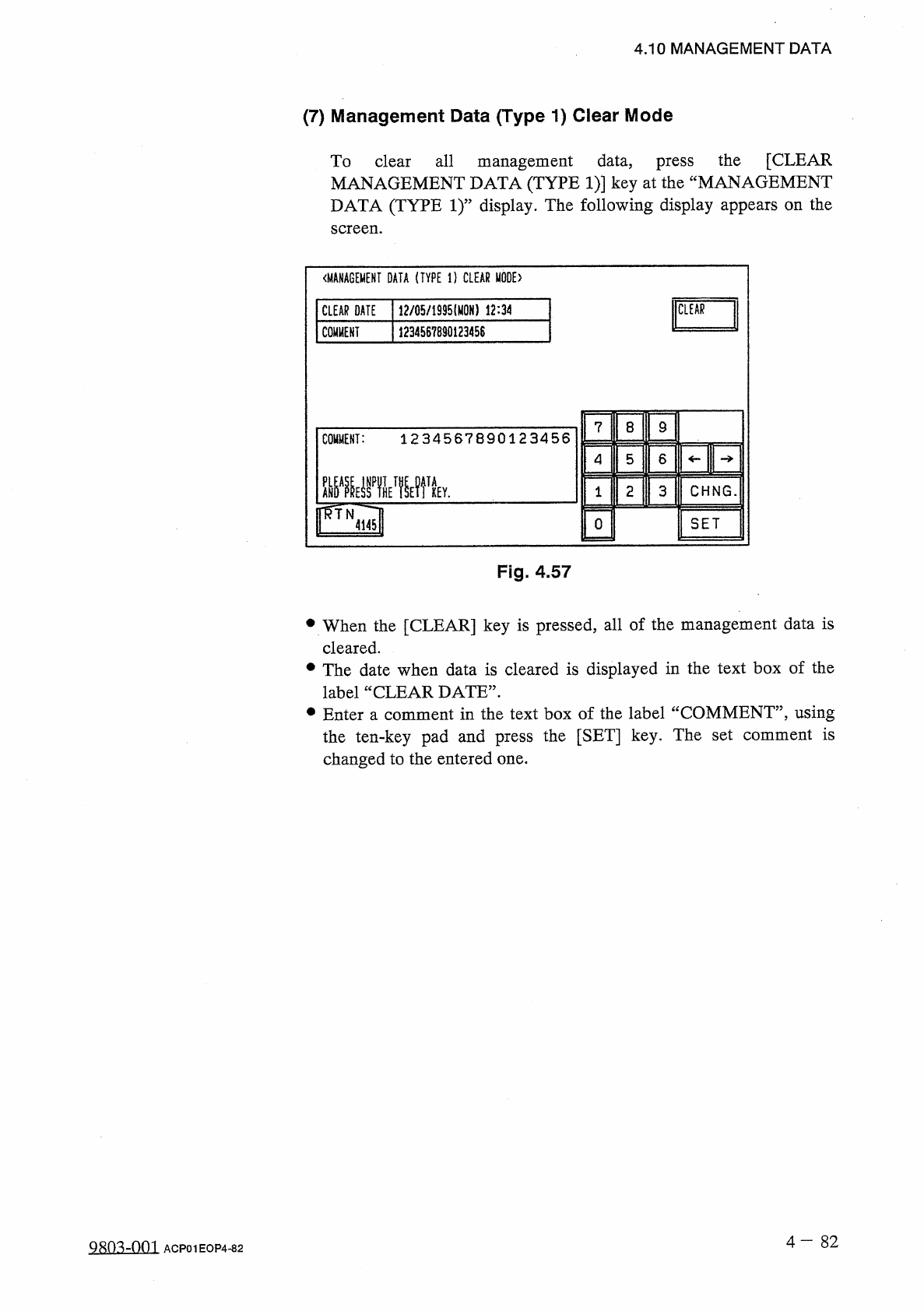
4.10 MANAGEMENT DATA ( 7 ) Management Data ( Type 1 ) Clear Mode To clear all management data , press the [ CLEAR MANAGEMENT DATA ( TYPE 1 ) ] key at the “ MANAGEMENT DATA ( TYPE 1 ) ” display . The following display app…
4.10
MANAGEMENT
DATA
⑦
[
COMP
_
PICK
-
UP
]
Value
(
%
)
determined
by
the
following
formula
#
of
Picks
—
(
#
of
Pick
-
Up
Errors
[
Sensor
]
+
#
of
Pick
-
Up
Errors
[
Recognition
]
+
#
of
Vertically
Picked
Components
)
x
100
#
of
Picks
⑧
[
COMP
.
PLACEMENT
]
Value
(
%
)
determined
by
the
following
formula
#
of
Picks
—
(
#
of
Pick
-
Up
Errors
[
Sensor
]
+
#
of
Pick
-
Up
Errors
[
Recognition
]
-
f
#
of
Vertically
Picked
Components
+
#
of
Error
in
Component
Thickness
+
#
of
Component
Recognition
Errors
)
x
100
#
of
Picks
[
Data
Counting
]
Counting
of
#
of
Pick
-
Up
Errors
[
Sensor
]
and
#
of
Pick
-
Up
Errors
[
Recognition
]
(
1
)
When
the
tape
end
detection
function
is
used
,
a
component
shortage
alarm
is
issued
after
the
tape
end
is
detected
continuously
3
times
.
When
“
Missing
Component
”
is
detected
and
a
component
shortage
error
occurs
after
the
alarm
is
issued
,
the
last
picking
action
is
not
added
to
the
number
of
picks
and
the
number
of
pick
-
up
errors
.
(
2
)
When
the
tape
end
detection
function
is
not
used
,
the
machine
stops
in
an
error
condition
according
to
the
number
of
times
(
the
number
of
continuous
component
missing
errors
to
be
counted
to
stop
the
machine
in
an
error
condition
)
set
in
the
“
ERROR
PROCESS
DATA
1
”
data
box
at
the
“
COMPONENT
LIBRARY
”
display
.
In
this
case
,
the
number
of
missing
component
errors
is
not
added
to
the
number
of
picks
and
the
number
of
pick
-
up
errors
.
4
一
81
Q
^
10
-
n
02
ACP
01
EOP
4
-
81
4.10
MANAGEMENT
DATA
(
7
)
Management
Data
(
Type
1
)
Clear
Mode
To
clear
all
management
data
,
press
the
[
CLEAR
MANAGEMENT
DATA
(
TYPE
1
)
]
key
at
the
“
MANAGEMENT
DATA
(
TYPE
1
)
”
display
.
The
following
display
appears
on
the
screen
.
〈
MANAGEMENT
DATA
(
TYPE
1
)
CLEAR
MODE
)
CLEAR
DATE
12
/
05
/
1935
⑽
N
)
12
:
34
CLEAR
COMMENT
1234567890123458
7
8
9
COMMENT
:
1234567890123456
4
5
6
2
CHNG
.
3
1
SET
0
4145
Fig
.
4.57
•
When
the
[
CLEAR
]
key
is
pressed
,
all
of
the
management
data
is
cleared
.
•
The
date
when
data
is
cleared
is
displayed
in
the
text
box
of
the
label
“
CLEAR
DATE
”
.
•
Enter
a
comment
in
the
text
box
of
the
label
“
COMMENT
”
,
using
the
ten
-
key
pad
and
press
the
[
SET
]
key
.
The
set
comment
is
changed
to
the
entered
one
.
4
-
8 2
9803
-
001
ACP
01
EOP
4
-
82
4.11
Setting
of
Automatic
Offset
Teaching
Mode
4.11
Setting
of
Automatic
Offset
Teaching
Mode
When
the
[
AUTO
OFFSET
TEACH
MODE
]
key
is
pressed
at
the
“
AUTO
OPN
.
SUB
-
MENU
”
display
,
the
following
display
appears
on
the
screen
.
Pressing
the
[
NEXT
PAGE
]
key
at
this
display
further
opens
the
display
(
Fig
.
4.58
-
1
and
Fig
.
4.58
-
2
)
.
01
/
03
<
AUT
0
OFFSET
TEACH
MODE
)
ENABLE
AUTO
OFFSET
TEACH
MODE
9999
H
j
TEACHING
TERM
UHLIMIT
mu
[
TEACHING
INTERVAL
MANUAL
[
I
膙
8
9
C
9999
H
TEACHING
INTERVAL
:
6
4
5
2
3
r
^
TN
NP
^
E
SET
0
1120
Fig
.
4.58
%
[
NEXT
PAGE
]
M
\
l
X
02
/
03
<
AUT
0
OFFSET
TEACH
MODE
)
SELECT
MODE
^
EDIT
DATA
HEAD
ORIGIN
OFFSET
TEACH
HEAD
ALL
HEAD
TEACK
NOZZLE
OFFSET
NOZZLE
5
TEAGH
(
CAMRJ
1
/
BAGK
LTG
.
)
COMP
.
RECOG
.
LTG
.
NOZZLE
POSITION
OFFSET
TEACH
(
L
-
LEYEL
)
NOZZLE
LEVEL
NOZZLE
TYPE
021
TEACH
HEAD
OFFSET
8
PT
TEACH
NO
.
NOZZLE
HEAD
ORIGIN
OFFSET
NOZZLE
TYPE
021
NOZ
.
POS
,
(
Y
)
TOL
,
0.005
ift
10
RETRY
COUNT
rfTN
1
I
2
Q
Fig
.
4.58
-
1
[
NEXT
PAGE
]
、
i
V
03
/
03
<
AUT
0
OFFSET
TEACH
MODE
)
MBLEI
PLACE
,
P
0
S
.
ADJ
.
M
0
DE
TOD
(
A
)
ADJUSTMENT
©
丽
(
B
)
ADJUSTMENT
DISABLE
ENABLE
PLACE
.
POS
.
ADJ
.
MODE
:
ENABLE
AHDAPRESSPTHST
!
IETPKEY
,
r
^
TN
T
NEP
^
E
P
^
h
SET
1120
Fig
.
4.58
-
2
4
-
83
Qsm
-
on
?
.
ACP
01
EOP
4
-
83