1OPERATION_.pdf - 第264页
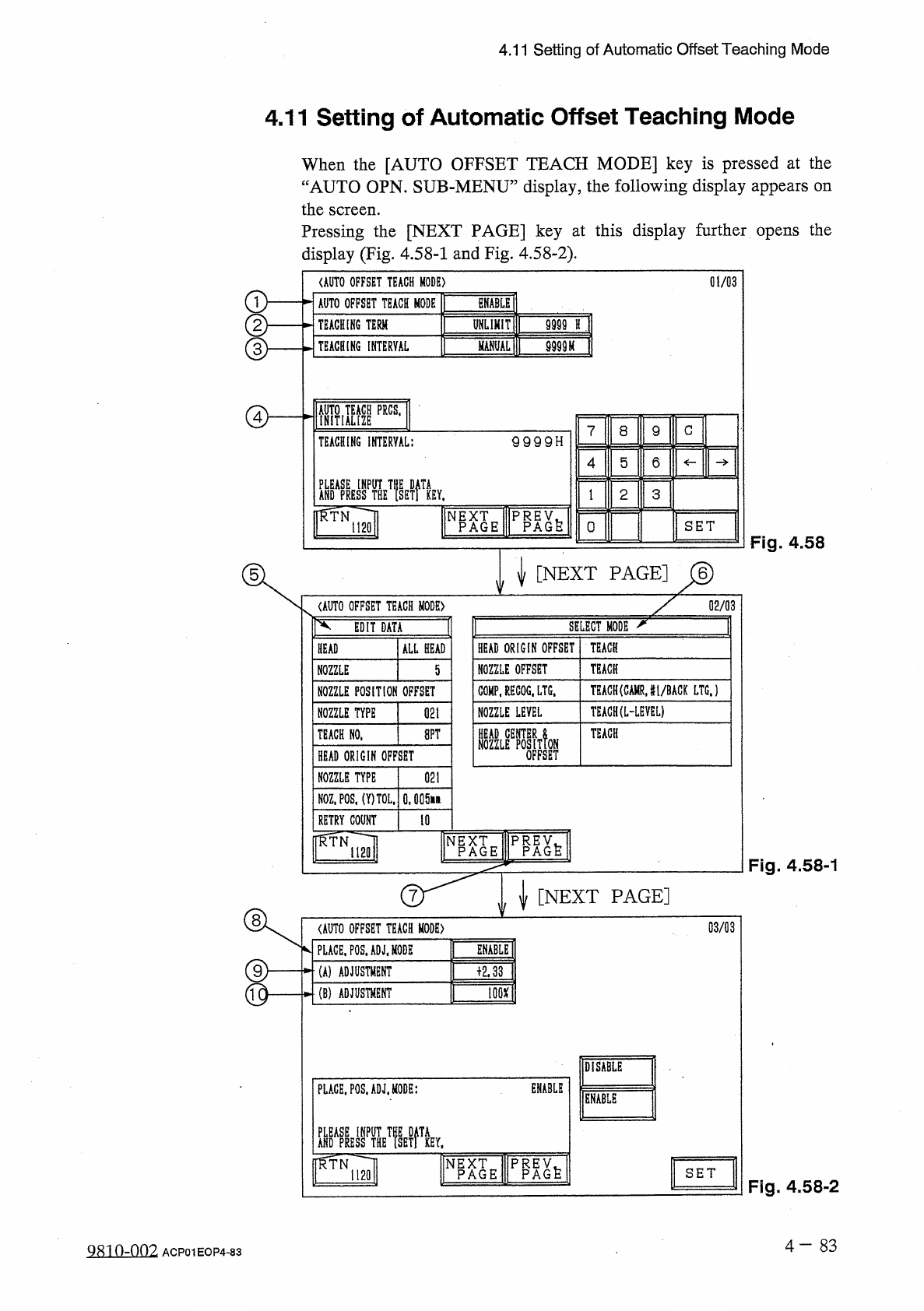
4.11 Setting of Automatic Offset Teaching Mode 4.11 Setting of Automatic Offset Teaching Mode When the [ AUTO OFFSET TEACH MODE ] key is pressed at the “ AUTO OPN . SUB - MENU ” display , the following display appears on…
4.10
MANAGEMENT
DATA
(
7
)
Management
Data
(
Type
1
)
Clear
Mode
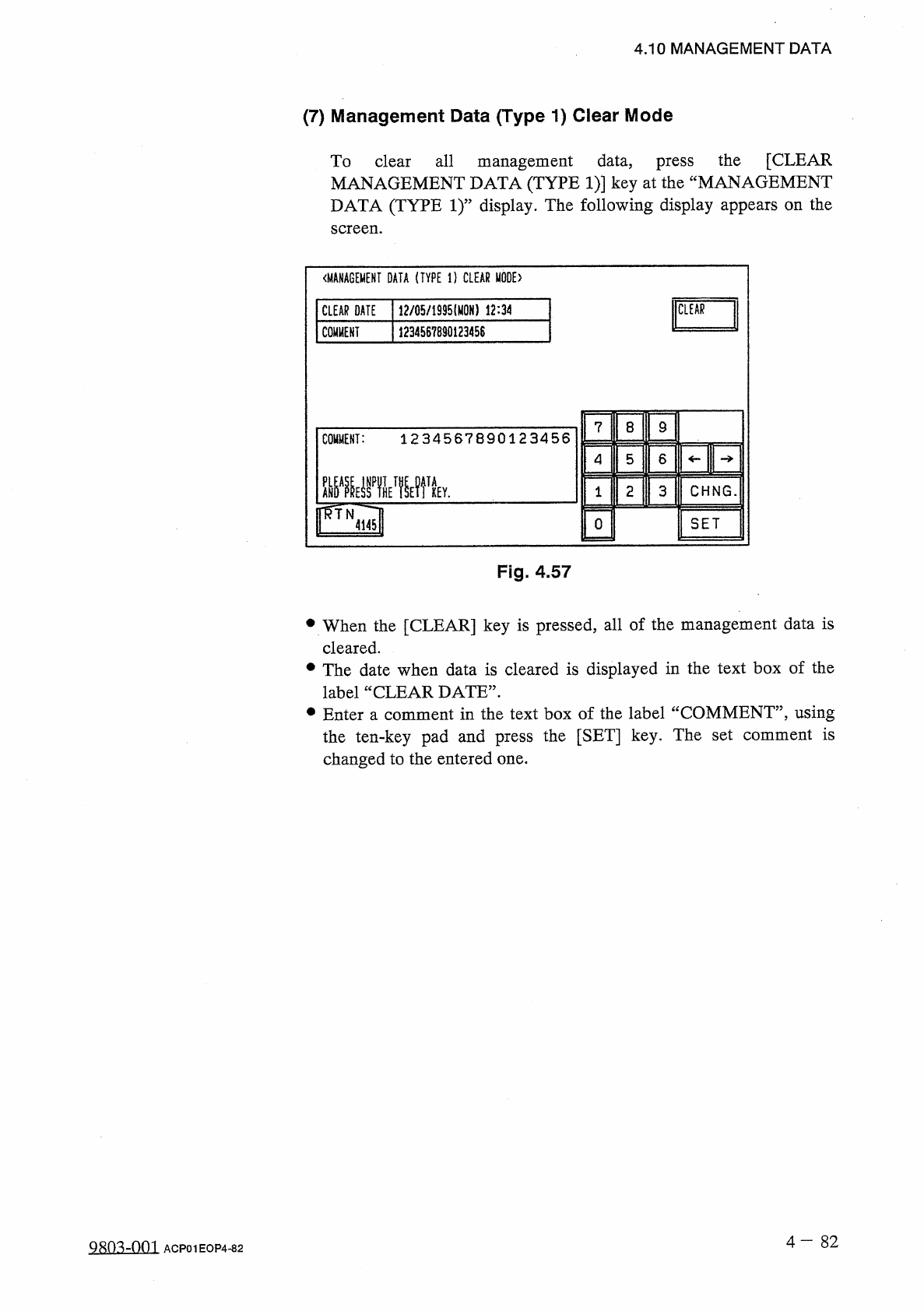
To
clear
all
management
data
,
press
the
[
CLEAR
MANAGEMENT
DATA
(
TYPE
1
)
]
key
at
the
“
MANAGEMENT
DATA
(
TYPE
1
)
”
display
.
The
following
display
appears
on
the
screen
.
〈
MANAGEMENT
DATA
(
TYPE
1
)
CLEAR
MODE
)
CLEAR
DATE
12
/
05
/
1935
⑽
N
)
12
:
34
CLEAR
COMMENT
1234567890123458
7
8
9
COMMENT
:
1234567890123456
4
5
6
2
CHNG
.
3
1
SET
0
4145
Fig
.
4.57
•
When
the
[
CLEAR
]
key
is
pressed
,
all
of
the
management
data
is
cleared
.
•
The
date
when
data
is
cleared
is
displayed
in
the
text
box
of
the
label
“
CLEAR
DATE
”
.
•
Enter
a
comment
in
the
text
box
of
the
label
“
COMMENT
”
,
using
the
ten
-
key
pad
and
press
the
[
SET
]
key
.
The
set
comment
is
changed
to
the
entered
one
.
4
-
8 2
9803
-
001
ACP
01
EOP
4
-
82
4.11
Setting
of
Automatic
Offset
Teaching
Mode
4.11
Setting
of
Automatic
Offset
Teaching
Mode
When
the
[
AUTO
OFFSET
TEACH
MODE
]
key
is
pressed
at
the
“
AUTO
OPN
.
SUB
-
MENU
”
display
,
the
following
display
appears
on
the
screen
.
Pressing
the
[
NEXT
PAGE
]
key
at
this
display
further
opens
the
display
(
Fig
.
4.58
-
1
and
Fig
.
4.58
-
2
)
.
01
/
03
<
AUT
0
OFFSET
TEACH
MODE
)
ENABLE
AUTO
OFFSET
TEACH
MODE
9999
H
j
TEACHING
TERM
UHLIMIT
mu
[
TEACHING
INTERVAL
MANUAL
[
I
膙
8
9
C
9999
H
TEACHING
INTERVAL
:
6
4
5
2
3
r
^
TN
NP
^
E
SET
0
1120
Fig
.
4.58
%
[
NEXT
PAGE
]
M
\
l
X
02
/
03
<
AUT
0
OFFSET
TEACH
MODE
)
SELECT
MODE
^
EDIT
DATA
HEAD
ORIGIN
OFFSET
TEACH
HEAD
ALL
HEAD
TEACK
NOZZLE
OFFSET
NOZZLE
5
TEAGH
(
CAMRJ
1
/
BAGK
LTG
.
)
COMP
.
RECOG
.
LTG
.
NOZZLE
POSITION
OFFSET
TEACH
(
L
-
LEYEL
)
NOZZLE
LEVEL
NOZZLE
TYPE
021
TEACH
HEAD
OFFSET
8
PT
TEACH
NO
.
NOZZLE
HEAD
ORIGIN
OFFSET
NOZZLE
TYPE
021
NOZ
.
POS
,
(
Y
)
TOL
,
0.005
ift
10
RETRY
COUNT
rfTN
1
I
2
Q
Fig
.
4.58
-
1
[
NEXT
PAGE
]
、
i
V
03
/
03
<
AUT
0
OFFSET
TEACH
MODE
)
MBLEI
PLACE
,
P
0
S
.
ADJ
.
M
0
DE
TOD
(
A
)
ADJUSTMENT
©
丽
(
B
)
ADJUSTMENT
DISABLE
ENABLE
PLACE
.
POS
.
ADJ
.
MODE
:
ENABLE
AHDAPRESSPTHST
!
IETPKEY
,
r
^
TN
T
NEP
^
E
P
^
h
SET
1120
Fig
.
4.58
-
2
4
-
83
Qsm
-
on
?
.
ACP
01
EOP
4
-
83
4.11
Setting
of
Automatic
Offset
Teaching
Mode
(
First
Page
)
This
is
protected
by
the
password
in
the
same
level
as
that
of
the
teaching
session
(
various
head
/
nozzle
offset
data
)
.
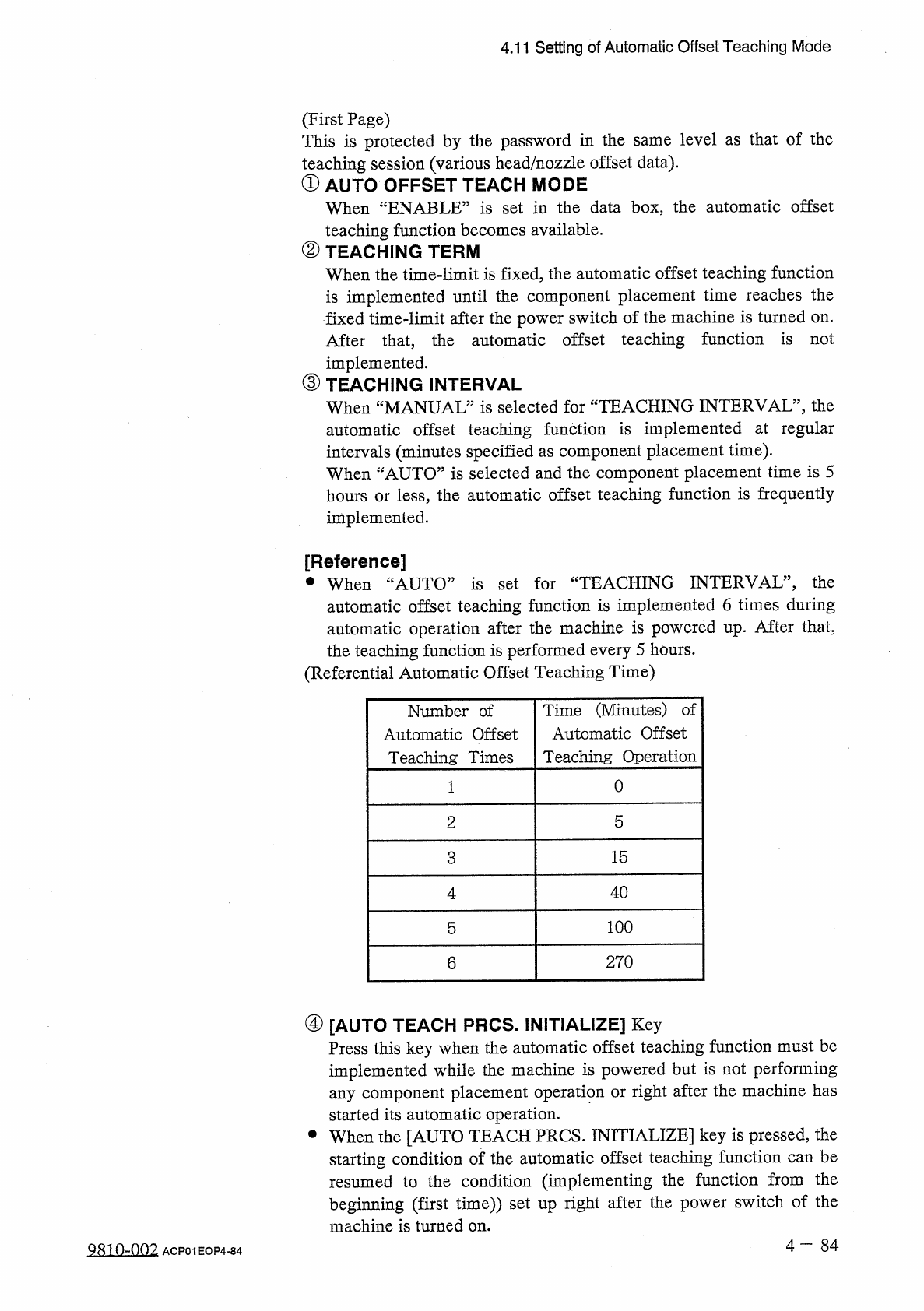
①
AUTO
OFFSET
TEACH
MODE
When
“
ENABLE
”
is
set
in
the
data
box
,
the
automatic
offset
teaching
function
becomes
available
.
②
TEACHING
TERM
When
the
time
-
limit
is
fixed
,
the
automatic
offset
teaching
function
is
implemented
until
the
component
placement
time
reaches
the
fixed
time
-
limit
after
the
power
switch
of
the
machine
is
turned
on
.
After
that
,
the
automatic
offset
teaching
function
is
not
implemented
.
③
TEACHING
INTERVAL
When
“
MANUAL
”
is
selected
for
“
TEACHING
INTERVAL
”
,
the
automatic
offset
teaching
function
is
implemented
at
regular
intervals
(
minutes
specified
as
component
placement
time
)
.
When
“
AUTO
”
is
selected
and
the
component
placement
time
is
5
hours
or
less
,
the
automatic
offset
teaching
function
is
frequently
implemented
.
[
Reference
]
•
When
“
AUTO
”
is
set
for
“
TEACHING
INTERVAL
”
,
the
automatic
offset
teaching
function
is
implemented
6
times
during
automatic
operation
after
the
machine
is
powered
up
.
After
that
,
the
teaching
function
is
performed
every
5
hours
.
(
Referential
Automatic
Offset
Teaching
Time
)
Time
(
Minutes
)
of
Automatic
Offset
Teaching
Operation
Number
of
Automatic
Offset
Teaching
Times
0
2
5
3
15
40
4
100
5
270
6
④
[
AUTO
TEACH
PRCS
.
INITIALIZE
]
Key
Press
this
key
when
the
automatic
offset
teaching
function
must
be
implemented
while
the
machine
is
powered
but
is
not
performing
any
component
placement
operation
or
right
after
the
machine
has
started
its
automatic
operation
.
•
When
the
[
AUTO
TEACH
PRCS
.
INITIALIZE
]
key
is
pressed
,
the
starting
condition
of
the
automatic
offset
teaching
function
can
be
resumed
to
the
condition
(
implementing
the
function
beginning
(
first
time
)
)
set
up
right
after
the
power
switch
of
the
machine
is
turned
on
.
from
the
Q
810
-
002
ACP
01
EOP
4
-
84