1OPERATION_.pdf - 第278页
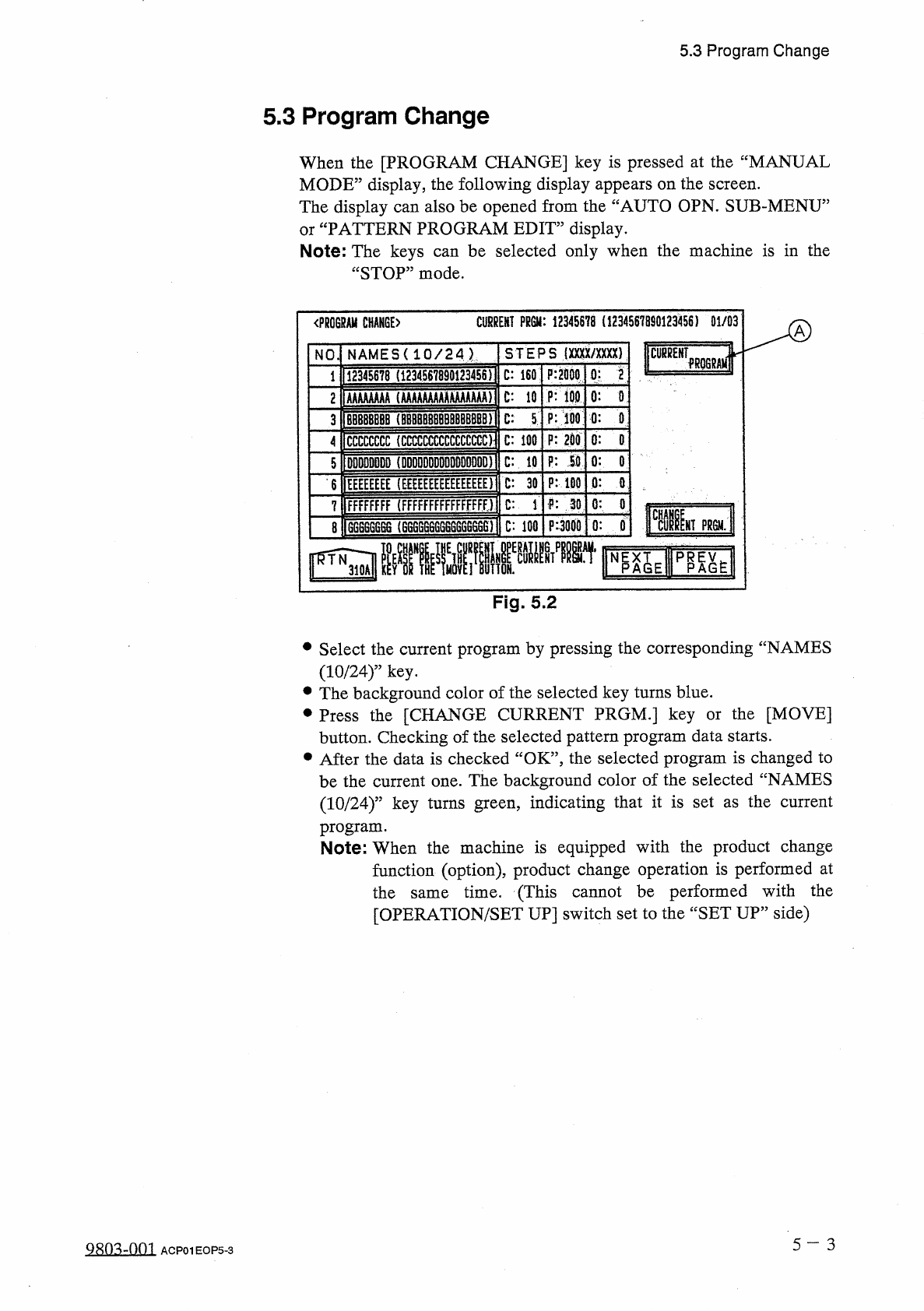
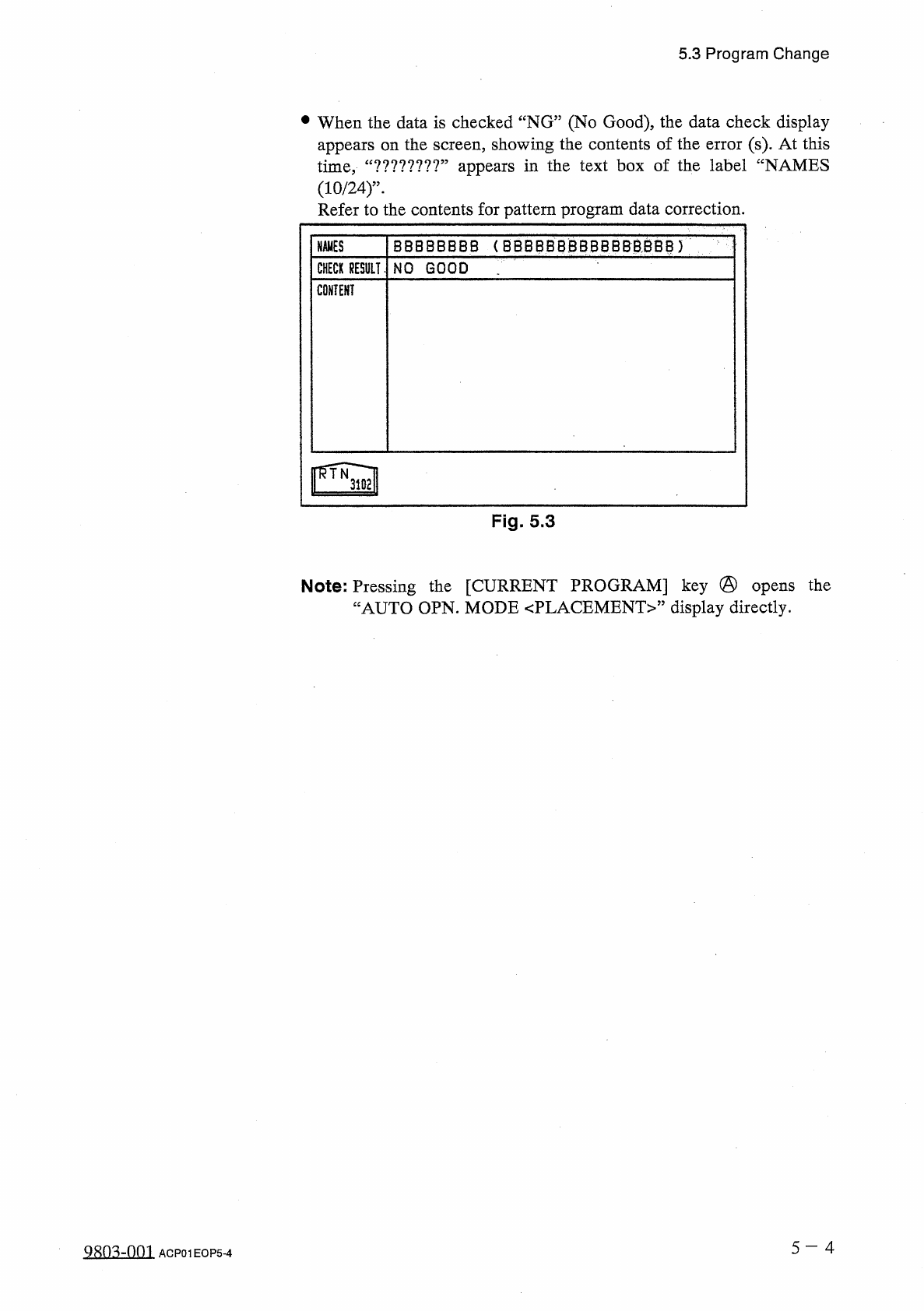
5 . 3 P r o g r a m C h a n g e • When the data is checked “ NG ” ( No Good ) , the data check display appears on the screen , showing the contents of the error ( s ) . At this time , ( 1 0 / 2 4 ) ” - Refer to the conte…
5.3
Program
Change
5.3
Program
Change
When
the
[
PROGRAM
CHANGE
]
key
is
pressed
at
the
“
MANUAL
MODE
”
display
,
the
following
display
appears
on
the
screen
.
The
display
can
also
be
opened
from
the
“
AUTO
OPN
.
SUB
-
MENU
”
or
“
PATTERN
PROGRAM
EDIT
”
display
.
Note
:
The
keys
“
STOP
”
mode
.
be
selected
only
when
the
machine
is
in
the
can
CURREHT
?
m
:
12345678
(
1234
S
67
BS
0123456
)
01
/
03
《
PROGRAM
CHANGE
)
A
(
mx
/
xxxx
)
NAMES
(
1
Q
/
24
|
STEPS
NO
F
:
2000
12345678
(
1234567890123456
)
C
:
160
P
:
ioo
0
:
O
AAAAAAAA
(
AAMAAAAKAMAAAA
)
C
:
10
2
P
:
100
C
:
5
0
:
0
BB
8
BBBBB
(
的
BBBBB
8
刪
BBBBB
)
3
0
:
0
P
:
200
CCCCCCCC
(
CCCCCCCCCCCCCCCC
)
C
:
100
4
P
:
SO
0
:
0
DDDDDDDD
(
DDDDDDDDDDDDDDDD
)
C
:
.
10
5
0
:
0
P
:
100
EEEEEEEE
(
EEEEEEEEEEEEEEEE
)
C
:
30
6
9
:
30
0
:
0
FFFFFFFF
(
FFFFfFFFFFFFFFFFJ
C
:
i
7
si
am
購
i
«
lf
隱
,
,
圓圓
P
:
3000
0
:
T
PRGM
.
6
G
6666
B
6
(
666666
G
66
S
6
GG
66
B
)
C
:
100
8
Fig
.
5.2
•
Select
the
current
program
by
pressing
the
corresponding
“
NAMES
(
10
/
24
)
”
key
.
•
The
background
color
of
the
selected
key
turns
blue
.
•
Press
the
[
CHANGE
CURRENT
PRGM
.
]
key
button
.
Checking
of
the
selected
pattern
program
data
starts
.
•
After
the
data
is
checked
“
OK
”
,
the
selected
program
is
changed
to
be
the
current
one
.
The
background
color
of
the
selected
“
NAMES
(
10
/
24
)
”
key
turns
green
,
indicating
that
it
is
set
as
the
current
program
.
Note
:
When
the
machine
is
equipped
with
the
product
change
function
(
option
)
,
product
change
operation
is
performed
at
the
same
time
.
(
This
cannot
be
performed
with
the
[
OPERATION
/
SET
UP
]
switch
set
to
the
“
SET
UP
”
side
)
the
[
MOVE
]
or
5
一
3
QRO
^
-
Om
ACP
01
EOP
5
-
3
5.3
Program
Change
•
When
the
data
is
checked
“
NG
”
(
No
Good
)
,
the
data
check
display
appears
on
the
screen
,
showing
the
contents
of
the
error
(
s
)
.
At
this
time
,
(
10
/
24
)
”
-
Refer
to
the
contents
for
pattern
program
data
correction
.
appears
in
the
text
box
of
the
label
“
NAMES
?
?
?
*
?
?
?
?
?
,,
u
BBBBBBBB
(
BBBBBBBBBBBBBSSB
)
NAMES
CHECK
RESULT
.
NO
GOOD
CONTENT
Fig
.
5.3
Note
:
Pressing
the
[
CURRENT
PROGRAM
]
key
@
“
AUTO
OPN
.
MODE
<
PLACEMENT
>
”
display
directly
.
opens
the
5
-
4
aSQ
3
rDQl
ACP
01
EOP
5
-
4
5.4
Zeroing
Operation
5.4
Zeroing
Operation
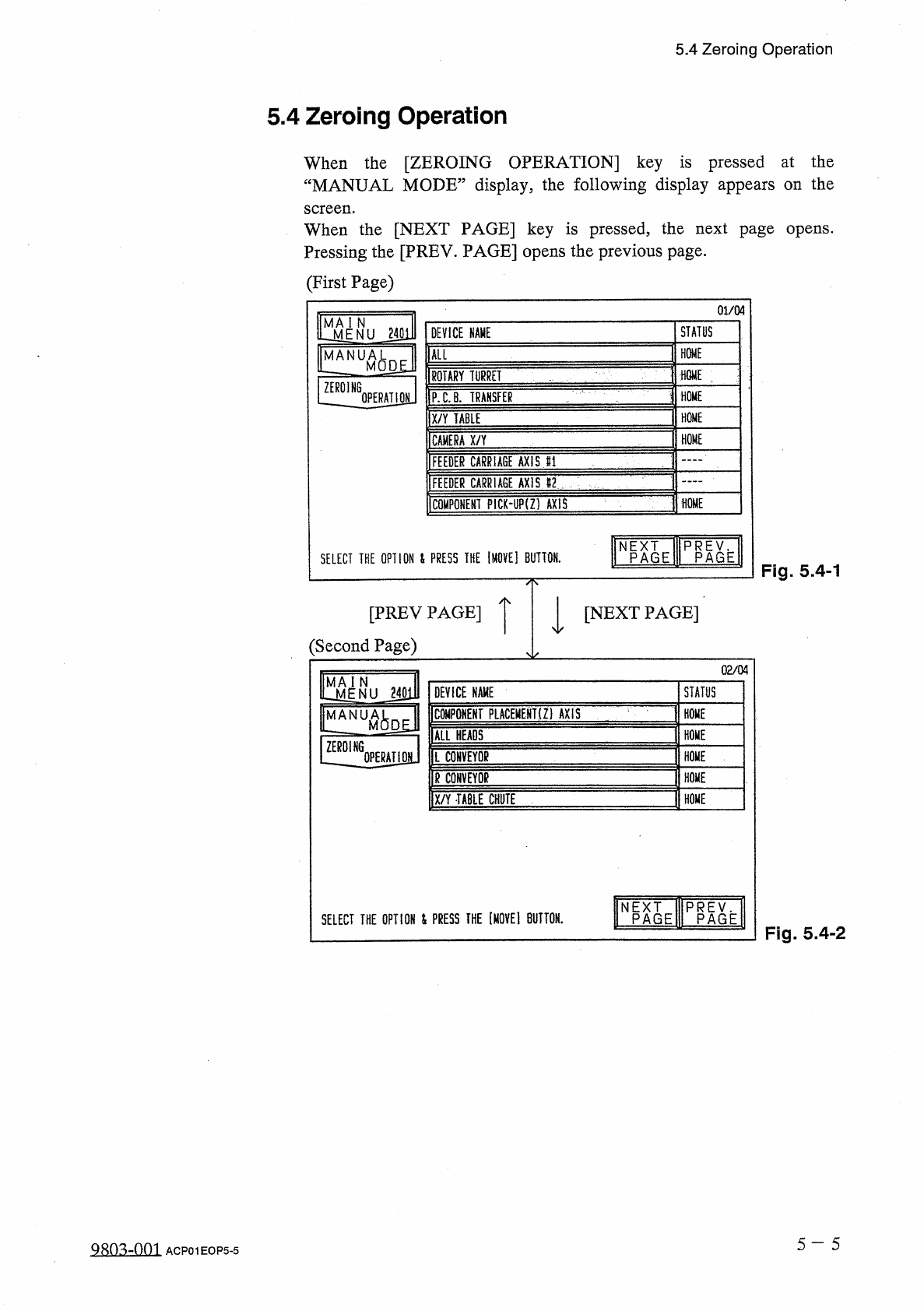
When
the
[
ZEROING
OPERATION
]
key
is
pressed
at
the
“
MANUAL
MODE
”
display
,
the
following
display
appears
on
the
screen
.
When
the
[
NEXT
PAGE
]
key
is
pressed
,
the
next
page
opens
.
Pressing
the
[
PREV
.
PAGE
]
opens
the
previous
page
.
(
First
Page
)
01
/
04
MAi
N
lLiiENU
_
i
40
lll
IMANUATT
^
I
MQDgJ
STATUS
DEVICE
NAME
HOME
ALL
HOME
:
ROTARY
TURRET
ZEROING
HOME
P
.
C
.
B
.
TRANSFER
OPERAT
10
L
1
HOME
X
/
Y
TABLE
HOME
CAMERA
X
/
Y
FEEDER
CARRIAGE
AXIS
81
FEEDER
CARRIAGE
AXIS
82
CQMPONEHT
PICK
-
UP
(
Z
)
AXIS
HOME
NPAGE
PPAGE
SELECT
THE
OPTION
&
PRESS
THE
[
MOVE
]
BUTTON
.
Fig
.
5.4
-
1
[
PREV
PAGE
]
[
NEXT
PAGE
]
(
Second
Page
)
02
/
04
^
jNU
_
2401
MANUKA
DEVICE
NAME
STATUS
COMPONENT
PLACEMEHT
(
Z
)
AXIS
HOME
6
D
£
.
M
臟
E
ALL
HEADS
ZEROING
L
COHVEYQg
HOME
0
PERATI
0
H
HOME
R
CONVEYOR
X
/
Y
TABLE
CHUTE
HOME
HEPIIE
PRplh
SELECT
THE
OPTION
&
PRESS
THE
lMOVEl
BUTTON
.
Fig
.
5.4
-
2
5
一
5
Q
8
Q
^
-
oni
ACP
01
EOP
5
-
5